1. Utangulizi
This manual provides essential instructions for the setup, operation, maintenance, and troubleshooting of your White Shark GK-2102 LEGIONNAIRE-X RGB USB Keyboard. Please read this manual thoroughly before using the product to ensure proper functionality and longevity.

Picha 1.1: Juu view of the White Shark GK-2102 LEGIONNAIRE-X RGB USB Keyboard, showcasing mpangilio wake kamili na taa za RGB.
2. Kuweka
Follow these steps to connect your White Shark GK-2102 LEGIONNAIRE-X RGB USB Keyboard to your computer.
- Fungua Kibodi: Carefully remove the keyboard and its USB cable from the packaging.
- Unganisha kebo ya USB: Insert the USB connector of the keyboard into an available USB port on your computer.

Image 2.1: Close-up of the USB connector, which is used to connect the keyboard to a computer.
- Ufungaji wa Dereva: Kibodi imeunganishwa na kuchezwa. Mfumo wako wa uendeshaji unapaswa kugundua na kusakinisha kiotomatiki viendeshi vinavyohitajika. Hakuna usakinishaji wa ziada wa programu unaohitajika kwa kawaida.
- Rekebisha Miguu ya Kibodi: For ergonomic comfort, you may extend the adjustable feet located on the underside of the keyboard.

Picha ya 2.2: View of the adjustable feet on the keyboard's underside, allowing users to modify the typing angle.
3. Maagizo ya Uendeshaji
The White Shark GK-2102 LEGIONNAIRE-X is a standard USB keyboard with RGB lighting features. Below are general operating guidelines.
3.1 Kazi za Msingi za Kibodi
The keyboard functions as a standard QWERTY layout device. All keys perform their indicated character or function when pressed. Special function keys (F1-F12) may require the 'Fn' key to be held down simultaneously for their secondary functions, depending on your operating system and specific keyboard model configuration.
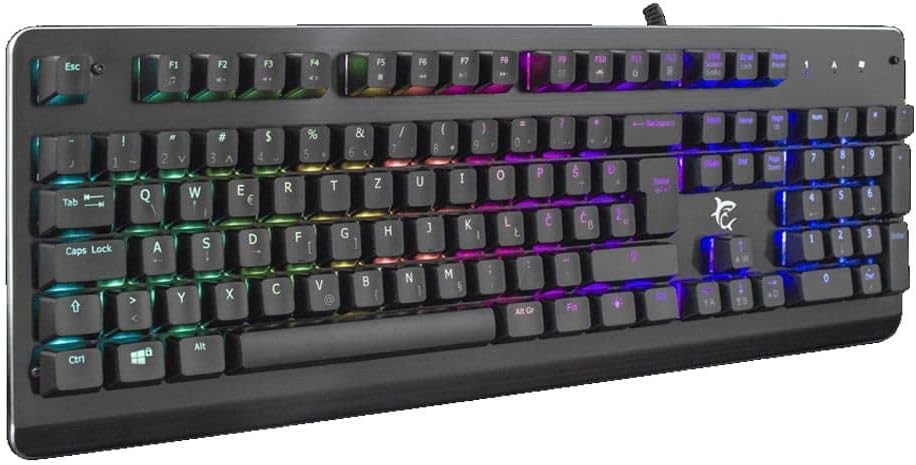
Picha 3.1: Yenye pembe view of the keyboard, highlighting the key layout and illuminated RGB backlighting.
Udhibiti wa Taa wa 3.2 RGB
This keyboard features RGB lighting. Specific key combinations, often involving the 'Fn' key and other designated keys (e.g., arrow keys, Ins, Home, PgUp, Del, End, PgDn), are typically used to cycle through lighting modes, adjust brightness, or change colors. Refer to the quick start guide or manufacturer's website for detailed RGB control commands specific to this model.
4. Matengenezo
Utunzaji sahihi huhakikisha uimara na utendaji wa kibodi yako.
- Kusafisha: Disconnect the keyboard from your computer before cleaning. Use a soft, dry cloth to wipe the surface. For stubborn dirt, a slightly damp kitambaa chenye sabuni laini kinaweza kutumika, kuhakikisha hakuna kioevu kinachoingia kwenye kibodi. Hewa iliyobanwa inaweza kutumika kuondoa vumbi na uchafu kutoka kati ya funguo.
- Epuka Vimiminika: Do not spill liquids on the keyboard. Liquid damage can cause permanent malfunction.
- Hifadhi: Hifadhi kibodi mahali pa baridi, pakavu mbali na jua moja kwa moja na halijoto kali wakati haitumiki kwa muda mrefu.
5. Utatuzi wa shida
Ukikumbana na matatizo na kibodi yako, jaribu suluhisho zifuatazo:
- Kibodi Haijibu:
- Hakikisha kuwa kebo ya USB imeunganishwa kwa usalama kwenye kibodi na kompyuta.
- Jaribu kuunganisha kibodi kwenye mlango tofauti wa USB kwenye kompyuta yako.
- Test the keyboard on another computer to determine if the issue is with the keyboard or the computer's port/drivers.
- Anzisha tena kompyuta yako.
- Vifunguo havifanyi kazi:
- Angalia kama kuna vizuizi vyovyote vya kimwili chini ya vifuniko vya ufunguo.
- Clean the keyboard as described in the Maintenance section.
- Mwangaza wa RGB Haufanyi Kazi/Si Sahihi:
- Hakikisha kibodi imeunganishwa vizuri na inapokea umeme.
- Refer to the manufacturer's specific instructions for RGB control key combinations.
6. Vipimo
Below are the technical specifications for the White Shark GK-2102 LEGIONNAIRE-X RGB USB Keyboard:

Picha ya 6.1: Pro wa upandefile of the keyboard, illustrating its physical dimensions and keycap height.
| Kipengele | Maelezo |
|---|---|
| Chapa | Shark Mweupe |
| Mfano | GK-2102 LEGIONNAIRE-X |
| Muunganisho | USB |
| Vipimo vya Bidhaa | 50 x 50 x 28 cm |
| Uzito | 1.06 kg |
| Nyenzo | Plastiki |
| Vipengele Maalum | Mwangaza wa RGB |
| Betri Inahitajika | Hapana |
7. Taarifa za Udhamini
For detailed warranty information regarding your White Shark GK-2102 LEGIONNAIRE-X RGB USB Keyboard, please refer to the warranty card included with your product or visit the official White Shark webtovuti. Sheria na masharti ya udhamini yanaweza kutofautiana kulingana na eneo na muuzaji rejareja.
8. Msaada
If you require further assistance or have questions not covered in this manual, please contact White Shark customer support through their official website or the contact information provided with your purchase. Please have your product model (GK-2102 LEGIONNAIRE-X) and purchase details ready when contacting support.


