1. Utangulizi
Thank you for choosing the White Shark GK-2022 SHINOBI Mechanical Keyboard. This compact 61-key keyboard is designed for optimal performance and durability, featuring OUTEMU Red mechanical switches and vibrant RGB backlighting. This manual provides detailed instructions for setup, operation, maintenance, and troubleshooting to ensure you get the most out of your new keyboard.
2. Yaliyomo kwenye Kifurushi
Tafadhali angalia kifurushi kwa vitu vifuatavyo:
- White Shark GK-2022 SHINOBI Mechanical Keyboard
- Kebo ya USB-A hadi USB-C (1.8m)
- Mwongozo wa Mtumiaji (hati hii)
3. Bidhaa Imeishaview
The White Shark GK-2022 SHINOBI is a 61-key compact mechanical keyboard, ideal for users seeking a minimalist design without compromising on functionality. It features durable mechanical switches and customizable backlighting.

Kielelezo 3.1: Juu view of the White Shark GK-2022 SHINOBI keyboard, showcasing mpangilio wake mdogo wa vitufe 61 na mwangaza wa nyuma wa RGB unaong'aa.

Kielelezo 3.2: Pembe view of the keyboard, highlighting its ergonomic profile na muundo wa kofia za ufunguo.
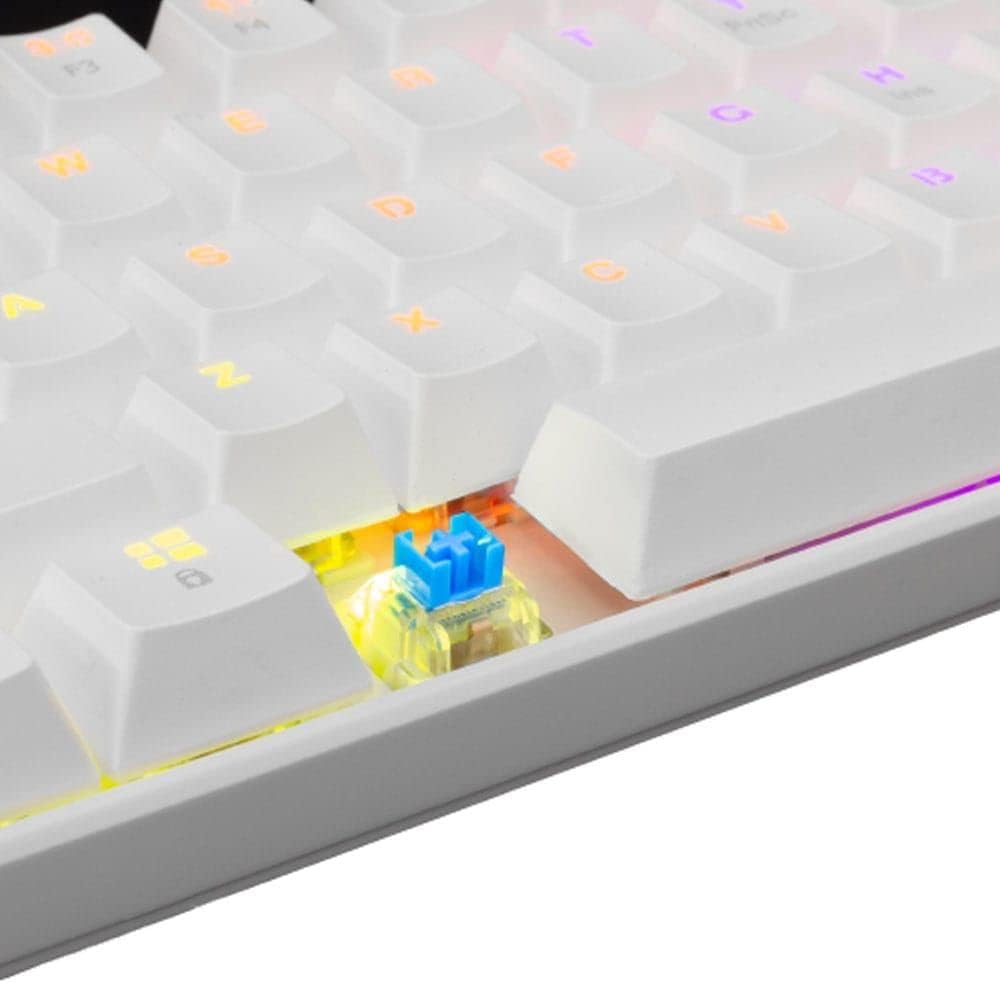
Mchoro 3.3: Kukaribiana view of an OUTEMU Red mechanical switch, known for its linear and quiet operation.
4. Kuweka
Follow these steps to set up your White Shark GK-2022 SHINOBI keyboard:
- Unpack the keyboard and the USB cable from the box.
- Tafuta mlango wa USB-C kwenye kibodi.
- Insert the USB-C end of the cable into the keyboard's port.
- Connect the USB-A end of the cable to an available USB 2.0 port on your computer (PC, Laptop, etc.).
- The keyboard is plug-and-play and should be automatically recognized by your operating system. No additional drivers are typically required.

Figure 4.1: Connecting the USB-C cable to the keyboard's port for power and data transmission.
5. Maagizo ya Uendeshaji
5.1 Operesheni ya Msingi
Once connected, the keyboard is ready for immediate use. Type as you would on any standard keyboard.
5.2 Function Keys and Shortcuts
Due to its compact 61-key layout, many standard functions are accessed via a combination of the Function (Fn) key and other keys. Refer to the keycaps for specific Fn layer markings.
- Fn + [Ufunguo]: Access secondary functions printed on the keycaps (e.g., F1-F12, multimedia controls, navigation keys).
- Udhibiti wa Mwangaza wa Nyuma: The keyboard features single-color backlighting. Use Fn key combinations to cycle through lighting modes or adjust brightness. Specific combinations are usually marked on the keys (e.g., Fn + \ for lighting modes, Fn + arrow keys for brightness/speed).
5.3 Kupinga Mizimu
The GK-2022 SHINOBI supports full 61-key anti-ghosting, ensuring that every key press is registered accurately, even during rapid, simultaneous keystrokes, which is beneficial for gaming and fast typing.
6. Matengenezo
Proper maintenance will extend the lifespan of your keyboard:
- Kusafisha: Use a soft, dry cloth to wipe the surface of the keyboard. For deeper cleaning, you may use compressed air to remove dust and debris from between the keycaps.
- Matone: In case of liquid spills, immediately unplug the keyboard from your computer. Turn it upside down to drain any liquid and allow it to dry completely before reconnecting. Do not use a hairdryer as excessive heat can damage components.
- Hifadhi: Store the keyboard in a cool, dry place away from direct sunlight and extreme temperatures.
7. Utatuzi wa shida
If you encounter issues with your keyboard, try the following solutions:
- Kibodi haijibu:
- Hakikisha kuwa kebo ya USB imeunganishwa kwa usalama kwenye kibodi na kompyuta.
- Jaribu kuunganisha kibodi kwenye mlango tofauti wa USB kwenye kompyuta yako.
- Anzisha tena kompyuta yako.
- Jaribu kibodi kwenye kompyuta nyingine ili kubaini kama tatizo liko kwenye kibodi au mfumo wako.
- Vifunguo ambavyo havijasajili au kuandika mara mbili:
- Check for any debris or foreign objects under the affected keycap.
- Hakikisha kifuniko cha kitufe kimewekwa vizuri kwenye swichi.
- Mwangaza nyuma haufanyi kazi:
- Hakikisha kibodi imewezeshwa ipasavyo.
- Try cycling through the lighting modes using the Fn key combinations.
- Adjust brightness settings.
If the problem persists after trying these steps, please contact White Shark customer support.
8. Vipimo
| Kipengele | Maelezo |
|---|---|
| Mfano | GK-2022 SHINOBI |
| Chapa | Shark Mweupe |
| Idadi ya Funguo | 61 |
| Badilisha Aina | Mechanical - OUTEMU (Red) |
| Shinikizo muhimu | 60 g +/- 15 g |
| Kupinga Ghosting | 61 keys (Full Anti-Ghosting) |
| Rangi | Nyeupe |
| Kiolesura | USB 2.0 |
| Urefu wa Cable | mita 1.8 |
| Vifaa Sambamba | PC, Laptop, Tablet, Smartphone (via USB) |
| Matumizi Yanayopendekezwa | Gaming, Office Work, Multimedia Editing |
| Mwangaza Nyuma wa Kibodi | Single Color (RGB effects) |
| Nyenzo | Plastiki |
| Uzito wa Kipengee | 556 g |
| Vipimo vya Kifurushi | 31 x 13 x 5 cm |
9. Udhamini na Msaada
White Shark products are manufactured to the highest quality standards. For information regarding warranty coverage, technical support, or service inquiries, please refer to the warranty card included with your product or visit the official White Shark webtovuti. Tafadhali hifadhi uthibitisho wako wa ununuzi kwa madai ya udhamini.
For further assistance, you may contact White Shark customer support through their official channels.


