1. Utangulizi
Thank you for choosing the Meetion C4120 2.4G Wireless Mouse and Keyboard Combo. This manual provides essential information for setting up, operating, and maintaining your new wireless peripheral set. Please read it thoroughly before use to ensure optimal performance and longevity.
This combo includes a full-size wireless keyboard and a wireless optical mouse, designed for efficient and comfortable use across various operating systems.
2. Yaliyomo kwenye Kifurushi
- Meetion 2.4G Wireless Keyboard
- Meetion 2.4G Wireless Mouse
- USB Nano Receiver (typically stored inside the mouse battery compartment)
- Mwongozo wa Mtumiaji (hati hii)
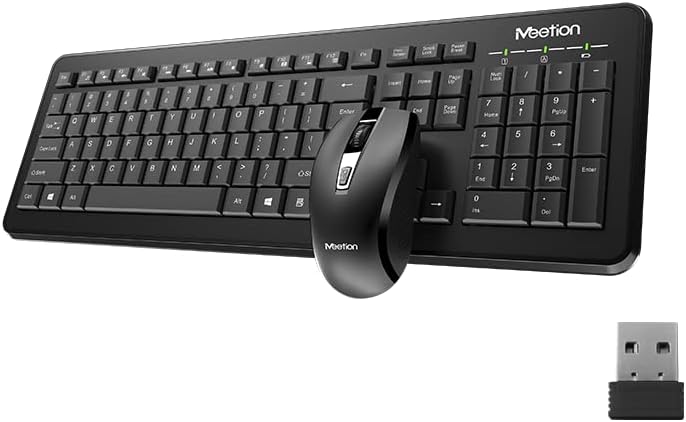
Image Description: This image displays the Meetion C4120 wireless keyboard, the wireless mouse, and the compact USB nano receiver, which is essential for connecting both devices to your computer.
3. Mwongozo wa Kuweka
3.1. Kuweka Betri
Ufungaji wa Batri ya Kibodi
- Tafuta sehemu ya betri upande wa chini wa kibodi.
- Fungua kifuniko cha sehemu ya betri.
- Insert the required batteries (e.g., 2 x AAA alkaline batteries), ensuring correct polarity (+/-).
- Funga kifuniko cha sehemu ya betri kwa usalama.
Panya Ufungaji wa Battery
- Tafuta sehemu ya betri kwenye upande wa chini wa panya.
- Fungua kifuniko cha sehemu ya betri.
- Remove the USB Nano Receiver from its storage slot.
- Insert the required battery (e.g., 1 x AA alkaline battery), ensuring correct polarity (+/-).
- Funga kifuniko cha sehemu ya betri kwa usalama.
3.2. Kuunganisha kwenye Kompyuta yako
- Ensure batteries are correctly installed in both the keyboard and mouse.
- Turn on the power switch on the underside of the mouse (if present).
- Chomeka Kipokeaji Nano cha USB kwenye mlango unaopatikana wa USB kwenye kompyuta yako.
- Kompyuta yako inapaswa kugundua na kusakinisha kiotomatiki viendeshi vinavyohitajika. Mchakato huu unaweza kuchukua muda mfupi.
- Mara tu madereva yanapowekwa, kibodi na kipanya vinapaswa kuwa tayari kutumika.

Image Description: This image shows the top view of the wireless keyboard and mouse, along with the USB receiver, illustrating their compact design and how they appear together.
4. Maagizo ya Uendeshaji
4.1. Kazi za Kinanda
The Meetion C4120 keyboard features a standard layout with a numeric keypad for efficient data entry.
Taa za Viashiria:
- Kiashiria cha Kufuli cha Nambari: Huangaza wakati kitufe cha nambari kinatumika.
- Kiashiria cha Caps Lock: Huangaza wakati Caps Lock imeunganishwa.
- Kiashiria cha Kufungia Kusogeza: Huangaza wakati Scroll Lock inatumika.
- Kiashiria cha Betri: May flash or illuminate to indicate low battery power. Replace batteries when this occurs.
4.2. Kazi za Kipanya
The Meetion C4120 wireless mouse is equipped with a 1200 DPI optical sensor for precise tracking and smooth cursor movement.
Vifungo:
- Kitufe cha Kubofya Kushoto: Uteuzi na uanzishaji wa kawaida.
- Kitufe cha Kubofya Kulia: Hufikia menyu za muktadha.
- Gurudumu la Kutembeza: Husogeza hati na web kurasa. Inaweza pia kufanya kazi kama kitufe cha kubofya katikati.
- Kitufe cha Marekebisho ya DPI: Located below the scroll wheel, this button allows you to cycle through different DPI settings for varying cursor speeds.
DPI (Dots kwa Inchi): The mouse operates at 1200 DPI, providing accurate and smooth cursor movement suitable for general computing tasks.

Image Description: This image provides a detailed view of the Meetion C4120 wireless mouse, highlighting its ergonomic design and the USB nano receiver.
5. Utatuzi wa shida
5.1. Keyboard or Mouse Not Responding
- Angalia Betri: Hakikisha betri zimeingizwa kwa usahihi na zina chaji ya kutosha. Badilisha ikiwa ni lazima.
- Angalia Kipokezi cha USB: Make sure the USB Nano Receiver is securely plugged into a working USB port on your computer. Try a different USB port.
- Kubadilisha Nguvu: Ensure the mouse's power switch (if applicable) is in the "ON" position.
- Anzisha tena Muunganisho: Chomoa kipokezi cha USB, subiri sekunde chache, kisha ukichomeke tena.
- Kuingilia: Move the keyboard and mouse closer to the USB receiver. Avoid placing the receiver near other wireless devices or large metal objects that could cause interference.
- Anzisha tena Kompyuta: Sometimes a simple computer restart can resolve connectivity issues.
5.2. Lagging or Intermittent Connection
This can often be caused by wireless interference. Try the suggestions above regarding proximity and interference sources.
5.3. Mouse Cursor Jumps or is Inaccurate
Ensure the mouse optical sensor is clean and free from dust or debris. Use the mouse on a clean, non-reflective surface.
6. Matengenezo
To ensure the longevity and optimal performance of your Meetion C4120 wireless combo, follow these maintenance guidelines:
- Kusafisha:
- Keyboard: Use a soft, dry cloth to wipe the surface. For deeper cleaning, use compressed air to remove debris from between keys. Avoid liquid cleaners directly on the keys.
- Mouse: Use a soft, dry cloth to clean the exterior. Ensure the optical sensor on the underside is free of dust and lint.
- Ubadilishaji wa Betri: Replace batteries promptly when the low battery indicator appears or performance degrades. Dispose of old batteries responsibly according to local regulations.
- Hifadhi: When not in use for extended periods, remove batteries and store the devices in a cool, dry place away from direct sunlight and extreme temperatures.
- Epuka Vimiminika: Keep the keyboard and mouse away from liquids to prevent damage.
7. Maelezo ya Bidhaa
| Kipengele | Maelezo |
|---|---|
| Mfano | C4120 (MT-C4120) |
| Chapa | MKUTANO |
| Muunganisho | 2.4G Isiyo na waya |
| DPI ya panya | 1200 DPI Optical |
| Utangamano | Windows, Mac, Linux |
| Aina ya Kibodi | Full-size with Numeric Keypad |
| Battery Type (Keyboard) | Alkaline (e.g., 2x AAA*) |
| Battery Type (Mouse) | Alkaline (e.g., 1x AA*) |
| Rangi | Nyeusi |
*Note: Battery types are typical for such devices; please refer to the product packaging for exact requirements.
8. Udhamini na Msaada
8.1. Udhamini wa Mtengenezaji
The Meetion C4120 Wireless Mouse and Keyboard Combo comes with a Dhamana ya Mtengenezaji ya Mwaka 1 kuanzia tarehe ya ununuzi. Udhamini huu unashughulikia kasoro katika nyenzo na utengenezaji chini ya matumizi ya kawaida.
The warranty does not cover damage caused by misuse, accident, unauthorized modification, or external causes such as liquid damage.
8.2. Msaada kwa Wateja
For technical assistance, warranty claims, or further inquiries, please contact Meetion customer support through their official webtovuti au muuzaji ambapo bidhaa ilinunuliwa.
Please have your product model number (C4120 or MT-C4120) and proof of purchase ready when contacting support.


