1. Utangulizi
This manual provides comprehensive instructions for the assembly, setup, operation, and maintenance of your CaDA C51075W Blaze Sport Car Building Kit. Please read this manual thoroughly before beginning assembly to ensure correct usage and to maximize your experience with the product.
2. Bidhaa Imeishaview
The CaDA C51075W Blaze Sport Car is a 1:20 scale remote-controlled building block model consisting of 295 pieces. This kit allows for the construction of a detailed sport car featuring a smart chassis platform. It offers versatile control options, including a 2.4 GHz remote control and a dedicated mobile application with advanced functionalities such as Scratch graphical programming, gyroscope operation, and path planning. The design emphasizes both an engaging building experience and dynamic play.

Image 2.1: The CaDA C51075W Blaze Sport Car, showcasing the assembled model, packaging, remote control, and mobile app interface.
3. Yaliyomo kwenye Kifurushi
Verify that all components are present before starting assembly. The package should contain:
- 295 Building Block Pieces for the Blaze Sport Car
- 1 Smart Chassis Platform
- 1 2.4 GHz Remote Control
- Mwongozo wa Maagizo (iliyochapishwa)
Note: Batteries for the remote control are not included. The smart chassis platform does not include an internal battery and requires external power (e.g., from the remote control or app-controlled system).
4. Maagizo ya Mkutano
Follow the detailed, step-by-step illustrations provided in the included printed instruction manual to assemble your CaDA C51075W Blaze Sport Car. The building process is designed to be engaging and educational, promoting STEM skills.
- Fungua Vipengee: Carefully remove all building blocks and components from the packaging.
- Panga vipande: Organize the pieces by type or color to facilitate the building process.
- Fuata Mwongozo: Refer to the printed instruction manual for precise assembly steps. Each step is illustrated to guide you.
- Connect Chassis: Integrate the smart chassis platform as indicated in the manual.
- Hakikisha Miunganisho Salama: Press blocks firmly together to ensure a stable and durable structure. The quick-release design helps maintain structural integrity during play.

Image 4.1: A user engaged in the assembly process of the CaDA Blaze Sport Car, demonstrating the hands-on building experience.
Note: The building blocks are compatible with other CaDA sets and Lego bricks, allowing for customization.
5. Kuweka
5.1 Battery Installation (Remote Control)
- The 2.4 GHz remote control requires betri mbili (2) za AA.
- Fungua sehemu ya betri nyuma ya kidhibiti cha mbali.
- Insert the AA batteries, ensuring correct polarity (+/-).
- Funga sehemu ya betri kwa usalama.
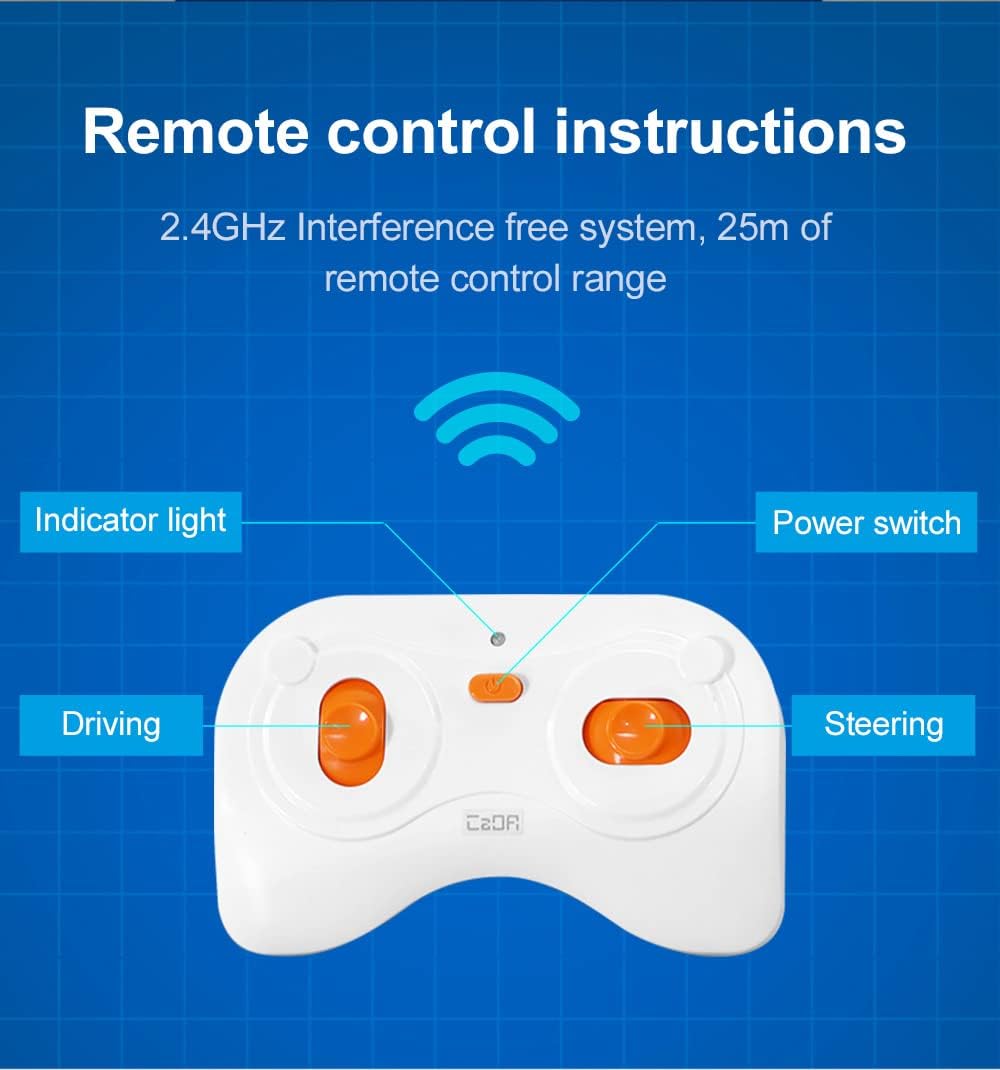
Image 5.1: Diagram illustrating the components of the 2.4 GHz remote control, including the power switch, indicator light, and control sticks for driving and steering.
Usakinishaji wa App
The CaDA Blaze Sport Car can also be controlled via a mobile application. To install the app:
- Locate the QR code on the product packaging.
- Changanua msimbo wa QR ukitumia simu mahiri au kompyuta yako kibao.
- Follow the prompts to download and install the CaDA app.
- The app is compatible with devices running iOS 12.0+ or Android 8.0+.

Image 5.2: A smartphone displaying the CaDA app's multi-mode operation interface, featuring options for remote control, Scratch programming, gyroscope control, and path mode.
6. Uendeshaji
6.1 Operesheni ya Udhibiti wa Mbali
Once batteries are installed in the remote control and the car's smart chassis is powered on (if applicable), you can operate the vehicle:
- Washa: Ensure the car and remote control are both switched on. The indicator light on the remote control should illuminate.
- Kuoanisha: The remote control and car should automatically pair. If not, refer to the printed manual for specific pairing instructions.
- Kuendesha gari: Use the left joystick for forward and backward movement.
- Uendeshaji: Use the right joystick for left and right steering.
- Masafa: The remote control operates on a 2.4 GHz frequency, providing a stable connection up to 25 meters.
6.2 Operesheni ya Kudhibiti Programu
After installing the CaDA app and connecting it to your Blaze Sport Car (refer to in-app instructions for connection), you can access various control modes:
- Hali ya Udhibiti wa Mbali: Provides a virtual joystick interface for basic driving and steering.
- Scratch Programming Mode: Allows users to program custom movement sequences using a visual block-based coding interface.
- Udhibiti wa Gyroscope: Control the car's movement by tilting your mobile device.
- Njia ya Njia: Draw a path on your device screen, and the car will attempt to follow it.

Image 6.1: The CaDA Blaze Sport Car in action, controlled via a mobile application, demonstrating its dynamic capabilities.
7. Matengenezo
- Kusafisha: Tumia kitambaa laini na kikavu kufuta gari na kidhibiti cha mbali. Epuka kutumia visafishaji vya maji au kemikali.
- Hifadhi: Store the building kit and its components in a cool, dry place away from direct sunlight.
- Uondoaji wa Betri: If the product will not be used for an extended period, remove batteries from the remote control to prevent leakage.
- Angalia Viunganisho: Periodically inspect all building block connections to ensure they are secure. Re-attach any loose pieces.
8. Utatuzi wa shida
| Tatizo | Sababu inayowezekana | Suluhisho |
|---|---|---|
| Car does not respond to remote/app. | Low or dead batteries in remote control; car not powered on; connection issue. | Replace remote control batteries; ensure car's smart chassis is powered; re-pair remote/app with car. |
| Gari hutembea polepole au bila mpangilio. | Low battery power; loose connections in the car's structure. | Replace remote control batteries; ensure all blocks are securely attached. Note that the car's maximum speed is 3.8 km/h. |
| Parts detach during play. | Blocks not pressed firmly during assembly; rough handling. | Re-attach detached parts, ensuring a firm connection. Avoid operating on very rough surfaces or engaging in high-impact collisions. |
| Masuala ya muunganisho wa programu. | Bluetooth/Wi-Fi interference; incorrect app settings; outdated app version. | Ensure Bluetooth/Wi-Fi is enabled on your device; restart the app and car; check for app updates. |
9. Vipimo
- Nambari ya Mfano: C51075W
- Chapa: CaDA
- Idadi ya vipande: 295
- Mizani: 1:20
- Vipimo vya Bidhaa (Zilizounganishwa): Approximately L20 cm × W9 cm × H6 cm (7.87 in × 3.54 in × 2.36 in)
- Aina ya Kudhibiti: 2.4 GHz Remote Control, Mobile App Control
- Masafa ya Udhibiti wa Mbali: Hadi mita 25 (futi 82)
- Kasi ya Juu: 3.8 km/saa (2.36 mph)
- Betri za Kidhibiti cha Mbali: Betri 2 x AA (hazijajumuishwa)
- Utangamano wa Programu: iOS 12.0+ / Android 8.0+
- Utangamano: Compatible with other CaDA building sets and major building block brands.
- Umri Unaopendekezwa: Miaka 6+
10. Msaada kwa Wateja
For any questions, concerns, or assistance with your CaDA C51075W Blaze Sport Car Building Kit, please contact CaDA customer support. Refer to the product packaging or the official CaDA webtovuti kwa maelezo ya sasa ya mawasiliano.
Rasilimali za Mtandaoni: You may find additional support, FAQs, and building tips on the official CaDA webtovuti: CaDA Official Store


