1. Utangulizi
This manual provides comprehensive instructions for the Naxa NDS-6501 Portable Dual 6.5-inch Bluetooth Speaker. Please read this manual thoroughly before operating the device to ensure proper use and to maximize your experience. Keep this manual for future reference.
2. Yaliyomo kwenye Kifurushi
Thibitisha kuwa bidhaa zote zilizoorodheshwa hapa chini zimejumuishwa kwenye kifurushi chako:
- Naxa NDS-6501 Portable Bluetooth Speaker
- Maikrofoni yenye waya
- Kebo ya Kuchaji ya USB
- Mwongozo wa Mtumiaji (hati hii)
3. Bidhaa za Bidhaa
The Naxa NDS-6501 speaker offers a range of functionalities designed for portable audio entertainment:
- Dual 6.5-inch full-frequency speakers for clear audio output.
- Muunganisho wa Bluetooth kwa ajili ya utiririshaji wa sauti usiotumia waya kutoka kwa vifaa vinavyooana.
- Integrated multi-color flame lights with various lighting effects.
- True Wireless Stereo (TWS) function for connecting two NDS-6501 speakers wirelessly.
- Wired microphone input for vocal use.
- Built-in FM radio tuner for local station access.
- USB port and MicroSD/TF card slot for playing audio files from external storage.
- Auxiliary (3.5mm) input for wired audio connections.
- Rechargeable battery providing up to 2 hours of playback time.
4. Vidhibiti na Bandari
The speaker features various controls and input/output ports. A typical layout includes a power button, volume controls, mode selection, playback controls (play/pause, skip tracks), microphone input, USB port, MicroSD card slot, auxiliary input, and a charging port. Refer to the diagram below for specific locations.
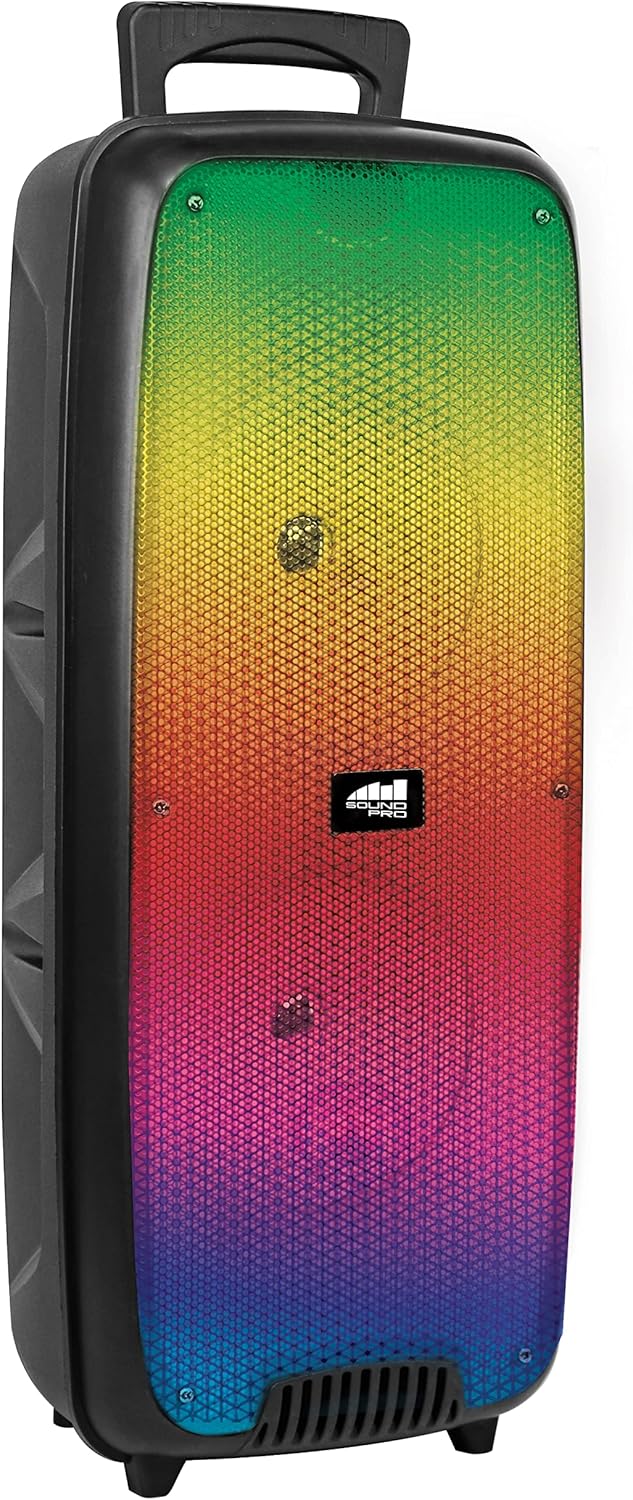
Kielelezo cha 4.1: Mbele view of the Naxa NDS-6501 speaker, showcasing the dual 6.5-inch drivers and multi-color flame lights.

Kielelezo cha 4.2: Upande view of the Naxa NDS-6501 speaker, illustrating its portable design with an integrated handle.
5. Kuweka
5.1 Kutoza malipo kwa Spika
- Unganisha kebo ya kuchaji ya USB iliyotolewa kwenye mlango wa kuchaji wa spika.
- Unganisha ncha nyingine ya kebo ya USB kwenye adapta ya umeme inayooana (haijajumuishwa) au mlango wa USB wa kompyuta.
- Mwanga wa kiashirio cha kuchaji utaangazia, kwa kawaida nyekundu, wakati wa kuchaji.
- Once fully charged, the indicator light will change color or turn off (refer to specific LED behavior in your product). A full charge provides approximately 2 hours of playback.
5.2 Kuwasha / Kuzima
- To power on: Press and hold the Power button for a few seconds until the speaker activates.
- Ili kuzima: Bonyeza na ushikilie kitufe cha Kuwasha tena hadi spika izime.
6. Maagizo ya Uendeshaji
6.1 Kuoanisha Bluetooth
- Ensure the speaker is powered on and in Bluetooth mode. If not, press the Mode button to switch to Bluetooth. The speaker will indicate it is ready for pairing (e.g., a flashing LED or an audible prompt).
- Kwenye kifaa chako kilichowezeshwa na Bluetooth (smartphone, kompyuta kibao, nk), nenda kwenye mipangilio ya Bluetooth.
- Tafuta available devices. You should see "NDS-6501" or a similar name in the list.
- Select "NDS-6501" to initiate pairing.
- Once successfully paired, the speaker will provide an audible confirmation, and the Bluetooth indicator light will become solid.
6.2 Uoanishaji wa Kweli wa Wireless Stereo (TWS).
The TWS function allows you to connect two NDS-6501 speakers for a stereo sound experience.

Kielelezo cha 6.1: Illustration of the True Wireless Stereo (TWS) function, enabling two speakers to connect wirelessly from a single Bluetooth source.
- Ensure both NDS-6501 speakers are powered on and in Bluetooth mode, but not yet paired to any device.
- On one of the speakers (this will be the primary speaker), press and hold the TWS button (or a designated pairing button) for a few seconds.
- Spika kuu itatafuta spika ya pili. Mara tu itakapounganishwa, spika zote mbili zitatoa uthibitisho unaosikika.
- Now, pair your Bluetooth device to the primary speaker as described in Section 6.1. Audio will play through both speakers in stereo.
6.3 Uendeshaji wa Redio ya FM
- Bonyeza kitufe cha Hali ili kubadili hadi hali ya Redio ya FM.
- Bonyeza kitufe cha Cheza/Sitisha ili kuchanganua kiotomatiki na kuhifadhi vituo vya FM vinavyopatikana.
- Use the Previous/Next track buttons to navigate between saved stations.
6.4 Uchezaji wa USB/MicroSD
- Insert a USB flash drive or a MicroSD/TF card (with audio files) kwenye lango linalolingana.
- The speaker should automatically switch to USB or MicroSD mode and begin playing audio. If not, press the Mode button to select the correct input.
- Use the playback controls (Play/Pause, Previous/Next) to manage your music.
6.5 Matumizi ya Maikrofoni
- Connect the wired microphone to the microphone input jack on the speaker.
- Adjust the microphone volume control (if available) on the speaker to your desired level.
- The microphone audio will be mixed with any music playing through the speaker.
6.6 Athari za Mwangaza
- The speaker features integrated multi-color flame lights.
- Press the Light button (if available) to cycle through different lighting modes or to turn the lights on/off.
- The lights may synchronize with the music playback.
7. Matengenezo
- Kusafisha: Tumia kitambaa laini na kikavu kusafisha sehemu ya nje ya mzungumzaji. Usitumie visafishaji vya abrasive, waksi au vimumunyisho.
- Hifadhi: Wakati haitumiki kwa muda mrefu, hifadhi kipaza sauti mahali penye baridi, pakavu mbali na jua moja kwa moja na halijoto kali.
- Utunzaji wa Betri: Ili kuongeza muda wa matumizi ya betri, epuka kutoa betri mara kwa mara. Chaji mzungumzaji mara kwa mara, hata ikiwa haitumiki.
- Mfiduo wa Maji: Spika hii si ya kuzuia maji. Epuka kuiweka kwenye maji au unyevu kupita kiasi.
8. Utatuzi wa shida
| Tatizo | Sababu inayowezekana | Suluhisho |
|---|---|---|
| Spika hana nguvu. | Betri imeisha. | Chaji spika kwa kutumia kebo ya USB iliyotolewa. |
| Hakuna sauti kutoka kwa spika. | Volume is too low; incorrect input mode; device not paired. | Increase volume; press Mode button to select correct input; re-pair Bluetooth device. |
| Bluetooth device cannot find speaker. | Spika haiko katika hali ya kuoanisha; kifaa mbali sana; kuingiliwa. | Ensure speaker is in Bluetooth pairing mode; move device closer; avoid obstacles. |
| Uoanishaji wa TWS umeshindwa. | Spika tayari zimeunganishwa na kifaa; mbali sana. | Ensure both speakers are unpaired from other devices; place speakers within 33 feet of each other. |
| Maikrofoni haifanyi kazi. | Microphone not fully plugged in; microphone volume low. | Ensure microphone is securely connected; adjust microphone volume. |
9. Vipimo
| Kipengele | Vipimo |
|---|---|
| Nambari ya Mfano | NDS-6501 |
| Ukubwa wa Spika | Inchi 6.5 mbili |
| Teknolojia ya Uunganisho | Bluetooth, USB, MicroSD, Aux (3.5mm) |
| Ingizo la Sauti | Maikrofoni yenye waya |
| Njia ya Pato la Sauti | Stereo |
| Upeo wa Nguvu ya Pato | 3 Watts |
| Spika AmpAina ya liification | Inayotumika |
| Aina ya Betri | Lithium Ion (rechargeable, included) |
| Wastani wa Maisha ya Betri | Hadi Saa 2 |
| Vipimo vya Bidhaa (L x W x H) | Sentimita 24.13 x 19.05 x 57.91 (inchi 9.5 x 7.5 x 22.8) |
| Uzito wa Kipengee | Kilo 2.81 (pauni 6.2) |
| Rangi | Nyeusi |
| UPC | 840005017555 |
10. Udhamini na Msaada
For warranty information or technical support, please refer to the warranty card included with your product or visit the official Naxa Electronics webtovuti. Weka risiti yako ya ununuzi kama dhibitisho la ununuzi kwa madai yoyote ya udhamini.


