1. Utangulizi
Thank you for choosing the HXSJ X50 Wireless Game Mouse. This manual provides detailed instructions for setting up, operating, and maintaining your new wireless mouse. Please read this manual thoroughly before use to ensure optimal performance and longevity of your device.
Yaliyomo kwenye Kifurushi:
- HXSJ X50 Wireless Game Mouse
- Mpokeaji wa USB

Image 1.1: The HXSJ X50 Wireless Game Mouse and its USB receiver.
2. Taarifa za Usalama
- Usimwachie panya maji au unyevu kupita kiasi.
- Epuka kuangusha au kuelekeza kipanya kwenye athari kali.
- Weka kifaa mbali na halijoto kali.
- Do not attempt to disassemble or repair the mouse yourself. Contact qualified service personnel if needed.
- Tupa betri kulingana na kanuni za mitaa.
3. Kuweka
3.1 Ufungaji wa Betri
The HXSJ X50 Wireless Game Mouse requires batteries for operation. Please ensure you have the necessary batteries (typically 1x AA battery, not included) before proceeding.
- Tafuta sehemu ya betri kwenye upande wa chini wa panya.
- Fungua kifuniko cha sehemu ya betri.
- Ingiza betri, hakikisha polarity sahihi (+/-).
- Funga kifuniko cha sehemu ya betri kwa usalama.
3.2 Kuunganisha Kipokea USB
- Tafuta mlango wa USB unaopatikana kwenye kompyuta yako.
- Insert the USB receiver into the USB port. Your computer should automatically detect and install the necessary drivers.
3.3 Kuwasha
Slide the power switch, located on the underside of the mouse, to the 'ON' position. The mouse is now ready for use.
4. Maagizo ya Uendeshaji
4.1 Kazi za Kitufe
The HXSJ X50 mouse features 6 buttons for enhanced functionality:
- Kitufe cha Kubofya Kushoto: Kipengele cha msingi, uteuzi.
- Kitufe cha Kubofya Kulia: Kipengele cha pili, menyu za muktadha.
- Gurudumu la Kutembeza: Sogeza juu/chini, bofya katikati.
- Kitufe cha Marekebisho ya DPI: Hupitia mipangilio ya DPI.
- Page Forward Button: Husogea mbele ndani web vivinjari au file wachunguzi.
- Page Backward Button: Husogea nyuma ndani web vivinjari au file wachunguzi.

Picha 4.1: Upande view showing the ergonomic design and side buttons.
4.2 Marekebisho ya DPI
Press the DPI adjustment button (located behind the scroll wheel) to cycle through the available sensitivity settings: 1000DPI, 1200DPI, 1600DPI, and 2400DPI. Select the DPI that best suits your preference and task.
4.3 Kuokoa Nguvu
The mouse features a power switch on its underside. To conserve battery life, slide the switch to the 'OFF' position when the mouse is not in use for extended periods.
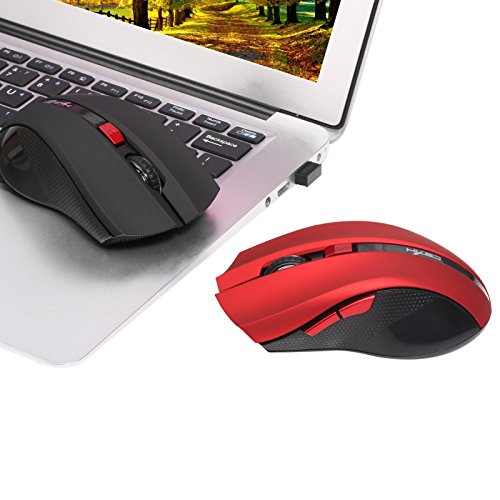
Image 4.2: The HXSJ X50 mouse in use with a laptop.
5. Matengenezo
5.1 Kusafisha
To clean the mouse, gently wipe its surface with a soft, dry cloth. For stubborn dirt, slightly dampsw kitambaa na maji. Epuka kutumia kemikali kali au visafishaji vya abrasive.
5.2 Hifadhi
When not in use, store the mouse and USB receiver in a dry, cool place, away from direct sunlight and extreme temperatures. If storing for an extended period, it is recommended to remove the battery.
6. Utatuzi wa shida
- Panya haijibu:
Ensure the mouse is powered on. Check if the USB receiver is securely plugged into a working USB port. Replace the battery if it is low or depleted. - Mwendo wa kishale usio na mpangilio:
Clean the optical sensor on the underside of the mouse. Ensure the surface you are using the mouse on is clean and non-reflective. - Masuala ya muunganisho:
Try plugging the USB receiver into a different USB port. Move the mouse closer to the receiver to rule out interference. - Vifungo vya pembeni havifanyi kazi:
Ensure your operating system and applications support the forward/backward functions. Some software may require specific drivers or settings.
7. Vipimo
| Kipengele | Maelezo |
|---|---|
| Chapa | HXSJ |
| Mfano | X50 |
| Muunganisho | Isiyo na waya (Kipokea USB) |
| Rangi zisizo na waya | Hadi mita 10-15 |
| Ugunduzi wa Harakati | Macho |
| Mipangilio ya DPI | 1000, 1200, 1600, 2400 (Inarekebishwa) |
| Idadi ya Vifungo | 6 (Kushoto, Kulia, Gurudumu la Kusogeza, DPI, Mbele, Nyuma) |
| Chanzo cha Nguvu | Betri (1x AA, haijajumuishwa) |
| Maisha ya Betri (Wastani) | Miezi 6 |
| Mwelekeo wa Mikono | Ambidextrous |
| Nyenzo | Plastiki |
| Uzito wa Kipengee | 80 g |
| Mfumo wa Uendeshaji Sambamba | Windows 98/ME/2000/XP/Vista/7/8, Linux |
8. Udhamini na Msaada
Kwa taarifa za udhamini au usaidizi wa kiufundi, tafadhali rejelea hati zilizotolewa na ununuzi wako au wasiliana na muuzaji/mtengenezaji moja kwa moja. Weka uthibitisho wako wa ununuzi kwa madai ya udhamini.


