1. Utangulizi
This manual provides detailed instructions for the LFF DAB Plus Digital FM Radio. It covers setup, operation, maintenance, and troubleshooting to ensure optimal performance and user experience. Please read this manual thoroughly before using the device.

Mbele view of the LFF DAB Plus Digital FM Radio, showing the speaker grille, color display, and extended antenna.
2. Yaliyomo kwenye Kifurushi
Tafadhali angalia kifurushi kwa vitu vifuatavyo:
- 1 x LFF DAB Plus Digital FM Radio
- 1 x Adapter ya Nguvu ya AC
- 1 x Mwongozo wa Kuanza Haraka
3. Bidhaa Imeishaview
Familiarize yourself with the radio's components and controls.
3.1 Sifa Muhimu

This diagram illustrates the radio's key functions: DAB+ radio, 60 station presets, FM radio, sleep timer, headphone jack, Bluetooth connectivity, full-color screen, and dual alarm capability.
3.2 Vidhibiti na Bandari

Juu na upande view of the radio, showing control buttons and knobs on the top panel, and the 3.5mm headphone jack located on the side.
Refer to the diagram above for the location of the following:
- Kitufe cha Nguvu: Huwasha/kuzima redio.
- Kitufe cha Hali: Hubadilisha kati ya hali za DAB+, FM, na Bluetooth.
- Tune/Chagua Knobo: Rotates to tune stations or navigate menus, press to select.
- Kitovu cha Sauti: Hurekebisha sauti ya sauti.
- Vifungo vya kuweka mapema: For saving and recalling favorite stations.
- Alarm/Sleep Timer Button: Accesses alarm and sleep timer settings.
- Onyesho la Rangi: Inaonyesha maelezo ya kituo, saa na chaguo za menyu.
- Kipaza sauti cha Jack (3.5mm): Kwa usikilizaji wa faragha.
- DC KATIKA Bandari: Kwa ajili ya kuunganisha adapta ya umeme ya AC.
- Antena ya Telescopic: Kwa mapokezi ya redio yaliyoboreshwa.
4. Kuweka
4.1 Kuwasha
The radio can be powered by the included AC adapter or by batteries.
- Nguvu ya AC: Connect the AC power adapter to the DC IN port on the back of the radio and plug it into a wall outlet.
- Nguvu ya Betri: Open the battery compartment on the back of the radio and insert 4 x 1.5V AA (LR6) batteries, ensuring correct polarity.
Nyuma view of the radio, detailing the battery compartment for 4x AA batteries, the AC adapter input (5V/1000mA), and the 360° rotatable antenna. Product dimensions are also indicated.
4.2 Marekebisho ya Antena
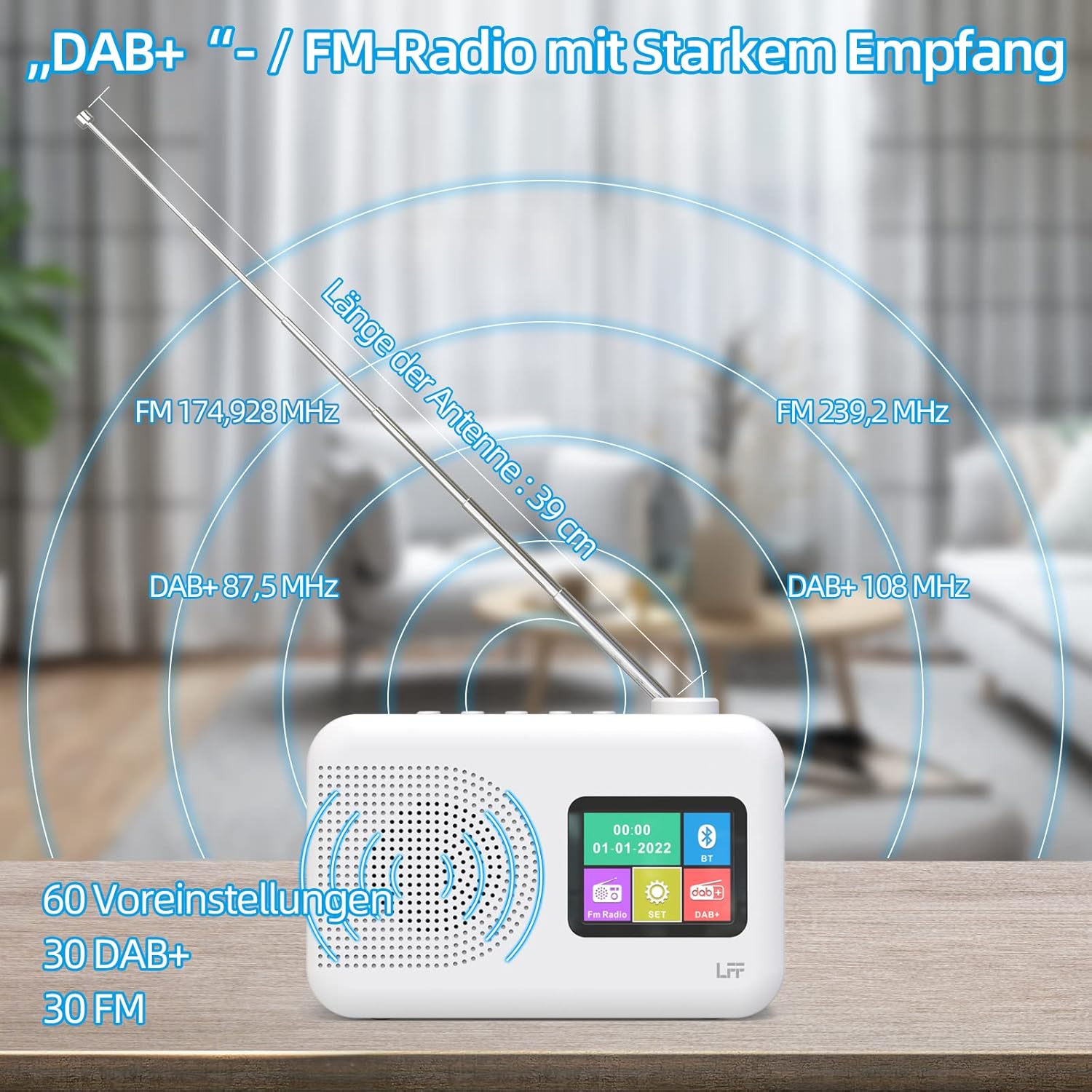
Extend the telescopic antenna fully (approximately 39 cm) and adjust its angle for optimal reception, especially for DAB+ and FM stations.

This diagram illustrates the radio's strong DAB+ and FM reception capabilities with the fully extended 39cm antenna, showing frequency ranges and the capacity for 60 total presets (30 DAB+, 30 FM).
4.3 Initial Scan (DAB+)
- Washa redio.
- Ensure the mode is set to DAB+. If not, press the Hali kitufe cha kubadili.
- The radio will automatically perform a full scan for available DAB+ stations. This may take a few minutes.
- Once the scan is complete, the radio will display a list of found stations.
5. Maagizo ya Uendeshaji
5.1 DAB+ Hali ya Redio
- Bonyeza kwa Hali kitufe cha kuchagua hali ya DAB+.
- Zungusha Tune/Chagua knob to browse through the available stations.
- Bonyeza kwa Tune/Chagua kitufe cha kuchagua kituo.
- Inahifadhi Mipangilio mapema: Ili kuhifadhi kituo, bonyeza na ushikilie Weka mapema button until the display confirms. To recall, briefly press the corresponding Weka mapema button. Up to 30 DAB+ stations can be saved.
5.2 Njia ya Redio ya FM
- Bonyeza kwa Hali kitufe cha kuchagua hali ya FM.
- Zungusha Tune/Chagua knob to manually tune to a frequency.
- Bonyeza na ushikilie Tune/Chagua knob for a few seconds to auto-scan for the next available station.
- Inahifadhi Mipangilio mapema: Similar to DAB+ mode, press and hold a Weka mapema button to save, and briefly press to recall. Up to 30 FM stations can be saved.
Njia ya Bluetooth ya 5.3

This diagram illustrates the three primary playback options for the radio: through its internal speaker, via Bluetooth connection to an external device, or using headphones connected to the headphone jack.
- Bonyeza kwa Hali button to select Bluetooth mode. The display will show "Bluetooth Pairing" or similar.
- On your external device (e.g., smartphone), enable Bluetooth and search for available devices.
- Select "LFF Radio" (or similar name) from the list to pair.
- Once paired, you can play audio from your device through the radio's speaker.
- Kumbuka: This radio acts as a Bluetooth receiver. It does not support connecting to Bluetooth headphones or other Bluetooth speakers.
5.4 Muda wa Kulala
Kipima muda cha usingizi huruhusu redio kuzima kiotomatiki baada ya kipindi fulani.

This image depicts the sleep timer function, offering selectable durations of 15, 30, 45, 60, 90, and 120 minutes before the radio automatically powers off.
- Bonyeza kwa Alarm/Sleep Timer button repeatedly to cycle through sleep timer options (15 min, 30 min, 45 min, 60 min, 90 min, 120 min, OFF).
- Select your desired duration. The radio will turn off automatically after this time.
5.5 Saa ya Kengele
The radio features a dual alarm function.
- Bonyeza na ushikilie Alarm/Sleep Timer button to enter alarm settings.
- Tumia Tune/Chagua knob to set the alarm time, alarm source (DAB+, FM, or buzzer), and volume.
- Bonyeza kwa Tune/Chagua knob ili kuthibitisha kila mpangilio.
- Repeat the process for the second alarm if needed.
5.6 Matumizi ya Vipaza sauti
Plug 3.5mm headphones into the headphone jack on the side of the radio for private listening. The internal speaker will automatically mute.
6. Matengenezo
6.1 Kusafisha
- Futa uso wa redio kwa kitambaa laini na kikavu.
- Usitumie visafishaji vya abrasive, nta, au viyeyusho kwani vinaweza kuharibu umaliziaji.
6.2 Ubadilishaji wa Betri
When using battery power, replace all four AA batteries when the low battery indicator appears on the display or when performance degrades.
- Ensure the radio is turned off and disconnected from AC power.
- Fungua kifuniko cha sehemu ya betri nyuma.
- Ondoa betri za zamani na uondoe vizuri.
- Insert new 4 x 1.5V AA (LR6) batteries, observing correct polarity (+/-).
- Funga kifuniko cha sehemu ya betri kwa usalama.
6.3 Screen Protection Film
The radio's display comes with a transparent protective film. For optimal clarity, gently peel off this film before first use.
7. Utatuzi wa shida
Ukikumbana na masuala, rejelea matatizo na suluhisho zifuatazo za kawaida:
| Tatizo | Sababu inayowezekana | Suluhisho |
|---|---|---|
| Hakuna nguvu | AC adapter not connected, batteries depleted or incorrectly inserted. | Angalia muunganisho wa adapta ya AC. Badilisha betri au hakikisha polarity sahihi. |
| Mapokezi duni ya redio | Antena haijapanuliwa, eneo dhaifu la mawimbi, kuingiliwa. | Fully extend and adjust the telescopic antenna. Move the radio to a different location. Avoid sources of interference. |
| Bluetooth haiunganishi | Radio not in Bluetooth mode, device too far, already paired with another device. | Ensure radio is in Bluetooth mode. Keep devices within range. Disconnect from other devices. |
| Hakuna sauti | Volume too low, headphones connected, mute activated. | Increase volume. Disconnect headphones. Check if mute is active. |
8. Vipimo
- Chapa: LFF
- Mfano: DAB Plus Digital FM Radio
- Rangi: Nyeupe
- Teknolojia ya Uunganisho: Bluetooth
- Vipimo (L x W x H): Sentimita 16.1 x 5.9 x sentimita 10.9
- Tuning Technology: DAB
- Chanzo cha Nguvu: AC Adapter (5V/1000mA) or 4 x 1.5V AA (LR6) Batteries
- Bendi za Redio Zinazotumika: DAB+, FM
- Masafa ya Marudio ya DAB+: 174.928 - 239.2 MHz
- Rangi ya Frequency ya FM: 87.5 - 108 MHz
- Kuweka mapema: 30 DAB+, 30 FM
- Urefu wa Antena: 39 cm (extendable)
- Vipengele Maalum: DAB Plus Radio, Sleep Timer, Dual Alarm, Headphone Jack, Color Display
- Vipengele vilivyojumuishwa: DAB Digital Radio, AC Power Adapter, Quick Start Guide
9. Udhamini na Msaada
For any quality-related issues or technical support, please contact the seller directly. We are committed to resolving any problems you may encounter with your LFF DAB Plus Digital FM Radio.


