Utangulizi
This manual provides comprehensive instructions for the setup, operation, and maintenance of your Tesla Smart Pet Feeder (Model TSL-PC-BL4). Please read this manual thoroughly before using the device to ensure proper functionality and safety for your pet.
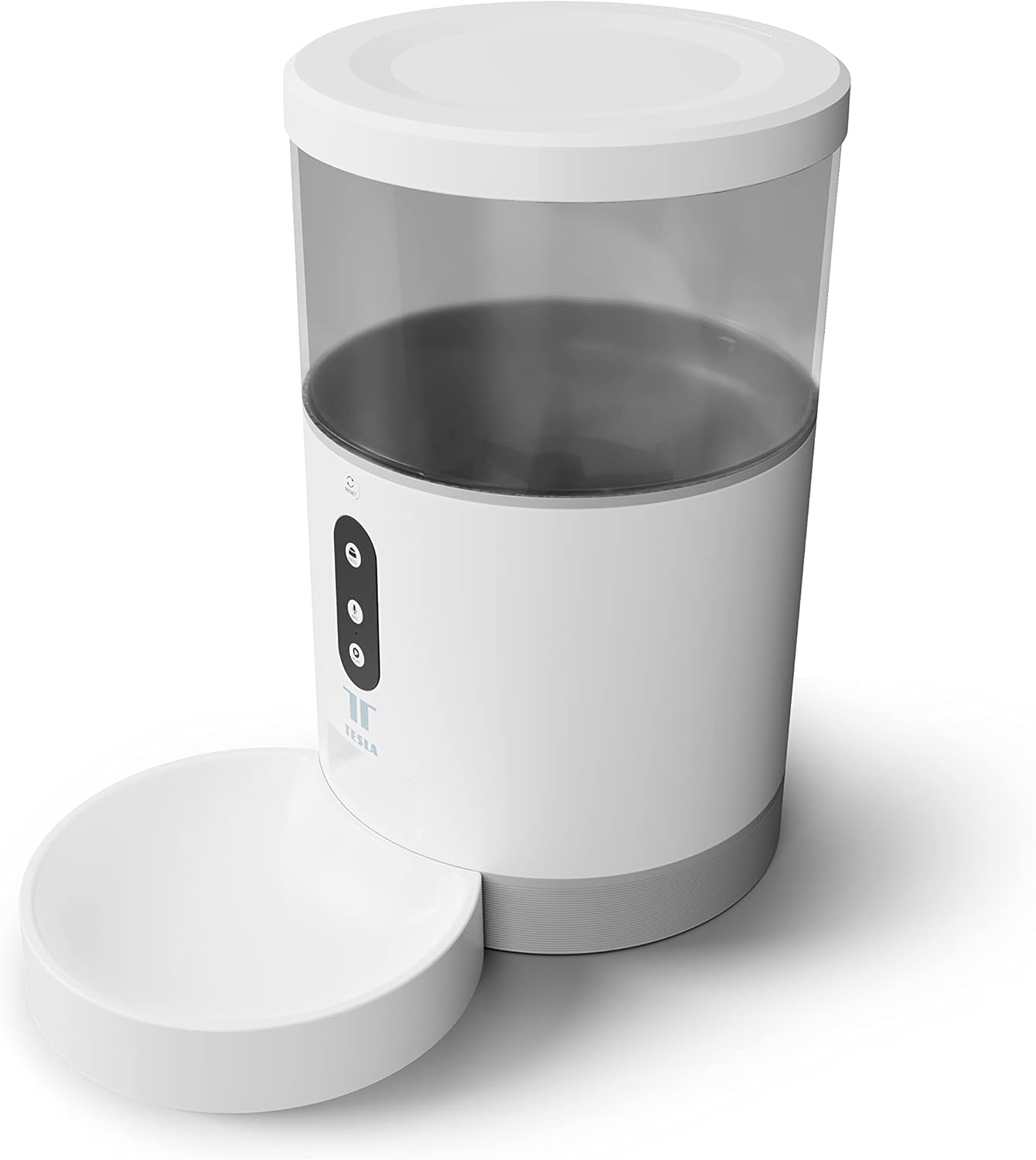
Picha: Mbele view of the Tesla Smart Pet Feeder, showing the main unit with a transparent food reservoir, control buttons, and an attached white food bowl.
Taarifa Muhimu za Usalama
Tafadhali fuata tahadhari zifuatazo za usalama ili kuzuia jeraha au uharibifu wa kifaa:
- Usitumbukize kitengo kikuu katika maji au vinywaji vingine.
- Hakikisha kichungi kimewekwa kwenye uso thabiti na tambarare.
- Weka mbali na watoto wadogo na wanyama kipenzi wakati haitumiki au wakati wa mkusanyiko.
- Use only dry pet food with a kibble size up to 10 mm.
- Usijaribu kutenganisha au kutengeneza kifaa mwenyewe. Wasiliana na usaidizi kwa wateja kwa usaidizi.
- Always unplug the feeder before cleaning.
Yaliyomo kwenye Kifurushi
Thibitisha kuwa vipengele vyote vipo kwenye kifurushi:
- Tesla Smart Pet Feeder Main Unit
- Bakuli la Chakula
- Adapta ya Nguvu
- Mwongozo wa Mtumiaji (hati hii)
Mwongozo wa Kuweka
1. Bunge
- Place the main feeder unit on a flat, stable surface.
- Attach the food bowl to the designated slot at the base of the main unit. Ensure it clicks securely into place.

Picha: Mbele view of the feeder highlighting the control panel with feed, record, and play buttons.
2. Kuwasha Kifaa
- Nguvu ya AC: Connect the power adapter to the feeder's power input port and plug it into a standard wall outlet.
- Hifadhi Nakala ya Betri (Hiari): For uninterrupted operation during power outages, insert three LR20 (D-cell) batteries into the battery compartment located at the bottom of the unit. Betri hazijajumuishwa na lazima zinunuliwe tofauti.

Picha: Nyuma view of the Tesla Smart Pet Feeder, showing the power input and battery compartment location.
3. Kujaza Chombo cha Chakula
- Ondoa kifuniko kutoka juu ya kichungi.
- Pour dry pet food into the transparent container. The feeder has a capacity of 4 liters. Ensure kibble size does not exceed 10 mm to prevent jamming.
- Badilisha kifuniko kwa usalama.

Picha: Karibu view of dry pet food kibble in the feeder's bowl, demonstrating the type of food suitable for the device.
4. Upakuaji wa Programu na Muunganisho wa Wi-Fi
- Download the Tesla Smart app from the App Store (iOS) or Google Play Store (Android).
- Open the app and follow the on-screen instructions to create an account and add your Tesla Smart Pet Feeder.
- Ensure your Wi-Fi network is 2.4 GHz for successful connection.
Maagizo ya Uendeshaji
1. Scheduling Feeds via App
The primary method for controlling the feeder is through the Tesla Smart app. The app allows you to:
- Set feeding schedules: Define specific times for food dispensing.
- Adjust portion sizes: Control the amount of food dispensed per feeding. The feeder can dispense up to 10 portions per feeding.
- View historia ya kulisha.

Image: An orange cat resting beside the Tesla Smart Pet Feeder, illustrating the feeder in a home environment.
2. Kulisha kwa Mwongozo
To dispense food manually, press the "Feed" button on the feeder's control panel. Each press will dispense one portion of food.
3. Voice Recording and Playback
The feeder includes a built-in microphone and speaker, allowing you to record a short message to call your pet at feeding times.
- Rekodi: Press and hold the "Record" button (microphone icon) on the control panel. Speak your message. Release the button to save.
- Cheza: Press the "Play" button (speaker icon) to play your recorded message. The message will also play automatically at scheduled feeding times.
4. Smart Home Integration
The Tesla Smart Pet Feeder is compatible with Google Assistant and Amazon Alexa. You can control the feeder using voice commands after linking it through the respective smart home applications.
Matengenezo na Usafishaji
Regular cleaning ensures the longevity and hygienic operation of your pet feeder.
- Bakuli la Chakula: The food bowl can be detached and washed by hand with mild soap and water. Rinse thoroughly and dry completely before reattaching.
- Chombo cha Chakula: The transparent food container can be wiped clean with a damp Hakikisha kimekauka kabisa kabla ya kujaza tena chakula.
- Sehemu kuu: Wipe the exterior of the main unit with a soft, dry cloth. Usitumie visafishaji vya kukwaruza au kuzamisha kifaa kikuu ndani ya maji.
- Duka la Chakula: Periodically check the food outlet for any blockages or food residue and clear as necessary.
Important: Always unplug the feeder from the power source before cleaning.
Kutatua matatizo
| Tatizo | Sababu inayowezekana | Suluhisho |
|---|---|---|
| Kifaa cha kulisha hakiwaki. | No power from outlet; batteries depleted or incorrectly installed. | Check power adapter connection and wall outlet. Replace or install D-cell batteries correctly. |
| Chakula hakitolewi. | Food jammed; container empty; incorrect kibble size; feeder offline. | Check for food blockages in the outlet. Refill container. Ensure kibble is max 10mm. Check Wi-Fi connection and app status. |
| Haiwezi kuunganisha kwenye Wi-Fi. | Incorrect Wi-Fi password; 5GHz network; feeder too far from router. | Verify Wi-Fi password. Ensure you are connecting to a 2.4 GHz network. Move feeder closer to router. Restart feeder and router. |
| Kurekodi sauti hakufanyi kazi. | Microphone issue; recording procedure incorrect. | Ensure you are pressing and holding the record button correctly. Try restarting the feeder. |
Vipimo
| Kipengele | Maelezo |
|---|---|
| Nambari ya Mfano | TSL-PC-BL4 |
| Vipimo (L x W x H) | 30 x 30 x 20 cm |
| Uzito | Kilo 1.92 |
| Nyenzo | Plastiki |
| Rangi | Nyeupe |
| Uwezo | 4 lita |
| Ukubwa wa Kibble | Hadi 10 mm |
| Chanzo cha Nguvu | AC Adapter, 3x LR20 (D-cell) batteries (not included) |
| Muunganisho | Wi-Fi (GHz 2.4) |
| Vipengele Maalum | Wi-Fi and App Control, Voice Recording, Google Assistant/Amazon Alexa Compatible |
Udhamini na Msaada
For warranty information, technical support, or service inquiries, please refer to the official Tesla Smart webtovuti au wasiliana na idara yao ya huduma kwa wateja. Weka risiti yako ya ununuzi kama uthibitisho wa ununuzi.
For the most up-to-date information and support resources, visit: www.teslasmart.com


