1. Utangulizi
This manual provides comprehensive instructions for the installation, operation, and maintenance of your COUGAR Archon 2 RGB Mid Tower Case. Please read this manual carefully before beginning installation to ensure proper setup and to maximize the performance and longevity of your product.

Kielelezo 1.1: Pembe view of the COUGAR Archon 2 RGB Mid Tower Case, showcasing the tempered glass side panel and front RGB fans.
2. Bidhaa za Bidhaa
The COUGAR Archon 2 RGB Mid Tower Case is designed for PC enthusiasts seeking a balance of aesthetics, airflow, and functionality. Key features include:
- Elegant Design with Tempered Glass: A sleek black finish combined with a tempered glass side panel allows for a clear view of internal components and RGB lighting.
- Utiririshaji wa hewa ulioboreshwa: Supports multiple fan configurations and includes three pre-installed 120mm ARGB fans at the front for efficient cooling.
- Utangamano wa Kina: Accommodates Mini ITX, Micro ATX, and ATX motherboards.
- Ample Storage Options: Provides bays for both 3.5" HDDs and 2.5" SSDs.
- I/O ya Mbele Inayofaa: Features USB 3.0 and USB 2.0 ports for easy peripheral connectivity.
- Udhibiti wa Mwangaza wa RGB: Integrated ARGB fans offer customizable lighting effects.

Kielelezo 2.1: Mbele view of the COUGAR Archon 2 RGB case, highlighting the three pre-installed ARGB fans.
3. Mwongozo wa Kuweka
Follow these steps to properly install your components into the COUGAR Archon 2 RGB case.
3.1. Orodha ya Hakiki ya Kusakinisha
- Ensure you have all necessary components: motherboard, CPU, RAM, GPU, power supply, storage drives, and appropriate tools (screwdriver, zip ties).
- Work on a clean, static-free surface. Consider using an anti-static wrist strap.
3.2. Opening the Case
- Carefully remove the tempered glass side panel by unscrewing the thumbscrews located at the rear of the case. Set the panel aside on a soft, flat surface to prevent scratches.
- Remove the opposite metal side panel by unscrewing its thumbscrews and sliding it backward.
3.3. Ufungaji wa Motherboard
- Sakinisha ngao ya I/O (ikiwa haijaunganishwa kwenye ubao mama wako) kwenye sehemu ya nyuma ya kisahani.
- Align your motherboard with the standoffs inside the case. Ensure all standoffs match the screw holes on your motherboard.
- Secure the motherboard using the provided screws. Do not overtighten.
3.4. Ufungaji wa Kitengo cha Ugavi wa Nguvu (PSU).
- Locate the PSU mounting area at the bottom rear of the case.
- Slide your PSU into the designated bay from the rear of the case, ensuring the fan faces downwards for optimal cooling (if the case has a bottom vent).
- Linda PSU na skrubu kutoka sehemu ya nyuma ya kipochi.
3.5. Usakinishaji wa Hifadhi ya Hifadhi
The Archon 2 RGB supports both 3.5" HDDs and 2.5" SSDs.
- For 3.5" HDDs: Locate the drive cage usually beneath the PSU shroud. Slide the HDD into the drive bay and secure it with screws.
- For 2.5" SSDs: Mount SSDs to the designated mounting points on the back of the motherboard tray or within the drive cage, securing them with screws.
3.6. Usakinishaji wa Kadi ya Upanuzi (GPU)
- Ondoa vifuniko muhimu vya nafasi ya PCIe kutoka nyuma ya kesi.
- Insert your graphics card or other expansion cards into the appropriate PCIe slot on the motherboard.
- Secure the card with screws to the case.
3.7. Cable Management and Front Panel Connections
Route all power and data cables neatly behind the motherboard tray. Connect the front panel I/O cables (USB, audio, power switch, reset switch, LED indicators) to their respective headers on the motherboard according to your motherboard manual.

Figure 3.1: Dimensions of the COUGAR Archon 2 RGB case, useful for planning component fit and space.
4. Maagizo ya Uendeshaji
4.1. Kuwasha
Once all components are installed and cables are connected, replace both side panels. Connect your monitor, keyboard, mouse, and power cable to the PSU. Press the power button on the top panel of the case to start your system.
4.2. Udhibiti wa Taa ya RGB
The pre-installed ARGB fans are typically controlled via a dedicated button on the case's front I/O panel or through your motherboard's RGB software (if connected to an ARGB header). Refer to your motherboard manual for software-based control options.
5. Matengenezo
Matengenezo ya mara kwa mara husaidia kuhakikisha utendakazi bora na maisha marefu ya vijenzi vya Kompyuta yako.
- Kusafisha vumbi: Safisha vichujio vya vumbi mara kwa mara (kama vipo) na vipengele vya ndani kwa kutumia hewa iliyobanwa. Hakikisha mfumo umezimwa na kuchomoka kabla ya kusafisha.
- Usimamizi wa Cable: Ensure cables are neatly routed to avoid obstructing airflow.
- Ukaguzi wa Mashabiki: Check fans for dust buildup or obstructions that could impede their operation.
6. Utatuzi wa shida
Ukikumbana na matatizo, rejelea hatua zifuatazo za kawaida za utatuzi:
- Mfumo hauwashi:
- Check all power connections, including the PSU to the wall outlet, PSU to motherboard (24-pin and CPU 8-pin), and front panel power switch header.
- Hakikisha swichi ya PSU iko katika nafasi ya 'ON'.
- Fans Not Spinning / RGB Not Working:
- Verify fan power cables are securely connected to the motherboard or fan controller.
- Check ARGB headers for proper connection to the motherboard or RGB controller.
- Ensure RGB software or case button is correctly configured.
- Hakuna Toleo la Kuonyesha:
- Confirm the monitor cable is connected to the graphics card (not the motherboard integrated graphics, unless no dedicated GPU is present).
- Weka upya kadi ya picha na moduli za RAM.
7. Vipimo
Detailed specifications for the COUGAR Archon 2 RGB Mid Tower Case:
| Kipengele | Maelezo |
|---|---|
| Jina la Mfano | ARCHON 2 RGB |
| Aina ya Kesi | Mnara wa kati |
| Utangamano wa Ubao wa Mama | Mini ITX, Micro ATX, ATX |
| Vipimo (LxWxH) | Inchi 14.96 x 8.27 x 18.5 (380 x 210 x 470 mm) |
| Uzito wa Kipengee | Pauni 11.37 (kilo 5.17) |
| Nyenzo | Chuma, Kioo chenye hasira |
| Rangi | Nyeusi |
| Mashabiki waliosakinishwa awali | 3 x 120mm ARGB fans (Front) |
| Usaidizi wa Mashabiki (Mbele) | 3 x 120mm au 2 x 140mm |
| I/O Bandari | 1 x USB 2.0, 2 x USB 3.0, Audio In/Out |
| Aina ya Kuweka Ugavi wa Umeme | Mlima wa Chini |
| Mbinu ya Kupoeza | Hewa |
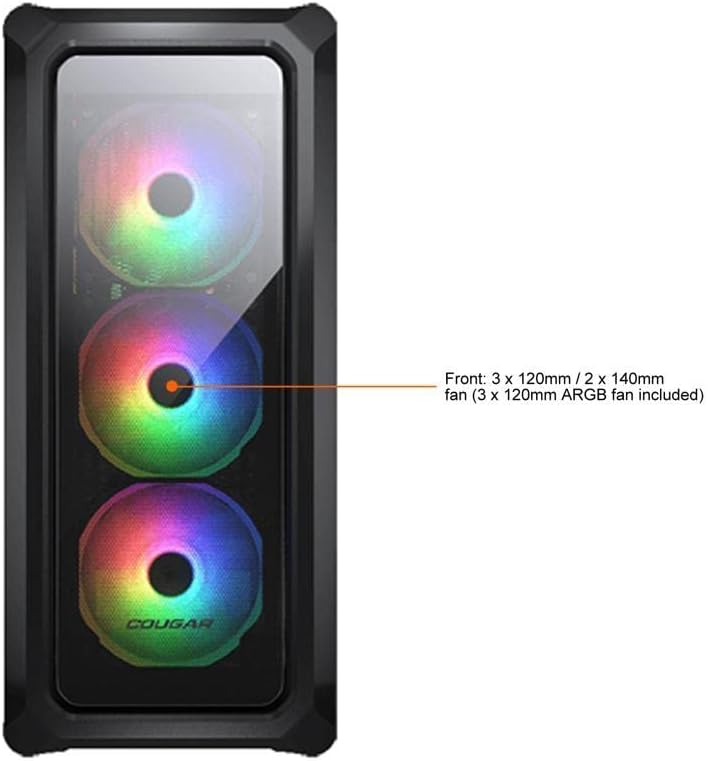
Figure 7.1: Front panel fan configuration and size options for the COUGAR Archon 2 RGB case.
8. Udhamini na Msaada
For warranty information and technical support, please refer to the official COUGAR webtovuti au wasiliana na idara yao ya huduma kwa wateja. Weka uthibitisho wako wa ununuzi kwa madai ya udhamini.
COUGAR Official Webtovuti: cougargaming.com


