1. Utangulizi
The MR CARTOOL M80 is an intelligent multi-function vehicle head-up display designed for automotive use. It combines GPS and OBD functionalities to provide real-time vehicle data, including speed, pitch and roll angles, and navigation information. This device aims to enhance driving safety by presenting crucial data directly in the driver's line of sight.

Picha: Mbele view of the MR CARTOOL M80 display, showing pitch, roll, speed, compass, and other vehicle data.
2. Sifa Muhimu
- Dual Data Modules: Supports both GPS satellite positioning and OBD interface for comprehensive data acquisition.
- Real-time Inclinometer: Displays vehicle pitch and roll angles for safe navigation on uneven terrain.
- Head-Up Display (HUD): Projects essential gauges onto your windshield for improved visibility and reduced distraction.
- Onyesho la kazi nyingi: Includes speedometer (MPH/KPH), compass, altitude, longitude, latitude, driving time, coolant temperature, battery voltage, RPM, and more.
- Inayoshikamana na Inadumu: Measures 17 x 6 x 7 cm, constructed from plastic and metal, weighing 210 grams.
- Sensor ya Mwanga otomatiki: Adjusts display brightness automatically for optimal readability in various lighting conditions.
- Vipengele vya Kengele: Features roll angle alarm, pitch angle alarm, and fatigue driving alarm.

Image: Detailed breakdown of the MR CARTOOL M80 display, highlighting various data points like speed, RPM, angles, and GPS information.
3. Yaliyomo kwenye Kifurushi
Baada ya kufungua kifurushi, hakikisha kuwa bidhaa zote zipo na ziko katika hali nzuri:
- MR CARTOOL M80 Main Unit
- Power Cable (Cigarette Lighter Adapter)
- OBD Connection Cable
- Mounting Bracket with 3M Adhesive Tape
- Mwongozo wa Mtumiaji

Image: Contents of the MR CARTOOL M80 package, including the main unit, cables, and mounting accessories.
4. Kuweka na Kuweka
4.1 Kuweka Kifaa
- Select a suitable flat surface on your vehicle's dashboard that does not obstruct your view au kuingilia udhibiti wa kuendesha gari.
- Clean the chosen surface thoroughly to ensure proper adhesion of the mounting bracket.
- Attach the 3M adhesive tape to the bottom of the mounting bracket.
- Securely press the mounting bracket onto the cleaned dashboard surface.
- Attach the MR CARTOOL M80 main unit to the mounting bracket using the tripod-style attachment point. Adjust the angle for optimal viewing.
Video: Installation guide for the MR CARTOOL M60 Inclinometer, demonstrating bracket attachment and device placement on the dashboard.
Uunganisho wa Nguvu 4.2
The device can be powered via the vehicle's cigarette lighter or hardwired using the provided cables.
- Muunganisho wa Kiyoyozi cha Sigara:
- Connect the power cable with the cigarette lighter adapter to the device.
- Insert the cigarette lighter adapter into your vehicle's 12V power outlet.
- OBD Connection (if applicable):
- Locate your vehicle's OBD-II port (typically under the dashboard on the driver's side).
- Connect the OBD connection cable to the device and then to the OBD-II port.
- Route the cable neatly to avoid obstruction.
Video: Heads Up Display P8 Installation Steps, showing how to connect the device to the OBD-II port and route the cable.
5. Maagizo ya Uendeshaji
5.1 Kuwasha / Kuzima
The device will automatically power on when the vehicle starts and power off when the vehicle is turned off (if connected via OBD or a switched cigarette lighter port). Manual power buttons are located on the top of the unit.
5.2 Urekebishaji
For accurate readings, especially for pitch and roll angles, the device needs to be calibrated after installation or if moved.
- Hakikisha gari lako limeegeshwa kwenye sehemu tambarare.
- With the device powered on, short press the right button (Power key) to reset the slope parameters to zero. The display will show "00°" for both roll and pitch.
Video: GPS Car Digital Inclinometer for Off Road Vehicles, demonstrating the calibration process for pitch and roll angles.
5.3 Hali na Mipangilio ya Onyesho
The device offers various display modes and customizable settings. Use the left and right buttons on the top of the unit to navigate and adjust.
- Changing Display: Short press the left button (M key) to cycle through different display interfaces (e.g., racing theme, blue theme, digital theme, vehicle slope meter, acceleration time).
- Kuingiza Mipangilio: Press and hold the left button (M key) to enter the setting interface.
- Mipangilio ya Kuelekeza: Use the left button to move between settings options and the right button to adjust values or confirm selections.
- Mipangilio ya Kuondoka: Press and hold the right button to exit the setting interface and save changes.
- Kurekebisha Mwangaza: The device features an automatic light sensor. Manual adjustment may be available in settings.
- Speed Unit Switch: Change between MPH and KPH in the settings menu.
Video: P21 heads up display, showing various display modes and how to navigate settings.
6. Matengenezo
- Kusafisha: Use a soft, dry cloth to clean the display and exterior of the device. Avoid abrasive cleaners or solvents.
- Hifadhi: If storing the device for an extended period, disconnect it from the power source and store it in a cool, dry place.
- Sasisho za Firmware: Check the official MR CARTOOL webtovuti kwa masasisho yoyote ya programu dhibiti inayopatikana ili kuhakikisha utendaji bora na vipengele vipya.
7. Utatuzi wa shida
| Tatizo | Sababu inayowezekana | Suluhisho |
|---|---|---|
| Kifaa hakiwashi. | Hakuna umeme au muunganisho uliolegea. | Check power cable connection to the device and vehicle's power outlet/OBD port. Ensure vehicle ignition is on. |
| Inaccurate pitch/roll readings. | Device not calibrated or not level. | Recalibrate the device on a level surface as described in Section 5.2. Ensure the device is mounted securely and level. |
| Hakuna mawimbi ya GPS. | Imezuiwa view of the sky or weak signal area. | Hakikisha kuwa kifaa kina uwazi view of the sky. Move to an open area if inside a garage or tunnel. Allow time for GPS acquisition. |
| Onyesho ni hafifu/mwangavu sana. | Automatic light sensor interference or manual setting. | Check for obstructions over the light sensor. Adjust brightness manually in the settings if needed. |
8. Vipimo
| Kipengele | Maelezo |
|---|---|
| Mfano | M80 |
| Vipimo (L x W x H) | 170 x 60 x 70 mm (inchi 6.69 x 2.36 x 2.76) |
| Uzito | Gramu 210 (pauni 0.46) |
| Ugavi wa Nguvu | DC 10V-30V |
| Safu ya Pembe ya Lami | -40° ~ +40° |
| Mfululizo wa Angle | -40° ~ +40° |
| Usahihi wa kasi | <0.36km/saa |
| Wakati wa Kuanza Baridi wa GPS | 32s (wastani) |
| Wakati wa Kuanza Moto wa GPS | 1s (wastani) |
| GPS Data Refresh Rate | 1s |
| Joto la Uendeshaji | -40°C ~ +80°C |
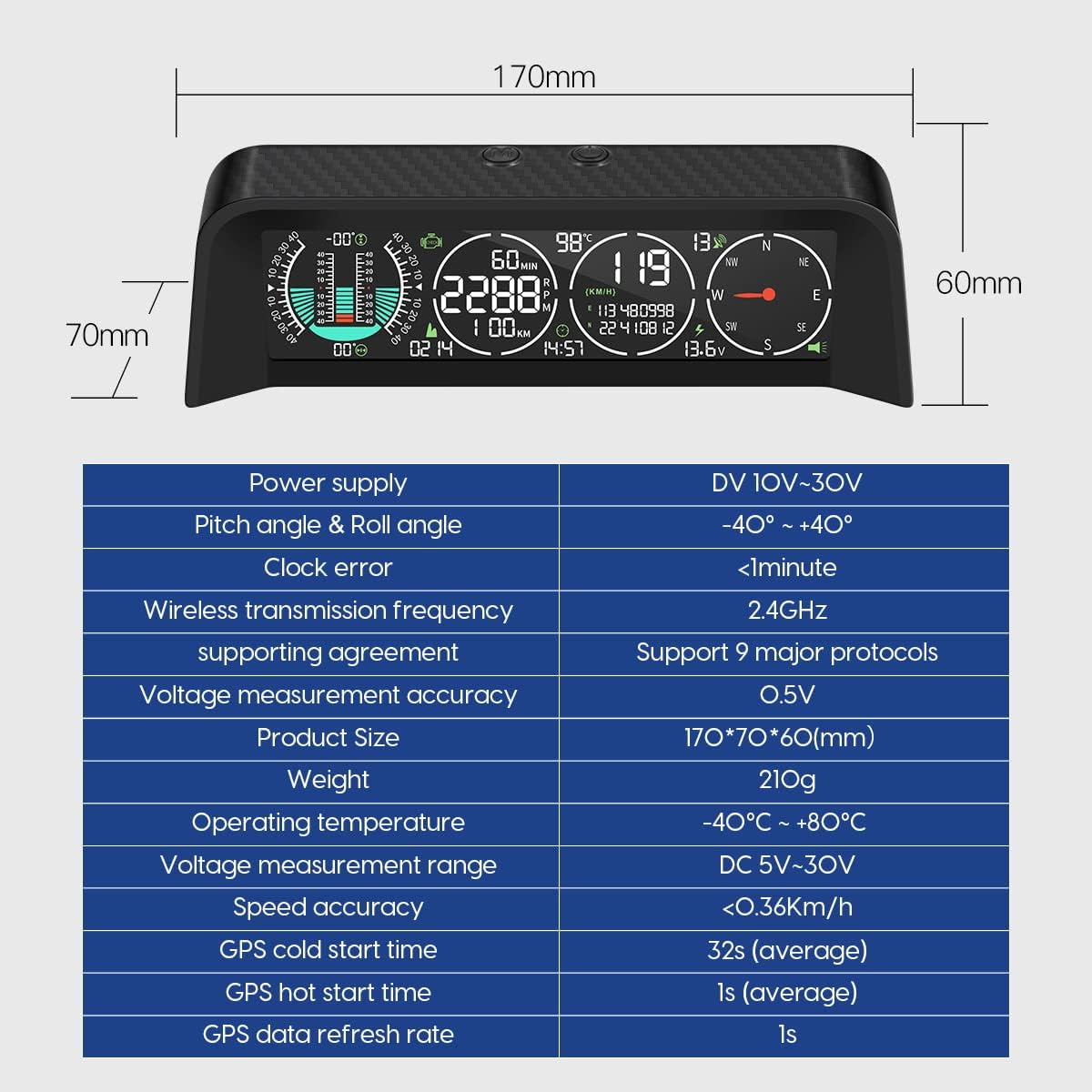
Image: Technical specifications and dimensions of the MR CARTOOL M80 device.
9. Udhamini na Msaada
For warranty information and technical support, please refer to the official MR CARTOOL webtovuti au wasiliana na huduma kwa wateja wao moja kwa moja. Weka risiti yako ya ununuzi kama dhibitisho la ununuzi kwa madai yoyote ya udhamini.
Mtengenezaji: MR CARTOOL
ASIN: B09LC5P16X
Tarehe ya Kwanza Inapatikana: Machi 4, 2022


