1. Utangulizi
Thank you for choosing the Aerocool Crown AeroSuede Gaming Chair. This manual provides essential information for the safe and correct assembly, operation, and maintenance of your new chair. Please read these instructions thoroughly before assembly and retain this manual for future reference.
The Aerocool Crown AeroSuede Gaming Chair is designed for comfort and durability, featuring an ergonomic design and high-quality materials to support extended periods of use.
2. Bidhaa za Bidhaa
The Aerocool Crown Gaming Chair incorporates several features designed to enhance user experience:
- High-Performance Comfort: Constructed with durable stitching on the backrest and seat, providing both aesthetic appeal and exceptional comfort.
- Muundo wa Ergonomic: Engineered to offer sustained ergonomic support, promoting relaxation and comfort during prolonged work, gaming, or study sessions.
- Tilt Control Mechanism: Allows for a rocking motion up to 18 degrees. A locking mechanism is included to secure the chair in a fixed position if preferred.
- Robust and Reliable Structure: Built with premium materials, including a sturdy steel frame and a durable nylon base, ensuring long-term stability and quality.
- Silaha Zinazoweza Kurekebishwa: Provides customizable support for arms and shoulders.
- Usaidizi wa Lumbar unaoweza kubadilishwa: Offers personalized lower back support.
- Urefu unaoweza kurekebishwa: Allows for customization of the chair's height to suit individual preferences and desk setups.
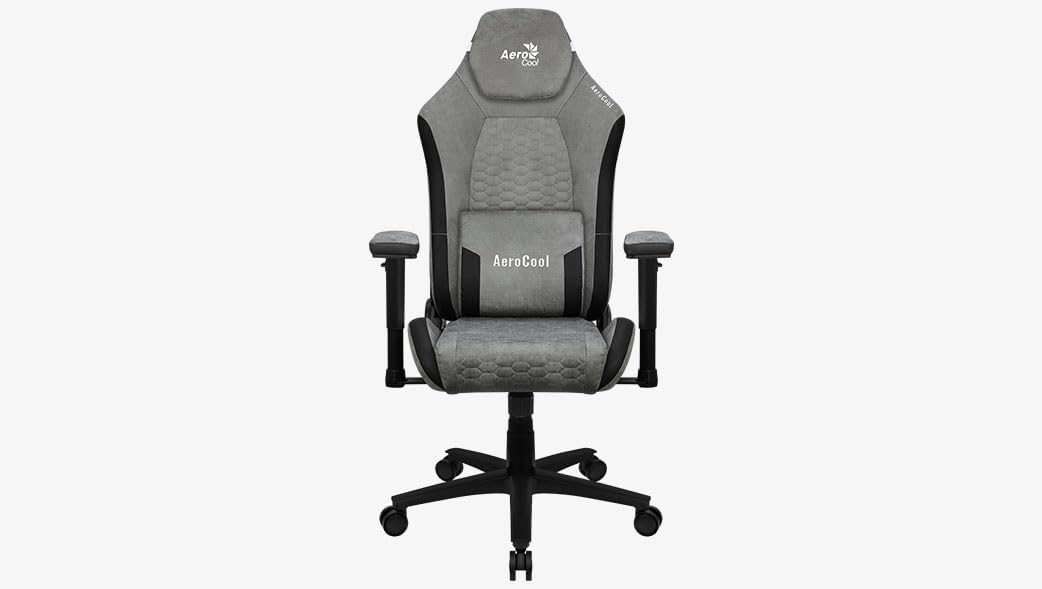
Kielelezo 1: Mbele view of the Aerocool Crown AeroSuede Gaming Chair. The chair features a grey AeroSuede material with black accents, adjustable armrests, a headrest, and a five-star base with casters.
3. Maagizo ya Mkutano
Before beginning assembly, ensure all components are present and undamaged. It is recommended to assemble the chair on a soft, clean surface to prevent scratching. Two people may be required for certain steps.
- Fungua Vipengee: Ondoa kwa uangalifu sehemu zote kutoka kwenye kifungashio na uziweke.
- Kusanya Msingi: Insert the five casters into the holes at the end of each leg of the five-star base. Ensure they are securely seated.
- Sakinisha Lifti ya Gesi: Place the gas lift cylinder into the central hole of the assembled five-star base.
- Ambatisha Utaratibu kwenye Kiti: Secure the tilt mechanism to the underside of the seat using the provided screws. Ensure the front of the mechanism aligns with the front of the seat.
- Ambatisha Armrests: Fasten the armrests to the sides of the seat base using the designated screws. Do not overtighten initially.
- Unganisha sehemu ya nyuma kwenye kiti: Align the backrest with the seat and secure it using the screws. Once all screws are in place for the backrest and armrests, tighten them firmly.
- Mount Seat Assembly onto Gas Lift: Weka kwa uangalifu kiti kilichokusanyika na backrest kwenye silinda ya kuinua gesi, uhakikishe kuwa iko katikati na imara.
- Attach Cushions (if separate): If your model includes separate headrest and lumbar cushions, attach them as desired using their integrated straps.
After assembly, test all functions and ensure all screws are tightened. Do not use the chair if any part feels loose or unstable.
4. Maagizo ya Uendeshaji
Your Aerocool Crown Gaming Chair offers several adjustment options for personalized comfort:
- Marekebisho ya Urefu: To adjust the chair height, pull the lever located under the right side of the seat upwards. While seated, lift your weight off the seat to raise it, or remain seated to lower it. Release the lever to lock the height.
- Tilt/Rocking Function: To enable the rocking function, pull the lever located under the left side of the seat outwards. To disable it and lock the chair in an upright position, push the lever inwards.
- Marekebisho ya Mvutano wa Tilt: The round knob located under the front of the seat controls the tension of the rocking mechanism. Turn clockwise to increase tension (making it harder to rock) or counter-clockwise to decrease tension (making it easier to rock).
- Marekebisho ya Armrest: The armrests can be adjusted in height. Press the button on the side of each armrest support and move the armrest up or down to your desired position. Release the button to lock.
- Kuegemea kwa Backrest: Pull the recline lever (typically on the right side, near the seat) upwards and lean back to adjust the backrest angle. Release the lever to lock the backrest in place.
5. Matengenezo
Proper maintenance ensures the longevity and performance of your gaming chair:
- Kusafisha: Wipe the chair surfaces with a clean, damp cloth. For synthetic leather, use a mild soap solution if necessary, then wipe with a clean, dry cloth. Avoid harsh chemicals or abrasive cleaners.
- Ukaguzi wa Mara kwa Mara: Periodically check all screws and bolts to ensure they are tight. Retighten if necessary to maintain stability and safety.
- Huduma ya Caster: Keep the casters clean from hair and debris to ensure smooth movement.
- Epuka jua moja kwa moja: Kukaa kwa muda mrefu kwenye jua moja kwa moja kunaweza kusababisha kufifia na uharibifu wa nyenzo.
6. Utatuzi wa shida
This section addresses common issues you might encounter with your gaming chair:
- Mwenyekiti anapiga kelele:
- Check and tighten all screws, especially those connecting the backrest, seat, and mechanism.
- Apply a small amount of silicone lubricant to moving parts or joints if the squeaking persists.
- Chair is Unstable/Wobbly:
- Hakikisha skrubu zote zimekazwa kikamilifu.
- Verify that the gas lift is properly seated in the base and the seat mechanism.
- Check if the casters are fully inserted into the base.
- Urekebishaji wa urefu haufanyi kazi:
- Ensure the height adjustment lever is fully engaged when attempting to adjust.
- Angalia vizuizi vyovyote karibu na utaratibu wa kuinua gesi.
- If the gas lift is completely unresponsive, it may need replacement.
- Chair Does Not Rock/Tilt:
- Ensure the tilt lock lever is disengaged (pulled outwards).
- Adjust the tilt tension knob (under the seat) to a looser setting (counter-clockwise).
7. Vipimo
| Sifa | Maelezo |
|---|---|
| Chapa | Aerocool |
| Nambari ya Mfano | CROWNSG |
| Rangi | Kijivu cha Jiwe |
| Vipimo vya Bidhaa (L x W x H) | 52 x 52 x 133 cm |
| Nyenzo | Synthetic Leather (AeroSuede) |
| Nyenzo ya Fremu | Aloi ya chuma |
| Uzito wa Kipengee | Kilo 18.9 |
| Vipengele Maalum | Armrest, Ergonomic, Adjustable Height, Adjustable Lumbar Support |
| Maelekezo ya Utunzaji | Clean (Wipe with damp kitambaa) |
8. Udhamini na Msaada
Specific warranty information for the Aerocool Crown AeroSuede Gaming Chair is not provided in the available product data. For details regarding warranty coverage, claims, or technical support, please contact Aerocool customer service directly or refer to the official Aerocool webtovuti.
Daima weka uthibitisho wako wa ununuzi kwa maswali yoyote yanayohusiana na udhamini.


