1. Utangulizi
Thank you for choosing the HAYLOU GT7 NEO Wireless Earbuds. These earbuds are designed to provide a high-quality audio experience with advanced features such as Bluetooth 5.2 connectivity, HD stereo sound, AI noise cancellation for clear calls, and a long battery life. This manual will guide you through the setup, operation, and maintenance of your new earbuds.

Image 1.1: HAYLOU GT7 NEO Wireless Earbuds and their charging case. The earbuds are black with a sleek design, and the charging case is compact and oval-shaped.
2. Ni nini kwenye Sanduku
Baada ya kufungua kifurushi, tafadhali hakikisha vipengele vyote vipo:
- HAYLOU GT7 NEO Wireless Earbuds (Left and Right)
- Kesi ya Kuchaji
- Kebo ya Kuchaji ya USB-C
- Matakia ya Masikio (Ukubwa wa S, M, L)
- Mwongozo wa Mtumiaji (hati hii)
3. Kuanzisha na Matumizi ya Kwanza
3.1 Kuchaji vifaa vya masikioni na Kipochi
Before first use, fully charge the earbuds and the charging case. Connect the USB-C cable to the charging port on the case and to a power source. The indicator light on the case will show charging status.
- A full charge provides up to 6.5 hours of playtime for the earbuds and up to 22 hours with the charging case.
3.2 Kuoanisha na Kifaa Chako
The HAYLOU GT7 NEO earbuds feature one-step auto pairing after the initial setup.
- Hakikisha Bluetooth ya kifaa chako imewashwa.
- Fungua kesi ya malipo. Vifaa vya masikioni vitaingia kiotomatiki modi ya kuoanisha.
- Kwenye kifaa chako, tafuta vifaa vya Bluetooth na uchague "Haylou GT7" kutoka kwenye orodha.
- Baada ya kuunganishwa, utasikia sauti ya uthibitishaji.

Image 3.1: Illustration of the one-step auto-pairing process, showing the earbuds being taken out of the case and a smartphone displaying "Haylou GT7" in its Bluetooth device list.
The earbuds support dual host connection, allowing for stable connection and seamless switching between mono and twin modes.
4. Uendeshaji na Udhibiti
The HAYLOU GT7 NEO earbuds feature smart touch controls for easy management of music playback, calls, and other functions.
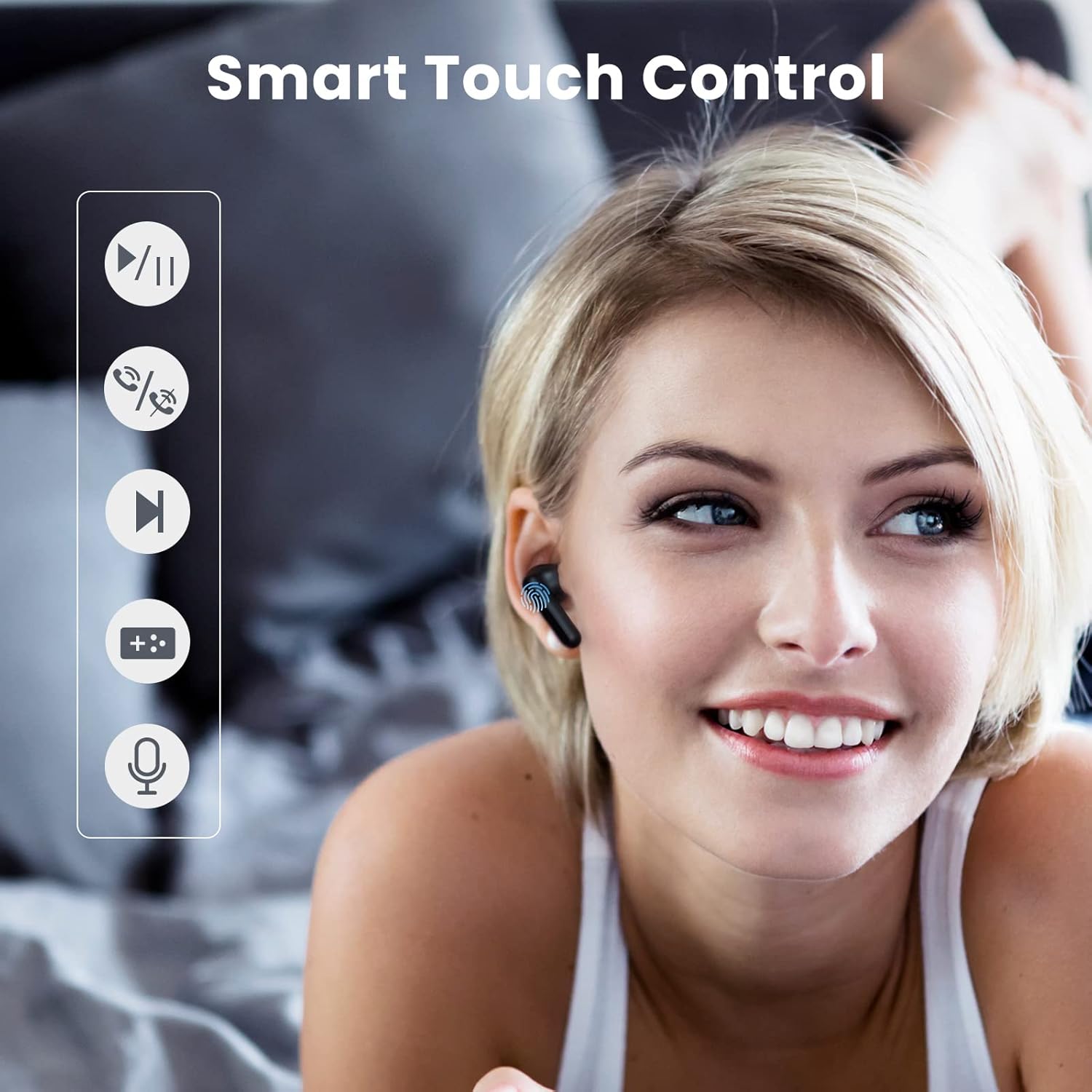
Image 4.1: Visual guide demonstrating the touch control functions on the earbuds, including play/pause, answer/hang up, next track, voice assistant, and low latency mode activation.
4.1 Kazi za Kudhibiti Mguso
| Kitendo | Kazi |
|---|---|
| Tap the Earbud (any) Once | Play/Pause Music, Answer/Hang Up Call |
| Double Tap the Right Earbud | Wimbo Unaofuata |
| Double Tap the Left Earbud | Turn On/Off 65ms Ultra-Low Latency Mode |
| Tap the Earbud (any) Three Times | Washa Mratibu wa Sauti |
| Tap the Earbud 1.5s | Turn On Earbuds |
| Tap the Earbud 4.5s | Turn Off Earbuds |
4.2 AI Noise Cancellation for Calls
The earbuds utilize a neural network noise reduction algorithm to effectively minimize environmental noise during calls, ensuring clearer conversations. This feature is automatically active during calls.

Image 4.2: Depiction of the AI Call Noise Cancellation, showing a person using the earbud in a noisy environment with a waveform illustrating noise reduction before and after processing.
4.3 Ultra-Low Latency Mode
For an optimized gaming experience, double-tap the left earbud to activate the 65ms ultra-low latency mode. This reduces audio delay, providing a more synchronized audio-visual experience.

Image 4.3: Visual representation of the ultra-low latency mode, showing earbuds connected to a smartphone displaying an intense gaming scene, emphasizing reduced audio lag.
5. Matengenezo na Matunzo
Proper maintenance ensures the longevity and optimal performance of your HAYLOU GT7 NEO earbuds.
- Kusafisha: Safisha vifaa vya masikioni na kipochi cha kuchaji mara kwa mara kwa kitambaa laini, kikavu na kisicho na pamba. Usitumie visafishaji vya abrasive au vimumunyisho.
- Hifadhi: Wakati haitumiki, hifadhi vifaa vya sauti vya masikioni kwenye kipochi chao cha kuchaji ili kuvilinda na kuendelea kuwa na chaji.
- Upinzani wa Maji: The earbuds are waterproof. However, avoid prolonged exposure to water and do not submerge them. Dry them thoroughly if they get wet.
- Halijoto: Epuka kuweka vifaa vya sauti vya masikioni kwenye joto kali (joto au baridi) kwani hii inaweza kuathiri maisha ya betri na utendakazi kwa ujumla.
- Vidokezo vya Masikio: Clean the ear tips regularly to prevent wax buildup, which can affect sound quality. Replace ear tips if they become damaged or worn.
6. Utatuzi wa shida
If you encounter issues with your HAYLOU GT7 NEO earbuds, please refer to the following common solutions:
6.1 Masuala ya Muunganisho
- Vifaa vya sauti vya masikioni havioanishi: Ensure both earbuds are in the charging case, then take them out. Check if Bluetooth is enabled on your device. Try forgetting "Haylou GT7" in your device's Bluetooth settings and re-pairing.
- Kifaa kimoja tu cha sauti cha masikioni kinachofanya kazi: Weka vifaa vyote viwili vya masikioni kwenye kisanduku cha kuchaji, funga kifuniko, subiri sekunde chache, kisha fungua kifuniko na uvitoe tena. Hii mara nyingi huvisawazisha tena.
- Muunganisho wa mara kwa mara: Ensure there are no significant obstructions between the earbuds and your device. Keep the device within the 10-meter Bluetooth range.
6.2 Masuala ya Sauti
- Hakuna sauti: Angalia kiwango cha sauti kwenye kifaa chako na vifaa vya masikioni. Hakikisha vifaa vya masikioni vimeunganishwa ipasavyo kwenye kifaa chako.
- Sauti ya chini: Adjust the volume on your device. Ensure the ear tips are correctly seated in your ears to form a good seal. Clean any debris from the earbud speakers.
- Ubora duni wa simu: Ensure the microphone is not obstructed. The AI noise cancellation should help, but extreme noise environments may still affect clarity.
6.3 Masuala ya Kutoza
- Vifaa vya masikioni havichaji: Ensure the charging contacts on the earbuds and inside the case are clean and dry. Make sure the charging cable is securely connected to both the case and the power source.
- Kesi haichaji: Jaribu kebo tofauti ya USB-C na adapta ya nishati.
7. Maelezo ya Bidhaa
| Kipengele | Vipimo |
|---|---|
| Jina la Mfano | Haylou GT7 |
| Teknolojia ya Uunganisho | Isiyo na waya (Bluetooth) |
| Toleo la Bluetooth | 5.2 |
| Msururu wa Bluetooth | Mita 10 |
| Maisha ya Betri (Earbuds) | Takriban saa 6.5 (chaji moja) |
| Jumla ya Maisha ya Betri (yenye Kipochi) | Hadi saa 22 |
| Kiolesura cha Kuchaji | USB-C |
| Ucheleweshaji wa Sauti | 65 Milliseconds (Ultra-Low Latency Mode) |
| Udhibiti wa Kelele | Kughairi Kelele za Simu za AI |
| Njia ya Kudhibiti | Gusa |
| Kiwango cha Upinzani wa Maji | Kuzuia maji |
| Uzito wa Kipengee | Wakia 1.41 (Gramu 40) |
| Vipimo vya Bidhaa | Inchi 1.46 x 0.67 x 0.59 |
| Vifaa Sambamba | Android phones, iPhones, Laptops, Tablets |
8. Udhamini na Msaada
For warranty information and customer support, please refer to the official HAYLOU webtovuti au wasiliana na mchuuzi wako. Weka risiti yako ya ununuzi kama dhibitisho la ununuzi kwa madai ya udhamini.
Kwa msaada zaidi, unaweza kutembelea HAYLOU Store on Amazon.


