1. Taarifa za Usalama
Read all safety warnings and instructions carefully before using this appliance. Failure to follow the warnings and instructions may result in electric shock, fire, or serious injury.
- Hakikisha ujazotage iliyoonyeshwa kwenye lebo ya ukadiriaji inalingana na juzuu kuutage nyumbani kwako.
- Do not cover the heater. Overheating may occur.
- Keep flammable materials (e.g., curtains, furniture) at least 1 meter (3 feet) away from the heater.
- Do not use the heater in bathrooms, laundry areas, or similar indoor locations where it may come into contact with water. The appliance has an IP24 rating, meaning it is protected against splashing water, but it is not fully waterproof.
- Daima ondoa hita wakati haitumiki au kabla ya kusafisha.
- Do not operate the heater with a damaged cord or plug, or after the appliance malfunctions or has been dropped or damaged in any manner.
- Kifaa hiki hakikusudiwa kutumiwa na watu (pamoja na watoto) walio na uwezo mdogo wa kimwili, hisi au kiakili, au wasio na uzoefu na ujuzi, isipokuwa wamepewa usimamizi au maagizo kuhusu matumizi ya kifaa na mtu anayehusika na usalama wao.
- Watoto wanapaswa kusimamiwa ili kuhakikisha kwamba hawachezi na kifaa.
2. Bidhaa Imeishaview
The Duux Edge 2000 Smart Convector Heater is designed to provide efficient heating for rooms up to 30 m². It features smart control via a smartphone app, a remote control, and can be operated manually. The heater offers both freestanding and wall-mounted installation options.

Image 2.1: Duux Edge 2000 Smart Convector Heater with its accompanying smartphone application interface.

Image 2.2: The Duux Edge 2000 Smart Convector Heater positioned freestanding in a contemporary living space.
3. Usakinishaji na Usanidi
3.1. Yaliyomo kwenye Kifurushi
Thibitisha kuwa vipengele vyote vipo:
- Duux Edge 2000 Convector Heater
- Udhibiti wa Kijijini
- Feet for freestanding use (if applicable)
- Wall mounting brackets and screws (if applicable)
- Mwongozo wa Maagizo
3.2. Usakinishaji wa Kujitegemea
- Fungua kwa uangalifu hita na vifaa vyote.
- Attach the provided feet to the bottom of the heater using the screws. Ensure they are securely fastened.
- Place the heater on a stable, level surface, ensuring adequate clearance from walls and furniture (minimum 1 meter).

Image 3.1: Mounting brackets and screws, which may be used for either wall mounting or attaching feet for freestanding use.
3.3. Ufungaji wa Ukuta
- Select a suitable wall location, ensuring it is clear of obstructions and at least 1 meter from flammable materials.
- Using the provided wall mounting brackets, mark the drilling points on the wall.
- Toboa mashimo na ingiza plagi za ukuta (ikiwa ni lazima).
- Secure the brackets to the wall with screws.
- Carefully hang the heater onto the installed wall brackets, ensuring it is stable and level.
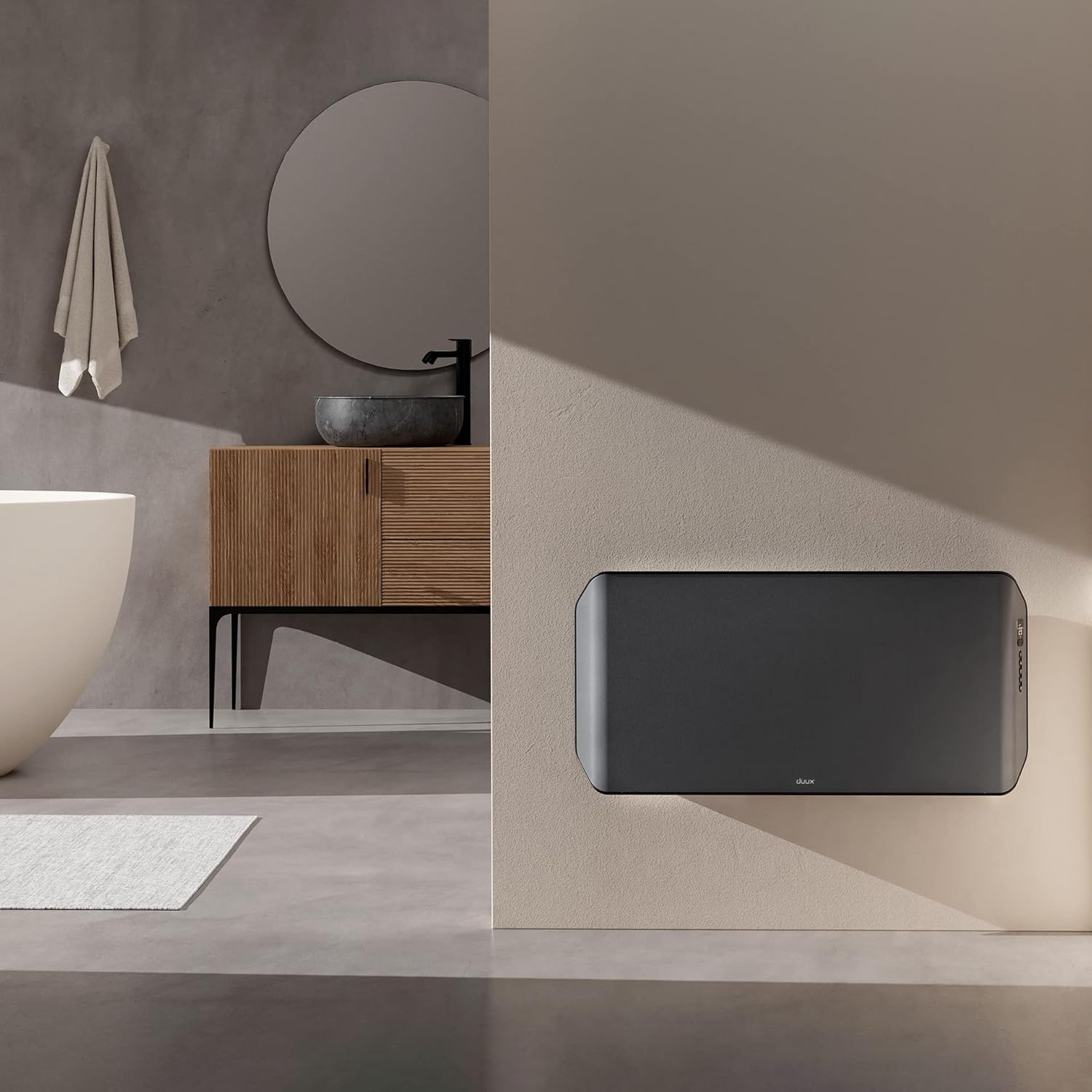
Image 3.2: The Duux Edge 2000 Smart Convector Heater installed on a wall in a bathroom setting.
3.4. Uunganisho wa Nguvu
Plug the power cord into a suitable electrical outlet. Ensure the outlet meets the power requirements of the heater (240V, 2000W).
4. Uendeshaji wa Hita
4.1. Jopo Kudhibiti Juuview
The control panel is located on the side of the heater and features a digital display and several buttons for manual operation.

Picha 4.1: Karibu view of the Duux Edge 2000 heater's integrated control panel.

Image 4.2: A hand demonstrating interaction with the heater's control panel buttons.
4.2. Kazi za Udhibiti wa Kijijini
The included remote control allows for convenient adjustment of settings from a distance.
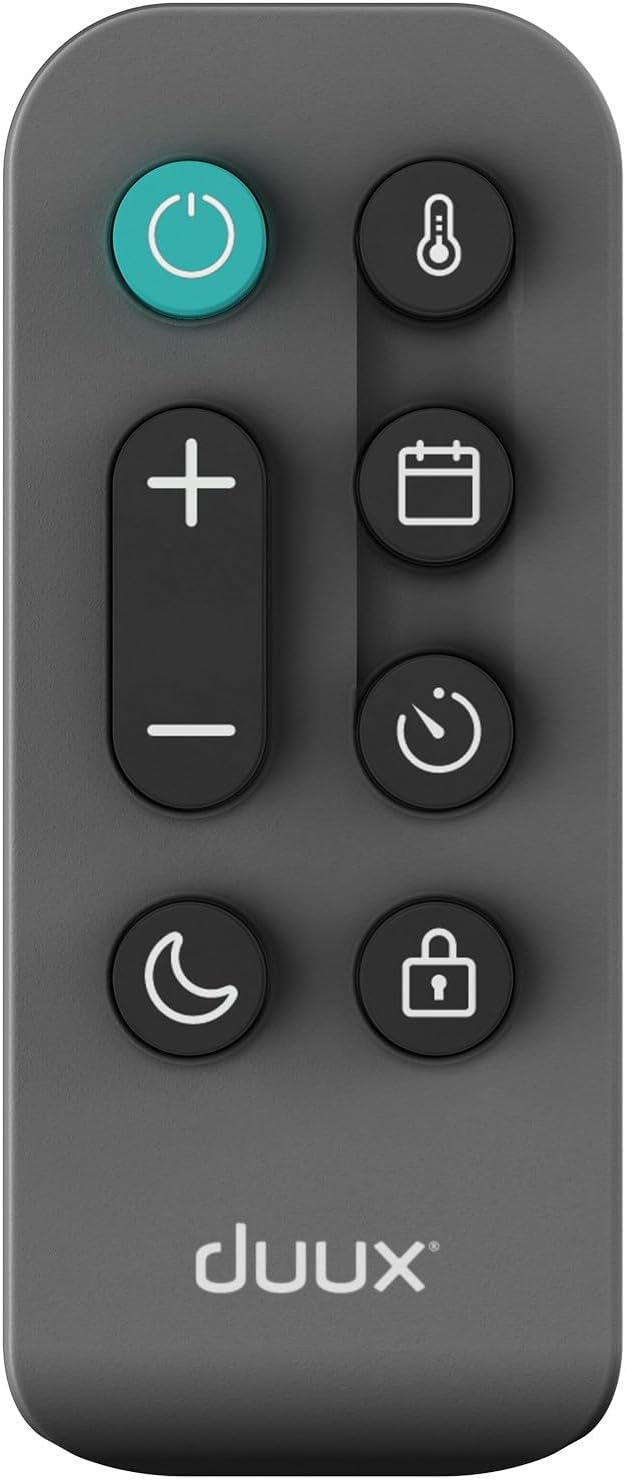
Image 4.3: The remote control for the Duux Edge 2000 Smart Convector Heater, showing various function buttons.
- Kitufe cha Nguvu: Huwasha au kuzima hita.
- Temperature +/-: Hurekebisha joto la chumba unachotaka.
- Kitufe cha Hali: Cycles through available heating modes (e.g., Eco, Comfort).
- Kitufe cha Kipima Muda: Huweka kipima muda cha kuzima kiotomatiki.
- Kitufe cha Kufunga Mtoto: Activates or deactivates the child lock function.
- Night Mode Button: Activates a low-light display mode for nighttime use.
4.3. Udhibiti wa Programu Mahiri
The Duux Edge 2000 can be controlled via a smartphone app, offering advanced features and scheduling.

Image 4.4: A user interacting with the Duux smartphone application to manage heater settings.
- Download the Duux app from your smartphone's app store.
- Follow the in-app instructions to pair your heater with your device.
- Once paired, you can control temperature, modes, set schedules, and monitor the heater's status remotely.
- The app is compatible with Amazon Alexa and Google Assistant for voice control.
5. Matengenezo
Utunzaji wa kawaida huhakikisha utendakazi bora na maisha marefu ya hita yako.
5.1. Kusafisha
- Daima ondoa hita na uiache ipoe kabisa kabla ya kusafisha.
- Futa nyuso za nje kwa laini, damp kitambaa. Usitumie visafishaji vya abrasive au vimumunyisho.
- Use a vacuum cleaner with a brush attachment to gently clean dust from the air intake and outlet grilles.
- Usizamishe hita ndani ya maji au kuruhusu maji kutiririka ndani ya chumba.

Image 5.1: Top-rear view of the heater, highlighting the air vents that require periodic cleaning.
5.2. Hifadhi
Ikiwa utahifadhi hita kwa muda mrefu, isafishe vizuri na uihifadhi katika kifungashio chake cha asili mahali pakavu na penye baridi.
6. Utatuzi wa shida
If you encounter issues with your Duux Edge 2000 heater, refer to the following common problems and solutions:
| Tatizo | Sababu inayowezekana | Suluhisho |
|---|---|---|
| Hita haina kuwasha. | Hakuna usambazaji wa umeme; Kitufe cha kuwasha hakijabonyezwa; Ulinzi wa joto kupita kiasi umewashwa. | Check power cord connection and wall outlet; Press the power button; Unplug, wait 30 minutes, then plug back in. |
| Hita imewashwa lakini haitoi joto. | Temperature setting too low; Eco mode active; Room temperature already reached. | Increase the target temperature; Switch to a higher heating mode; The heater will resume heating when the room temperature drops. |
| Smart app cannot connect to the heater. | Wi-Fi signal weak; Incorrect pairing procedure; Router issues. | Ensure heater is within Wi-Fi range; Re-attempt pairing process; Restart your Wi-Fi router. |
| Udhibiti wa mbali haufanyi kazi. | Betri zimeisha; Kizuizi kati ya remote na hita. | Replace remote control batteries; Ensure a clear line of sight to the heater's receiver. |
Tatizo likiendelea baada ya kujaribu suluhu hizi, tafadhali wasiliana na usaidizi kwa wateja.
7. Vipimo
| Kipengele | Vipimo |
|---|---|
| Chapa | Duux |
| Nambari ya Mfano | DXCH14 |
| Rangi | 2000w Gray |
| Nguvu | 2000 Watts |
| Voltage | 240 Volts |
| Kuzima kiotomatiki | Ndiyo |
| Idadi ya Kasi | 2 |
| Vipengele Maalum | Matumizi ya chini ya nishati |
| Uzito wa Bidhaa | 7.85 kg |
| Vipimo (L x W x H) | Sentimita 88 x 47 x sentimita 12 |
| Matumizi ya Ndani/Nje | Ndani |
| Aina ya Kuweka | Wall mount or freestanding |
| Aina ya Chumba Kilichopendekezwa | Bathroom (IP24 rated) |
| Chanjo ya Kupokanzwa | Hadi 30 m² |
8. Udhamini na Msaada
For warranty information and customer support, please refer to the documentation included with your product or visit the official Duux webtovuti. Weka uthibitisho wako wa ununuzi kwa madai ya udhamini.


