1.1. Yaliyomo kwenye Kifurushi
Tafadhali thibitisha kuwa kifurushi chako kina vitu vifuatavyo:
- Beafon SL720 Mobile Phone
- Betri
- Kebo ya Kuchaji
- Charging Cradle (optional, may vary by region)
- Mwongozo wa Mtumiaji
This manual provides detailed instructions for setting up, operating, maintaining, and troubleshooting your Beafon SL720 Silver Line mobile phone.
Tafadhali thibitisha kuwa kifurushi chako kina vitu vifuatavyo:
Before first use, fully charge your Beafon SL720. Connect the charging cable to the phone or place the phone in the charging cradle. The battery indicator on the screen will show charging status.

Image: Beafon SL720 flip phone placed in its charging cradle, showing an incoming call with a photo contact on the external display.
The Beafon SL720 features a large XXL 2.8-inch color display and large, illuminated keys for easy navigation. Use the directional keys to move through menu options and the central OK kitufe ili kuthibitisha chaguo.
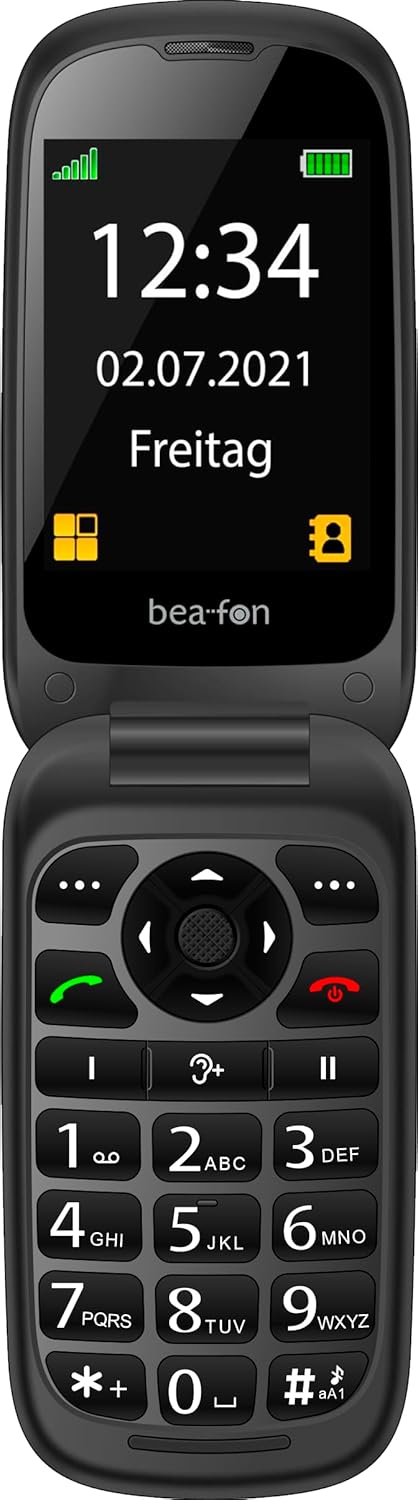
Image: The Beafon SL720 flip phone open, showing the main display with time and date.
You can store frequently used numbers in your phone's contact list. The Beafon SL720 supports photo contacts, allowing you to assign a picture to a contact for easier identification during incoming calls on both the internal and external screens.

Image: The Beafon SL720 flip phone displaying a photo contact on its main screen.

Image: The Beafon SL720 flip phone closed, showing an incoming call with a photo contact on the external 1.44-inch display.
The Beafon SL720 is equipped with a programmable SOS emergency call button located on the back of the device. In an emergency, pressing this button will initiate a call to pre-programmed emergency contacts or send an SOS message with location information (if GPS is active).
This phone offers enhanced accessibility features:

Image: Visual representation of key features including hearing aid compatibility, sound amplification, loud ringtone, SOS button, and display sizes.
Use a soft, dry cloth to clean the phone's exterior. Avoid using liquid cleaners or abrasive materials, as they may damage the device.
To prolong battery life, avoid exposing the phone to extreme temperatures. Do not leave the phone fully charged or fully discharged for extended periods.
When storing the phone for an extended period, ensure it is partially charged (around 50%) and kept in a cool, dry place.
| Kipengele | Maelezo |
|---|---|
| Chapa | Beafon |
| Jina la Mfano | SL720 |
| Rangi | Nyeusi |
| Aina ya Bidhaa | Geuza Simu |
| Mfumo wa Uendeshaji | Android (Simplified OS) |
| Ukubwa Mkuu wa Skrini | Inchi 2.8 (sentimita 7.11) |
| External Screen Size | Inchi 1.44 (sentimita 4.49) |
| Teknolojia ya Simu | 2G |
| Teknolojia ya Uunganisho | GPS |
| Vipengele Maalum | Hearing Aid Compatible (M4/T4), SOS Emergency Button, +25 dB Sound Amplification, 95 dB Ringtone |
| Betri | Lithium-ion 1 (imejumuishwa) |

Image: Physical dimensions of the Beafon SL720 phone.
Your Beafon SL720 mobile phone comes with a standard manufacturer's warranty. Please refer to the warranty card included in your package or contact your retailer for specific details regarding warranty coverage and duration.
If you encounter any issues not covered in this manual or require further assistance, please contact your point of purchase or the official Beafon customer support. Contact details can usually be found on the manufacturer's webtovuti au katika hati za bidhaa yako.
 |
Beafon SL495 Silver Line Simu ya Mkononi - Specifications na Features Kina juuview ya simu ya mkononi ya Beafon SL495 Silver Line, ikijumuisha vipimo vyake, vitendaji, vipengele vya usalama, na yaliyomo kwenye kifurushi. Hati hii inatoa maelezo ya kina kwa watumiaji watarajiwa. |
 |
beafon SL605 Feature Phone - Specifications and Features Detailed information about the beafon SL605 feature phone, including its specifications, functions, safety features, and package contents. Discover its large display, SOS button, and ease of use. |
 |
Beafon SL860 Silver Line Simu ya Mkononi - Sifa na Maelezo Ufafanuzi wa kina wa simu ya rununu ya Beafon SL860 Silver Line, ikijumuisha 4G LTE, WhatsApp, vitendaji vya SOS, maelezo ya kamera na uwezo wa media titika. Jifunze kuhusu kiolesura chake, onyesho na chaguo za muunganisho. |
 |
Bea-fon SL720 Guía del Usuario: Funciones y Operación Mwongozo wa matumizi ya data kwa el telefono movil Bea-fon SL720, cubriendo configuración inicial, funciones de llamada, mensajes, contactos, multimedia, seguridad y solución de problemas. |
 |
Hama SL720 Slimline Keyboard - User Guide and Connection Instructions User guide for the Hama SL720 Slimline Keyboard, detailing USB connection, special key functions, and warranty disclaimer. Learn how to connect and use your keyboard. |
 |
ZENEC Parrot Utangamano Matrix FC6000TS Hati hii ina maelezo ya upatanifu wa miundo mbalimbali ya simu za mkononi na vifaa vya ZENEC vilivyo na teknolojia ya Parrot Bluetooth. Inaangazia utendaji wa vipengele muhimu kama vile kushughulikia simu, ufikiaji wa kitabu cha simu, na utiririshaji wa media (A2DP/AVRCP) kwa anuwai ya vifaa, kusaidia watumiaji kuhakikisha ujumuishaji bila mshono. |