1. Utangulizi na Zaidiview
Thank you for choosing the PXN 9607X Wireless Switch Controller. This manual provides detailed instructions on how to set up, operate, and maintain your controller for an optimal gaming experience on Nintendo Switch, Switch Lite, and OLED models.

Image: The PXN 9607X Wireless Switch Controller in yellow, showcasing muundo wake wa ergonomic.
The PXN 9607X controller is designed to enhance your gaming with features such as wireless connectivity, adjustable Turbo function, NFC Amiibo support, 6-axis gyroscope, and dual vibration motors. Its ergonomic design ensures comfortable gameplay for extended periods.
2. Bidhaa za Bidhaa
- Uunganisho wa wireless: Seamless connection to Nintendo Switch, Switch Lite, and OLED consoles.
- Adjustable Turbo Function: Customize rapid-fire settings for enhanced gameplay.
- Usaidizi wa NFC Amiibo: Interact with Amiibo figures for in-game bonuses and features.
- Gyroskopu ya Mihimili 6: Provides precise motion control for immersive gaming.
- Mota za Mtetemo Mbili: Offers three levels of adjustable vibration feedback for realistic immersion.
- Maisha marefu ya Betri: Built-in 550mAh battery for extended play sessions.
- One-Key Wake-up: Conveniently wake up your Switch console from sleep mode.
Video: Maonyesho rasmi ya video ya bidhaaasing the PXN 9607X controller's features, including wake-up, Turbo function, and multi-player use.
3. Kuweka na Kuunganisha
3.1 Uoanishaji wa Awali
- On your Nintendo Switch console, navigate to the HOME Menu.
- Select "Controllers" > "Change Grip/Order".
- On the PXN 9607X controller, press and hold the Kitufe cha Nyumbani na Kitufe cha Y simultaneously until the LED indicators begin to flash rapidly.
- Once the controller is successfully paired, the LED indicators will stop flashing and remain solid.
3.2 Kuunganisha tena
To reconnect the controller to a previously paired Switch console, simply press the Kitufe cha Nyumbani. The controller will automatically attempt to connect.
3.3 Clearing Pairing Data (Reset)
To clear all stored pairing data from the controller:
- Bonyeza na ushikilie Kitufe cha T na Kitufe cha Kutoa (-) simultaneously. This will clear all setup button functions and pairing information.
3.4 Wake-up Function
Bonyeza kwa Kitufe cha Nyumbani on the controller to wake up the Nintendo Switch console remotely from sleep mode.

Image: Instructions for setting and clearing controller connections, with LED status indicators.
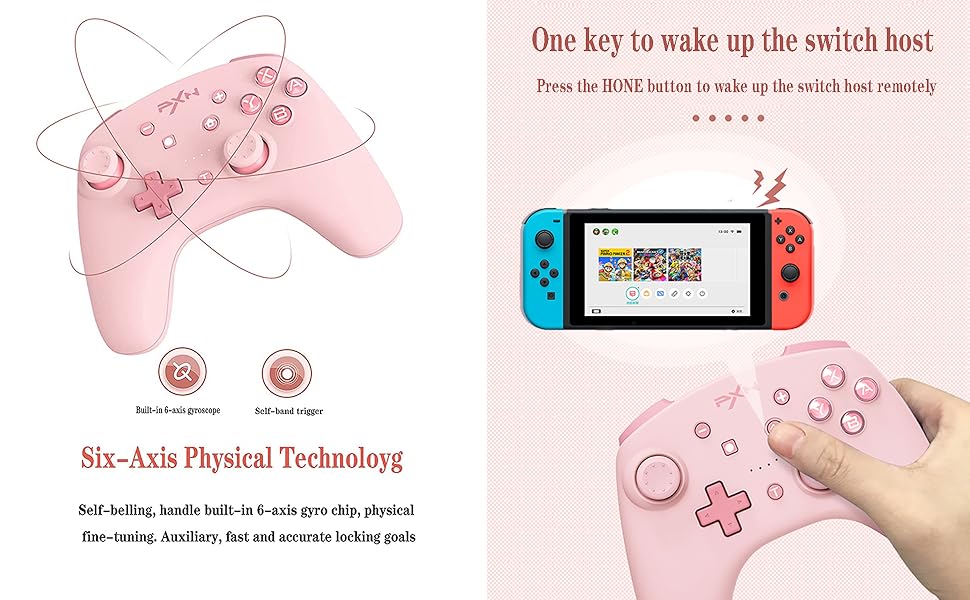
Image: The controller's one-key wake-up feature for the Nintendo Switch console.
4. Maagizo ya Uendeshaji
4.1 Mpangilio wa Kitufe

Image: A comprehensive diagram labeling all buttons and ports on the PXN 9607X controller, including R, L, ZR, ZL, Micro USB Port, Capture, Minus (-), Left Stick, Directional Button, Home, Plus (+), ABXY Buttons, LED, Right Stick, and TURBO button.
4.2 Kazi ya TURBO
The Turbo function allows for rapid, repeated input of a button press. There are two modes: Manual Turbo and Auto Turbo.
- Setting Manual Turbo: Bonyeza kwa Kitufe cha TURBO and one or more desired action buttons simultaneously to activate the Turbo function for those buttons.
- Clearing Manual Turbo: Repeat the same operation (press Kitufe cha TURBO and the action button) to clear the Turbo function for that specific button.
- Clearing All Turbo Functions: Bonyeza kwa Kitufe cha TURBO na Kitufe cha Kutoa (-) simultaneously to clear all set Turbo functions.

Image: Visual representation of the Turbo function being activated on the controller.
4.3 NFC Amiibo Support
The controller supports NFC functionality, allowing you to use Amiibo figures to unlock extra features and content in compatible games. Simply place your Amiibo figure over the NFC detection area (usually around the PXN logo or center of the controller) to activate it.

Image: The controller's NFC function in use with various Amiibo figures.
4.4 6-Axis Gyroscope
The built-in 6-axis gyro chip provides sensitive somatosensory control, allowing for precise aiming and movement in games that support motion controls. This feature enhances immersion and accuracy.

Image: The 6-axis gyroscope in action, providing motion control for precise in-game actions.
4.5 Dual Vibration
The controller features asymmetric dual vibration motors with three adjustable intensity levels (strong, medium, weak). This provides tactile feedback for in-game events like impacts, explosions, and environmental effects, enhancing the gaming experience.

Picha: Ndani view highlighting the dual vibration motors within the controller.

Image: Diagram illustrating the three adjustable vibration levels: strong, medium, and weak.
5. Kuchaji na Betri
The PXN 9607X controller is equipped with a high-performance built-in lithium battery.
- Uwezo wa Betri: Takriban 550 mAh
- Muda wa Kuchaji: Takriban masaa 2
- Matumizi ya Kuendelea: Takriban masaa 20
The controller features a power-on smart sleep/wake-up function to efficiently manage battery life and provide longer game time.

Image: Visual display of battery capacity, charging time, and continuous usage time.
6. Vipimo
| Kipengele | Maelezo |
|---|---|
| Mfano | PXN 9607X |
| Utangamano | Nintendo Switch, Switch Lite, Switch OLED |
| Muunganisho | Bila waya |
| Uwezo wa Betri | 550 mAh Lithium-ion |
| Muda wa Kuchaji | Takriban. 2 masaa |
| Muda wa Kucheza unaoendelea | Takriban. 20 masaa |
| Vipengele Maalum | NFC, Turbo, 6-Axis Gyro, Dual Vibration (3 levels), One-Key Wake-up |
| Uzito wa Kipengee | Wakia 13.9 (takriban gramu 394) |
| Vipimo vya Kifurushi | Inchi 7.48 x 5.71 x 3.15 |
7. Utatuzi wa shida
7.1 Masuala ya Muunganisho
- Kidhibiti hakiunganishi: Ensure the Switch console is in "Change Grip/Order" mode. Make sure the controller is charged. Try clearing the controller's pairing data (Section 3.3) and re-pairing.
- Muunganisho wa mara kwa mara: Ensure no strong wireless interference sources are nearby. Move closer to the Switch console.
7.2 Button/Function Not Responding
- Vifungo havijibu: Check if the controller is properly connected. If a specific button's Turbo function is active, try clearing it (Section 4.2).
- Gyroskopu haifanyi kazi: Ensure the game supports motion controls. Try recalibrating the gyroscope in the Switch system settings.
- NFC not detecting Amiibo: Ensure the Amiibo is placed correctly over the NFC area. Check if the game supports Amiibo functionality.
7.3 Masuala ya Kutoza
- Kidhibiti hakichaji: Ensure the USB cable is securely connected to both the controller and a power source. Try a different USB cable or charging port.
8. Matengenezo
- Weka kidhibiti mbali na halijoto kali, jua moja kwa moja, na unyevunyevu.
- Safisha kidhibiti kwa kitambaa laini na kikavu. Epuka kutumia kemikali kali au vifaa vya kukwaruza.
- Hifadhi kidhibiti mahali salama wakati hakitumiki ili kuzuia uharibifu.
9. Udhamini na Msaada
The PXN 9607X Wireless Switch Controller comes with a standard manufacturer's warranty. For detailed warranty information, product support, or technical assistance, please refer to the official PXN webtovuti au wasiliana na huduma kwa wateja wao moja kwa moja.
Tafadhali hifadhi uthibitisho wako wa ununuzi kwa madai ya udhamini.


