1. Utangulizi
This manual provides detailed instructions for the setup, operation, maintenance, and troubleshooting of your MEETION MT-KB015 One-Handed Wired RGB Gaming Keyboard. Please read this manual thoroughly to ensure proper use and to maximize your gaming experience.
2. Bidhaa Imeishaview
The MEETION MT-KB015 is a compact, one-handed gaming keyboard designed for enhanced control and comfort. It features vibrant RGB backlighting, ergonomic keycaps, and dedicated multimedia controls. Its durable membrane switches are rated for 50 million keystrokes, ensuring longevity.

Picha hii inaonyesha mbele view of the MEETION MT-KB015 one-handed gaming keyboard, highlighting its compact design and vibrant RGB backlighting.

An angled perspective of the MEETION MT-KB015 keyboard, emphasizing its integrated ergonomic palm rest designed for comfortable use during extended gaming sessions.

A user's hand is shown comfortably resting on the integrated palm rest of the MEETION MT-KB015 keyboard, illustrating its ergonomic design for gaming.
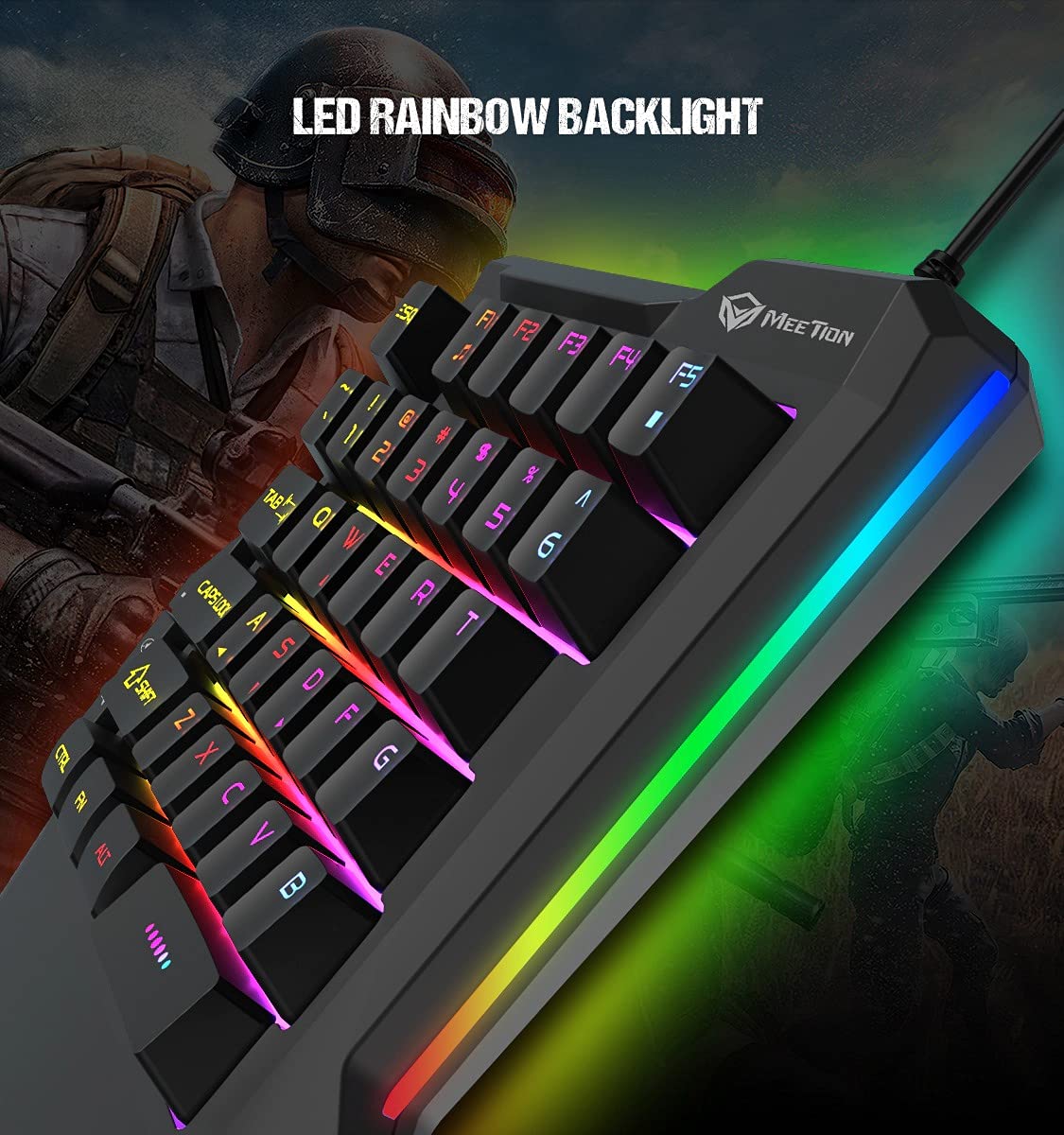
Maelezo ya kina view of the MEETION MT-KB015 keyboard's keys, showcasing the dynamic LED rainbow backlighting effect.

This image provides a close-up of the membrane switch keys on the MEETION MT-KB015 keyboard, illustrating their design and construction.

The MEETION MT-KB015 keyboard is depicted connected to a computer setup, demonstrating its simple plug-and-play connectivity.

Rudia view of a user engaged in gaming, utilizing the MEETION MT-KB015 one-handed keyboard alongside a gaming mouse on a desk.
Sifa Muhimu:
- 50 Million Keystroke Life: Durable membrane switches designed for extended use.
- Vifunguo vya Multimedia: Conveniently placed dedicated keys for volume control.
- Comfortable Palm Rest: Integrated broad palm rest for ergonomic support during long gaming sessions.
- Easy To Use Plug and Play: Simple connectivity with various devices without requiring additional drivers.
3. Kuweka
The MEETION MT-KB015 keyboard is designed for plug-and-play functionality, requiring no complex installation.
Kuunganisha Kibodi:
- Locate an available USB port on your computer, laptop, or compatible smartphone.
- Plug the USB cable of the MT-KB015 keyboard into the USB port.
- The operating system (e.g., Windows 10) will automatically detect and install the necessary drivers.
- The keyboard's RGB backlight will illuminate, indicating it is ready for use.
Vifaa Vinavyolingana: Laptop, PC, Smartphone.
4. Maagizo ya Uendeshaji
Operesheni ya Msingi:
Once connected, the keyboard functions immediately. The keys are laid out for one-handed gaming, providing quick access to essential commands.
Udhibiti wa Mwangaza wa RGB:
The keyboard features an LED rainbow backlight. Specific key combinations or dedicated buttons for backlight mode changes are not detailed in the product information, but the lighting will be active upon connection.
Vifunguo vya Multimedia:
The MT-KB015 includes dedicated multimedia keys for convenient audio control.

A diagram highlighting the location and function of the dedicated Volume Up, Mute, and Volume Down multimedia keys positioned on the left side of the MEETION MT-KB015 keyboard.
- Kiasi Juu: Increases audio output.
- Nyamazisha: Huzima/kuwasha sauti.
- Punguza sauti: Decreases audio output.
Additional multimedia functions (Music Player, Stop) are indicated with FN key combinations (FN + F1 for Music Player, FN + F5 for Stop).
5. Matengenezo
Ili kuhakikisha maisha marefu na utendakazi bora zaidi wa kibodi yako, fuata miongozo hii ya urekebishaji:
- Kusafisha: Use a soft, dry cloth to wipe the surface of the keyboard. For deeper cleaning, a slightly damp kitambaa chenye sabuni laini kinaweza kutumika, kuhakikisha hakuna kioevu kinachoingia kwenye swichi za funguo au vipengele vya ndani.
- Uondoaji wa vumbi: Tumia hewa iliyobanwa ili kuondoa vumbi na uchafu kati ya vifuniko muhimu.
- Epuka Vimiminika: Usimwagie vimiminika kwenye kibodi. Ikiwa itamwagika kwa bahati mbaya, tenganisha kibodi mara moja na uiruhusu ikauke kabisa kabla ya kuunganisha tena.
- Hifadhi: Hifadhi kibodi mahali pa baridi, pakavu mbali na jua moja kwa moja na halijoto kali.
6. Utatuzi wa shida
If you encounter issues with your MEETION MT-KB015 keyboard, refer to the following common solutions:
Kibodi Haijibu:
- Angalia Muunganisho wa USB: Ensure the USB cable is securely plugged into a functional USB port on your device. Try a different USB port.
- Anzisha tena Kifaa: Anzisha upya kompyuta au simu yako mahiri.
- Jaribu kwenye Kifaa Kingine: Connect the keyboard to another computer or compatible device to determine if the issue is with the keyboard or the original device.
Backlight haifanyi kazi:
- Hakikisha kibodi imeunganishwa vizuri na inapokea umeme.
- If available, check for any dedicated backlight control keys or software settings.
Vifunguo Kutosajili au Kuandika Mara Mbili:
- Clean the affected keys to remove any debris that might be obstructing the switch mechanism.
- Hakikisha kibodi iko kwenye uso thabiti na tambarare.
Ikiwa matatizo yataendelea baada ya kujaribu suluhu hizi, tafadhali wasiliana na usaidizi kwa wateja.
7. Vipimo
| Kipengele | Maelezo |
|---|---|
| Chapa | MKUTANO |
| Nambari ya Mfano | MT-KB015 |
| Mfululizo | MEETION MT-KB015 |
| Rangi | Nyeusi |
| Teknolojia ya Uunganisho | Wired |
| Maelezo ya Kibodi | Michezo ya kubahatisha |
| Badilisha Aina | Kubadili Utando |
| Keystroke Life Cycle | Milioni 50 |
| Jukwaa la Vifaa | Laptop, Kompyuta, Simu mahiri |
| Utangamano wa Mfumo wa Uendeshaji | Windows 10 (and compatible with other OS via Plug and Play) |
| Vipimo vya Bidhaa (LxWxH) | 21 x 3.8 x 18.1 cm |
| Uzito wa Kipengee | 420 g |
| Vipengee vilivyojumuishwa | Kebo ya USB |
| Betri Imejumuishwa | Hapana |
8. Udhamini na Msaada
Maelezo ya Udhamini:
The MEETION MT-KB015 One-Handed Wired RGB Gaming Keyboard comes with a Udhamini wa Miaka 1 kuanzia tarehe ya ununuzi. Udhamini huu unashughulikia kasoro za utengenezaji chini ya matumizi ya kawaida. Tafadhali hifadhi uthibitisho wako wa ununuzi kwa madai ya udhamini.
Usaidizi kwa Wateja:
For technical assistance, warranty claims, or any product-related inquiries, please contact MEETION customer support. Contact details for the manufacturer/importer are provided below:
- Mtengenezaji: Meetion, Meetion Tech Co. LTD - China
- Mwagizaji: Cavitak Marketing Pvt Ltd. 9, Vitthalbhai Patel Colony, Lakhudi, Naranpura, Ahmedabad-380014
- Barua pepe: meetion@cavitak.com
- Simu: 0796813-66-11


