1. Utangulizi
Asante kwa ununuziasing the Audizio Rome Internet WiFi Stereo DAB+ Radio. This manual provides essential information for the safe and efficient operation of your device. Please read it thoroughly before use and retain it for future reference.
The Audizio Rome is a versatile audio system offering a wide range of listening options, including Internet Radio, DAB+, FM, and Bluetooth streaming. It features a clear color display, multiple presets, alarm functions, and various connectivity options for an enhanced audio experience.
2. Taarifa za Usalama
- Ugavi wa Nguvu: Tumia adapta ya umeme iliyobainishwa pekee. Hakikisha voltage matches the requirements of your region (230Vac / 50Hz).
- Maji na Unyevu: Do not expose the device to rain, moisture, or dripping/splashing liquids. Do not place objects filled with liquids, such as vases, on the apparatus.
- Uingizaji hewa: Hakikisha uingizaji hewa wa kutosha. Usizuie fursa za uingizaji hewa.
- Vyanzo vya joto: Weka kifaa mbali na vyanzo vya joto kama vile radiator, rejista za joto, majiko, au vifaa vingine (ikiwa ni pamoja na amplifiers) zinazotoa joto.
- Kusafisha: Kata kutoka kwa umeme kabla ya kusafisha. Tumia kitambaa laini na kikavu. Usitumie visafishaji vya kioevu au visafishaji vya erosoli.
- Kuhudumia: Usijaribu kuhudumia bidhaa hii mwenyewe. Rejelea huduma zote kwa wafanyikazi waliohitimu wa huduma.
3. Yaliyomo kwenye Kifurushi
Baada ya kufungua, tafadhali hakikisha kuwa vitu vyote vilivyoorodheshwa hapa chini vipo na viko katika hali nzuri:
- Audizio Rome Internet WiFi Stereo DAB+ Radio
- Udhibiti wa Kijijini
- Adapta ya Nguvu
- Mwongozo wa Mtumiaji (hati hii)
4. Bidhaa Imeishaview
The Audizio Rome radio features a sleek design with intuitive controls and a clear display for easy navigation.

Kielelezo cha 4.1: Audizio Rome Internet Radio, front-angled view. This image shows the overall design of the radio, including the dual speakers, central control knob, and color display.
Udhibiti wa Paneli ya Mbele na Maonyesho

Kielelezo cha 4.2: Close-up of the Audizio Rome radio's display and control knob, showing menu options. The 2.4-inch TFT color screen provides clear information, while the central knob allows for tuning and selection.
- Onyesho la Rangi la TFT la inchi 2.4: Huonyesha taarifa za kituo, menyu, saa, na mipangilio.
- Kitufe cha Nguvu: Huwasha / kuzima kitengo.
- Tune/Chagua Knobo: Rotate to navigate menus or tune stations; press to confirm selection.
- Kitufe cha Menyu: Inafikia menyu kuu.
- Preset/Favorite Button: Saves or recalls favorite stations.
- Local Button: Quickly access local radio stations.
- Navigation Buttons (Left/Right/Up/Down): Kwa urambazaji wa menyu.
Viunganisho vya Paneli ya Nyuma

Kielelezo cha 4.3: Rear panel of the Audizio Rome radio, showing DC input, LAN port, AUX-IN, AUDIO OUT, headphone jack, and power switch. These ports allow for various wired connections.
- DC NDANI: Uunganisho wa adapta ya nguvu.
- LAN (RJ45): Wired Ethernet connection for Internet Radio.
- AUX-IN (3.5mm jack): Unganisha vifaa vya sauti vya nje.
- AUDIO OUT (3.5mm jack): Unganisha kwa nje amplifier au spika.
- Jeki ya Vipokea Sauti vya Kipokea Sauti (jeki ya 3.5mm): Kwa usikilizaji wa faragha.
- Washa / ZIMA Zima: Kubadilisha nguvu kuu.
5. Kuweka
5.1 Kuongeza Nguvu kwa Awali
- Connect the supplied power adapter to the DC IN port on the rear of the radio.
- Chomeka adapta ya nguvu kwenye sehemu inayofaa ya ukuta.
- Flip the ON/OFF switch on the rear panel to the 'ON' position.
- Press the Power button on the front panel or remote control to turn on the radio.
5.2 Network Connection (Wi-Fi or LAN)
For Internet Radio functionality, a stable internet connection is required.
Muunganisho wa Wi-Fi:
- Upon first power-up, the radio will guide you through the network setup. If not, navigate to Menyu > Mipangilio ya Mfumo > Mtandao > Mtandao wa Wi-Fi.
- Redio itachanganua mitandao inayopatikana ya Wi-Fi. Chagua mtandao wako kutoka kwenye orodha.
- Enter your Wi-Fi password using the control knob or remote control. Press 'OK' or 'Select' to confirm.
- Mara tu ikiwa imeunganishwa, aikoni ya Wi-Fi itaonekana kwenye onyesho.
LAN (Wired) Connection:
- Connect an Ethernet cable from your router to the LAN port on the rear of the radio.
- The radio will automatically detect the wired connection. No further setup is typically required.
6. Maagizo ya Uendeshaji
6.1 Uteuzi wa Njia
Press the 'Mode' button on the remote control or navigate through the main menu to select your desired listening mode:
- Redio ya Mtandao: Access thousands of radio stations worldwide.
- DAB+: Digital Audio Broadcasting Plus for high-quality digital radio.
- FM: Traditional analog radio broadcasting.
- Bluetooth: Stream audio wirelessly from your compatible devices.
- AUX-IN: Play audio from external devices connected via the AUX-IN port.
6.2 Redio ya Mtandao

Kielelezo cha 6.1: Audizio Rome radio displaying a list of internet radio stations, with the remote control in the foreground. This illustrates the user interface for station selection.
- Chagua hali ya 'Redio ya Intaneti'.
- Unaweza kuvinjari vituo kwa eneo, aina, au kutumia kipengele cha utafutaji.
- Rotate the Tune/Select knob to scroll through the list and press to select a station.
- To save a favorite station, press and hold the 'Preset' button. Select a preset number (1-99) and confirm.
- To recall a preset, briefly press the 'Preset' button and select the desired number.
6.3 DAB+ / FM Radio
- Select 'DAB+' or 'FM' mode.
- For DAB+, the radio will automatically scan for available stations. For FM, you can manually tune or use the auto-scan function.
- Use the Tune/Select knob to navigate through stations.
- Save and recall presets as described for Internet Radio.
6.4 Utiririshaji wa Bluetooth
- Select 'Bluetooth' mode. The radio will enter pairing mode, indicated on the display.
- On your smartphone, tablet, or other Bluetooth device, enable Bluetooth and search for 'Audizio Rome'.
- Select 'Audizio Rome' to pair. Once connected, you can stream audio from your device to the radio.
6.5 Alarms and Sleep Timer
The radio includes an alarm clock with two alarms and a sleep timer function.
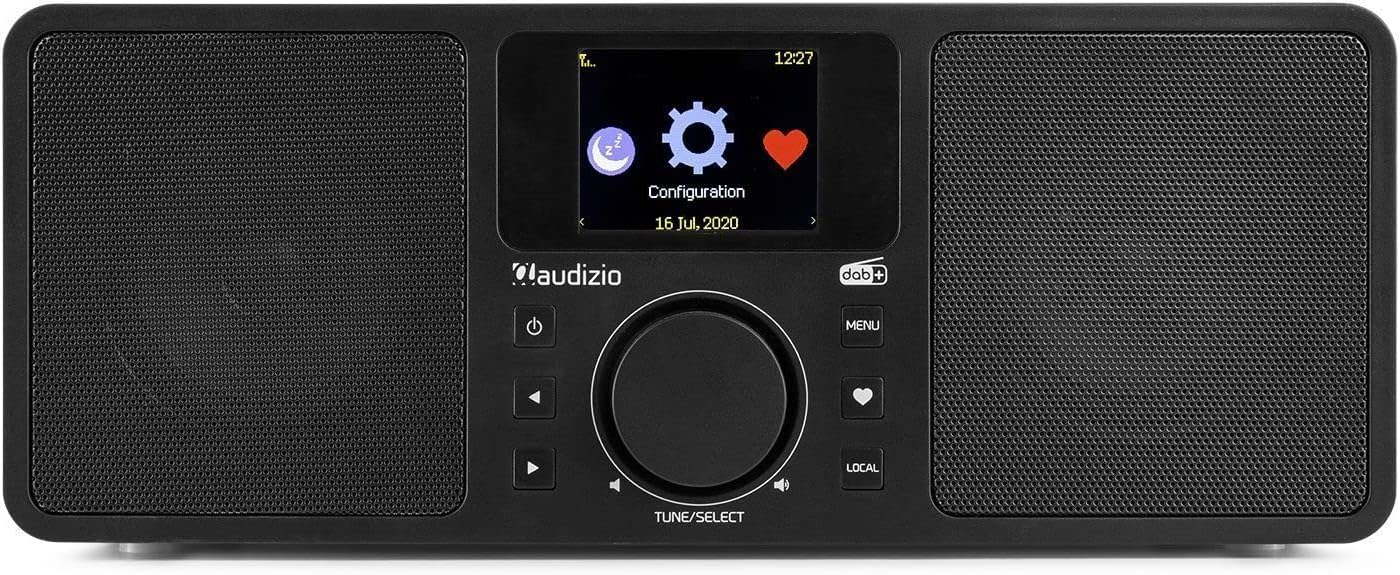
Kielelezo cha 6.2: The Audizio Rome radio's display showing system configuration options, including settings for alarms and timers.
- Kuweka Kengele: Nenda kwa Menu > System Settings > Alarm. Configure Alarm 1 and Alarm 2 with desired time, source (buzzer, Internet Radio, DAB+, FM), and recurrence.
- Muda wa Kulala: Nenda kwa Menu > System Settings > Sleep Timer. Set the duration after which the radio will automatically turn off.
7. Matumizi ya Udhibiti wa Mbali
The included remote control provides convenient access to all functions of the Audizio Rome radio.
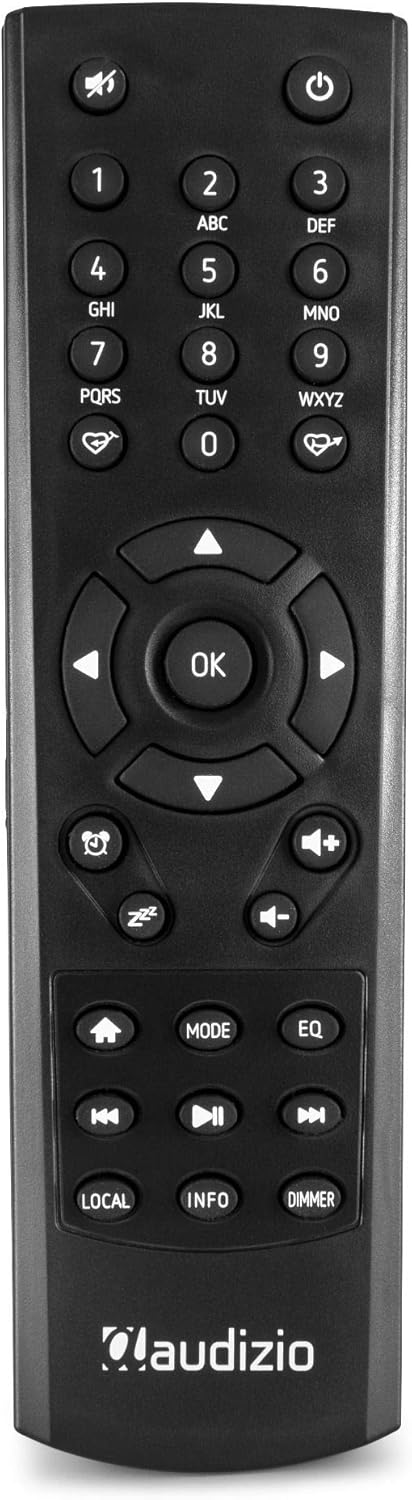
Kielelezo cha 7.1: Kina view of the Audizio Rome radio's remote control, showing various buttons for navigation, volume, mode, and presets. The remote allows for full control of the device from a distance.
- Nguvu: Huwasha/kuzima redio.
- Nyamazisha: Huzima/huondoa sauti.
- Vifungo vya Nambari (0-9): For direct input or selecting presets.
- Navigation (Arrows & OK): Kwa urambazaji wa menyu na uteuzi.
- Kiasi (+/-): Hurekebisha kiwango cha sauti.
- Menyu: Inafikia menyu kuu.
- Hali: Switches between different audio sources (Internet Radio, DAB+, FM, Bluetooth, AUX).
- Preset/Favorite: Saves or recalls favorite stations.
- Ndani: Accesses local radio stations.
- Taarifa: Displays detailed information about the current station or track.
- Punguza: Hurekebisha mwangaza wa onyesho.
- Alarm/Sleep: Hufikia mipangilio ya kengele na kipima muda cha kulala.
8. Matengenezo
- Kusafisha: Always unplug the radio from the power outlet before cleaning. Use a soft, dry, lint-free cloth to wipe the surfaces. Do not use abrasive cleaners, waxes, or solvents.
- Antena: Ensure the telescopic antenna is fully extended for optimal DAB+ and FM reception. Handle with care to avoid damage.
- Hifadhi: Ikiwa kifaa kitahifadhi kwa muda mrefu, kiondoe kwenye chanzo cha umeme na ukihifadhi mahali pakavu na penye baridi.
9. Utatuzi wa shida
| Tatizo | Sababu inayowezekana | Suluhisho |
|---|---|---|
| Hakuna nguvu | Power adapter not connected; Main power switch off; Power outlet faulty. | Check power adapter connection; Ensure rear ON/OFF switch is ON; Try a different power outlet. |
| Hakuna sauti | Volume too low; Mute activated; Incorrect audio source selected. | Increase volume; Press Mute button on remote; Select correct audio source (Internet Radio, DAB+, FM, Bluetooth, AUX). |
| Haiwezi kuunganisha kwenye Wi-Fi | Nenosiri si sahihi; Kipanga njia kimezidi; Tatizo la mtandao. | Re-enter Wi-Fi password carefully; Move radio closer to router; Restart router; Check network settings (Menu > System Settings > Network). |
| Mapokezi duni ya DAB+/FM | Antena haijapanuliwa; Eneo la ishara dhaifu; Kuingilia kati. | Fully extend the telescopic antenna; Reposition the radio; Check for local interference sources. |
| Uoanishaji wa Bluetooth umeshindwa | Device not in pairing mode; Radio not in Bluetooth mode; Device already paired with another unit. | Ensure radio is in Bluetooth mode; Make sure your device's Bluetooth is on and searching; Disconnect from other devices. |
10. Vipimo
| Kipengele | Vipimo |
|---|---|
| Chapa | Audio |
| Nambari ya Mfano | 102.228 |
| Rangi | Nyeusi |
| Teknolojia ya Uunganisho | Bluetooth, Wi-Fi, LAN (RJ45) |
| Teknolojia ya Tuner | DAB+, FM |
| Bendi za Redio Zinazotumika | FM |
| Vipengele Maalum | Integrated Clock, 2.4-inch TFT Color Display, 99 Presets, 2 Alarms, Sleep Timer, DLNA (UPnP) compatible |
| Nguvu ya Pato | 2x 25W (jumla ya 50W) |
| Muunganisho wa Kipokea Simu | Jack 3.5 mm |
| Muunganisho wa Pato la Mstari | Jack 3.5 mm |
| Muunganisho wa Kuingiza Data | Jack 3.5 mm |
| Kiwango cha Wi-Fi | 802.11b/g/n |
| Voltage | 230Vac / 50Hz |
| Vipimo (L x W x H) | 300 x 135 x 120 mm |
| Uzito | 2 kg |
| Vipengee vilivyojumuishwa | Udhibiti wa Kijijini |
| Vifaa Sambamba | Headphones, Earphones, MP3 Player, Smartphone, Laptop, External Speakers (for Auxiliary and Bluetooth connectivity) |
11. Udhamini na Msaada
The Audizio Rome Internet WiFi Stereo DAB+ Radio comes with a dhamana ya mwaka 2 kuanzia tarehe ya ununuzi. Tafadhali hifadhi uthibitisho wako wa ununuzi kwa madai ya udhamini.
For technical support, service, or warranty inquiries, please contact your retailer or the Audizio customer service department. Information regarding spare parts availability and software updates is not available at this time.


