1. Utangulizi
This manual provides comprehensive instructions for the One For All URC4912 Sony TV Replacement Remote Control. Designed to function identically to your original Sony TV remote, the URC4912 offers immediate compatibility with all Sony TV models (LCD, LED, Plasma) without requiring any setup. It also includes a learning feature for personalized customization of functions.
2. Kuweka
2.1 Kufunga Batri
The URC4912 remote control requires two AA batteries (not included). Follow these steps to install them:
- Tafuta kifuniko cha sehemu ya betri nyuma ya kidhibiti cha mbali.
- Telezesha kifuniko kuelekea chini au bonyeza lachi ili kuifungua.
- Ingiza betri mbili za AA, kuhakikisha vituo chanya (+) na hasi (-) vinaendana ipasavyo na alama zilizo ndani ya sehemu.
- Badilisha kifuniko cha sehemu ya betri kwa kutelezesha tena mahali pake hadi ibofye kwa usalama.
Kumbuka: Tumia betri mpya kila wakati na tupa betri za zamani kwa kuwajibika.
2.2 Initial Setup (No Configuration Required)
The One For All URC4912 remote control is pre-programmed for all Sony televisions. No setup or programming is required. Simply insert the batteries, and the remote is ready for immediate use with your Sony TV.
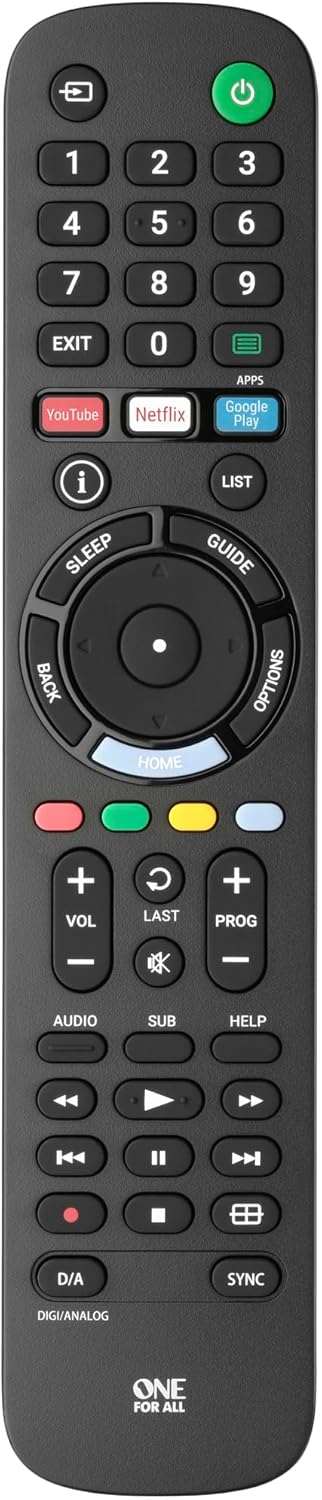
Picha 1: Mbele view of the One For All URC4912 remote control. This image displays the remote's layout, including number buttons, navigation pad, volume and channel controls, and dedicated app buttons for services like YouTube and Netflix.
3. Uendeshaji wa Udhibiti wa Mbali
3.1 Kazi za Msingi
The URC4912 remote provides all standard functions found on an original Sony TV remote:
- Kitufe cha Nguvu: Huwasha au kuzima TV.
- Vifungo vya Nambari (0-9): Kwa uteuzi wa kituo cha moja kwa moja.
- Sauti Juu/Chini (+/-): Hurekebisha sauti ya TV.
- Channel Up/Down (PROG +/-): Inabadilisha vituo vya TV.
- Kitufe cha kunyamazisha: Inanyamazisha sauti ya TV.
- Pedi ya Kusogeza (Juu, Chini, Kushoto, Kulia, Sawa): Kwa urambazaji wa menyu na uteuzi.
- Kitufe cha Nyuma: Hurudi kwenye skrini au menyu iliyotangulia.
- Kitufe cha Nyumbani: Accesses the TV's main home screen or smart TV interface.
3.2 Specific Sony Functions
This remote supports common Sony-specific functions, including:
- Ukumbi wa michezo: Activates or deactivates Theatre mode.
- i-Manual: Accesses the TV's electronic instruction manual.
- Chaguo: Huonyesha chaguo nyeti kwa muktadha kwa skrini ya sasa.
3.3 Learning Feature
The URC4912 remote includes a learning feature, allowing you to copy functions directly from your original remote control. This is useful for any specific functions not pre-programmed or for personalizing button assignments.
- Place the URC4912 remote and your original remote on a flat surface, facing each other, with their IR emitters approximately 1-2 inches apart.
- Kwenye URC4912, bonyeza na ushikilie WENGI button (if available, or refer to the full manual for specific button combination to enter learning mode) until the LED indicator blinks twice and then stays lit.
- Press the button on the URC4912 that you wish to program. The LED will blink rapidly.
- On your original remote, press and hold the corresponding function button until the URC4912's LED blinks twice to confirm successful learning.
- Rudia hatua ya 3 na 4 kwa vitufe vingine vyovyote unavyotaka kutayarisha.
- Ili kuondoka kwenye modi ya kujifunza, bonyeza kitufe WENGI kifungo tena. LED itazima.
Note: If the LED shows a long blink, the learning was unsuccessful. Try again, ensuring both remotes are stable and the original remote's batteries are fresh.

Picha 2: Yenye pembe view of the One For All URC4912 remote control, highlighting its ergonomic design and button placement for easy access to various functions.
4. Matengenezo
Ili kuhakikisha maisha marefu na utendaji bora wa kidhibiti chako cha mbali:
- Kusafisha: Wipe the remote with a soft, dry cloth. Do not use abrasive cleaners or liquids.
- Ubadilishaji wa Betri: Replace batteries when the remote's response becomes sluggish or the LED indicator (if present) signals low power. Always replace both batteries simultaneously.
- Hifadhi: Hifadhi rimoti mahali pakavu, mbali na jua moja kwa moja na halijoto kali.
5. Utatuzi wa shida
| Tatizo | Suluhisho |
|---|---|
| Kidhibiti cha mbali hakijibu. |
|
| Vifungo vingine havifanyi kazi. |
|
| Learning feature fails. |
|
6. Vipimo
| Chapa | Moja Kwa Wote |
| Mfano | UR4912 |
| Vifaa Sambamba | Television (All Sony TV types: LCD, LED, Plasma) |
| Vipengele Maalum | Infrared, Learning Function |
| Idadi ya Vipengee | 1 |
| Aina ya Betri | Betri 2 x AA (hazijajumuishwa) |
| Vipimo vya Bidhaa | 19.5 x 4.4 x 2.5 cm |
| Uzito wa Kipengee | 100 g |
7. Taarifa za Udhamini
For detailed warranty information regarding your One For All URC4912 remote control, please refer to the official One For All webtovuti au kadi ya udhamini iliyojumuishwa katika ununuzi wako. Sheria na masharti ya udhamini yanaweza kutofautiana kulingana na eneo.
8. Msaada
Should you require further assistance, technical support, or have questions not covered in this manual, please visit the official One For All support website or contact their customer service. You can often find FAQs, additional guides, and contact information on their brand page:


