1. Utangulizi
This manual provides detailed instructions for the installation, operation, and maintenance of your xmartO DT3034 2K Wireless Security Camera. Please read this manual thoroughly before using the product to ensure proper functionality and safety. The xmartO DT3034 is an outdoor WiFi security camera featuring 2K Super HD resolution, auto-tracking, pan-tilt-zoom control, enhanced two-way audio, auto floodlights, and IP66 weatherproofing. It can operate standalone via the xmartO WallPixel App or integrate with an xmartO NVR system.
2. Yaliyomo kwenye Kifurushi
Thibitisha kuwa vipengee vyote vipo kwenye kifurushi chako:
- 1 x xmartO DT3034 WiFi Security Camera
- 2 x Antena za WiFi
- Adapta ya Nguvu ya 1 x 12V DC 1A
- 1 x Mwongozo wa Mtumiaji (hati hii)
- 1 x Mounting Kits (screws and wall anchors)
3. Bidhaa Imeishaview
The xmartO DT3034 camera is designed for outdoor surveillance, offering a range of features for comprehensive security monitoring.


4. Kuweka
4.1 Power and Connectivity Requirements
The camera requires a continuous power supply from a nearby electrical outlet. It can connect to your network wirelessly via WiFi or through a wired Ethernet connection.

4.2 Ufungaji wa Kimwili
- Chagua Mahali: Select a mounting location that provides the desired viewing angle and is within range of a power outlet and your WiFi network. Ensure the location offers good signal strength for wireless operation.
- Weka Kamera: Use the provided mounting kit to securely attach the camera to a wall or ceiling.
- Unganisha Nguvu: Plug the 12V DC 1A power adapter into the camera and then into a power outlet.
4.3 Usakinishaji wa Programu na Usanidi wa Awali
- Pakua Programu: Tafuta 'xmartO WallPixel' in your smartphone's app store (available on Google Play and Apple App Store) and install it.
- Fungua Akaunti: Fungua programu na ufuate maagizo kwenye skrini ili kuunda akaunti mpya ya mtumiaji.
- Ongeza Kamera: Follow the in-app guide to add your DT3034 camera. This typically involves scanning a QR code on the camera or manually entering its ID.
- Unganisha kwenye Mtandao: Configure the camera's network settings within the app. You can choose to connect via WiFi or a wired Ethernet cable.
- Sasisho la Firmware: It is important to perform an Over-The-Air (OTA) firmware upgrade to the latest version upon initial setup to enable features like Auto-Track and Home Point.
5. Maagizo ya Uendeshaji
5.1 Ufuatiliaji wa Kiotomatiki
The camera features automatic motion tracking. When movement is detected, the camera will automatically pan and tilt to follow the subject and record the activity. You can enable or disable this feature in the xmartO WallPixel app.

5.2 Night Vision and Auto Flood Lights
The DT3034 camera is equipped with both infrared (IR) LEDs and professional floodlights for night vision capabilities.
- Maono ya Usiku wa IR: Six built-in IR LEDs provide clear black-and-white video in complete darkness.
- Auto Flood Lights & Color Night Vision: Four professional LED floodlights automatically activate upon motion detection at night, illuminating the area and enabling the camera to capture full-color night vision video. The floodlights can be configured to turn on or off based on your preferences.


5.3 Sauti ya Njia Mbili
The camera includes a high-gain microphone and enhanced speakers, allowing for clear two-way communication through the xmartO WallPixel app. You can listen to the camera's surroundings and speak through the camera from your smartphone.

5.4 Deterrence Protection
With auto floodlights and an integrated siren, the camera can deter intruders. These features can be activated automatically upon motion detection or manually controlled via the app. You have the option to enable or disable the siren and floodlights independently.

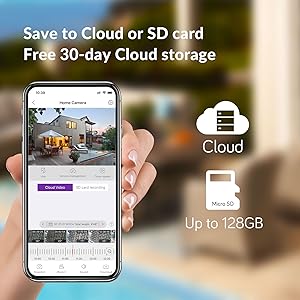
5.5 Chaguzi za Hifadhi
The xmartO DT3034 supports two primary storage methods for recorded video:
- Kadi ya SD ya Micro: The camera supports up to a 128GB TF (Micro SD) card for local storage.
- Hifadhi ya Wingu: Encrypted AWS Cloud storage is available, often with a free trial period (e.g., 30 days).

5.6 Ujumuishaji wa Alexa
The xmartO DT3034 camera is compatible with Amazon Alexa. You can use voice commands to view mlisho wa kamera kwenye vifaa vinavyoweza kutumika na Alexa.

6. Matengenezo
- Kusafisha: Safisha mara kwa mara lenzi ya kamera na nyumba kwa laini, damp kitambaa ili kuondoa vumbi na uchafu. Usitumie kemikali kali.
- Sasisho za Firmware: Regularly check for and install firmware updates via the xmartO WallPixel app. Updates often include performance improvements, new features, and security enhancements.
- Mzunguko wa Nguvu: Ikiwa kamera itakumbwa na matatizo, jaribu kuibadilisha kuwa umeme kwa kuiondoa kwenye plagi na kuiunganisha tena kwenye adapta ya umeme.
7. Utatuzi wa shida
If you encounter problems with your xmartO DT3034 camera, refer to the following common issues and solutions:
| Tatizo | Sababu / Suluhisho linalowezekana |
|---|---|
| Camera is offline or disconnects frequently |
|
| Auto-tracking is not working or inaccurate |
|
| Kengele za uwongo kutoka kwa kugundua mwendo |
|
| Floodlights or siren do not activate |
|
| Camera rotation (Pan/Tilt) issues |
|
8. Vipimo
| Kipengele | Vipimo |
|---|---|
| Nambari ya Mfano | DT3034 |
| Azimio la Kukamata Video | MP 3 (2K Super HD) |
| Teknolojia ya Uunganisho | Isiyo na waya (Wi-Fi) |
| Chanzo cha Nguvu | Umeme wa Cord (12V DC) |
| Matumizi ya Ndani/Nje | Nje |
| Ukadiriaji wa Ulinzi wa Kimataifa | IP66 Weatherproof |
| Mbele ya Maono ya Usiku | Mita 30 |
| Chaguzi za Hifadhi | Kadi Ndogo ya SD (hadi GB 128), Hifadhi ya Wingu |
| Sifa za Sauti | Enhanced 2-Way Audio |
| Vipengele Maalum | Auto-Track, Auto Flood Lights, Color Night Vision, Auto Siren, Motion Sensor, Alexa Integration |
| Vipimo (L x W x H) | Inchi 8.35 x 8.23 x 5.51 |
| Uzito wa Kipengee | pound 1 |
9. Udhamini na Msaada
xmartO is committed to providing reliable products and customer support.
- Dhamana ya Kurejeshewa Pesa ya Siku 30 na Kurejesha Bila Malipo: Ikiwa haujaridhika na ununuzi wako, unaweza kuirejesha ndani ya siku 30 ili urejeshewe pesa kamili.
- Udhamini Mdogo wa Mwaka 1: The xmartO DT3034 camera is covered by a 1-year limited warranty against manufacturing defects.
- 24/7 Msaada mkondoni: Access 1-on-1 online support for any technical assistance or inquiries.