1. Utangulizi
This manual provides essential information for the safe and efficient operation of your Cecotec Ready Warm 800 Thermal Connected 600W Digital Heater. Please read these instructions carefully before using the appliance and retain them for future reference. This heater is designed to provide supplementary heating for indoor spaces and features Wi-Fi connectivity for remote control.
2. Maagizo ya Usalama
ONYO: Kushindwa kufuata maagizo haya ya usalama kunaweza kusababisha moto, mshtuko wa umeme, au jeraha.
- Hakikisha ujazotage iliyoonyeshwa kwenye lebo ya ukadiriaji inalingana na juzuu yako kuutage kabla ya kuunganisha kifaa.
- Do not cover the heater. Overheating can occur if the heater is covered or obstructed.
- Keep flammable materials such as furniture, curtains, and bedding at least 1 meter (3 feet) away from the heater.
- Do not operate the heater with a damaged cord or plug, or after the appliance malfunctions or has been dropped or damaged in any manner.
- Kifaa hiki hakikusudiwa kutumiwa na watu (pamoja na watoto) walio na uwezo mdogo wa kimwili, hisi au kiakili, au wasio na uzoefu na ujuzi, isipokuwa wamepewa usimamizi au maagizo kuhusu matumizi ya kifaa na mtu anayehusika na usalama wao.
- Watoto wanapaswa kusimamiwa ili kuhakikisha kwamba hawachezi na kifaa.
- Usitumie hita katika mazingira ya karibu ya kuoga, kuoga au bwawa la kuogelea.
- Daima ondoa hita wakati haitumiki au kabla ya kusafisha.
- Do not insert any objects into the ventilation or exhaust openings as this may cause electric shock, fire, or damage to the heater.
3. Bidhaa Imeishaview
Familiarize yourself with the components of your Cecotec Ready Warm 800 Digital Heater.

This image shows the Cecotec Ready Warm 800 Digital Heater from a side angle, highlighting its slim profile and the integrated control panel on the right side. The heater is white with black vents at the top and stands on two white feet.

The heater is shown in a home environment, positioned on a wooden floor next to a person seated on a black armchair, illustrating its compact size and how it fits into a living space.
Jopo la Kudhibiti na Onyesho
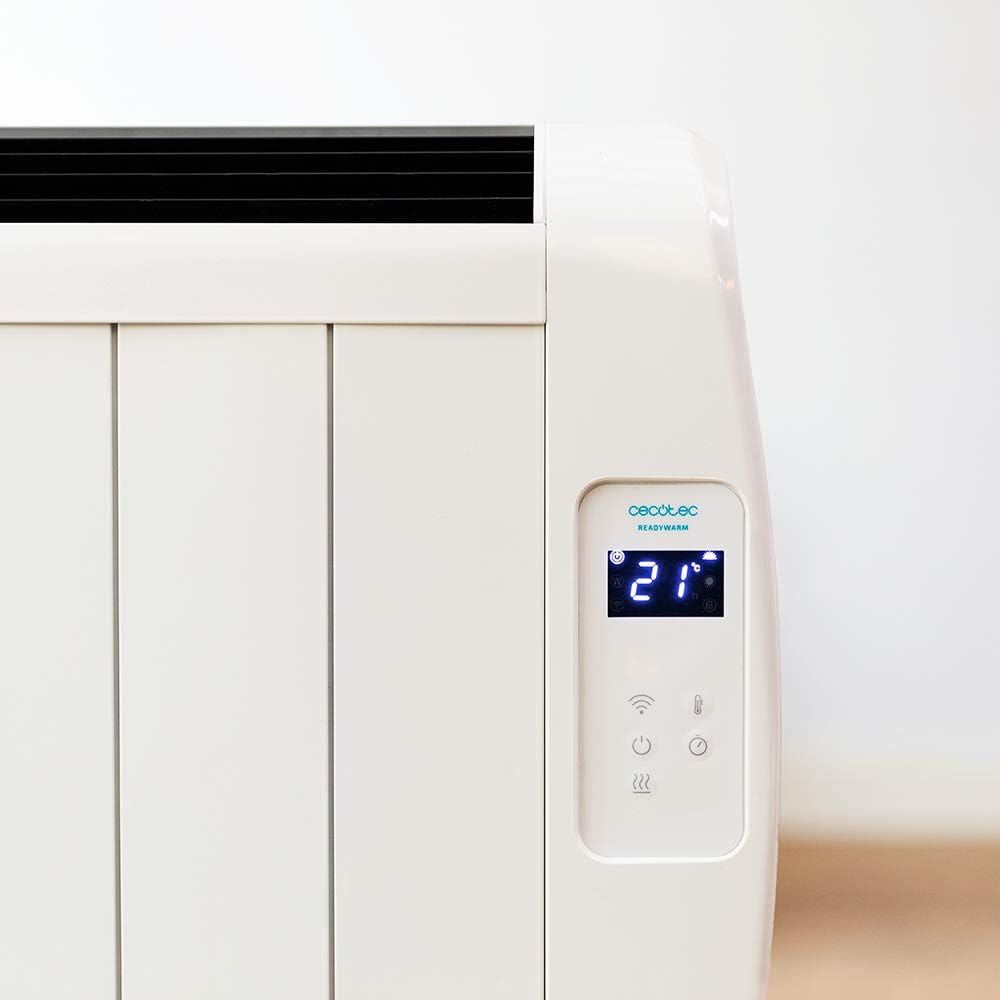
Maelezo ya kina view of the heater's digital control panel, featuring a clear LCD screen showing '21' degrees Celsius, indicating the current temperature setting. Below the screen are touch-sensitive buttons for power, Wi-Fi, mode selection, and temperature adjustment.

This image focuses on the digital control panel, showing the LCD screen set to a timer function, displaying '04' hours. This indicates the heater is programmed to operate for a specific duration.
The digital display shows the current temperature, timer settings, and Wi-Fi status. The touch-sensitive buttons allow for easy control of the heater's functions.
Kubadilisha Nguvu

A close-up shot of the heater's base, revealing the physical on/off power switch. This switch provides a direct way to cut power to the unit.
A physical power switch is located at the base of the unit for complete power disconnection.
4. Kuweka
- Kufungua: Ondoa hita kwa uangalifu kutoka kwenye kifungashio chake. Weka kifungashio kwa ajili ya kuhifadhi au kusafirisha.
- Uwekaji: Place the heater on a firm, level surface. Ensure there is at least 1 meter (3 feet) of clear space around the heater from walls, furniture, and other objects. Do not place it directly under a power outlet.
- Muunganisho wa Nishati: Plug the power cord into a suitable 230V AC power outlet. Ensure the main power switch at the base of the unit is in the 'OFF' position before plugging in.
- Kuwasha kwa Awali: Flip the main power switch at the base of the unit to the 'ON' position. The digital display on the control panel should illuminate.
Dimensions for Placement

This image provides a clear diagram of the heater's physical dimensions: 63 cm in width, 10.5 cm in depth, and 53.5 cm in height, useful for planning placement.
5. Maagizo ya Uendeshaji
Operesheni ya Msingi
- Washa/Zima: Bonyeza kitufe cha nguvu (U) on the control panel to turn the heater on or off.
- Marekebisho ya Halijoto: Use the temperature up (+) na chini (-) buttons to set your desired room temperature. The display will show the set temperature.
- Uteuzi wa Hali: Press the mode button to cycle through available heating modes (e.g., Low, Medium, High, or Eco, depending on the model's specific programming).
- Kazi ya Kipima Muda: Press the timer button to set an operating duration. Use the temperature adjustment buttons to set the desired hours (e.g., 0-24 hours). The heater will automatically turn off after the set time.
Muunganisho wa Wi-Fi na Udhibiti wa Programu
The Cecotec Ready Warm 800 features Wi-Fi connectivity, allowing you to control the heater remotely via a smartphone application.

A hand holding a smartphone with the Cecotec Ready Warm mobile application open. The app interface shows a large dial indicating '33°C' and various control options, demonstrating remote control capabilities.
- Pakua Programu: Tafuta the 'Cecotec Ready Warm' app in your smartphone's app store (iOS or Android).
- Sajili/Ingia: Unda akaunti au ingia ikiwa tayari unayo.
- Ongeza Kifaa: Follow the in-app instructions to add your Ready Warm 800 heater. This typically involves putting the heater into pairing mode (often by pressing and holding the Wi-Fi button on the control panel) and connecting it to your home Wi-Fi network.
- Udhibiti wa Mbali: Once connected, you can control the heater's power, temperature, modes, and timer functions from your smartphone.
6. Matengenezo
Utunzaji wa kawaida huhakikisha utendakazi bora na maisha marefu ya hita yako.
- Kusafisha: Daima chomoa hita na uiruhusu ipoe kabisa kabla ya kusafisha. Tumia laini, damp kitambaa kuifuta nyuso za nje. Usitumie visafishaji vya abrasive au vimumunyisho.
- Uondoaji wa vumbi: Periodically use a vacuum cleaner with a brush attachment to remove dust from the air intake and exhaust vents.
- Hifadhi: Ikiwa utahifadhi hita kwa muda mrefu, ifungue, isafishe vizuri, na uihifadhi mahali pakavu na penye baridi, ikiwezekana katika kifungashio chake cha asili.
- Hakuna Sehemu Zinazoweza Kutumika kwa Mtumiaji: Do not attempt to open or repair the heater yourself. Refer all servicing to qualified personnel.
7. Utatuzi wa shida
Ukikumbana na matatizo na hita yako, rejelea jedwali lifuatalo kwa matatizo na suluhisho za kawaida.
| Tatizo | Sababu inayowezekana | Suluhisho |
|---|---|---|
| Hita haina kuwasha. | No power supply. Main power switch off. | Check if the power cord is securely plugged in. Ensure the main power switch at the base is ON. Check the wall outlet. |
| Hakuna pato la joto. | Temperature setting too low. Overheat protection activated. | Increase the desired temperature setting. Unplug the heater, let it cool for 30 minutes, then plug it back in. Ensure vents are not blocked. |
| Muunganisho wa Wi-Fi umeshindwa. | Incorrect Wi-Fi password. Heater too far from router. App issues. | Verify Wi-Fi password. Move heater closer to the router. Restart the app and heater. Ensure your router is 2.4GHz compatible. |
| Hita huzima bila kutarajia. | Timer function activated. Overheat protection. | Check if the timer is set. If not, unplug the heater, let it cool, and check for obstructions. |
8. Vipimo
| Kipengele | Maelezo |
|---|---|
| Chapa | Cecotec |
| Nambari ya Mfano | 05372 |
| Nguvu / Wattage | 600W |
| Voltage | 230 Volts |
| Vipimo vya Bidhaa | 63 x 10.5 x 53.5 cm |
| Uzito | 3.4 kg |
| Vipengele Maalum | Portable, Wireless (Wi-Fi Control), LCD Screen |
| Njia ya Kupokanzwa | Radiant |
| Matumizi ya Ndani/Nje | Ndani |
| Aina ya Kuweka | Wall Mount (optional, accessories not included) / Freestanding |
9. Udhamini na Msaada
Your Cecotec Ready Warm 800 Digital Heater is covered by a manufacturer's warranty. Please refer to the warranty card included with your purchase for specific terms and conditions, including the warranty period and coverage details.
For technical support, troubleshooting assistance beyond this manual, or warranty claims, please contact Cecotec customer service. Contact information can typically be found on the Cecotec official webtovuti au kwenye ufungaji wa bidhaa yako.
Unapowasiliana na usaidizi, tafadhali pata nambari yako ya mfano ya bidhaa (05372) na uthibitisho wa ununuzi upatikane kwa urahisi.


