Utangulizi
The Amazon Echo Show 5 (2nd Gen, 2021 release) is a smart display designed to simplify your daily routines and enhance your connected home experience. This certified refurbished device has been tested and certified to function like new, offering all the features of a new unit.
With Alexa built-in, you can manage your day, stay entertained, and connect with others using just your voice. The compact 5.5-inch screen provides visual feedback for alarms, timers, news, video calls, and more.

Image: The Echo Show 5 on a nightstand, illustrating its use as a smart display for time and daily information.
Sanidi
Setting up your Echo Show 5 is a straightforward process. The device is designed for simple setup, allowing you to connect to your Wi-Fi network with ease.
Ni nini kwenye Sanduku:
- Kifaa cha Echo Show 5
- Glacier White power adapter (15W) with cable (4.9 ft.)
- Mwongozo wa kuanza haraka
Hatua za Kuweka Awali:
- Chomeka: Connect the power adapter to your Echo Show 5 and plug it into a wall outlet.
- Fuata Maagizo ya Skrini: The device will power on and guide you through the initial setup process on its touch screen.
- Unganisha kwa Wi-Fi: Select your Wi-Fi network from the list and enter the password. The Echo Show 5 supports dual-band 802.11a/b/g/n/ac Wi-Fi networks.
- Ingia kwenye Akaunti ya Amazon: Log in with your Amazon account credentials.
- Binafsisha Mipangilio: Customize settings such as time zone, device name, and privacy preferences.
- Pakua Programu ya Alexa: For full functionality and advanced controls, download the Alexa app on your Fire OS, Android, or iOS device. The app is also accessible via a web kivinjari.
Amazon's Wi-Fi simple setup technology helps streamline the connection process, making it easier to get your device up and running quickly.
Kuendesha Onyesho Lako la Echo 5
The Echo Show 5 offers a wide range of functionalities, primarily controlled by voice commands to Alexa and through its interactive touch screen.
Daily Assistance:
- Kengele na Vipima Muda: Set alarms and timers with voice commands.
- Calendar & News: Check your calendar, get news updates, and view utabiri wa hali ya hewa.
- Ratiba: Create routines to automate actions, such as gradually turning on compatible lights in the morning.
Udhibiti Mahiri wa Nyumbani:
Manage compatible smart home devices using the interactive display, your voice, or motion detection.
- Kamera Iliyojengewa ndani: Use the 2 MP camera to look in on your home when you're away.
- Udhibiti wa Kifaa: Control lights, cameras, and other smart devices.

Image: A man carrying a laundry basket, with an Echo Show 5 in the foreground, demonstrating how the device can be used to control smart home devices, possibly through motion detection.
Mawasiliano:
- Simu ya Video: Make video calls to friends and family who have the Alexa app or an Echo device with a screen using the 2 MP camera.
- Matangazo: Send announcements to other compatible devices in your home.

Image: The Echo Show 5 displaying an active video call, highlighting its communication capabilities.
Burudani:
- Utiririshaji: Play TV shows and movies from services like Prime Video and Netflix on the 5.5-inch screen.
- Muziki na Sauti: Stream music from Amazon Music, Apple Music, Spotify, and others.
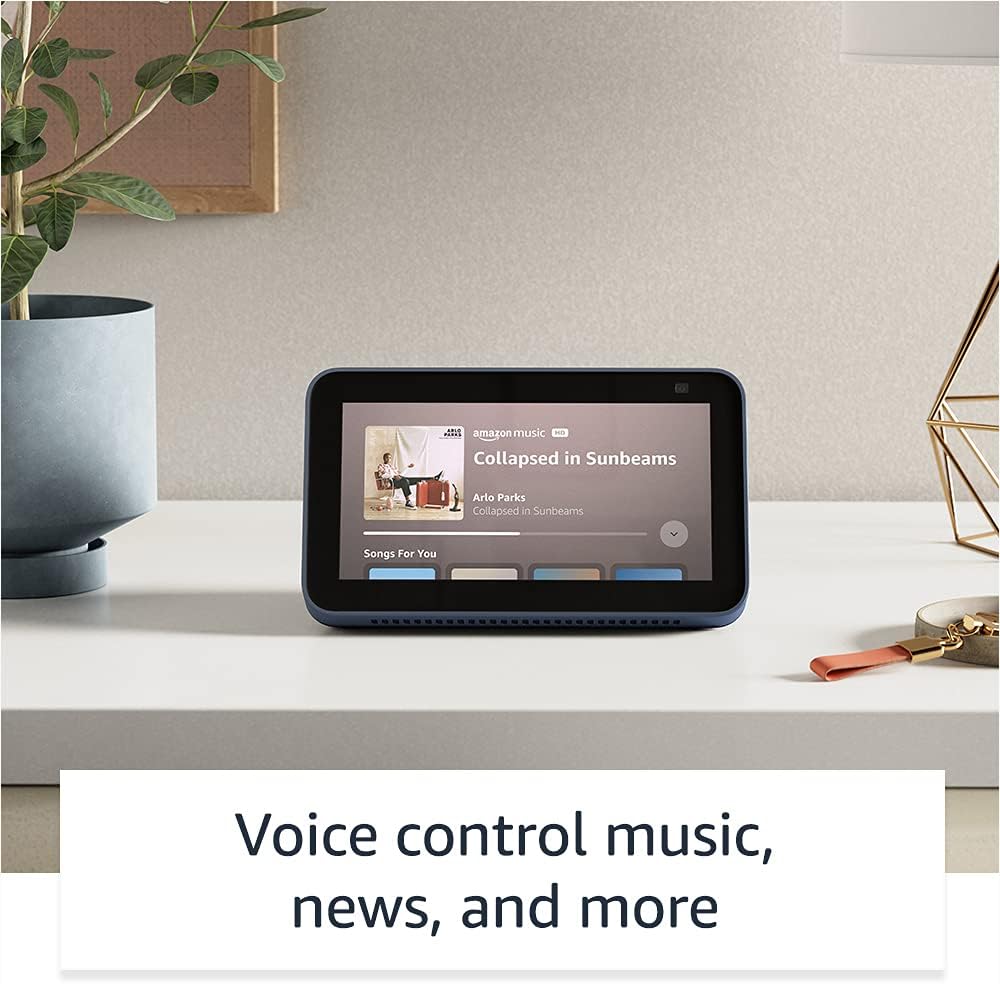
Image: The Echo Show 5 displaying a music playback screen, demonstrating its entertainment features.
Ubinafsishaji:
- Fremu ya Picha Dijitali: Use Amazon Photos to turn your home screen into a digital photo frame.

Image: The Echo Show 5 displaying a personal photo, illustrating its use as a digital photo frame.
Sifa za Faragha:
The Echo Show 5 is designed with multiple layers of privacy controls:
- Kitufe cha Kuzima Maikrofoni/Kamera: A physical button to electronically disconnect the microphones and camera.
- Kifunga Kamera Kilichojengewa Ndani: A physical shutter to cover the camera lens.
- Voice Recording Controls: Uwezo wa view na ufute rekodi zako za sauti.
- Teknolojia ya Kuamka kwa Neno: The device only begins listening after detecting your chosen wake word.
- Viashiria vya Kutiririsha: Visual indicators show when audio or video is being streamed to the cloud.

Picha: Karibu view of the Echo Show 5's top, highlighting the physical camera shutter button for privacy control.
Vipengele vya Ufikivu:
Echo Show 5 inajumuisha vipengele mbalimbali vya ufikiaji ili kubinafsisha Alexa kulingana na uwezo wako. Hizi zinaweza kufikiwa kupitia Mipangilio → Ufikiaji kwenye kifaa chako.
- Gusa kwenye Alexa: Interact with Alexa via touch through on-screen tiles or a keyboard.
- Usikilizaji Unaobadilika: Hutoa muda zaidi wa kumaliza kuzungumza kabla ya Alexa kujibu.
- Kiwango cha Kuzungumza Kinachopendelewa: Dhibiti jinsi Alexa anavyozungumza kwa kasi au polepole.
- Manukuu: Alexa Captioning, Call Captioning, and Closed Captioning provide text for supported content.
- Onyesha na Usimulie: Helps identify products for users who are blind or visually impaired.
- SautiView Kisoma skrini: Enables access for blind or visually impaired users.
- Kikuza Skrini: Zoom in/out and pan around the screen.
- Arifu Ukiwa Karibu: Hucheza sauti za arifa zinapogunduliwa karibu na kifaa.
- Kindle Soma Kwa Sauti: Alexa anaweza kusoma vitabu vyako vya Kindle kwa sauti.
- Maandishi ya Wakati Halisi: Type live text during a video call.
- Additional settings for Color Inversion, Color Correction, Request Sound, and more.
Matengenezo
The Certified Refurbished Echo Show 5 has undergone rigorous testing and certification to ensure it looks and works like new. Regular maintenance is minimal.
- Kusafisha: Gently wipe the screen and device exterior with a soft, lint-free cloth. Avoid abrasive cleaners or sprays.
- Masasisho ya Programu: Ensure your device is connected to Wi-Fi to receive automatic software security updates, which are guaranteed for at least four years after the device is last available for purchase as a new unit.
Kutatua matatizo
If you encounter issues with your Echo Show 5, consider the following general troubleshooting steps:
- Mzunguko wa Nguvu: Unplug the device from the power outlet, wait for 30 seconds, and then plug it back in.
- Angalia Muunganisho wa Wi-Fi: Ensure your Wi-Fi network is active and the device is connected. You can check network status in the device settings.
- Verify Internet Connectivity: Confirm your internet service is working by testing other devices on the same network.
- Check Microphone/Camera: Ensure the mic/camera off button is not activated and the camera shutter is open if you are trying to use these features.
- Programu ya Alexa: Use the Alexa app on your smartphone or tablet to manage device settings, check for updates, and access further support resources.
- Amri za Sauti: Speak clearly and ensure you are within range of the device's microphones.
For more detailed troubleshooting or specific issues, refer to the help section within the Alexa app or visit the official Amazon support webtovuti.
Vipimo
| Kipengele | Maelezo |
|---|---|
| Ukubwa | 5.8" x 3.4" x 2.9" (148mm x 86mm x 73mm) |
| Uzito | Wakia 14.5 (gramu 410) |
| Onyesho | 5.5" skrini ya kugusa |
| Kamera | 2 MP camera with built-in shutter |
| Uunganisho wa WiFi | Dual-band wifi (802.11a/b/g/n/ac). Does not support ad-hoc networks. |
| Muunganisho wa Bluetooth | A2DP support for audio streaming; AVRCP for voice control of connected mobile devices. PIN-code speakers not supported. |
| Sauti | Spika kamili ya inchi 1.65 iliyojengewa ndani |
| Kichakataji | MediaTek MT 8163 |
| Kizazi | Echo Show 5 (2nd Gen) - 2021 release |
| Lugha | Alexa speaks English and Spanish |
Udhamini na Msaada
Your Certified Refurbished Echo Show 5 comes with the same limited warranty as a new device. For specific details regarding your warranty, please refer to the documentation included with your device or visit the official Amazon website for Certified Refurbished Amazon devices.
For customer support, troubleshooting, and to manage your device settings, utilize the Alexa app on your compatible smartphone or tablet. You can also find extensive support resources and FAQs on the Amazon support webtovuti.
Software Security Updates: This device receives guaranteed software security updates until at least four years after the device is last available for purchase as a new unit on Amazon's webtovuti.
Nyaraka Zinazohusiana - Echo Show 5 (Toleo la 2, 2021)
 |
Mwongozo wa Kuanza Haraka wa Amazon Echo 8 (Kizazi cha 2) Mwongozo wa kuanza na Amazon Echo Show 8 (kizazi cha pili), unaohusu usanidi, vipengele, na faragha. |
 |
Mwongozo wa Mtumiaji wa Amazon Echo Show 8 (kizazi cha 2) Mwongozo kamili wa mtumiaji wa Amazon Echo Show 8 (kizazi cha 2), unaoelezea usanidi, vipengele vya faragha, amri za sauti, na vidokezo vya kutumia Alexa. |
 |
Miongozo ya Matumizi ya Amazon Echo & Alexa Brand kwa Washirika wa Nje Mwongozo rasmi kwa washirika wa nje kuhusu matumizi sahihi ya bidhaa za Amazon Echo na Alexa, ikijumuisha nembo, uchapaji, rangi na uwakilishi katika nyenzo za uuzaji. Hakikisha uthabiti wa chapa na uadilifu. |
 |
Mwongozo wa Kuanza Haraka wa Amazon Echo Show 8 (Kizazi cha 2): Usanidi na Vipengele Jifunze jinsi ya kuanzisha na kutumia Amazon Echo Show 8 yako (Kizazi cha 2). Mwongozo huu unashughulikia vipengele vya kifaa, vidhibiti vya faragha, na amri muhimu za Alexa kwa kazi za kila siku. |
 |
Mwongozo wa Kuanza Haraka wa Amazon Echo 5 (Kizazi cha 2) Mwongozo wa kuanza haraka kwa Amazon Echo Show 5 (Kizazi cha 2), unaohusu usanidi, vipengele vya faragha, na matumizi ya msingi na Alexa. |
 |
Mwongozo wa Kuanza Haraka wa Amazon Echo 5 (Kizazi cha 2) Anza na Amazon Echo Show 5 yako (Kizazi cha 2). Mwongozo huu unashughulikia usanidi, vipengele vya kifaa, vidhibiti vya faragha, na jinsi ya kutumia Alexa kwa burudani, nyumba mahiri, na mawasiliano. |