1. Utangulizi
The PeakTech P 8005 is a high-precision Class 2 sound level meter designed for accurate noise measurement and data logging. It is suitable for a wide range of applications including noise projects, quality control, disease prevention, and environmental sound measurements in factories, schools, offices, traffic, and households. This device features a 4-digit 20mm LCD multi-function display with a bargraph and backlight, a USB interface for continuous measurements, and AC/DC outputs for connection to frequency analyzers or X-Y wave recorders. This manual provides detailed instructions for the proper use, maintenance, and troubleshooting of your PeakTech P 8005.
2. Taarifa za Usalama
Please read all safety instructions carefully before operating the device. Failure to follow these instructions may result in damage to the device or personal injury.
- Usiweke kifaa kwenye joto kali, unyevunyevu au jua moja kwa moja.
- Epuka mitetemo mikali au athari.
- Usijaribu kufungua au kurekebisha kifaa. Matengenezo yanapaswa kufanywa na wafanyakazi waliohitimu pekee.
- Weka kifaa mbali na sehemu zenye nguvu za sumakuumeme.
- Ensure proper ventilation when using the AC adapter for extended periods.
- Tupa betri kulingana na kanuni za mitaa.
3. Yaliyomo kwenye Kifurushi
Thibitisha kuwa bidhaa zote zilizoorodheshwa hapa chini zimejumuishwa kwenye kifurushi chako:
- PeakTech P 8005 Sound Level Meter
- Kesi ya kubeba
- 3m Additional Microphone Cable
- Cable ya Kiingiliano cha USB
- Software for Windows (on CD-ROM)
- Mini Tripod
- Adapta ya Umeme ya AC ya 9V
- Betri ya 9V
- Mwongozo wa Mtumiaji

4. Bidhaa Imeishaview
The PeakTech P 8005 is designed for user-friendly operation while providing professional-grade accuracy. Familiarize yourself with the main components and controls.
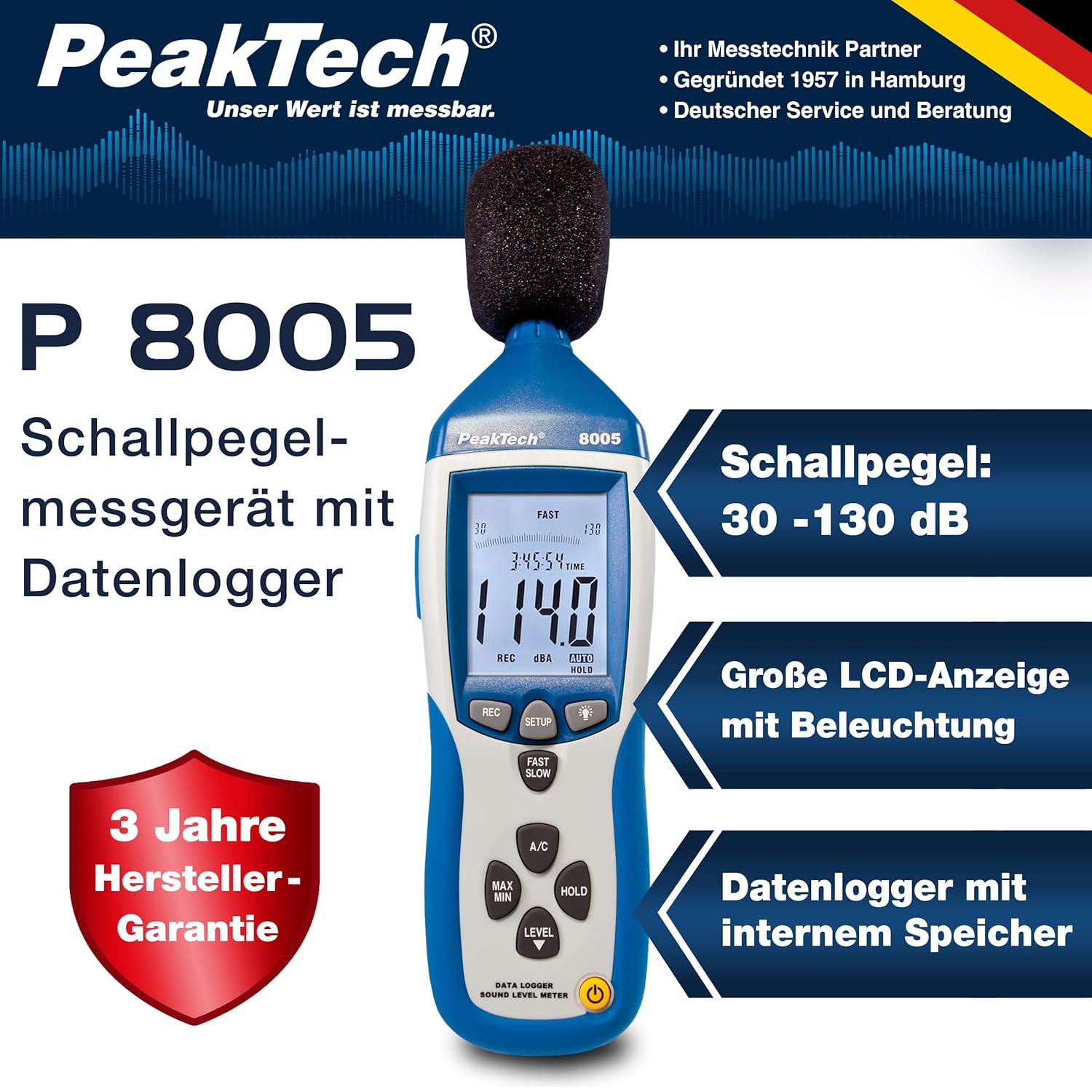
4.1. Sifa Kuu
- Kipimo cha Usahihi: Class 2 sound level meter (IEC-61672-1 compliant) for accurate readings even in noisy environments.
- Kiwango Kina cha Vipimo: 30 to 130 dB across 4 ranges with 0.1 dB resolution.
- Uwekaji Data: Internal memory for up to 32,000 readings (1x/sec to 1x/min).
- Muunganisho: USB 2.0 interface for PC connection and data transfer.
- Matokeo ya Analogi: AC/DC outputs for connecting to frequency analyzers or X-Y wave recorders.
- Onyesha: 4-digit 20mm LCD with bargraph and backlight.
- Njia za kipimo: Fast (125 ms) and Slow (1 s) response times, A and C weighting.
- Kazi za Ziada: MIN/MAX measurements, over-range/under-range indication.

5. Kuweka
5.1. Ufungaji wa Betri
The PeakTech P 8005 operates on a 9V battery or via the included 9V AC power adapter.
- Tafuta sehemu ya betri nyuma ya kifaa.
- Fungua kifuniko cha betri.
- Ingiza betri ya 9V, kuhakikisha polarity sahihi.
- Funga kifuniko cha betri kwa usalama.
5.2. Kuwasha Kifaa
- Ili kuwasha, bonyeza kitufe NGUVU kitufe.
- Ili kuzima, bonyeza na ushikilie NGUVU kitufe hadi onyesho lizime.
- For continuous operation, connect the 9V AC power adapter to the DC 9V input port on the side of the device.
5.3. Muunganisho wa Maikrofoni
The device comes with a built-in microphone. For remote measurements or specific setups, you can use the included 3m additional microphone cable.
- Unscrew the microphone cap from the top of the device.
- Connect the 3m microphone cable to the microphone input.
- Attach the external microphone to the other end of the cable.
- For stable measurements, attach the device to the mini tripod using the threaded mount at the bottom.

Video 5.1: Mwishoview of the PeakTech 8005 Sound Level Meter, demonstrating its features and setup, including the use of the external microphone and power adapter.
6. Maagizo ya Uendeshaji
6.1. Kipimo cha Msingi
After powering on, the device will immediately begin measuring sound levels.
- The current sound level in dB is displayed on the LCD.
- Tumia NGAZI button to cycle through the four measurement ranges (30-80 dB, 50-100 dB, 80-130 dB, Auto 30-130 dB).
- Bonyeza HARAKA/POLEREFU to switch between fast (125 ms) and slow (1 s) response times. Fast is suitable for sudden noise changes, while slow is for average noise levels.
- Bonyeza A/C to select A-weighting (dBA) or C-weighting (dBC). A-weighting mimics human ear response, C-weighting is for mechanical noise.

6.2. Data Logging and PC Connection
The P 8005 can record up to 32,000 measurement values internally. To access and analyze this data, use the included Windows software.
- Install the software from the provided CD-ROM onto a Windows PC (Windows 95/98/NT/2000/XP/VISTA/7/8/10 supported).
- Connect the sound level meter to your PC using the USB interface cable.
- Open the software. The software allows for real-time data display, data import from the device's internal memory, and export to formats like Excel for further analysis.
- Refer to the software's help documentation for detailed instructions on data logging setup and analysis.

7. Matengenezo
7.1. Kusafisha
Safisha kifaa mara kwa mara ili kuhakikisha utendaji bora.
- Futa nje kwa kitambaa laini na kavu.
- Usitumie visafishaji vya abrasive au vimumunyisho.
- Keep the microphone free from dust and debris.
7.2. Hifadhi
When not in use, store the device in its carrying case in a cool, dry place, away from direct sunlight and extreme temperatures.
7.3. Urekebishaji
The PeakTech P 8005 is a precision instrument. Regular calibration is recommended to maintain accuracy, especially for professional applications. Refer to the included test report for the last calibration date. Contact PeakTech support for calibration services.
8. Utatuzi wa shida
| Tatizo | Sababu inayowezekana | Suluhisho |
|---|---|---|
| Kifaa hakiwashi. | Low or dead battery; AC adapter not connected or faulty. | Replace the 9V battery or connect the AC adapter. Ensure the adapter is working. |
| Usomaji usio sahihi. | Incorrect measurement range; microphone obstructed; device needs calibration. | Adjust the measurement range using the NGAZI button. Clear any obstructions from the microphone. Consider professional calibration. |
| Software not recognizing device. | USB cable faulty; driver issue; software compatibility. | Try a different USB port or cable. Reinstall the software and drivers. Check software compatibility settings (e.g., Windows 98 compatibility mode for older systems). |
| Data logging issues. | Memory full; incorrect logging settings. | Download and clear data from the device. Review data logging settings in the software. |
9. Vipimo
| Kigezo | Thamani |
|---|---|
| Kiwango Kinachotumika | IEC-61672-1 Type 2, ANSI S1.4 Type 2 |
| Accuracy (1 kHz Sine; A, C) | ± 1.4 dB |
| Usahihi (Msururu wa Marudio) | According to EN-61672-1 Class 2, max. ± 5.6 dB |
| Masafa ya Marudio | 31.5 Hz - 8 kHz |
| Safu Inayobadilika | 50 dB |
| Viwango vya Ngazi | Low: 30 dB ~ 80 dB, Med: 50 dB ~ 100 dB, High: 80 dB ~ 130 dB, Auto: 30 dB ~ 130 dB |
| Muda wa Majibu | Fast: 125 ms / Slow: 1 s |
| Maikrofoni | ½-inch Electret Condenser Microphone |
| Azimio | 0.1 dB |
| Onyesha Sasisho | Mara 2 / sec. |
| Pato la Analogi | AC/DC Outputs, AC: 1 Veff = 10 mV/dB |
| Uendeshaji Voltage | 9V Battery or 9V AC Power Adapter |
| Vipimo (WxHxD) | 80 x 280 x 50 mm |
| Uzito | 350 g |
| Data Logger Memory | Hadi usomaji 32,000 |
10. Udhamini na Msaada
PeakTech products are designed for reliability and performance. For warranty information and technical support, please refer to the documentation included with your product or visit the official PeakTech webtovuti. Weka risiti yako ya ununuzi kama dhibitisho la ununuzi kwa madai ya udhamini.
Mtengenezaji: PeakTech
Webtovuti: PeakTech Official Store


