Utangulizi
Thank you for choosing the ChunHee Wireless Dog Doorbell. This device is designed to assist with pet potty training and can also serve as a versatile doorbell for homes or a paging device for caregivers. This manual provides detailed instructions for setup, operation, maintenance, and troubleshooting to ensure optimal performance and a positive user experience.

Picha: Juuview of the ChunHee Wireless Dog Doorbell system, showing two receivers and two transmitters.
Yaliyomo kwenye Kifurushi
Tafadhali thibitisha kuwa vipengee vyote vipo kwenye kifurushi chako:
- Mpokeaji x 2
- Kisambazaji x 3
- Double-sided adhesive stickers x 3
- Mwongozo wa Mtumiaji x 1
- 12V 23A Battery x 3
- Seti ya Parafujo x 1
Vipengele vya Bidhaa
- Uwezeshaji Rahisi: Dogs can activate the wireless doorbell by lightly touching or sliding on the touch pad with their nose or paw. Suitable for dogs and cats of all sizes.
- Safu Isiyo na Waya: Maximum working range of 150 meters (approximately 492 feet) in an open area.
- Melody Options: 52 distinct ringtones available. Users can set any preferred melody as the doorbell chime.
- Kiasi Kinachoweza Kurekebishwa: 5 volume levels (0-110dB), including a unique silent mode.
- Kiashiria cha LED: Visual flash indicator for those with hearing impairment.
- Muundo wa Kudumu: IP55 waterproof and dustproof transmitter, allowing installation near doors. Avoid prolonged submersion in water.
- Matumizi Mengi: Can be used as a standard doorbell for homes, apartments, offices, and villas, or as a paging device for elderly individuals.

Image: A dog activating the doorbell transmitter, illustrating the easy trigger feature.
Kuweka na Kuweka
Transmitter Installation
The dog doorbell does not require wiring. It can be affixed to a door or wall using the provided 3M double-sided adhesive tape or the screw set.
- Clean the desired installation surface thoroughly to ensure it is free of dust and grease.
- Peel off one side of the 3M double-sided adhesive tape and apply it to the back of the transmitter.
- Peel off the other side of the tape and firmly press the transmitter onto the chosen surface (door, wall, or glass).
- Alternatively, use the screw set to mount the transmitter for a more permanent installation.
Uwekaji wa Mpokeaji
The receiver plugs into a standard electrical outlet and does not require batteries for operation. Place the receiver in a location where the chime can be clearly heard, such as the kitchen or bedroom.
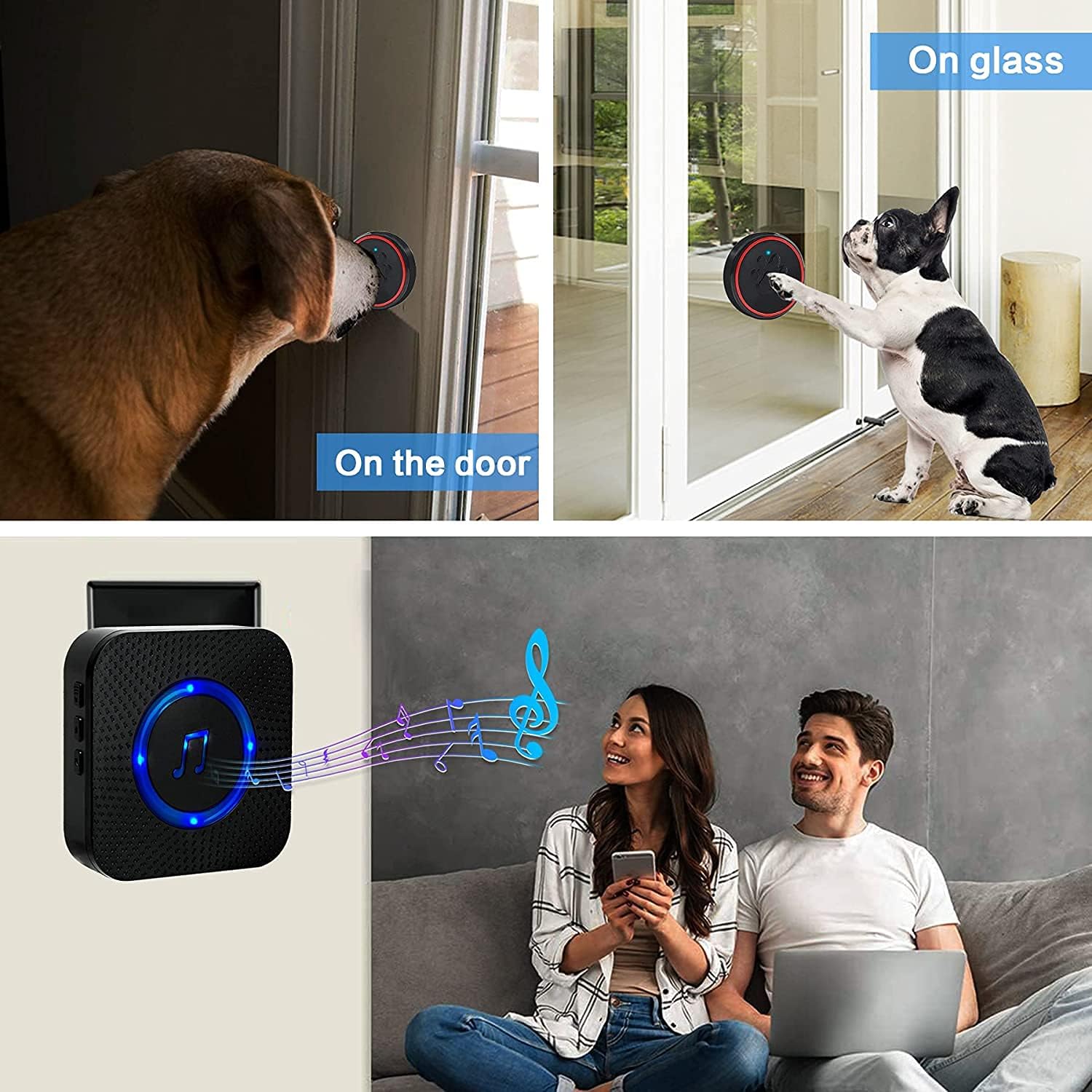
Picha: Examples of transmitter installation on a door and glass, and receiver in use.
Maagizo ya Uendeshaji
Adjusting Volume and Melodies
- Udhibiti wa Sauti: Press the volume button on the side of the receiver to cycle through 5 volume levels (0-110dB). The silent mode (0dB) will only activate the LED flash.
- Uchaguzi wa Melody: Use the forward/backward buttons on the receiver to browse through the 52 available ringtones.
Pairing Additional Transmitters/Receivers
The system supports adding more receivers or transmitters. Follow these steps to pair new components:
- Place the transmitter next to the receiver and plug in the receiver.
- Press and hold both the volume button and the melody selection button simultaneously for 5 seconds until the receiver's indicator light flashes blue rapidly.
- While the receiver light is flashing, press the button on the transmitter. The receiver will chime, indicating successful pairing.

Picha: Kina view of the receiver's controls for volume, pairing, and melody selection.
Matengenezo
- Kusafisha: Wipe the doorbell components with a soft, dry cloth. Avoid using abrasive cleaners or solvents.
- Battery Replacement (Transmitter): The transmitter uses a 12V 23A alkaline battery. Replace the battery when the signal strength weakens or the transmitter stops functioning. To replace, open the transmitter casing, remove the old battery, and insert a new one, ensuring correct polarity.
- Upinzani wa Maji: The transmitter is IP55 waterproof, meaning it is protected against dust and low-pressure water jets. Do not submerge the transmitter in water for extended periods.
Kutatua matatizo
- Hakuna Sauti kutoka kwa Kipokeaji:
- Hakikisha kipokezi kimechomekwa vizuri kwenye soketi ya umeme inayofanya kazi.
- Check if the receiver is in silent mode (0dB). Press the volume button to increase the volume.
- Verify that the transmitter battery is not depleted. Replace if necessary.
- Re-pair the transmitter and receiver following the "Pairing Additional Transmitters/Receivers" steps.
- Shortened Transmission Range:
- Metal objects can interfere with the wireless signal. Avoid placing the transmitter near large metal surfaces.
- Ensure there are no significant obstructions (thick walls, large appliances) between the transmitter and receiver.
- Check the transmitter battery. A low battery can reduce range.
- Transmitter Not Activating:
- Ensure the transmitter battery is correctly installed and not depleted.
- Confirm the transmitter and receiver are properly paired.
- Check for physical damage to the transmitter.
Vipimo
| Mpokeaji Uendeshaji Voltage | 110-260V |
| Betri ya Transmitter | 12V 23A Betri ya Alkali |
| Joto la Uendeshaji | -30°C hadi +70°C (-22°F hadi +158°F) |
| Transmitter Waterproof Rating | IP55 |
| Operating Range (Open Air) | Hadi mita 150 (takriban futi 492) |
| Viwango vya Kiasi | Viwango 5 (0-110dB) |
| Sauti za simu | Melodi 52 |
| Vipimo vya Bidhaa (Kifurushi) | 12.3 x 10.3 x 9.2 cm; gramu 300 |

Image: Visual representation of the doorbell's wireless range and IP55 waterproof rating.
Taarifa ya Udhamini
ChunHee products are designed for reliability and performance. For specific warranty details, including coverage period and terms, please refer to the warranty card included in your product packaging or visit the official ChunHee webtovuti. Tafadhali hifadhi uthibitisho wako wa ununuzi kwa madai yoyote ya udhamini.
Usaidizi wa Wateja
If you encounter any issues or have questions regarding your ChunHee Wireless Dog Doorbell that are not addressed in this manual, please contact our customer support team. You can find contact information on the official ChunHee webtovuti au kupitia jukwaa lako la ununuzi.
We are committed to providing excellent service and support for our products.


