1. Utangulizi
The Vimar 19593 Arké Connected IoT Actuator is an electronic control device designed for smart home environments. It features a NO 16 A relay output and supports dual IoT technology: Bluetooth 5.0 for the Vimar VIEW wireless mesh system and Zigbee 3.0 for broader compatibility. This actuator allows for both local control via a physical button and remote control through dedicated applications. It also includes instantaneous power measurement and energy consumption monitoring capabilities, along with an RGB LED for status indication and adjustable intensity.
This manual provides essential information for the safe installation, operation, and maintenance of your Vimar 19593 Arké Connected IoT Actuator.
2. Taarifa za Usalama
- Ufungaji wa Umeme: Installation must be performed by qualified personnel in compliance with local electrical codes and regulations.
- Ugavi wa Nguvu: Ensure the power supply (100-240 V ~ 50/60 Hz) matches the device specifications before installation.
- Ondoa Nguvu: Always disconnect power at the main circuit breaker before performing any installation, wiring, or maintenance.
- Matumizi ya Ndani Pekee: This device is intended for indoor use in dry environments. Do not expose to moisture or extreme temperatures.
- Epuka Kupakia kupita kiasi: Do not exceed the maximum load rating of 16 A for the relay output.
- Watoto na Wanyama wa Kipenzi: Weka kifaa na vipengele vyake mbali na watoto na wanyama kipenzi.
3. Bidhaa Imeishaview
The Vimar 19593 Arké Connected IoT Actuator is a compact module designed for integration into standard electrical systems. It features a physical button for local control and pairing, and an RGB LED indicator for status feedback.

Kielelezo cha 1: Mbele view of the Vimar 19593 Arké Connected IoT Actuator. It is a dark gray rectangular module with a small indicator light and a circular button at the bottom.

Kielelezo cha 2: Close-up of the actuator showing a symbol for wireless connectivity and the control button.
Vipengele Muhimu:
- Kitufe cha Kudhibiti: Used for local ON/OFF control and initiating the pairing process.
- Kiashiria cha LED cha RGB: Provides visual feedback on device status, pairing mode, and can be adjusted for intensity.
- Pato la Kupitisha: Connects to the load (e.g., lights, appliances) for switching ON/OFF.
- Moduli zisizo na waya: Integrated Bluetooth 5.0 and Zigbee 3.0 for smart home connectivity.
4. Kuweka
4.1 Ufungaji wa Kimwili
- Ondoa Nguvu: Kabla ya kuanza, hakikisha usambazaji mkuu wa umeme kwenye eneo la usakinishaji umezimwa kwenye kivunja mzunguko.
- Wiring: Connect the actuator according to the provided wiring diagram (typically found on the device itself or in the packaging). Ensure correct connection of live, neutral, and load wires to the appropriate terminals. This device is designed for modular, flush-mounted, or wall-mounted installations.
- Salama Kifaa: Mount the actuator securely within the electrical box or housing.
- Rejesha Nguvu: Mara tu usakinishaji utakapokamilika na miunganisho yote iko salama, rejesha nguvu kwenye kivunja mzunguko.
4.2 Kusakinisha na Kuoanisha Programu
The Vimar 19593 supports two primary wireless technologies for smart home integration: Bluetooth 5.0 (via Vimar VIEW Wireless app) and Zigbee 3.0 (via compatible Zigbee hubs and apps).

Kielelezo cha 3: Vimar VIEW App icon, used for managing the actuator.
- Pakua App: Pakua Vimar VIEW Bila waya app from your device's app store (for Bluetooth control) or a compatible Zigbee hub app (e.g., Amazon Alexa app for Zigbee).
- Fungua Akaunti: Open the app and create an account if you don't already have one.
- Anzisha Hali ya Kuoanisha: Press and hold the physical control button on the actuator for approximately 5 seconds. The RGB LED will begin to pulse blue, indicating it is in pairing mode.
- Ongeza Kifaa katika Programu: Follow the on-screen instructions in your chosen app to add a new device. The app should detect the Vimar 19593 actuator.
- Select Technology: Within the Vimar VIEW Wireless app, you can switch between Bluetooth and Zigbee modes if needed. For Zigbee, ensure your Zigbee hub is also in pairing mode.
- Kamilisha Kuweka: Assign a name to your device and configure any initial settings as prompted by the app.
5. Maagizo ya Uendeshaji
5.1 Udhibiti wa Mitaa
- WASHA/ZIMWA: Briefly press the physical control button on the actuator to toggle the connected load ON or OFF.
5.2 Udhibiti wa Mbali kupitia Programu
Once paired, you can control the actuator remotely using the Vimar VIEW Wireless app (for Bluetooth) or a compatible Zigbee app.
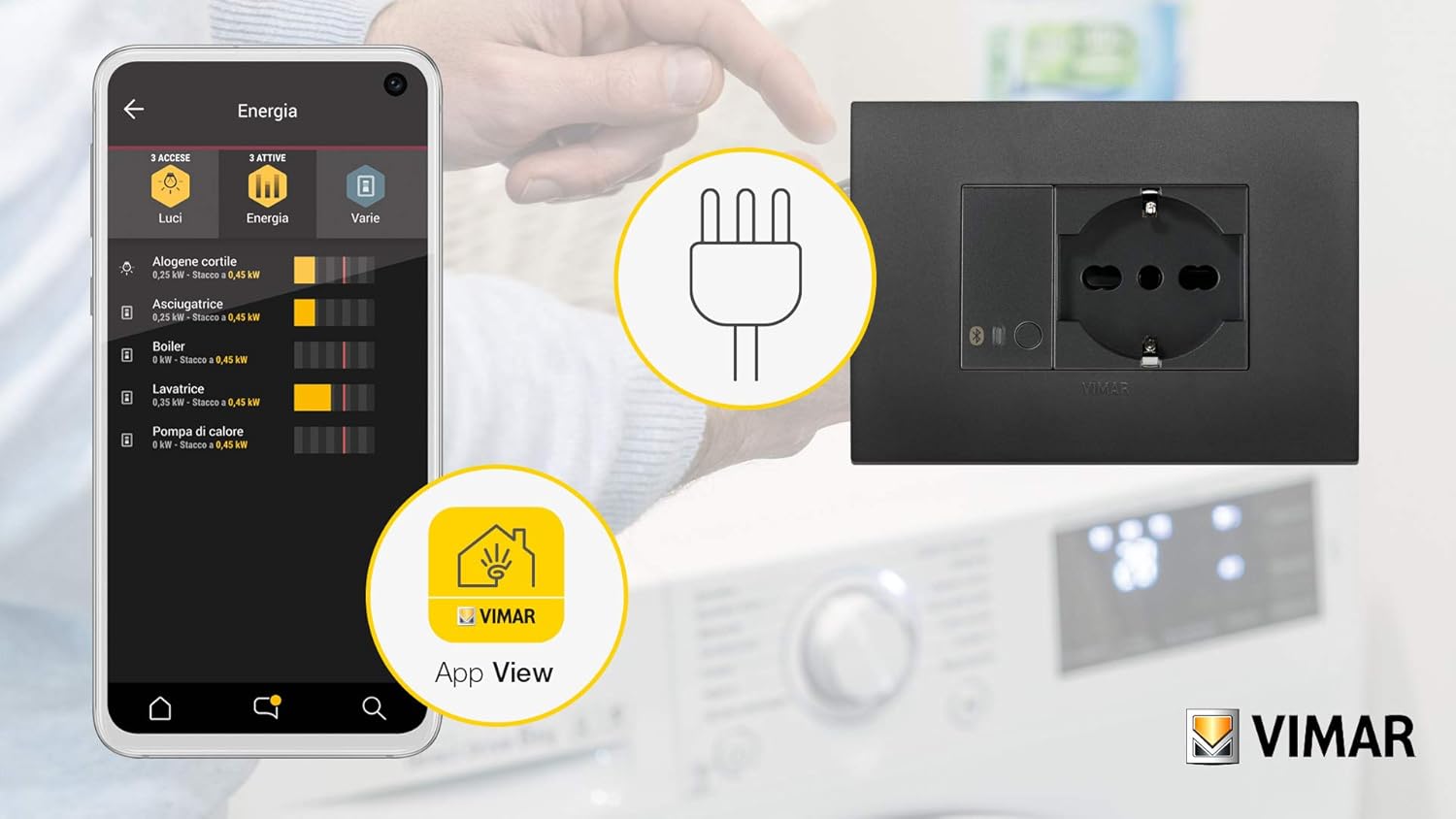
Kielelezo cha 4: Example of the Vimar app interface showing energy monitoring for connected devices.
- Toggle Load: Open the app, select your Vimar 19593 actuator, and use the virtual button to switch the connected load ON or OFF.
- Ufuatiliaji wa Nishati: The app provides real-time instantaneous power measurement and tracks consumed energy. This feature allows you to monitor the power usage of the connected appliance.
- RGB LED Adjustment: Adjust the intensity and potentially the color (if supported by the app) of the RGB LED indicator through the app settings.
5.3 Muunganisho wa Udhibiti wa Sauti
The actuator can be integrated with voice assistants through compatible smart home hubs (e.g., Amazon Alexa for Zigbee). Refer to your voice assistant's setup guide for integration steps.

Kielelezo cha 5: Illustration of a smart plug (similar to actuator function) being controlled via voice commands and a smartphone app.
6. Matengenezo
- Kusafisha: Disconnect power before cleaning. Use a soft, dry cloth to wipe the device. Do not use liquid cleaners or abrasive materials.
- Sasisho za Firmware: Periodically check the Vimar VIEW Wireless app for available firmware updates to ensure optimal performance and security. Follow the app's instructions for any update procedures.
- Ukaguzi wa Mara kwa Mara: Occasionally inspect the device for any signs of damage or loose connections. If any issues are found, disconnect power and consult a qualified electrician.
7. Utatuzi wa shida
- Kifaa hakijibu:
- Angalia kama usambazaji wa umeme unafanya kazi.
- Ensure the device is properly wired.
- If using a Vimar Gateway, confirm it has an active internet (CLOUD) connection, as loss of connection may prevent operation.
- Masuala ya Kuoanisha:
- Ensure the actuator's LED is pulsing blue, indicating pairing mode.
- Verify your smartphone or Zigbee hub is within range.
- If re-associating, you may need to switch the device to Bluetooth mode via the Vimar Arké app, then back to Zigbee. If this fails, temporarily remove power from the actuator and restore it to attempt a reset before re-pairing.
- LED Not Functioning as Expected (Zigbee Hub):
- When associated with a generic Zigbee hub, direct control over the LED's function and color may be limited. The LED typically reflects the actuator's ON (blue) or OFF (off) state.
- Power Consumption Readings Missing (Zigbee Hub):
- Some Zigbee integrations (e.g., ZHA) might not fully support reading power consumption data from this device. Verify compatibility with your specific Zigbee coordinator and integration.
- Kiwanda Rudisha: To perform a factory reset, remove power from the device for a few seconds, then restore it. This may clear all pairing information.
8. Vipimo
| Mtengenezaji | Vimar |
| Nambari ya Mfano | 19593 |
| Vipimo vya Bidhaa | 4.9 x 2.22 x 5.01 cm |
| Uzito | gramu 40 |
| Rangi | Kijivu |
| Voltage | Volts 100-240 AC |
| Mzunguko | 50/60 Hz |
| Relay Pato | NO 16 A |
| Teknolojia ya Wireless | Bluetooth 5.0, Zigbee 3.0 |
| Betri Inahitajika | Hapana |
| Nchi ya Asili | Italia |
9. Udhamini
For information regarding the warranty period and terms for your Vimar 19593 Arké Connected IoT Actuator, please refer to the official Vimar website or the warranty documentation included with your purchase. Warranty policies may vary by region and retailer.
10. Msaada
For additional instructions, tutorials, and technical support, please visit the official Vimar support webtovuti:
You can also contact Vimar customer service directly for assistance with product inquiries, troubleshooting, or warranty claims.


