Mwongozo wa Mtumiaji wa Simu ya Ofisi ya Snom M18 KLE SIP DECT yenye Meza 4
Model: M18 KLE
This manual provides comprehensive instructions for the setup, operation, and maintenance of your Snom M18 KLE SIP DECT 4-Line Desk Office Phone.
Mwongozo wa Kuweka
Yaliyomo kwenye Kifurushi
- Snom M18 KLE Desk Phone Unit
- Kifaa cha mkono
- Kamba ya mkono
- Kebo ya Ethernet
- Adapta ya Nguvu ya AC
Ufungaji wa Kimwili
Unganisha kifaa cha mkono: Chomeka ncha moja ya waya wa simu iliyosokotwa kwenye simu na ncha nyingine kwenye mlango ulioandikwa aikoni ya simu upande wa simu.
Unganisha kwenye Mtandao: Connect one end of the Ethernet cable to the LAN port on the back of the phone and the other end to your network router or switch.
Unganisha Nguvu: Plug the AC power adapter into the power port on the back of the phone, then plug the adapter into a standard electrical outlet. The phone will power on automatically.
Usanidi wa Awali
Upon first power-on, the phone may display a setup wizard or attempt to obtain network settings via DHCP. Follow the on-screen prompts to configure basic settings such as language, time zone, and network parameters if not automatically assigned.
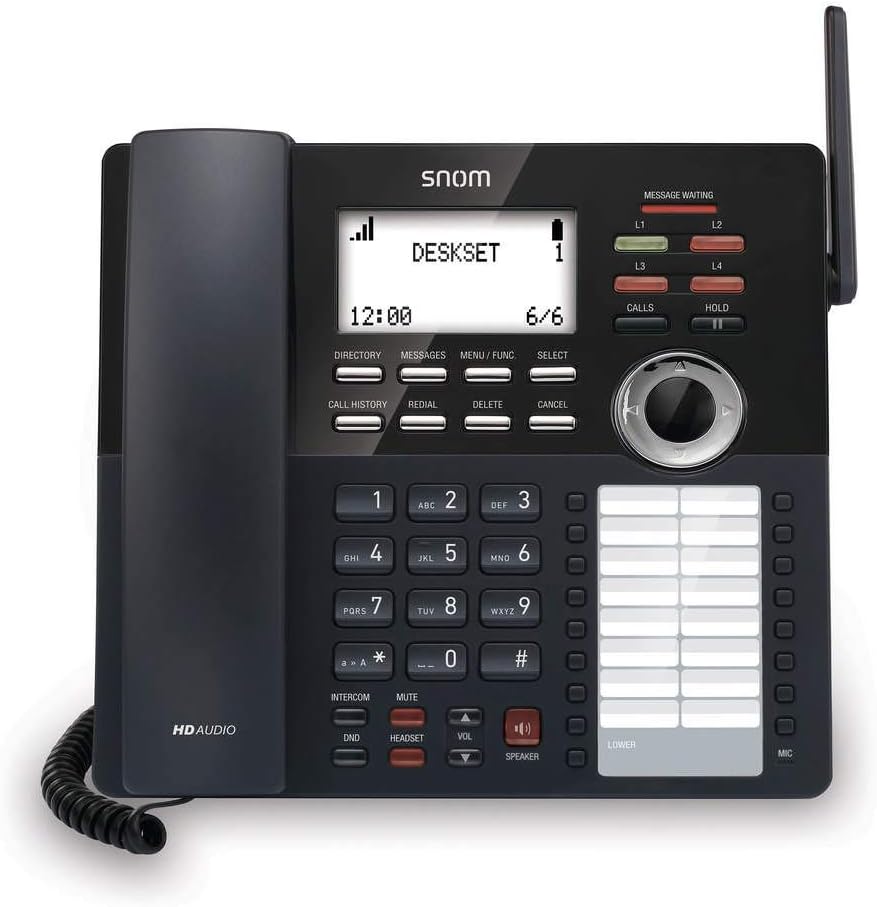
Picha: Mbele view of the Snom M18 KLE Desk Office Phone, showing the display, keypad, and function buttons. The handset is cradled on the left side, and a DECT antenna is visible on the right.
Maagizo ya Uendeshaji
Kazi za Msingi za Simu
Kupiga simu:
Chukua simu au bonyeza SPIKA kitufe.
Piga nambari ya simu inayotaka kwa kutumia vitufe.
Bonyeza kwa SIMU kitufe au subiri sekunde chache kwa simu kuungana kiotomatiki.
Kujibu Simu:
Wakati simu inalia, chukua simu au bonyeza kitufe SPIKA kitufe cha kujibu.
Kukata Simu:
Weka simu nyuma kwenye kitanda cha mtoto au bonyeza kitufe cha SPIKA kifungo tena.
Vipengele vya Wito vya Juu
Shikilia: Wakati wa simu inayotumika, bonyeza kitufe cha SHIKA button to place the call on hold. Press SHIKA tena ili kuanza tena simu.
Uhamisho:
Wakati wa simu inayotumika, bonyeza kitufe cha KUHAMISHA soft key (may be labeled differently on screen).
Piga nambari ambayo ungependa kuhamishia simu.
Kufanya a uhamisho wa kipofu, bonyeza KUHAMISHA soft key again before the recipient answers. To perform an uhamisho uliohudhuria, wait for the recipient to answer, announce the call, then press KUHAMISHA.
Mkutano: The phone supports 3-way local conferencing. During an active call:
Bonyeza kwa CONF soft key (or similar). The first call is placed on hold.
Piga nambari ya mtu wa tatu.
Mara tu mtu wa tatu akijibu, bonyeza kitufe CONF kitufe laini tena ili kujiunga na pande zote.
Nyamazisha: Bonyeza kwa MUME kitufe cha kunyamazisha maikrofoni yako wakati wa simu. Ibonyeze tena ili kurejesha sauti.
Usisumbue (DND): Bonyeza kwa DND button to activate or deactivate Do Not Disturb mode. When active, incoming calls will be redirected or sent to voicemail without ringing the phone.
Urambazaji wa Menyu
Use the 4-way navigational pad and the CHAGUA soft key to navigate through the phone's menus. Soft keys below the display change functionality based on the current screen.
Phonebook and Call History
Saraka: Bonyeza kwa DIRECTORY soft key to access your local phonebook. You can add, edit, and delete contacts.
Historia ya Simu: Bonyeza kwa WITO HISTORIA kifungo kwa view a list of dialed, received, and missed calls.
Matengenezo na Utunzaji
Kusafisha Kifaa
To clean the phone, use a soft, damp cloth. Avoid using abrasive cleaners or solvents, as these can damage the phone's surface. Ensure the phone is unplugged before cleaning.
Ubadilishaji wa Betri
The deskset contains a 2.4V/750 mAh Ni-MH battery. If battery performance degrades significantly over time, contact Snom support or a qualified technician for replacement. Do not attempt to replace the battery yourself unless specifically instructed by Snom.
Sasisho za Firmware
Periodically, Snom may release firmware updates to improve performance and add new features. Consult your system administrator or the Snom website for instructions on how to update your phone's firmware.
Kutatua matatizo
| Tatizo | Sababu inayowezekana | Suluhisho |
|---|---|---|
| Hakuna sauti ya kupiga | Phone not powered, network cable disconnected, or SIP registration failure. | Check power connection. Ensure Ethernet cable is securely connected. Verify SIP account registration status on the display. Restart the phone. |
| Haiwezi kupiga/kupokea simu | SIP registration issue, DND active, or network problem. | Check SIP registration. Deactivate DND. Verify network connectivity. Contact your IT administrator. |
| Onyesho ni tupu au limegandishwa | Power issue or software error. | Unplug the power adapter, wait 10 seconds, then plug it back in. If the issue persists, contact support. |
| Ubora duni wa sauti | Network congestion, faulty cable, or handset issue. | Check network connection and bandwidth. Try a different handset or headset. |
Vipimo vya Kiufundi
- Onyesha: 3.5-inch 102 x 66 pixels (w x h) mono LCD with blue/white backlighting
- Vifunguo vya Mstari: 4 programmable LED backlit line keys
- Funguo za Vipengele: 17 dedicated feature keys
- Urambazaji: 4-way navigational pad
- Upigaji Kasi: 32 speed dial keys (2 pages x 16)
- Voice Quality: HD voice for receiver and speakerphone, Full-duplex speakerphone
- Usaidizi wa Vifaa vya Kusikilizia Sauti: HAC receiver, 2.5mm corded headset jack
- Kushughulikia Simu: 4-line call handling (active and held), 3-way local conference, N-way network conference, Intercom, Call transfer (blind/attended), Call hold, Call forwarding, Mute, Redial, Caller ID
- Kitabu cha simu: Local up to 1,000 entries, XML/LDAP remote phonebook
- Historia ya Simu: Hadi maingizo 200
- Betri: Deskset battery: 2.4v/750 mAh Ni-MH
- Chanzo cha Nguvu: Corded Electric (Included AC Adapter)
- Standby/Talk Time: 36 hours standby / 7 hours talk time
Taarifa ya Udhamini
The Snom M18 KLE SIP DECT 4-Line Desk Office Phone comes with a 3-year limited warranty from the date of purchase. This warranty covers defects in materials and workmanship under normal use. For full terms and conditions, please refer to the official Snom warranty policy available on their webtovuti au wasiliana na usaidizi kwa wateja.
Usaidizi wa Wateja
For technical assistance, warranty claims, or further information, please visit the official Snom website or contact their customer support department. Keep your product model number (M18 KLE) and purchase details ready when contacting support.


