1. Bidhaa Imeishaview
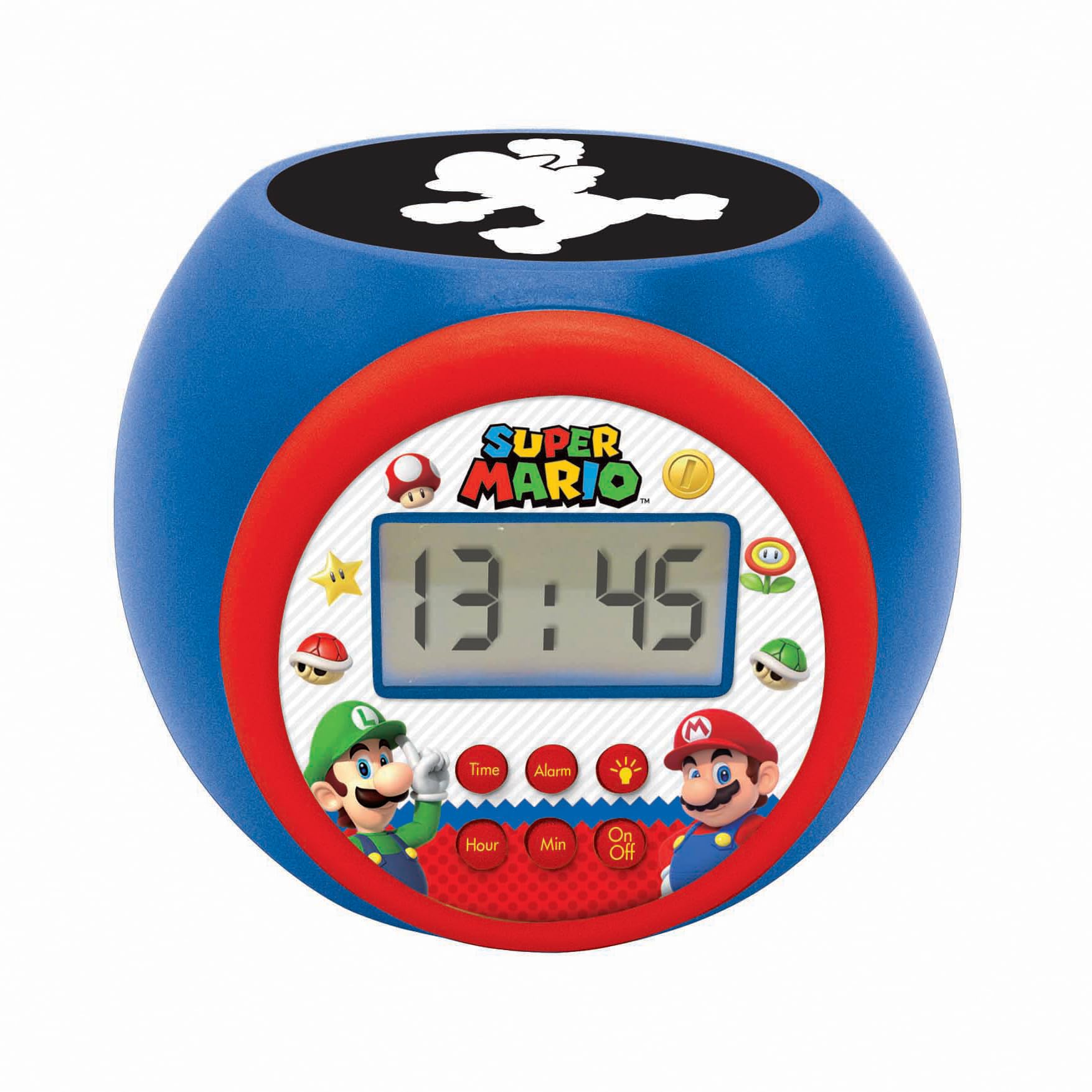
The LEXIBOOK Super Mario Projector Alarm Clock RL977NI is a digital alarm clock designed with a Super Mario theme. It features a backlit LCD screen, a projection function that displays Super Mario symbols onto the ceiling in three different colors, and a night light with integrated timers. This device includes an alarm with a snooze function and operates on batteries.
Sifa Muhimu:
- Round shaped alarm clock with backlit LCD screen.
- 3 integrated night light timers (5, 10, or 15 minutes).
- Super Mario symbol projection in 3 colors.
- Time display in 12/24 hour format.
- Kengele yenye kipengele cha kuahirisha.
2. Kuweka
2.1 Ufungaji wa Betri
The alarm clock requires 3 AAA batteries (not included) for operation. Follow these steps to install the batteries:
- Tafuta sehemu ya betri upande wa chini wa saa ya kengele.
- Kwa kutumia bisibisi ndogo, fungua kifuniko cha sehemu ya betri kwa uangalifu.
- Ingiza betri 3 mpya za AAA, kuhakikisha polarity sahihi (+ na -) kama inavyoonyeshwa ndani ya sehemu.
- Badilisha kifuniko cha sehemu ya betri na uilinde kwa skrubu.
Kumbuka: Always use fresh batteries and dispose of old batteries responsibly. Do not mix old and new batteries or different types of batteries.

3. Maagizo ya Uendeshaji
3.1 Kazi za Kitufe
The alarm clock features several buttons for control:
- Kitufe cha Saa: Inatumika kuingiza hali ya kuweka wakati.
- Kitufe cha Kengele: Inatumika kuingiza hali ya kuweka kengele.
- Kitufe cha Saa: Hurekebisha saa wakati wa saa au mpangilio wa kengele.
- Min Button: Hurekebisha dakika wakati wa saa au mpangilio wa kengele.
- Kitufe cha Washa/Zima: Activates or deactivates the night light/projector.
3.2 Kuweka Wakati
- Bonyeza na ushikilie Wakati button until the hour display starts flashing.
- Tumia Saa kifungo kurekebisha saa.
- Bonyeza kwa Wakati button again, and the minute display will flash.
- Tumia Dak kifungo kurekebisha dakika.
- Bonyeza kwa Wakati kitufe mara moja zaidi ili kuthibitisha na kutoka kwenye hali ya kuweka muda.
- Ili kubadilisha kati ya umbizo la saa 12 na saa 24, bonyeza kitufe cha Saa button while the time is displayed normally (not in setting mode).
Kuweka Kengele
- Bonyeza na ushikilie Kengele button until the alarm hour display starts flashing.
- Tumia Saa kitufe cha kuweka saa ya kengele inayotaka.
- Bonyeza kwa Kengele button again, and the alarm minute display will flash.
- Tumia Dak kitufe cha kuweka dakika za kengele unazotaka.
- Bonyeza kwa Kengele button one more time to confirm and activate the alarm. An alarm icon will appear on the LCD screen.
- Ili kuzima kengele, bonyeza Kengele button once when the time is displayed normally. The alarm icon will disappear.
3.4 Kazi ya Kuahirisha
When the alarm sounds, press any button (except the Kengele button to turn it off completely) to activate the snooze function. The alarm will temporarily stop and sound again after a few minutes.
3.5 Using the Projector and Night Light
The alarm clock features a projector that displays Super Mario symbols and also functions as a night light with a timer.
- Bonyeza kwa Washa/Zima button to activate the projector and night light.
- The projector will display Super Mario symbols onto the ceiling in one of three colors.
- To cycle through the projection colors or turn off the projection, press the Washa/Zima kifungo mara kwa mara.
- The night light has integrated timers of 5, 10, or 15 minutes. The timer setting is usually cycled by pressing the Washa/Zima button or a dedicated light button (if present, not explicitly mentioned but implied by "3 integrated timers"). Refer to the icons on the clock face for specific light control.


4. Matengenezo
4.1 Kusafisha
To clean the alarm clock, use a soft, dry cloth. Do not use abrasive cleaners, solvents, or chemical sprays, as these can damage the surface and internal components. Avoid getting moisture into any openings.
4.2 Ubadilishaji wa Betri
When the display dims or the functions become unreliable, it is time to replace the batteries. Follow the battery installation steps outlined in Section 2.1. Ensure the device is turned off before replacing batteries.
5. Utatuzi wa shida
| Tatizo | Sababu inayowezekana | Suluhisho |
|---|---|---|
| Onyesho la saa ni hafifu au tupu. | Betri za chini au zilizoisha. | Badilisha na betri mpya za AAA. Hakikisha polari sahihi. |
| Projection light is not working. | Projector is off or batteries are low. | Bonyeza kwa Washa/Zima button to activate. Check and replace batteries if necessary. |
| Kengele haisikiki. | Alarm is not set or is deactivated. | Ensure the alarm is set correctly and the alarm icon is visible on the display. Check battery level. |
| Vifungo havijibu. | Low batteries or temporary software glitch. | Replace batteries. If issue persists, remove batteries for a few minutes and reinsert to reset the device. |
| Time or alarm settings reset unexpectedly. | Batteries removed or completely depleted. | Replace batteries and reset the time and alarm. |
6. Vipimo
- Nambari ya Mfano: RL977NI
- Chapa: LEXiBOOK
- Aina ya Kuonyesha: LCD ya dijiti
- Chanzo cha Nguvu: Betri Inayotumia Betri (betri 3 za AAA, hazijajumuishwa)
- Vipimo vya Bidhaa: Approximately 4.65" W x 3.58" H (11.8 cm x 9.1 cm)
- Uzito wa Kipengee: Takriban wakia 7.4 (gramu 210)
- Nyenzo: Plastiki
- Vipengele Maalum: Alarm, Snooze, Night Light Timer, Projector
- Umri Unaopendekezwa: Miaka 3 na kuendelea
- Tarehe ya Kutolewa: Mei 27, 2020
7. Taarifa za Udhamini
This LEXIBOOK product is covered by a dhamana ya mwaka 2 from the date of purchase. This warranty covers manufacturing defects and material faults under normal use. Please retain your proof of purchase for warranty claims.
The warranty does not cover damage caused by misuse, accidents, unauthorized modifications, or normal wear and tear. For detailed warranty terms and conditions, please refer to the official LEXiBOOK webtovuti au wasiliana na usaidizi kwa wateja.
8. Msaada
For further assistance, technical support, or inquiries regarding your LEXIBOOK Super Mario Projector Alarm Clock RL977NI, please visit the official LEXiBOOK webtovuti au wasiliana na idara yao ya huduma kwa wateja.
Unaweza kupata habari zaidi na rasilimali za usaidizi kwa kutembelea Duka la LEXiBOOK kwenye Amazon.


