Utangulizi
The VIJIM VL120 LED Video Light is a compact and versatile lighting solution designed for photographers and videographers. It features 120 high-quality LED beads, adjustable bi-color temperature (3200K-6500K), and dimmable brightness, making it suitable for various shooting environments. This manual provides detailed instructions for the proper setup, operation, and maintenance of your VL120 LED Video Light.
Ni nini kwenye Sanduku
- Mwangaza wa Video ya LED
- Jalada la Silicone
- Color Paper (6 pieces)
- Kuweka Msingi
- Aina ya C ya Kuchaji

Vipengele vya Bidhaa
- High CRI LED Beads: Equipped with 120 high-quality LED beads, offering a Color Rendering Index (CRI) of 95+ for accurate color reproduction and up to 1250 Lux maximum brightness.
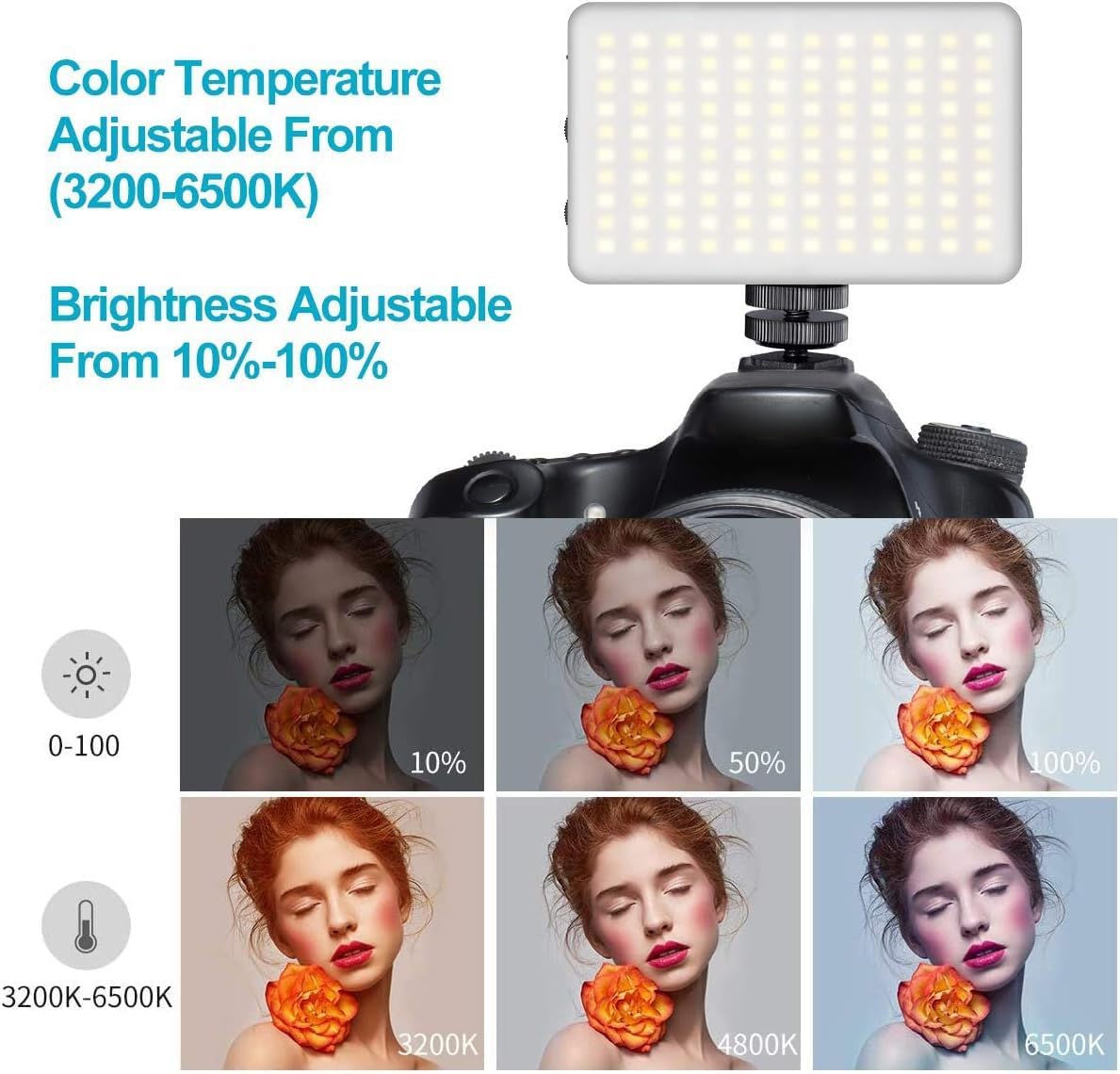
- Bi-Color Temperature: Steplessly adjustable color temperature from 3200K (warm) to 6500K (cool) to match various lighting conditions.
- Mwangaza Unaofifia: Brightness is adjustable from 10% to 100% using a single switch, providing precise control over light output.
- Usambazaji wa Mwangaza laini: Includes a silicone cover to soften the light output, protecting eyes and creating a more natural illumination.
- Vichungi vya Rangi: Six color filters (pink, red, yellow, purple, green, blue) are provided to create diverse lighting effects and moods.
- Betri Inayoweza Kuchajishwa Ndani: Features a 3100mAh lithium battery, offering 120-150 minutes of continuous use at maximum power.
- Kuchaji Aina ya C: Convenient Type-C charging port allows for charging while in use.
- Compact na Portable: Lightweight and durable construction for easy portability.

Sanidi
- Chaji Kifaa: Before first use, fully charge the VL120 using the provided Type-C charging cable. The battery indicator lights will show the charging status.
- Ambatisha Msingi wa Kupachika: Screw the cold shoe mounting base into the 1/4-inch screw hole at the bottom of the light.
- Mount to Camera/Tripod: Slide the cold shoe mount into your camera's hot shoe or attach it to a compatible tripod.
- Apply Silicone Cover (Optional): For softer light, slide the silicone diffuser cover over the LED panel.
- Insert Color Gels (Optional): If using color filters, place the desired color paper inside the silicone cover before attaching it to the light.

Maagizo ya Uendeshaji
- Washa/Zima: Slide the "OFF/ON" switch to turn the light on or off.
- Rekebisha Mwangaza: Use the "DIM +/-" knob to increase or decrease the brightness from 10% to 100%.
- Rekebisha Joto la Rangi: Use the "CT +/-" knob to change the color temperature from 3200K (warm) to 6500K (cool).
- Fuatilia Betri: The LED indicator lights on the side of the unit display the remaining battery charge.

Video: Demonstrates the features of the VIJIM VL120 LED Video Light, including its soft light cover and color gels. This video is provided by the seller.
Matengenezo
- Weka kifaa kavu na safi.
- Epuka kuangazia mwanga kwa joto kali au jua moja kwa moja kwa muda mrefu.
- Clean the LED panel and body with a soft, dry cloth. Do not use harsh chemicals or abrasive materials.
- Hifadhi taa mahali pa baridi, kavu wakati haitumiki.
Kutatua matatizo
Mwanga hauwashi:
- Hakikisha swichi ya umeme iko katika nafasi ya "IMEWASHWA".
- Check the battery level. If low, charge the device using the Type-C cable.
Brightness/Color Temperature cannot be adjusted:
- Verify that the respective adjustment knobs are being turned correctly.
- Hakikisha kuwa kifaa kimewashwa.
Maisha mafupi ya betri:
- Battery life is shorter at maximum brightness. Reduce brightness for extended use.
- Hakikisha kuwa betri imechajiwa kikamilifu kabla ya matumizi.
Vipimo
| Nambari ya Mfano | VL120 |
| Vipimo vya Bidhaa | Inchi 4.2 x 2.6 x 0.6 (sentimita 10.67 x 6.6 x 1.52) |
| Uzito wa Kipengee | Wakia 11.3 (gramu 320) |
| Shanga za LED | 120 pcs |
| Max Brightness Illuminance | Up to 1250 Lux |
| Kielezo cha Utoaji wa Rangi (CRI) | 95+ |
| Joto la Rangi | 3200K-6500K (Bi-Color, Steplessly Dimmable) |
| Marekebisho ya Mwangaza | 10% -100% |
| Uwezo wa Betri | 3100mAh Lithium Ion |
| Muda wa Betri (Nguvu ya Juu) | 120-150 minutes (approx. 2-2.5 hours) |
| Kuchaji Bandari | USB Type-C |
| Kiunzi cha vifaa | USB Aina C |
Udhamini na Msaada
For warranty information or technical support, please refer to the product packaging or contact VIJIM customer service directly. Specific warranty terms may vary by region and retailer.


