Bidhaa Imeishaview
The Wasp WPL308 Desktop barcode printer is a versatile medium-duty barcode printer designed for various printing applications. It features a durable double-wall clamshell design and a 3.5-inch color TFT display with a real-time clock. This printer supports both thermal transfer and direct thermal printing methods, achieving print speeds of up to 8 inches per second at a 203 DPI resolution. It is equipped with 128 MB Flash memory and 128 MB SDRAM, suitable for producing high-volume 4x6 shipping labels, high-resolution product marking, and graphic solutions, including labels for electronics marking applications.
Standard connectivity options include USB 2.0, USB-A Host, 10/100 Mbps Ethernet, and Serial interfaces. An optional 802.11a/b/g/n Wi-Fi interface is also available.
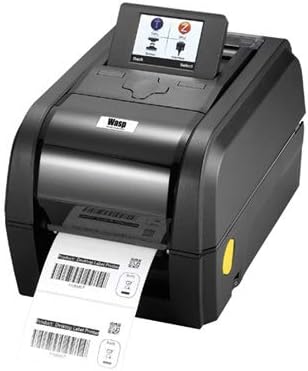
Image: The Wasp WPL308 Desktop Barcode Printer, showcasing its compact design and front-facing label output.
Sifa Muhimu
- Up to 203 mm (8 in) per sec. print speed
- 128 MB Flash memory and 128 MB SDRAM memory
- microSD Flash memory expansion up to 32 GB
- User-friendly clamshell design
- Serial, internal Ethernet USB 2.0 & USB host interfaces standard
- 3.5 inches TFT Display
- Label capacity up to 127 mm (5 inches) OD
- Ribbon capacity up to 300 m (984 feet)
- WPL firmware for plug-n-play ease
- ENERGY STAR® imehitimu
Yaliyomo kwenye Kifurushi
Before beginning installation, please verify that all items are present and undamaged:
- Wasp WPL308 Barcode Printer
- 203 dpi Thermal Printhead (pre-installed)
- Cable ya Nguvu

Image: The Wasp WPL308 printer with its clamshell cover open, revealing the internal mechanism for loading a roll of labels.
Mwongozo wa Kuweka
- Kufungua: Ondoa kwa uangalifu printa na vifaa vyote kutoka kwenye kifungashio. Weka kifungashio kwa ajili ya usafiri au hifadhi ya baadaye.
- Muunganisho wa Nishati: Connect the provided power cable to the printer's power input port and then to a suitable electrical outlet.
- Muunganisho wa Data: Connect the printer to your computer or network using a USB, Ethernet, or Serial cable as required by your setup. Ensure the cable is securely connected to both the printer and the host device.
- Ufungaji wa Dereva: Install the necessary printer drivers and software from the manufacturer's website or any included media. Follow the on-screen instructions for a complete installation.
- Inapakia Media: Open the printer's clamshell cover. Load the label roll onto the media supply spindle, ensuring it feeds smoothly through the guides and under the printhead. For thermal transfer printing, install the ribbon according to the printer's internal diagrams, ensuring it is taut and correctly aligned. Close the cover securely.
Uendeshaji
Once the printer is set up and connected, power it on. The 3.5-inch color TFT display will illuminate, showing the printer's status and menu options. Use the display and control buttons to navigate settings, perform calibrations, and monitor print jobs. Ensure your labels and ribbon (if applicable) are correctly loaded and aligned before sending print commands. Initiate print jobs from your computer application, ensuring the WPL308 is selected as the target printer.
Matengenezo
Regular maintenance is crucial for extending the life of your WPL308 printer and ensuring consistent print quality.
- Printhead Cleaning: Use a lint-free cloth lightly dampened with isopropyl alcohol to gently wipe the printhead surface. Perform this cleaning regularly, especially after replacing a roll of labels or ribbon.
- Platen Roller Cleaning: Clean the platen roller with isopropyl alcohol to remove any adhesive or dust buildup. Rotate the roller manually to clean the entire surface.
- Usafishaji wa jumla: Periodically clean the exterior and interior of the printer with a soft, dry cloth to remove dust and debris. Avoid using abrasive cleaners or solvents.
- Replacing Supplies: Replace label rolls and ribbons as they are depleted. Always use Wasp-approved supplies for optimal performance and to prevent damage to the printer.
Kutatua Masuala ya Kawaida
- Printa Haijibu: Check that the power cable is securely connected and the printer is powered on. Verify that the data cable (USB, Ethernet, Serial) is properly connected to both the printer and the computer/network. Ensure printer drivers are correctly installed and updated.
- Ubora duni wa Uchapishaji: Clean the printhead as described in the Maintenance section. Verify that the labels and ribbon (if used) are compatible with the printer and are loaded correctly. Adjust print darkness settings if necessary.
- Lebo Haziliwi Ipasavyo: Ensure the label roll is properly seated on the media supply spindle and that labels are threaded correctly through the guides. Check for any obstructions in the label path.
- Ujumbe wa Hitilafu kwenye Onyesho: Refer to the printer's 3.5-inch TFT display for specific error codes or messages. Consult the Wasp support website or the full user manual for detailed explanations and solutions for each error.
Vipimo vya Kiufundi
| Vipimo | Maelezo |
|---|---|
| Chapa | Nyigu |
| Jina la Mfano | WPL308 Barcode Printer |
| Teknolojia ya Uchapishaji | Thermal (Direct Thermal/Thermal Transfer) |
| Maximum Print Speed (Monochrome) | Inchi 8 kwa sekunde (203 mm/s) |
| Vipimo vya Bidhaa | Inchi 13.1 x 8.9 x 7.8 |
| Uzito wa Kipengee | Pauni 8.27 |
| Uwezo wa Kuhifadhi Kumbukumbu | 128 MB Flash, 128 MB SDRAM |
| Kiunzi cha vifaa | Ethernet, Serial Interface, USB |
| Teknolojia ya Uunganisho | Networkable, USB |
| Vipengee vilivyojumuishwa | 203 dpi Thermal Printhead, WPL308 Power Cable |
| Chapisha Media | Lebo |
| Kipengele Maalum | Nishati Star Imehitimu |
Udhamini na Msaada
The Wasp WPL308 printer includes a 2-year manufacturer's warranty that covers material defects. For enhanced protection and coverage beyond the standard warranty, WaspProtect extended service plans are available, which can also cover accidental breakage.
For technical assistance, troubleshooting, or to inquire about warranty claims and WaspProtect plans, please contact Wasp Barcode Technologies customer service. Visit the official Wasp Barcode Technologies webtovuti kwa taarifa za usaidizi za hivi punde na maelezo ya mawasiliano.


