1. Bidhaa Imeishaview
The Baseus W09 TWS Wireless Earphones (Model: Encok W09) are designed for convenient audio playback and communication. These in-ear earphones feature touch control and connect wirelessly via Bluetooth, offering a stereo bass sound experience.

Image 1: The Baseus W09 TWS Wireless Earphones securely placed within their charging case. The case is open, revealing both earbuds.
2. Kuweka
2.1 Kuchaji Simu za masikioni na Kipochi
Before initial use, ensure both the earphones and the charging case are fully charged. The charging case contains a built-in Lithium Ion battery.
- Weka vipokea sauti vya masikioni kwenye kipochi cha kuchaji.
- Connect the charging case to a power source using a compatible charging cable (not specified, assume USB).
- Chaji kamili huchukua takriban saa 1.5.
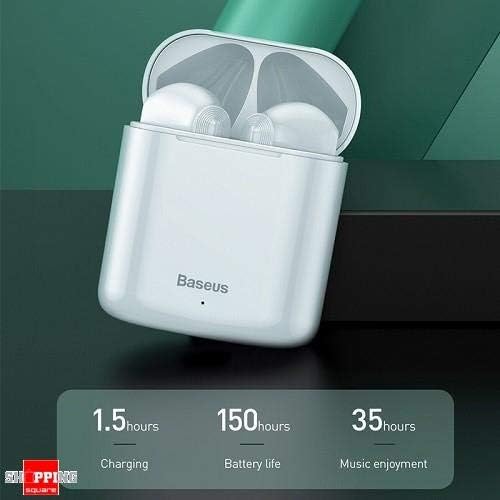
Image 2: The Baseus W09 charging case, illustrating its charging time of 1.5 hours, a standby battery life of 150 hours, and 35 hours of music enjoyment.
2.2 Kuoanisha Bluetooth
The Baseus W09 earphones are designed for quick and instant connection.
- Hakikisha spika za masikioni zimechajiwa.
- Fungua kesi ya malipo.
- Ondoa vipokea sauti vya masikioni kwenye kipochi cha kuchaji. Wataingia kiotomatiki modi ya kuoanisha.
- Kwenye kifaa chako (simu mahiri, kompyuta kibao, n.k.), washa Bluetooth na utafute vifaa vinavyopatikana.
- Select "Baseus Encok W09" or a similar name from the list to connect.
- Baada ya kuunganishwa, utasikia kidokezo cha sauti, na vipokea sauti vya masikioni vitakuwa tayari kutumika.

Image 3: A hand demonstrating the "Pick up and Connect" feature, showing an earphone being removed from its charging case, initiating quick Bluetooth connection.
3. Maagizo ya Uendeshaji
3.1 Kuvaa Earphone
Gently insert each earphone into the corresponding ear canal (L for left, R for right). Adjust them for a comfortable and secure fit to ensure optimal sound quality and stability.
3.2 Kazi za Kudhibiti Mguso
The Baseus W09 earphones feature intelligent touch controls for various functions. Specific gestures may vary; please refer to the product packaging or the official Baseus website for detailed touch control instructions.
- Cheza/Sitisha: Typically a single tap on either earphone.
- Jibu/Maliza Simu: Usually a single tap during an incoming call.
- Wimbo Ufuatao / Uliopita: Often a double or triple tap on a specific earphone.
- Washa Msaidizi wa Sauti: May involve a long press or specific tap sequence.
3.3 Maisha ya Betri
The Baseus W09 earphones and charging case offer extended usage times:
- Burudani ya Muziki: Up to 35 hours (with charging case).
- Wakati wa Kusubiri: Hadi masaa 150.
4. Matengenezo
4.1 Kusafisha
- Tumia kitambaa laini, kikavu, kisicho na ute ili kusafisha vipokea sauti vya masikioni na kisanduku cha kuchajia.
- Usitumie visafishaji abrasive, pombe, au vimumunyisho vya kemikali.
- Ensure no moisture enters the earphone speakers or charging ports.
4.2 Hifadhi
- Wakati haitumiki, hifadhi vipokea sauti vya masikioni kwenye vipochi vyake vya kuchaji ili kuzilinda na kuziweka na chaji.
- Hifadhi mahali pa baridi, kavu mbali na jua moja kwa moja na joto kali.
5. Utatuzi wa shida
If you encounter issues with your Baseus W09 earphones, try the following steps:
- Hakuna Sauti: Hakikisha vipokea sauti vya masikioni vimechajiwa, vimeunganishwa kwenye kifaa chako, na sauti imeongezeka kwenye vipokea sauti vya masikioni na kifaa chako.
- Haiwezi Kuoanisha: Make sure Bluetooth is enabled on your device and the earphones are in pairing mode. Try turning Bluetooth off and on again on your device.
- Muunganisho wa Mara kwa mara: Ensure there are no obstructions between the earphones and your device. Try moving closer to your device.
- Masuala ya Kuchaji: Check the charging cable and power adapter. Ensure the charging contacts on the earphones and case are clean.
- Rudisha: If issues persist, try resetting the earphones. Refer to the official Baseus website or product packaging for specific reset instructions.
6. Vipimo
| Kipengele | Maelezo |
|---|---|
| Chapa | Msingi |
| Nambari ya Mfano | Encok W09 |
| Aina | Katika Masikio |
| Teknolojia ya Uunganisho | Isiyo na waya (Bluetooth) |
| Njia ya Kudhibiti | Gusa |
| Maikrofoni Imejumuishwa | Ndiyo |
| Kufuta Kelele | Hapana |
| Aina ya Betri | Lithium Ion (pamoja na) |
| Muda wa Kuchaji | Takriban. 1.5 masaa |
| Music Enjoyment Time | Hadi saa 35 (na kesi ya kuchaji) |
| Wakati wa Kusubiri | Hadi saa 150 |
| Sambamba Na | Vifaa vyote vinavyowezeshwa na Bluetooth |
| Rangi | Nyeupe |
| Vipimo vya Kifurushi | 14.6 x 11 x 4 cm |
| Uzito wa Kipengee | 170 g |
7. Udhamini na Msaada
For warranty information, technical support, or further assistance, please refer to the documentation included with your product or visit the official Baseus webtovuti. Weka uthibitisho wako wa ununuzi kwa madai ya udhamini.


