1. Utangulizi
Asante kwa ununuziasing the GLIDiC Sound Air TW-5000s True Wireless Earbuds. This manual provides essential information for the safe and effective use of your device. Please read it thoroughly before use and retain it for future reference.
2. Taarifa za Usalama
- Usiwawekee vifaa vya sauti vya masikioni au kisanduku cha kuchajia kwenye halijoto kali, jua moja kwa moja, au unyevunyevu mwingi.
- Avoid dropping, impacting, or disassembling the device. This may cause damage and void the warranty.
- Keep the device away from water and liquids. While sweatproof, immersion can cause damage.
- Tumia kebo iliyotolewa tu ya kuchaji au kitu sawia kilichoidhinishwa.
- Kusikiliza kwa muda mrefu kwa sauti ya juu kunaweza kusababisha uharibifu wa kusikia. Rekebisha sauti hadi kiwango salama.
- Be aware of your surroundings when using earbuds, especially in traffic or hazardous environments.
3. Yaliyomo kwenye Kifurushi
Thibitisha kuwa vipengee vyote vipo kwenye kifurushi chako:
- GLIDiC Sound Air TW-5000s True Wireless Earbuds (Left and Right)
- Kesi ya Kuchaji
- USB Charging Cable (Type-A to Micro-USB)
- Vidokezo vya ukubwa vingi vya sikio (S, M, L)
- Mwongozo wa Maagizo (hati hii)
4. Bidhaa Imeishaview
Familiarize yourself with the components of your GLIDiC Sound Air TW-5000s earbuds and charging case.

Figure 4.1: GLIDiC Sound Air TW-5000s Earbuds and Charging Case. The image displays the black charging case with the GLIDiC logo on top, positioned next to the two black earbuds.
Vipengele vya Kifaa cha Kusikia
- Kitufe cha Utendakazi: Located on the outer surface of each earbud, used for playback control, call management, and voice assistant activation.
- Kiashiria cha LED: Provides status information (pairing, charging, power).
- Maikrofoni: For voice calls and voice assistant commands.
- Inachaji Anwani: Located on the underside of each earbud, for charging within the case.
- Kidokezo cha Masikio: Silicone tip for in-ear comfort and sound isolation.
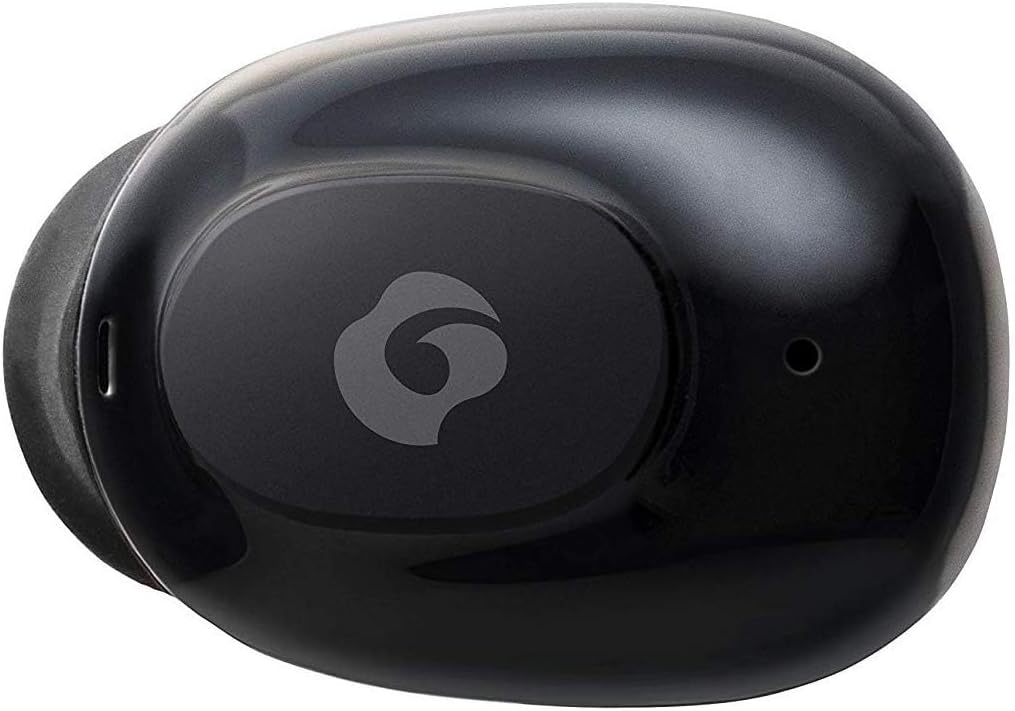
Kielelezo 4.2: Karibu view of a single GLIDiC earbud, highlighting the multifunction button with the GLIDiC logo and the microphone opening.
Vipengele vya Kesi ya Kuchaji
- Bandari za Kuchaji: Internal contacts for earbuds, external port for case charging.
- Kesi Kiashiria cha LED: Inaonyesha hali ya kuchaji ya kesi.
- Kifuniko: Protects earbuds and secures them during charging.
5. Kuweka
5.1 Kuchaji Awali
- Place both earbuds into the charging case. Ensure they are correctly seated, and the LED indicators on the earbuds illuminate.
- Unganisha kebo ya kuchaji ya USB kwenye mlango wa kuchaji kwenye kipochi na uchomeke mwisho mwingine kwenye chanzo cha nishati cha USB (kwa mfano, kompyuta, adapta ya ukutani).
- The case LED indicator will show charging status. Allow approximately 2 hours for a full charge of both earbuds and the case.
- Once fully charged, disconnect the charging cable. The earbuds offer up to 60 days of standby time when stored in the fully charged case.
5.2 Kuoanisha na Kifaa cha Bluetooth
- Hakikisha vifaa vya sauti vya masikioni vimechajiwa.
- Fungua kesi ya malipo. Vifaa vya masikioni vitaingia kiotomatiki modi ya kuoanisha, na viashirio vyake vya LED vitamulika.
- Kwenye kifaa chako kilichowezeshwa na Bluetooth (smartphone, kompyuta kibao, nk), nenda kwenye mipangilio ya Bluetooth.
- Tafuta available devices. Select "GLIDiC TW-5000s" from the list.
- Once connected, the earbud LED indicators will stop flashing and may show a solid light or turn off, depending on the model. A voice prompt may also confirm the connection.
- Ikiwa kuoanisha kutashindwa, weka vifaa vya masikioni ndani ya kisanduku, funga kifuniko, subiri sekunde chache, kisha rudia hatua hizo.
6. Maagizo ya Uendeshaji
6.1 Washa/Zima
- Washa: Open the charging case, or press and hold the multifunction button on each earbud for approximately 3 seconds.
- Zima umeme: Place the earbuds back into the charging case and close the lid, or press and hold the multifunction button on each earbud for approximately 5 seconds.
6.2 Uchezaji wa Muziki
- Cheza/Sitisha: Press the multifunction button once on either earbud.
- Wimbo Ufuatao: Double-press the multifunction button on the right earbud.
- Wimbo Uliopita: Double-press the multifunction button on the left earbud.
- Kiasi Juu: Triple-press the multifunction button on the right earbud.
- Punguza sauti: Triple-press the multifunction button on the left earbud.
6.3 Usimamizi wa Simu
- Jibu/Maliza Simu: Press the multifunction button once on either earbud.
- Kataa Simu: Press and hold the multifunction button on either earbud for approximately 2 seconds.
6.4 Msaidizi wa Sauti
- Washa Msaidizi wa Sauti: Press and hold the multifunction button on either earbud for approximately 2 seconds (when not on a call).
6.5 Multi-Communication Mode
The GLIDiC Sound Air TW-5000s features a multi-communication mode that allows select ambient sounds to be heard without compromising audio quality. This enhances user awareness and safety.
- Activate/Deactivate Multi-Communication Mode: Consult the specific instructions provided with your device, as activation methods can vary. Typically, this involves a specific press sequence on the multifunction button or an option within a companion app if available.
7. Matengenezo
7.1 Kusafisha
- Futa vifaa vya sauti vya masikioni na kisanduku cha kuchaji kwa kitambaa laini, kikavu, kisicho na utepe.
- Usitumie visafishaji abrasive, pombe, au vimumunyisho vya kemikali.
- Gently remove ear tips and clean them with mild soap and water if necessary. Ensure they are completely dry before reattaching.
- Tumia kitambaa kikavu cha pamba kusafisha kwa uangalifu sehemu za kuchajia kwenye vifaa vya masikioni na kwenye kisanduku.
7.2 Hifadhi
- Wakati haitumiki, hifadhi vifaa vya sauti vya masikioni kwenye kipochi chao cha kuchaji ili kuvilinda na kuhakikisha kuwa vinabaki na chaji.
- Hifadhi kifaa mahali pa baridi, kavu, mbali na jua moja kwa moja na joto kali.
8. Utatuzi wa shida
If you encounter issues with your GLIDiC Sound Air TW-5000s, refer to the following common problems and solutions:
| Tatizo | Suluhisho linalowezekana |
|---|---|
| Vifaa vya sauti vya masikioni haviwashi. | Ensure earbuds are charged. Place them in the charging case and connect the case to a power source. |
| Vifaa vya masikioni havioani na kifaa. |
|
| Kifaa kimoja tu cha sauti cha masikioni kilicho na sauti. |
|
| Kesi ya kuchaji haichaji. |
|
| Ubora wa sauti ni duni au wa vipindi. |
|
9. Vipimo
| Kipengele | Maelezo |
|---|---|
| Jina la Mfano | TW-5000s |
| Teknolojia ya Uunganisho | Isiyo na waya (Bluetooth) |
| Msururu wa Bluetooth | Mita 10 |
| Masafa ya Marudio | 20 Hz - 20,000 Hz |
| Battery Life (Carrying Case Standby) | Hadi Siku 60 |
| Kiwango cha Upinzani wa Maji | Haina Maji (Haijazi Jasho) |
| Aina ya Kudhibiti | Udhibiti wa Vyombo vya Habari, Mguso, Sauti |
| Vipengele Maalum | Microphone Included, Noise Cancellation, Multi-communication mode |
| Nyenzo | Plastic, TPE, and Silicone |
| Vipimo (Kifaa cha masikioni) | Inchi 0.98 x 0.67 x 0.91 (kadirio) |
| Uzito wa Kipengee | Wakia 9.6 (jumla ya uzito wa kifurushi) |
| UPC | 811559030024 |
10. Udhamini na Msaada
GLIDiC products are designed for reliability and performance. For specific warranty details, please refer to the warranty card included with your purchase or visit the official GLIDiC website. If you require technical support or have questions not covered in this manual, please contact GLIDiC customer service through their official channels.
Tafadhali hifadhi uthibitisho wako wa ununuzi kwa madai ya udhamini.