Utangulizi
The Hyperkin Armor3 NuWave Controller is designed to provide accurate and fluid motion control for your Nintendo Wii U and Wii consoles. Featuring built-in Nu+ technology, this controller enhances your gaming experience by offering a wider range of motion in compatible titles. This manual provides essential information on setting up, operating, maintaining, and troubleshooting your NuWave Controller.
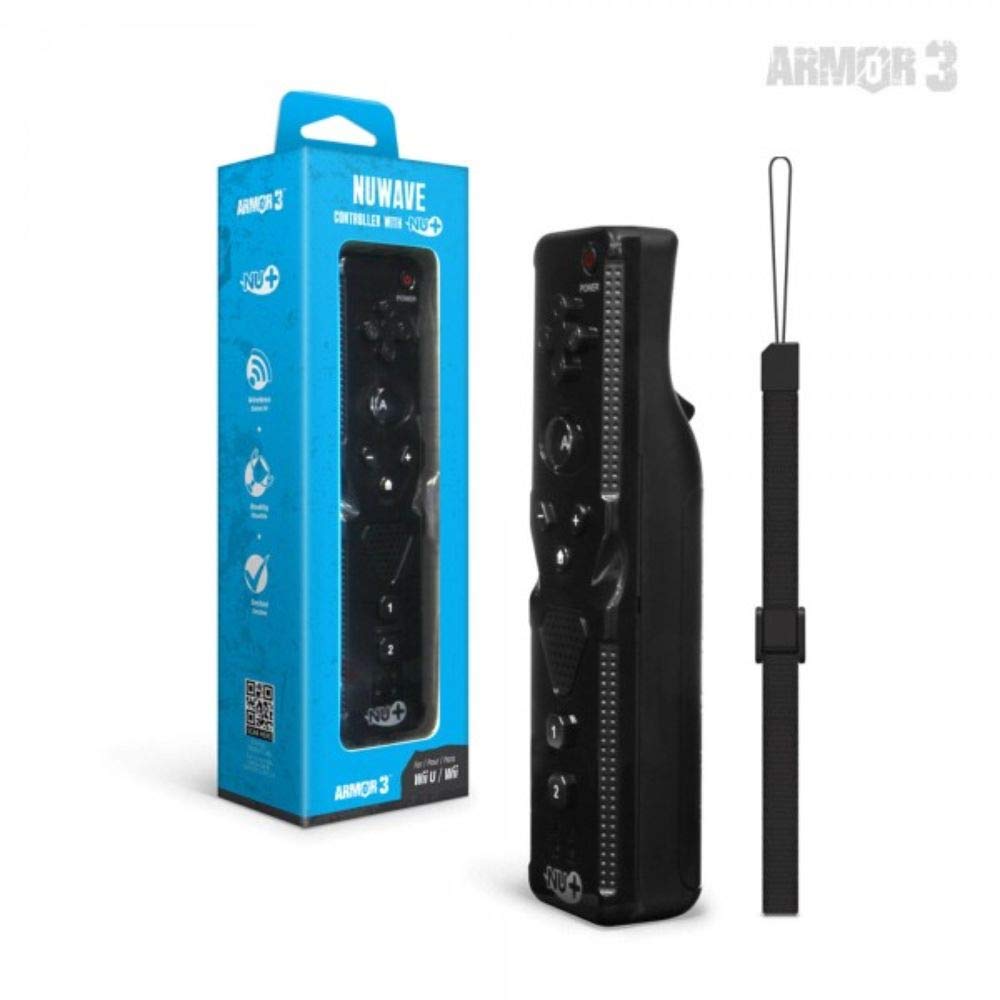
Kielelezo cha 1: Hyperkin Armor3 NuWave Controller and its packaging. The controller is black with a wrist strap, and the packaging highlights its Nu+ technology and compatibility with Wii U and Wii.
Bidhaa Imeishaview
The Armor3 NuWave Controller is a motion-sensing controller compatible with both Wii U and Wii systems. It integrates advanced Nu+ technology for enhanced motion detection and precision in supported games.
Sifa Muhimu:
- Utangamano: Fully compatible with Nintendo Wii U and Nintendo Wii consoles.
- Nu+ Technology: Built-in technology for a wider range of motion and improved accuracy in compatible titles.
- Muundo wa Ergonomic: Designed for comfortable grip and extended gameplay sessions.
- Chanzo cha Nguvu: Inahitaji betri 2 za AA (hazijajumuishwa).
Sanidi
1. Ufungaji wa Betri
- Tafuta sehemu ya betri nyuma ya kidhibiti.
- Telezesha kifuniko cha betri kuelekea chini ili kukifungua.
- Ingiza betri mbili (2) za AA, ukihakikisha polarity sahihi (+/-) kama inavyoonyeshwa ndani ya sehemu.
- Badilisha kifuniko cha betri kwa kutelezesha juu hadi ibofye mahali pake.
2. Connecting to Your Console
To connect the NuWave Controller to your Wii U or Wii console, follow these steps:
- Ensure your console is powered on.
- On your Wii U or Wii console, press the SYNC button (usually located near the SD card slot or battery compartment).
- On the NuWave Controller, open the battery cover and locate the small red SYNC button inside the battery compartment.
- Press and release the SYNC button on the controller.
- The player indicator lights on the bottom of the controller will flash. Once a single light remains lit, the controller is successfully connected.
- If connection fails, repeat steps 2-5. Ensure the controller is within range of the console.
Maagizo ya Uendeshaji
Vidhibiti vya Msingi:
- Pedi ya Mwelekeo (D-Pad): Used for menu navigation and character movement.
- Kitufe: Primary action button, often used for selection or interaction.
- B Button (Trigger): Located on the underside, typically used for grabbing or firing.
- Vifungo 1 na 2: Auxiliary action buttons, functions vary by game.
- Kitufe cha Nyumbani: Returns to the console's Home Menu.
- Plus (+) & Minus (-) Buttons: Often used for zooming, adjusting settings, or specific in-game actions.
- Kitufe cha Nguvu: Huwasha/kuzima kidhibiti.
Motion Sensing with Nu+ Technology:
The built-in Nu+ technology provides enhanced motion tracking. For games that support it, you will experience more precise and responsive movements. Hold the controller firmly and ensure clear line of sight to the sensor bar for optimal performance.
- Urekebishaji: Some games may require initial calibration. Follow on-screen prompts.
- Mkanda wa Kifundo: Always use the included wrist strap to prevent accidental drops during active gameplay.
Matengenezo
Kusafisha:
- Wipe the controller with a soft, dry cloth.
- Kwa uchafu mkaidi, kidogo dampfunika kitambaa na maji. Usitumie kemikali kali au visafishaji vya kukwaruza.
- Hakikisha hakuna kioevu kinachoingia kwenye nafasi za kidhibiti.
Hifadhi:
- Hifadhi kidhibiti mahali pa baridi, pakavu mbali na jua moja kwa moja na joto kali.
- Ikiwa itahifadhiwa kwa muda mrefu, ondoa betri ili kuzuia uvujaji.
Utunzaji wa Betri:
- Always use new, high-quality AA batteries.
- Usichanganye betri za zamani na mpya, au aina tofauti za betri.
- Tupa betri zilizotumika kwa uwajibikaji kulingana na kanuni za ndani.
Kutatua matatizo
| Tatizo | Sababu inayowezekana | Suluhisho |
|---|---|---|
| Kidhibiti hakiwaki. | Betri zilizokufa au zilizoingizwa vibaya. | Badilisha betri na betri mpya za AA, uhakikishe polarity sahihi. |
| Controller does not sync with console. | Incorrect syncing procedure; out of range; console interference. | Ensure console is on. Repeat syncing steps (press SYNC on console, then on controller). Move closer to console. Check for other wireless device interference. |
| Buttons are unresponsive or delayed. | Low battery; connection issue; physical obstruction. | Replace batteries. Re-sync the controller. Ensure buttons are not stuck. |
| Motion control is inaccurate. | Sensor bar obstruction; improper calibration; environmental factors. | Ensure clear line of sight to the sensor bar. Re-calibrate in-game if prompted. Avoid strong light sources directly facing the sensor bar. |
Vipimo
- Mfano: M07399-bk
- Chapa: Hyperkin
- Utangamano: Nintendo Wii U, Nintendo Wii
- Chanzo cha Nguvu: Betri 2 x AA (hazijajumuishwa)
- Vipimo: Inchi 2.8 x 1.8 x 8 (kadirio)
- Uzito: Wakia 3.88 (takriban, bila betri)
- Teknolojia: Built-in Nu+ motion technology
- Rangi: Nyeusi
Udhamini na Msaada
For specific warranty information and terms, please refer to the documentation included with your purchase or visit the official Hyperkin website. Hyperkin provides customer support for their products.
Msaada mkondoni: Visit the official Hyperkin webtovuti ya Maswali Yanayoulizwa Mara kwa Mara, miongozo ya utatuzi, na maelezo ya mawasiliano. www.hyperkin.com
Anwani: Refer to the Hyperkin website for the most current customer service contact methods (phone, email, etc.).


