1. Utangulizi
This manual provides essential instructions for setting up, operating, and maintaining your LG Phoenix 4 X210 smartphone. Please read this manual thoroughly to ensure proper use and to maximize the device's features.
The LG Phoenix 4 X210 is a GSM unlocked smartphone featuring a 5.0-inch display, 8 MP rear camera, 5 MP front camera, 16 GB internal memory, 2 GB RAM, and runs on Android 7.1 Nougat.
2. Mpangilio wa Kifaa
Familiarize yourself with the physical components of your LG Phoenix 4 X210.
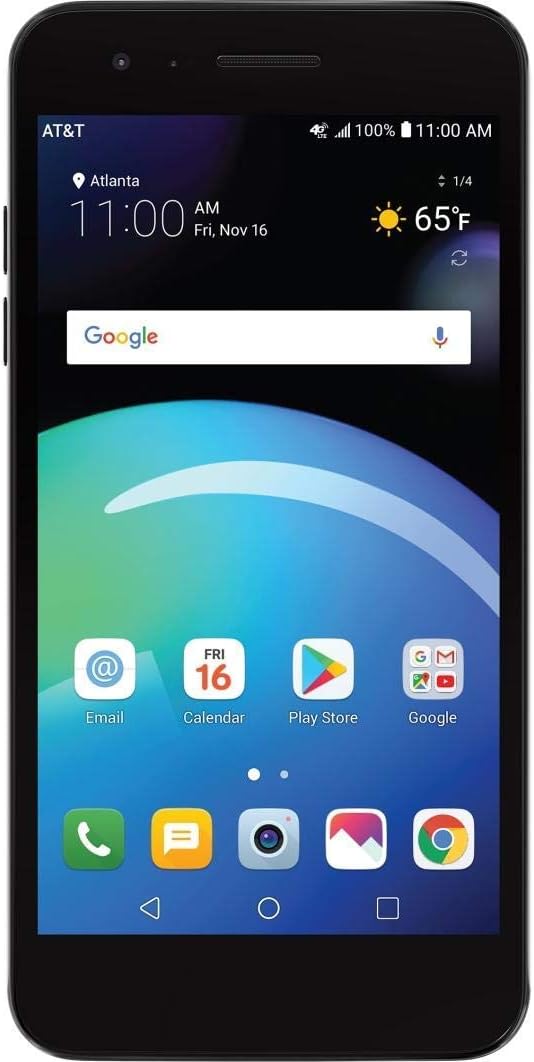
Kielelezo 2.1: Mbele View. This image shows the front of the LG Phoenix 4 X210 smartphone. The screen is active, displaying the home screen with various application icons, the current time, date, and weather information. The AT&T carrier logo is visible in the top left corner, indicating network connectivity.

Kielelezo cha 2.2: Nyuma View. This image displays the back of the LG Phoenix 4 X210. Prominently featured are the main camera lens, the LED flash, and a circular fingerprint sensor located below the camera. The LG logo is visible towards the bottom of the device.

Mchoro 2.3: Upande wa Kulia View. This image illustrates the right side of the LG Phoenix 4 X210, where the volume up and down buttons, along with the power/lock button, are located.

Kielelezo 2.4: Chini View. This image shows the bottom edge of the LG Phoenix 4 X210, featuring the 3.5mm headphone jack, the micro USB charging/data port, and the primary microphone opening.
3. Kuweka
3.1 Kuingiza SIM Kadi
The LG Phoenix 4 X210 requires a Nano-sized SIM card for network connectivity. The SIM card is not included with the device.
- Zima kifaa kabisa.
- Locate the SIM card slot, typically on the side or under the back cover. Refer to the device diagram for exact location.
- Insert the Nano SIM card into the designated slot with the gold contacts facing down, ensuring it is correctly oriented.
- Close the SIM card tray or replace the back cover securely.
Kumbuka: This device is GSM unlocked and compatible with GSM carriers such as AT&T and T-Mobile. It will not work with CDMA carriers like Verizon or Sprint.
3.2 Umeme wa Awali Umewashwa
- Press and hold the Power button (located on the right side of the device) until the LG logo appears on the screen.
- Fuata maekelezo kwenye skrini ili kukamilisha usanidi wa kwanza, ikijumuisha uteuzi wa lugha, muunganisho wa Wi-Fi, usanidi wa akaunti ya Google na mipangilio ya usalama.
4. Maagizo ya Uendeshaji
4.1 Urambazaji Msingi
- Skrini ya kugusa: Tap, swipe, pinch, and spread gestures are used to interact with the device.
- Skrini ya Nyumbani: Fikia programu, wijeti, na arifa. Binafsisha kwa kubonyeza kwa muda mrefu kwenye nafasi tupu.
- Upau wa Urambazaji: The bottom of the screen typically features Back, Home, and Recent Apps buttons.
4.2 Kupiga Simu na Kutuma Ujumbe
- Simu: Gusa aikoni ya Simu, ingiza nambari, na ubonyeze kitufe cha kupiga simu.
- Ujumbe: Tap the Messages icon, start a new conversation, enter the recipient and message, then send.
4.3 Matumizi ya Kamera
The device features an 8 MP rear camera with autofocus and flash, and a 5 MP front camera with Auto Shot for selfies.
- Fungua programu ya Kamera.
- Select between front and rear cameras using the camera switch icon.
- Tap the screen to focus, then tap the shutter button to capture a photo or start/stop video recording.
4.4 Usimamizi wa Betri
The LG Phoenix 4 X210 is equipped with a 2,500 mAh removable battery. To optimize battery life:
- Rekebisha mwangaza wa skrini.
- Zima Wi-Fi, Bluetooth, na GPS wakati haitumiki.
- Funga programu ambazo hazijatumika zinazoendeshwa chinichini.
- Utilize power-saving modes available in Settings.
5. Matengenezo
5.1 Kusafisha Kifaa
- Tumia kitambaa laini kisicho na pamba kusafisha skrini na mwili wa simu.
- Epuka kutumia kemikali kali au vifaa vya abrasive.
- Hakikisha milango yote imekauka kabla ya kuchaji.
5.2 Usasisho wa Programu
Regularly check for software updates to ensure optimal performance and security. Updates can typically be found in Mipangilio > Kuhusu simu > Masasisho ya programu.
5.3 Utunzaji wa Betri
- Epuka kuweka betri kwenye joto kali.
- Tumia chaja na nyaya zilizoidhinishwa pekee.
- If the battery is removable, ensure it is properly seated.
6. Utatuzi wa shida
6.1 Masuala ya Kawaida na Suluhu
| Suala | Suluhisho linalowezekana |
|---|---|
| Kifaa hakiwashi | Hakikisha kuwa betri imechajiwa. Unganisha chaja na usubiri dakika chache kabla ya kujaribu kuwasha tena. |
| Hakuna mawimbi ya mtandao | Verify SIM card is correctly inserted. Check network settings (Settings > Network & internet > Mobile network). Ensure you are within a GSM network coverage area. |
| Betri huisha haraka | Reduce screen brightness, disable unused features (Wi-Fi, Bluetooth, GPS), close background apps, and check for power-intensive apps in Battery settings. |
| Programu zinaanguka au kuganda | Restart the device. Clear the cache of the problematic app (Settings > Apps & notifications > App info > Storage > Clear cache). If the issue persists, consider uninstalling and reinstalling the app. |
| Kifaa kina kasi ya chini au hakijibu | Close unnecessary apps. Clear device cache. Consider performing a factory reset as a last resort (backup data first). |
6.2 Rudisha Kiwanda
Urejeshaji wa mipangilio ya kiwandani utafuta data yote kutoka kwa kifaa chako na kuirejesha kwenye mipangilio yake ya kiwandani asili. Hifadhi nakala rudufu ya data zote muhimu kabla ya kuendelea.
- Nenda kwa Mipangilio > Mfumo > Chaguzi za kuweka upya.
- Chagua Futa data yote (rejesha mipangilio ya kiwandani).
- Thibitisha uamuzi wako na uingize PIN/nenosiri lako ukiombwa.
7. Vipimo
- Mfano: LG Phoenix 4 X210 (LM-X210APM-cr)
- Mfumo wa Uendeshaji: Android 7.1 Nougat
- Onyesha: inchi 5.0
- Kichakataji: 1.4GHz Quad-Core Qualcomm Snapdragon (MSM8917)
- Hifadhi ya Ndani: 16 GB (approximately 9 GB available to user)
- RAM: GB 2
- Kamera ya Nyuma: 8 MP Autofocus na Flash
- Kamera ya mbele: 5 MP Auto Shot
- Betri: 2,500 mAh Removable Lithium Ion
- Wakati wa Maongezi: Hadi saa 14
- Wakati wa Kusubiri: Hadi siku 16.5
- Vipimo: Inchi 5.69 x 2.86 x 0.31
- Uzito: Wakia 4.8 (gramu 136)
- Utangamano wa Mtandao: GSM 850/900/1800/1900 MHz, UMTS Bands 2/4/5, LTE Bands 2/4/5/12
- Muunganisho: Wi-Fi, Bluetooth, GPS
8. Udhamini na Msaada
For warranty information and technical support, please refer to the documentation provided with your purchase or visit the official LG support webtovuti. Weka uthibitisho wako wa ununuzi kwa madai ya udhamini.
This device is sold as an unlocked unit. For network-specific issues, contact your chosen GSM carrier.