Utangulizi
This instruction manual provides comprehensive guidance for the Byron DBY-24722 Wireless Doorbell Kit. This kit includes a plug-in chime unit and a wireless push button, designed to alert you when someone is at your door. It offers a wireless range of up to 200 meters, customizable melodies, adjustable volume, and visual LED alerts. The system is also compatible with the Smartwares PRO series for smart home integration.
Yaliyomo kwenye Kifurushi
Ensure all components are present before proceeding with installation:
- Byron Wireless Plug-in Chime Unit (DBY-24722)
- Kitufe cha Kushinikiza kisicho na waya
- Double-sided Adhesive Tape for Push Button
- Mwongozo wa Maagizo

Maelezo ya Picha: A white Byron wireless doorbell kit, showing the rectangular plug-in chime unit on the left and the smaller, oval-shaped wireless push button on the right. Both units are white with a silver-colored ring around the central button area.
Kuweka na Kuweka
- Install Push Button: Select a suitable location for the wireless push button, typically near your front door. Ensure the surface is clean and dry. Use the provided double-sided adhesive tape to securely attach the push button. The push button is weatherproof (IP44 rated).
- Install Chime Unit: Plug the chime unit into a standard electrical outlet within your home. For optimal performance, choose a central location or an area where you wish to be alerted. The chime unit operates on 220-240V~ 50Hz.
- Uwiano wa awali (ikiwa ni lazima): The units are typically pre-paired from the factory. If they do not connect automatically, refer to the full manual for pairing instructions if needed.

Maelezo ya Picha: Upande view of the Byron DBY-24722 doorbell kit. The plug-in chime unit is shown with its electrical prongs extending from the back, ready to be plugged into an outlet. The wireless push button is positioned next to it.
Maagizo ya Uendeshaji
Once installed, the Byron DBY-24722 Wireless Doorbell Kit is ready for use.
- When the push button is pressed, the chime unit will sound the selected melody and illuminate its LED indicator.
- The LED indicator on the chime unit will light up in your chosen color, providing a visual alert in addition to the audio.
Kubinafsisha
The doorbell offers several customization options:
- Uchaguzi wa Melody: Choose from 8 different digital melodies. Refer to the chime unit's controls for melody selection.
- Marekebisho ya Sauti: Adjust the volume of the chime up to 85 decibels. This ensures you can hear the doorbell clearly in various environments.
- LED Color Choice: The chime unit's LED can illuminate in various colors. Select your preferred color for visual alerts.
- Zima Kitendo: Activate the mute function to silence the chime while still receiving visual alerts via the LED indicator. This is useful for quiet periods or when children are sleeping.
Smart Home Integration (Smartwares PRO)
The Byron DBY-24722 doorbell is compatible with the Smartwares PRO series, allowing for integration into your smart home system.
- To enable smart home features, you will need the Smartwares Link (available separately).
- Connect the doorbell and your smartphone to the Smartwares Link network.
- Once connected, you can receive notifications on your smartphone when someone presses the doorbell, regardless of your location.
Matengenezo
- Kusafisha: Futa kifaa cha kutoa kengele na bonyeza kitufe kwa kitambaa laini na kikavu. Usitumie visafishaji au viyeyusho vya kukwaruza.
- Kubadilisha Betri (Bonyeza Kitufe): The push button requires 1 Lithium metal battery (CR2450, 3V). If the push button stops functioning, replace the battery. Ensure correct polarity. The battery is haijajumuishwa katika kifurushi.
- Kitengo cha Kengele: The plug-in chime unit does not require battery replacement as it is powered by the mains electricity.
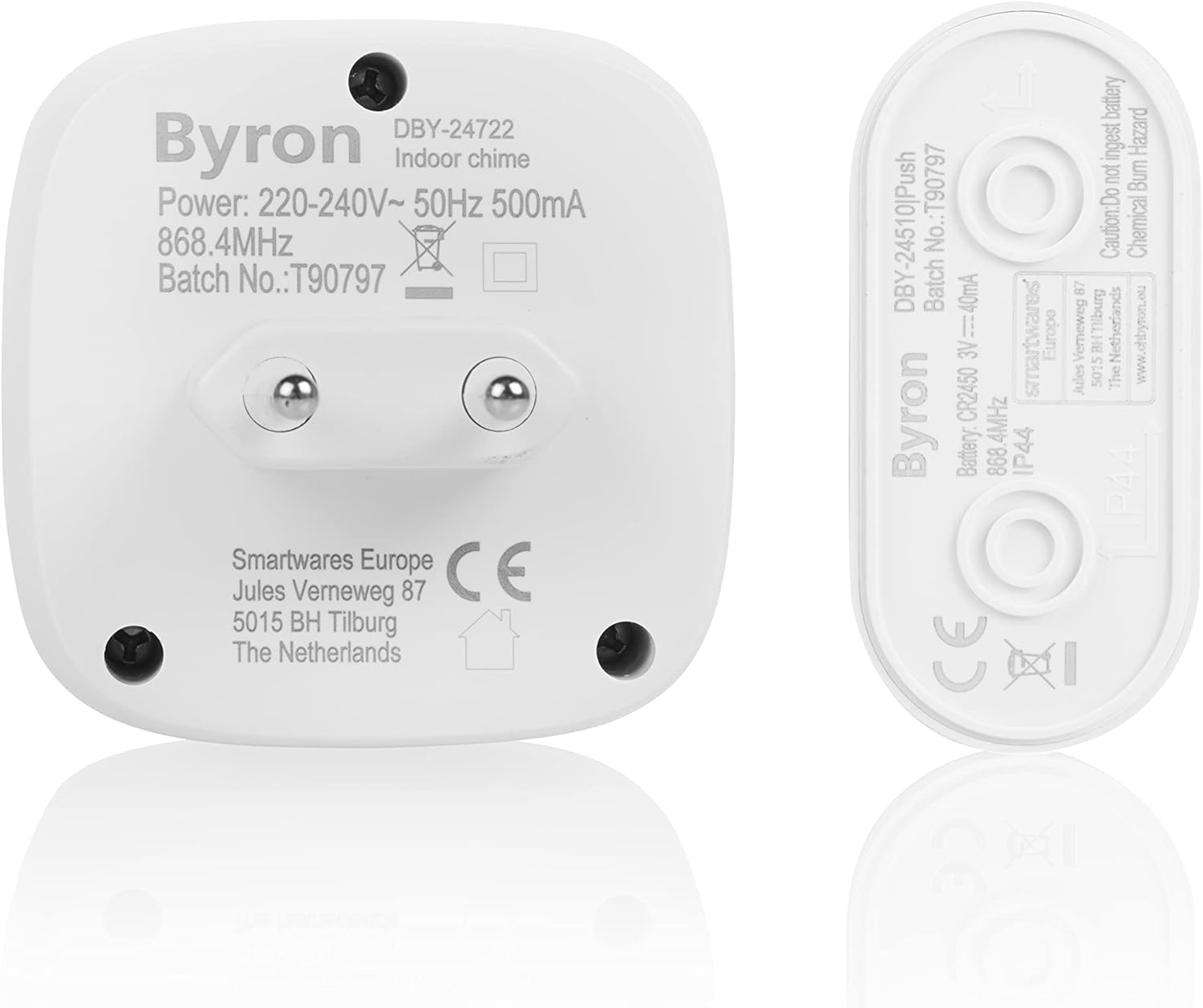
Maelezo ya Picha: A view of the back of the Byron DBY-24722 plug-in chime unit and the wireless push button. Labels on the back of both units show model numbers, power requirements, and other technical specifications, including battery type for the push button.
Kutatua matatizo
| Tatizo | Sababu inayowezekana | Suluhisho |
|---|---|---|
| Kengele haisikiki wakati kitufe kimebonyezwa. |
|
|
| Chime husikika mara kwa mara. |
|
|
| Kiashiria cha LED hakiwaki. |
|
|
Vipimo
- Nambari ya Mfano:
- DBY-24722
- Chapa:
- Byron
- Chime Power Source:
- AC (220-240V~ 50Hz 500mA)
- Betri ya Kitufe cha Kushinikiza:
- 1 x Lithium Metal (CR2450, 3V 40mA) - Haijajumuishwa
- Safu Isiyo na Waya:
- Hadi mita 200 (uwanja wazi)
- Kiwango cha Sauti:
- Hadi 85 dB
- Nyimbo:
- 8 digital melodies
- Mbinu ya Kudhibiti:
- Mguso
- Vipimo vya Bidhaa (L x W x H):
- 11 x 16 x 14.8 cm (Chime unit)
- Uzito wa Bidhaa:
- Gramu 128
- Nyenzo:
- Plastiki casing
- IP Rating (Push Button):
- IP44
- Utangamano:
- Smartwares PRO series, Smartwares Link
Udhamini na Msaada
Kwa taarifa za udhamini na usaidizi wa kiufundi, tafadhali rejelea hati zilizotolewa na ununuzi wako au tembelea Byron/Smartwares rasmi. webtovuti. Weka uthibitisho wako wa ununuzi kwa madai ya udhamini.


