Mwongozo wa Mtumiaji wa Kibodi ya Michezo ya Funguo 35 za HXSJ V100
Mfano: V100
1. Utangulizi
Thank you for choosing the HXSJ V100 35 Keys Gaming Keyboard. This compact, single-hand membrane keyboard is designed to enhance your gaming experience with its ergonomic design, programmable features, and vibrant LED backlighting. This manual provides detailed instructions on how to set up, operate, and maintain your keyboard to ensure optimal performance.
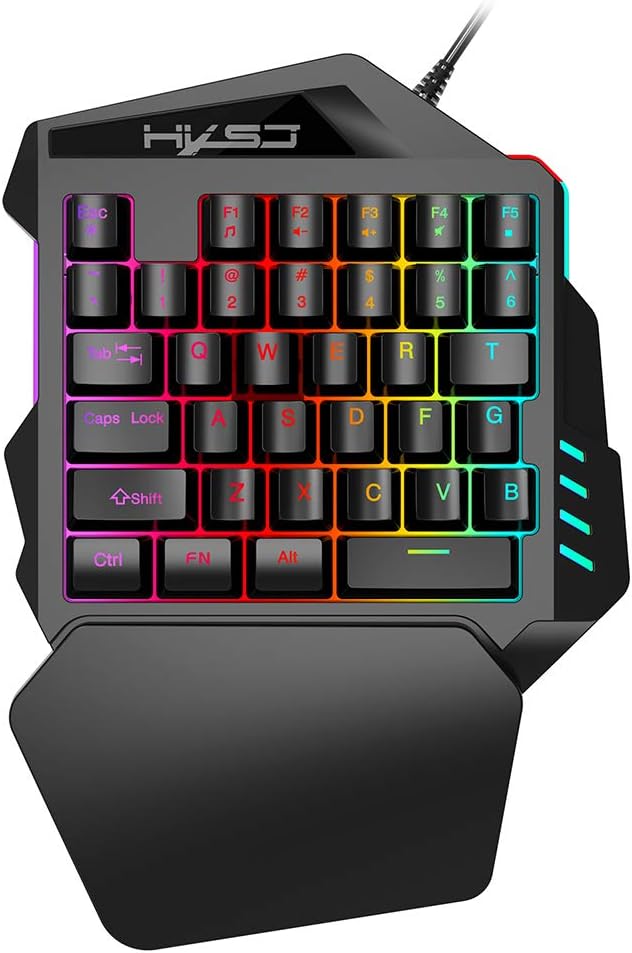
Figure 1: HXSJ V100 35 Keys Gaming Keyboard Overview
The HXSJ V100 is engineered for precision and comfort, making it an ideal companion for games like PUBG, LOL, and CS. Its mini design allows for easy single-hand operation, while the integrated wrist rest provides support during extended gaming sessions.
2. Sifa Muhimu
- Luminous LED Backlight: Features vibrant LED color backlighting for an immersive gaming atmosphere, especially in low-light conditions.
- Programmable Advanced Control: Offers customizable lighting and key functions for a personalized gaming setup.
- Muundo mdogo wa Kubebeka: Compact 35-key layout provides a super easy single-hand operating experience, optimizing desk space.
- Mapumziko ya Kifundo cha Mkono: Designed to fit your hand and wrist comfortably, simplifying complex operations and reducing fatigue.
- Utangamano mpana: Supports various operating systems including Win 2000, Win XP, Win ME, Vista, Win7, Win8, Android, Linux, and Apple.

Figure 2: Ergonomic Hand Rest for Enhanced Comfort
3. Yaliyomo kwenye Kifurushi
Tafadhali angalia yaliyomo kwenye kifurushi unapoondoa sanduku ili kuhakikisha kuwa vipengee vyote vipo:
- 1 x HXSJ V100 35 Keys Gaming Keyboard
- 1 x Mwongozo wa Mtumiaji
4. Mwongozo wa Kuweka
Setting up your HXSJ V100 Gaming Keyboard is straightforward. Follow these steps to get started:
- Unganisha kwenye Kifaa: Locate an available USB 2.0 port on your computer, laptop, or compatible gaming device.
- Chomeka: Ingiza kiunganishi cha USB cha kibodi kwenye mlango wa USB.
- Usakinishaji wa Kiotomatiki: Mfumo wako wa uendeshaji unapaswa kutambua moja kwa moja na kufunga madereva muhimu. Mchakato huu unaweza kuchukua muda mfupi.
- Tayari kwa Matumizi: Once the drivers are installed, the keyboard's LED backlight will illuminate, indicating it is ready for use.

Figure 3: Connecting the HXSJ V100 Keyboard to a Device
5. Maagizo ya Uendeshaji
The HXSJ V100 keyboard is designed for intuitive use. Here are the primary functions and special key combinations:
5.1 Kazi Muhimu za Kawaida
The keyboard features 35 standard keys, including alphanumeric keys, function keys (F1-F5), and modifier keys (Ctrl, Shift, Alt, FN). These keys operate as standard input devices for your computer or gaming system.

Figure 4: HXSJ V100 Keyboard Key Layout
5.2 FN Combination Functions
The FN key allows access to multimedia functions. Press and hold the FN key, then press the corresponding function key:
- FN+F1: Kicheza Muziki
- FN+F2: Volume Decrement
- FN+F3: Volume Increment
- FN+F4: Nyamazisha
- FN+F5: Sitisha/Cheza
Kumbuka: This keyboard features a single backlight color mode as depicted in the product images. The backlight is not customizable to different colors, but provides a consistent, vibrant illumination.
6. Matengenezo na Matunzo
To ensure the longevity and optimal performance of your HXSJ V100 Gaming Keyboard, follow these maintenance guidelines:
- Kusafisha: Tumia kitambaa laini na kikavu kufuta uso wa kibodi. Kwa uchafu mkaidi, futa kidogoampjw.org sw kitambaa chenye maji au kisafishaji kisicho na majimaji. Epuka unyevu kupita kiasi.
- Uondoaji wa vumbi: Tumia hewa iliyoshinikizwa kuondoa vumbi na uchafu kutoka kati ya funguo.
- Epuka Vimiminika: Usimwagie vimiminika kwenye kibodi. Ikiwa kitamwagika, ondoa kibodi mara moja na uiache ikauke kabisa kabla ya kuunganisha tena.
- Hifadhi: Hifadhi kibodi mahali pa baridi, pakavu mbali na jua moja kwa moja na halijoto kali wakati haitumiki kwa muda mrefu.
- Kushughulikia kwa Uangalifu: Avoid dropping the keyboard or subjecting it to strong impacts, which can damage internal components.
7. Utatuzi wa shida
If you encounter issues with your HXSJ V100 Gaming Keyboard, please refer to the following common problems and solutions:
| Tatizo | Sababu inayowezekana | Suluhisho |
|---|
| Kibodi haijibu | Muunganisho wa USB uliolegea, bandari ya USB yenye hitilafu, suala la dereva. | Ensure USB cable is securely plugged in. Try a different USB port. Restart your computer. Check Device Manager for driver issues. |
| Backlight haifanyi kazi | Keyboard not powered, backlight setting. | Ensure keyboard is properly connected and receiving power. The backlight is always on when powered. If not, try reconnecting. |
| Vifunguo ambavyo havijasajiliwa | Dust/debris under keys, software conflict. | Use compressed air to clean around and under the affected keys. Test the keyboard on another computer to rule out software issues. |
| FN multimedia keys not working | Mchanganyiko usio sahihi wa funguo, mgongano wa programu. | Ensure you are pressing and holding the FN key before pressing the desired F key. Check if other multimedia software is interfering. |
8. Maelezo ya Bidhaa
Detailed technical specifications for the HXSJ V100 Gaming Keyboard:
| Kigezo | Thamani |
|---|
| Jina la Bidhaa | One-handed Gaming Keyboard |
| Mfano wa Bidhaa | V100 |
| Kiolesura cha Bidhaa | USB 2.0 |
| Kibodi Kawaida | Kinanda Ndogo |
| Mtindo wa Uendeshaji | Utando |
| Idadi ya Funguo | 35 funguo |
| Urefu wa mstari wa bidhaa | mita 1.6 |
| Kazi ya Sasa | 100mA |
| Uzito wa Bidhaa | 350g |
| Ukubwa wa Bidhaa (L*W*H) | 26 x 18 x 4 cm |
| Uzito wa Kifurushi | 415g |
| Ukubwa wa Kifurushi | 26 x 19 x 4 cm |
| Mfumo wa Uendeshaji Sambamba | Win 2000, Win XP, Win ME, Vista, Win7, Win8, Android, Linux, Apple |
| Rangi ya Mwangaza | RGB (fixed mode) |

Figure 5: Product Label on the Bottom of the Keyboard
9. Udhamini na Msaada
HXSJ products are manufactured to high-quality standards. For information regarding warranty coverage, technical support, or service inquiries, please refer to the warranty card included with your product or visit the official HXSJ webtovuti. Tafadhali hifadhi uthibitisho wako wa ununuzi kwa madai yoyote ya udhamini.


