Utangulizi
This manual provides comprehensive instructions for the LMHOME Mini GPS Tracker (Model LM002). This device is designed for tracking various assets, vehicles, or individuals, offering features such as real-time location, geo-fencing, and historical data playback. Please read this manual carefully before using the device to ensure proper operation and maximize its capabilities.
Bidhaa Imeishaview
The LMHOME Mini GPS Tracker is a compact, waterproof device equipped with a strong internal magnet for easy placement. It operates using GPS, LBS, and GSM technologies for accurate positioning.

Figure 1: LMHOME Mini GPS Tracker and its accompanying mobile application interface.

Figure 2: Versatile applications of the LMHOME Mini GPS Tracker for tracking various items and individuals.

Figure 3: The tracker's ability to pinpoint location and display it on a mobile device.
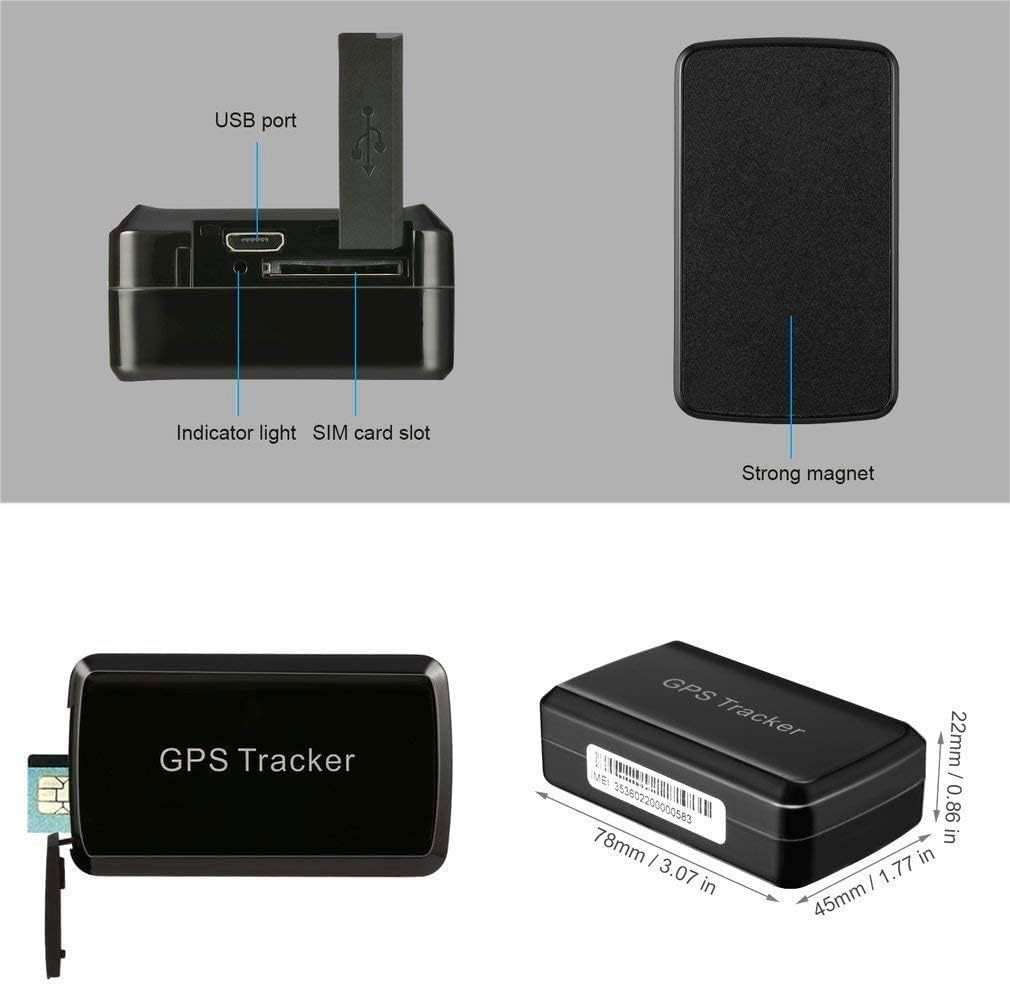
Figure 4: Key components and physical dimensions of the LMHOME Mini GPS Tracker.

Figure 5: Diverse applications for the LMHOME Mini GPS Tracker.

Kielelezo 6: Kutample of using the tracker for child safety by placing it in a backpack.
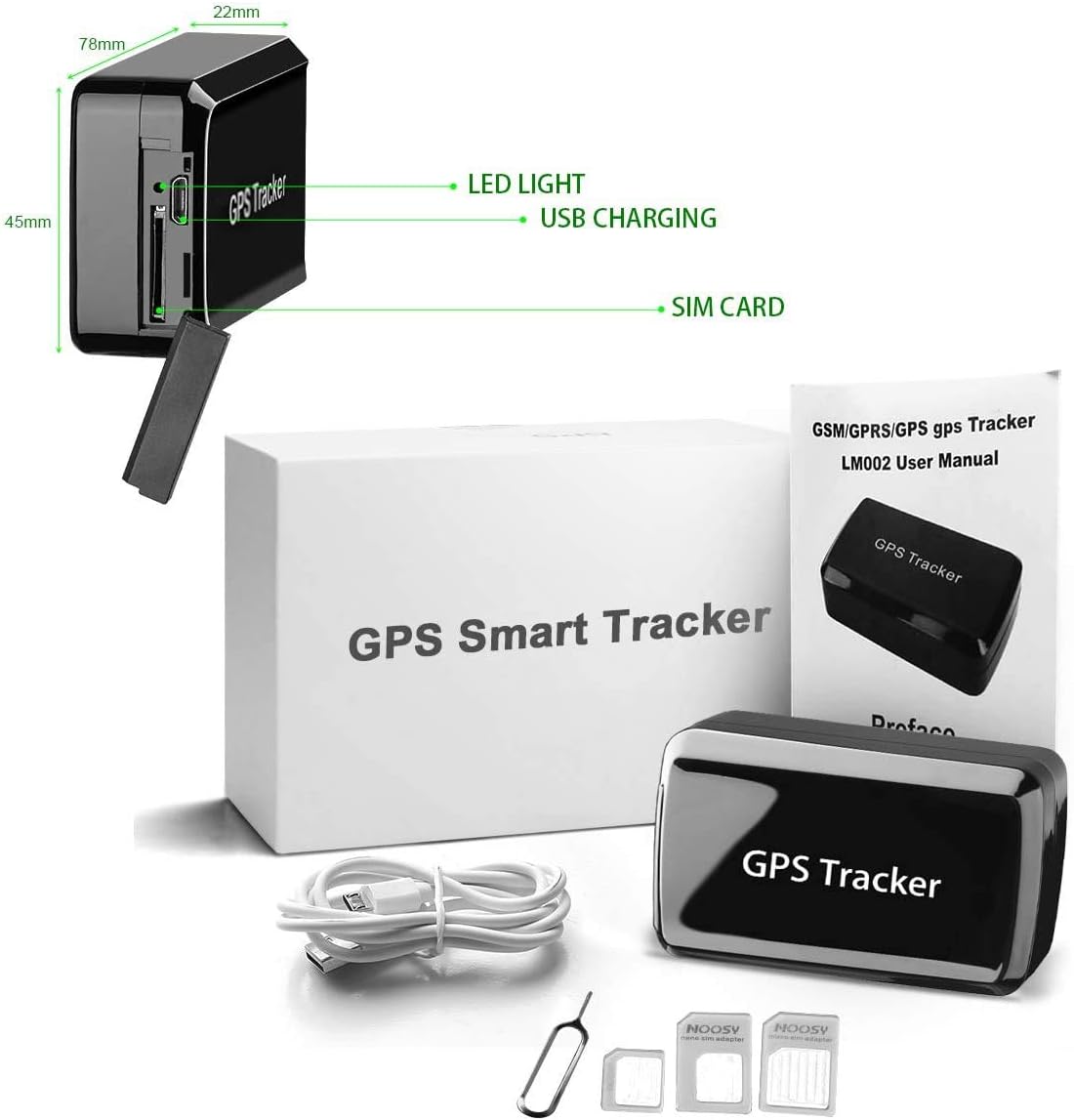
Figure 7: Package contents including the GPS tracker, charging cable, and SIM tools.

Kielelezo 8: Zaidiview of the various alarm features supported by the tracker.
Yaliyomo kwenye Kifurushi:
- 1 x Car GPS Tracker
- 1 x Instructions (User Manual)
- 1 x Qualified Certification
- 1 x Data cable (USB charging cable)
Sanidi
1. Ufungaji wa SIM Kadi:
The LMHOME Mini GPS Tracker requires a 2G SIM card for full functionality. Please ensure the SIM card is active and has sufficient data/credit. T-Mobile and SpeedTalk are recommended providers for 2G service in applicable regions.
- Tafuta sehemu ya SIM kadi kwenye kando ya kifaa (rejelea Mchoro 4).
- Carefully insert the 2G SIM card into the slot, ensuring correct orientation.
- Funga kifuniko cha nafasi ya SIM kadi kwa usalama.
2. Kuchaji Kifaa:
Before first use, fully charge the device. The tracker is powered by a rechargeable lithium polymer battery.
- Connect the provided data cable to the USB port on the tracker (refer to Figure 4).
- Connect the other end of the data cable to a standard USB power adapter (not included) or a computer USB port.
- The indicator light will show charging status. Allow the device to charge until the indicator light indicates a full charge.
3. Initial Activation:
Once the SIM card is installed and the device is charged, power on the device. It will automatically attempt to connect to the network and acquire a GPS signal.
Maagizo ya Uendeshaji
The LMHOME Mini GPS Tracker can be operated via SMS, calling, or through a dedicated mobile application/web jukwaa.
1. Mobile Application / Web Jukwaa:
The most comprehensive way to use the tracker is through its user-friendly mobile application or web platform. This allows for real-time viewing, monitoring, and management.
- Download the official application from your smartphone's app store (details typically provided in the included instructions or on the product packaging).
- Vinginevyo, fikia web jukwaa katika www.smartgpshome.com.
- Follow the on-screen instructions to register your device using its unique ID (IMEI number, usually found on the device or packaging).
- Mara baada ya kusajiliwa, unaweza view the device's current location, historical routes, and configure various settings and alerts. The location is automatically updated on the map every minute.
2. SMS / Calling Tracking:
The device also supports basic tracking via SMS commands or by calling the SIM card number inside the tracker. Specific SMS commands will be detailed in the included instructions. When calling the device, it may respond with a location link via SMS.
3. Sifa Muhimu:
- Global Locate: Works worldwide where GPS signal is available, using GPS + LBS + GSM for positioning with an error range of less than 5 meters.
- Geo-Fence: Set up a virtual boundary. If the device enters or exits this defined area, your phone will receive an alarm message.
- Tahadhari ya Mtetemo: Receive an alert on your phone if the device detects vibration, useful for anti-theft purposes.
- Kengele ya Mwendo: Alerts you if the device moves from its stationary position.
- Kengele ya Betri ya Chini: Notifies you when the device's battery is running low.
- Kengele ya Kasi: Set a speed limit, and receive an alert if the device exceeds it.
- Takwimu za kihistoria: Records all movement history for up to 3 months, accessible via the mobile app or web jukwaa.
Matengenezo
- Kusafisha: Futa kifaa kwa kitambaa laini, kavu. Usitumie kemikali kali au visafishaji vya abrasive.
- Inayozuia maji: The device is IP58 waterproof, meaning it is protected from limited dust ingress and can withstand immersion in water up to 1 meter for 30 minutes. However, avoid prolonged submersion or exposure to high-pressure water jets.
- Utunzaji wa Betri: To prolong battery life, avoid extreme temperatures. Charge the device regularly, especially if it will be stored for an extended period.
- Hifadhi: Hifadhi kifaa mahali pa baridi, kavu wakati haitumiki.
Kutatua matatizo
| Tatizo | Sababu inayowezekana | Suluhisho |
|---|---|---|
| Kifaa hakijawashwa. | Chaji ya betri ya chini au hakuna. | Charge the device fully using the provided data cable. |
| Hakuna ishara ya GPS / Eneo lisilo sahihi. | Device is indoors, in a covered area, or in an area with poor GPS reception. | Move the device to an open outdoor area with a clear view of the sky. Ensure the SIM card is active and has data. |
| Device not connecting to network. | SIM card not inserted correctly, SIM card inactive, or no 2G network coverage. | Re-insert the SIM card. Verify the SIM card is active and has a 2G plan. Check for 2G network availability in your area. |
| App not showing device online. | Device is off, SIM card issues, or incorrect device ID entered in app. | Ensure the device is powered on and has network connectivity. Verify the device ID entered in the app matches the one on your tracker. |
| Alarms not received. | Alarm settings not configured, app notifications disabled, or network issues. | Check alarm settings in the mobile app. Ensure app notifications are enabled on your phone. Verify network connectivity. |
Vipimo
| Kipengele | Maelezo |
|---|---|
| Mfano | LM002 |
| Voltage | 3.6-4.2VDC |
| Masafa ya GSM | 850M/900M/1800M/1900M (Global, not suitable for CDMA) |
| Mtandao | GSM/GPRS |
| Usahihi wa GPS | 5m |
| Betri chelezo | 3.7V 4000mA Lithium Polymer |
| Ukadiriaji wa kuzuia maji | IP58 |
| Teknolojia ya Uunganisho | Simu ya rununu |
| Programu Inayotumika | GPS |
| Vifaa Sambamba | Simu mahiri |
| Uzito wa Kipengee | 200 g |
| Vipimo (takriban.) | 78mm x 45mm x 22mm (inchi 3.07 x 1.77 x 0.86) |
Msaada
For any problems or inquiries regarding your LMHOME Mini GPS Tracker, please contact the seller directly through your Amazon account by clicking the "seller contact" button. You can also visit the official web jukwaa katika www.smartgpshome.com kwa rasilimali za ziada na usaidizi.
Taarifa ya Udhamini
Specific warranty details are typically provided with the product's included documentation. Please refer to the "Qualified Certification" or separate warranty card within your package for comprehensive information regarding warranty coverage, terms, and conditions. For warranty claims, retain your proof of purchase.

