Utangulizi
This manual provides detailed instructions for the setup, operation, and maintenance of your HORI PS4 Onyx Plus Wireless Controller. Please read this manual thoroughly before use to ensure proper functionality and longevity of your device.
Bidhaa Imeishaview
The HORI PS4 Onyx Plus Wireless Controller is designed for use with the PlayStation 4 console, offering wireless connectivity and a range of features for an enhanced gaming experience.
Sifa Muhimu
- Uunganisho wa wireless: Connects wirelessly to the PS4 console.
- Adjustable Triggers: Customizable trigger pressure.
- Vijiti viwili vya Analogi: For precise control.
- Imejengwa ndani ya Mic: For online chat and voice commands.
- Multi-Functional: Various buttons and features for diverse gameplay.
Mpangilio wa Kidhibiti
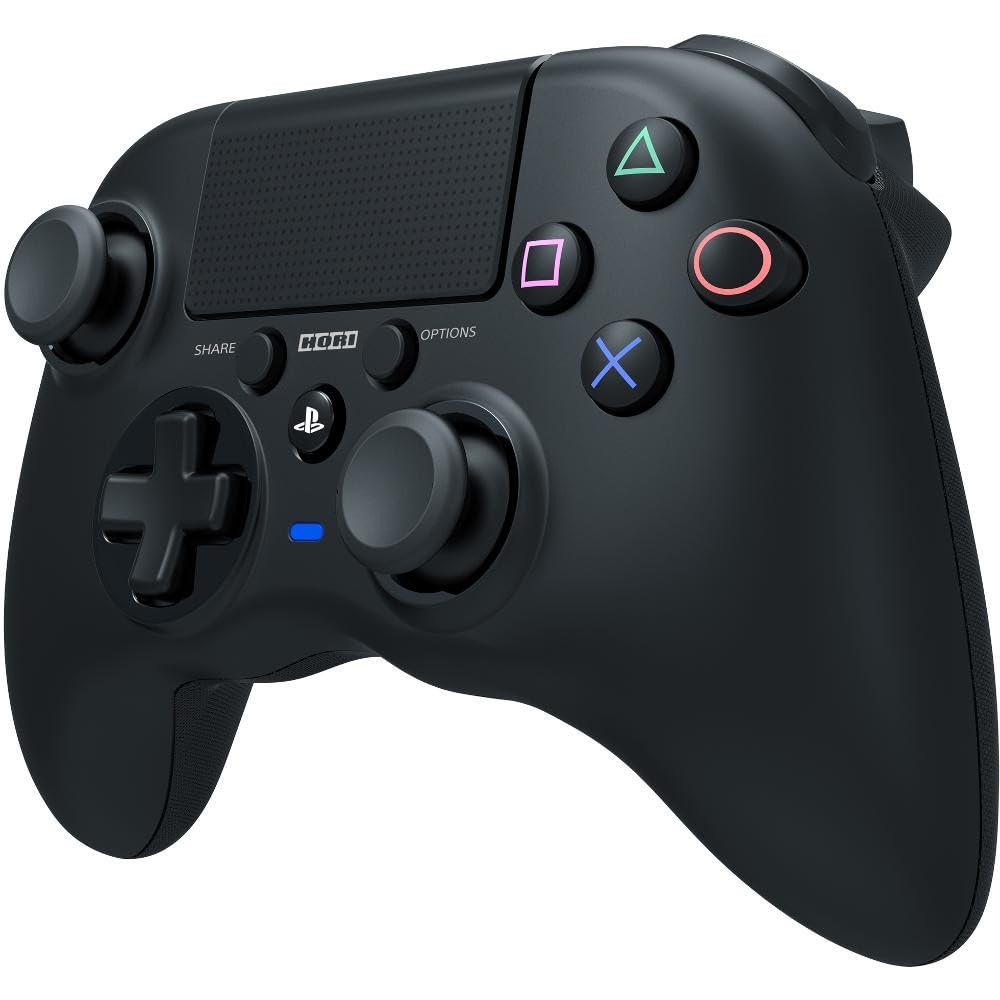
Picha: Mbele view of the HORI PS4 Onyx Plus Wireless Controller. It features two analog sticks, a D-pad, four action buttons (Triangle, Circle, Cross, Square), Share and Options buttons, a PS button, a touchpad, and a light bar. The controller is black with textured grips.
Setup and Initial Connection
Kuchaji Kidhibiti
The controller includes a built-in rechargeable battery. Before first use, fully charge the controller using a standard USB charging cable. Connect the cable to the controller's charging port and a powered USB port on your PS4 console or a USB wall adapter. The light bar on the controller will indicate charging status.
Kuoanisha na PlayStation 4
- Ensure your PlayStation 4 console is powered on.
- Ukiwa umezima kidhibiti, bonyeza na ushikilie Kitufe cha PS na Kitufe cha SHIRIKI simultaneously until the light bar begins to flash rapidly.
- On your PS4 console, navigate to Mipangilio > Vifaa > Vifaa vya Bluetooth.
- Select the "HORI Onyx Plus" controller from the list of available devices.
- Once paired, the light bar will glow a solid color, indicating a successful connection.
Note: Some versions of this controller may require a USB wireless dongle for connection. If direct Bluetooth pairing is unsuccessful, refer to any included quick start guide for dongle-specific instructions.
Uendeshaji wa Kidhibiti
Vidhibiti vya Msingi
The HORI PS4 Onyx Plus Wireless Controller features standard PlayStation button layouts:
- Vijiti vya Analogi: Used for movement and camera control. Push the sticks in for L3/R3 functions.
- D-Pad: For directional input in menus and certain games.
- Vifungo vya Kitendo (Pembetatu, Mduara, Msalaba, Mraba): Perform in-game actions.
- Kitufe cha KUSHIRIKI: Access sharing options (screenshots, video clips).
- Kitufe cha CHAGUO: Pause games or access in-game menus.
- Kitufe cha PS: Access the PS4 Home screen, switch users, or power off the console.
- Touchpad: Functions as a clickable button and a touch-sensitive surface for specific game interactions.
Adjustable Triggers
The L2 and R2 triggers feature adjustable pressure. Consult your game's settings or the controller's specific software (if available) for customization options. This allows users to fine-tune trigger sensitivity for different game genres.
Maikrofoni Iliyojengwa ndani
The integrated microphone allows for voice chat in online multiplayer games and voice commands for the PS4 system. Ensure your PS4 audio settings are configured to use the controller's microphone.
Matengenezo na Utunzaji
Kusafisha
To clean the controller, use a soft, dry cloth. For stubborn dirt, slightly dampen the cloth with water. Avoid using harsh chemicals, solvents, or abrasive materials, as these can damage the controller's finish and internal components.
Utunzaji wa Betri
- Epuka kutoa betri kikamilifu mara kwa mara ili kuongeza muda wake wa kuishi.
- Hifadhi kidhibiti mahali pa baridi, pakavu wakati hakitumiki kwa muda mrefu.
- Do not expose the controller to extreme temperatures.
Kutatua matatizo
Masuala ya Muunganisho
- Kidhibiti hakiunganishi: Ensure the controller is charged. Re-attempt the pairing process as described in the "Pairing with PlayStation 4" section. Move closer to the PS4 console to rule out range issues.
- Muunganisho wa mara kwa mara: Check for potential interference from other wireless devices. Ensure the controller is fully charged. If using a dongle, ensure it is securely plugged into the PS4.
Unyeti wa padi ya kugusa
Some users may find the touchpad to be highly sensitive. If accidental inputs occur, adjust your grip or check in-game settings for touchpad sensitivity options. There is no physical adjustment for touchpad sensitivity on the controller itself.
Dalili ya Maisha ya Battery
The controller does not display battery life on the PS4 system menu. The light bar will indicate charging status, and the controller will power off when the battery is depleted.
Controller Not Turning On Console
This controller may not support turning on the PS4 console directly from a powered-off state. Power on the console manually before connecting the controller.
Vipimo
| Kipengele | Maelezo |
|---|---|
| Nambari ya Mfano | PS4-149E |
| Muunganisho | Bila waya |
| Vipimo (L x W x H) | Inchi 2.76 x 6.3 x 7.09 |
| Uzito | 8.1 wakia |
| Betri | 1 Betri (pamoja na) |
| Kwanza Inapatikana | Januari 30, 2022 |
Udhamini na Msaada
Dhamana ya Bidhaa
For information regarding the product warranty, please refer to the warranty card included with your purchase or visit the official HORI webtovuti. Sheria na masharti ya udhamini yanaweza kutofautiana kulingana na eneo.
Usaidizi wa Wateja
If you encounter any issues not covered in this manual or require further assistance, please contact HORI customer support. You can find contact information on the official HORI webtovuti au kupitia muuzaji ambapo ulinunua bidhaa.
Visit the HORI Store on Amazon kwa maelezo zaidi ya bidhaa na nyenzo za usaidizi.


