Utangulizi
This manual provides comprehensive instructions for the setup, operation, and maintenance of your waveshare 7-inch Capacitive Touch LCD Display Kit for Raspberry Pi 4 Model B. Please read this manual thoroughly before use to ensure proper functionality and to maximize your product experience.
Yaliyomo kwenye Kifurushi
Thibitisha kuwa bidhaa zote zilizoorodheshwa hapa chini zimejumuishwa kwenye kifurushi chako:
- 7-inch Capacitive Touch LCD Display
- Raspberry Pi 4 Model B (4GB RAM version)
- MicroSD Card (pre-loaded with system, typically 16GB)
- Adapter ya Nguvu ya USB
- USB-A to USB-C Cable (for power)
- HDMI Cable (Micro HDMI to Standard HDMI)
- USB-A to Micro USB Cable (for touch functionality)
- Acrylic Case components (top, bottom, side panels, stand)
- Vifaa vya kupachika (skrubu, vifaa vya kusimama)
- Kisomaji cha Kadi ya MicroSD

Image: All components included in the waveshare 7-inch Display Kit, including the LCD, Raspberry Pi 4, cables, power adapter, acrylic case parts, and a microSD card with reader.
Maagizo ya Kuweka
Follow these steps to assemble and set up your display kit:
- Prepare the Raspberry Pi: Insert the provided MicroSD card into the Raspberry Pi 4 Model B.
- Mount the Raspberry Pi: Secure the Raspberry Pi 4 to the back of the 7-inch LCD display using the provided standoffs and screws. Ensure proper alignment with the display's connectors.
- Unganisha Kebo za Kuonyesha:
- Connect one end of the Micro HDMI cable to the Raspberry Pi's Micro HDMI port and the other end to the display's HDMI input.
- Connect the USB-A to Micro USB cable from a USB 2.0 port on the Raspberry Pi to the Micro USB port on the display. This provides power for the display's backlight and enables touch functionality.
- Assemble the Acrylic Case: Carefully attach the acrylic case components around the assembled display and Raspberry Pi. Refer to the case assembly diagram for correct orientation.
- Unganisha Nguvu: Plug the USB power adapter into a wall outlet and connect the USB-A to USB-C cable to the Raspberry Pi's USB-C power input.
- Boot ya Awali: The system should power on automatically. The display will show the boot sequence.

Image: The fully assembled waveshare 7-inch Display Kit, showing the Raspberry Pi 4 mounted behind the screen, connected with cables, and powered by an adapter.
Uendeshaji
Once the display kit is powered on, the pre-installed operating system (typically Raspbian) will boot. You can interact with the system using the capacitive touch screen.
- Utendaji wa Mguso: The 7-inch display supports up to five-point capacitive touch when running Raspbian. For other supported operating systems like Ubuntu, Kali, or WIN10 IoT, it typically supports single-point touch.
- Viungo vya Kuunganisha: Use the USB ports on the Raspberry Pi to connect a keyboard, mouse, or other USB devices as needed.
- Muunganisho wa Mtandao: The Raspberry Pi 4 supports Gigabit Ethernet and 2.4/5GHz Wi-Fi for internet access.
- Pato la Sauti: Audio can be output via the 3.5mm audio jack or HDMI.
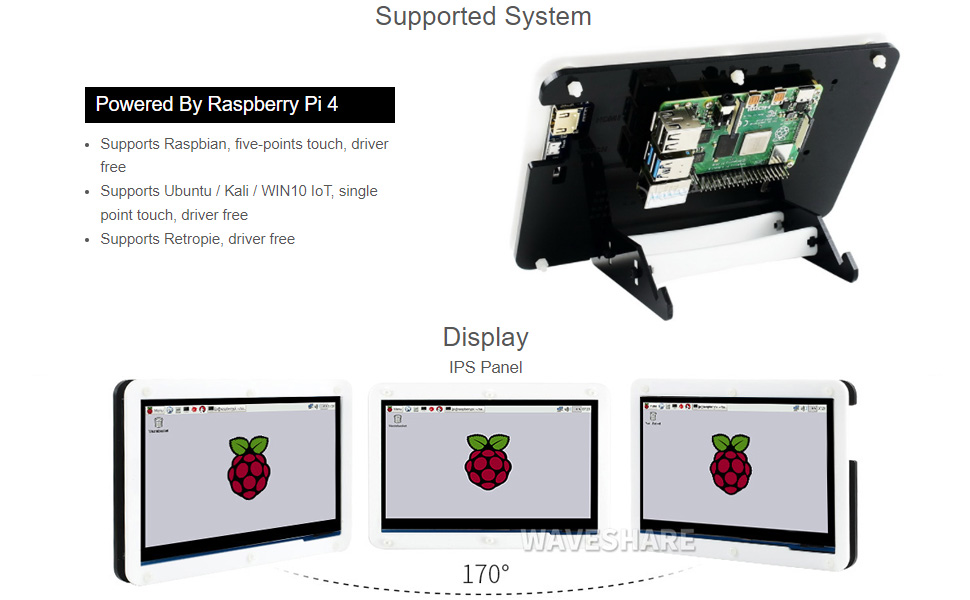
Image: A hand interacting with the capacitive touch screen, demonstrating its functionality with a graphical user interface.
Mifumo ya Uendeshaji Inayotumika
The waveshare 7-inch Display Kit is compatible with various operating systems for the Raspberry Pi 4 Model B:
- Raspbian: Supports five-point touch, driver-free.
- Ubuntu / Kali / WIN10 IoT: Supports single-point touch, driver-free.
- Retropie: Driver-free support.

Image: Visual representation of the display showing different viewing angles and indicating support for various operating systems like Raspbian, Ubuntu, Kali, and Windows 10 IoT.
Sifa Muhimu
- Onyesho la IPS la inchi 7: Pana viewing angle with 1024x600 resolution.
- Capacitive Touch: Supports 5-point touch (with Raspbian) for intuitive interaction.
- Integrated Raspberry Pi 4: Powered by Broadcom BCM2711B0 Quad-core 64-bit SoC.
- Kumbukumbu: 4GB LPDDR4 RAM.
- Muunganisho: Dual-band 2.4/5GHz Wi-Fi, Bluetooth 5.0, Gigabit Ethernet.
- Bandari: 2x USB 3.0, 2x USB 2.0, 2x Micro HDMI (up to 4Kp60), 4-pole stereo audio, 2-lane MIPI DSI display port, 2-lane MIPI CSI camera port, 40-pin GPIO header.
- Ingizo la Nguvu: USB-C 5V/3A.
- Hifadhi: Slot ya kadi ndogo ya SD.

Image: Detailed diagram of the Raspberry Pi 4 Model B board, highlighting its processor, RAM, various ports (USB, HDMI, Ethernet, GPIO), and wireless capabilities.
Matengenezo
- Kusafisha: Use a soft, dry cloth to clean the display and case. For stubborn smudges on the screen, a slightly damp, lint-free cloth can be used. Avoid abrasive cleaners or solvents.
- Masasisho ya Programu: Regularly update the operating system and installed software on your Raspberry Pi to ensure optimal performance and security.
- Masharti ya Mazingira: Operate the device in a clean, dry environment. Avoid extreme temperatures, direct sunlight, and high humidity.
- Usimamizi wa Nguvu: Always shut down the Raspberry Pi gracefully through the operating system before disconnecting power to prevent data corruption.
Kutatua matatizo
- Hakuna matokeo ya onyesho:
- Ensure the Micro HDMI cable is securely connected to both the Raspberry Pi and the display.
- Verify the Raspberry Pi is receiving power (check the power LED on the Pi).
- Confirm the MicroSD card is properly inserted and contains a valid operating system image.
- Skrini ya kugusa haijibu:
- Check that the USB-A to Micro USB cable is connected from the Raspberry Pi to the display.
- Ensure the operating system supports touch functionality and that necessary drivers (if any, though typically driver-free for supported OS) are loaded.
- Restart the Raspberry Pi.
- System not booting:
- Confirm the power supply is adequate (5V/3A recommended for Raspberry Pi 4).
- Re-flash the operating system image onto the MicroSD card.
- Angalia miunganisho yoyote iliyolegea au vipengele vilivyoharibiwa.
Vipimo vya Kiufundi
| Ukubwa wa Kuonyesha | Inchi 7 |
| Azimio | 1024 x 600 |
| Aina ya Paneli | IPS |
| Aina ya Kugusa | Capacitive (5-point with Raspbian, 1-point with others) |
| Kichakataji | Broadcom BCM2711B0, Quad-core 64-bit SoC |
| RAM | GB 4 LPDDR4 |
| Hifadhi | 16 GB MicroSD Card (included) |
| Muunganisho wa Waya | 2.4/5GHz Wi-Fi, Bluetooth 5.0 |
| Muunganisho wa Waya | Gigabit Ethernet |
| Pato la Video | 2x Micro HDMI (up to 4Kp60) |
| Pato la Sauti | 4-pole stereo audio jack |
| Bandari za USB | 2x USB 3.0, 2x USB 2.0 |
| Ingizo la Nguvu | USB-C 5V/3A |
| Vipimo (Kifurushi) | Inchi 9.06 x 6.69 x 2.76 |
| Uzito wa Kipengee | Pauni 1.43 |

Image: Technical drawing showing the dimensions of the 7-inch display in millimeters and illustrating the two available stand angles (45° and 60°) for the acrylic case.
Udhamini na Msaada
Kwa taarifa za udhamini na usaidizi wa kiufundi, tafadhali rejelea sehemu rasmi ya mawimbi webtovuti au wasiliana na huduma kwa wateja wao moja kwa moja. Weka risiti yako ya ununuzi kama dhibitisho la ununuzi kwa madai yoyote ya udhamini.
Rasilimali za Mtandaoni: For additional documentation, tutorials, and community support, visit the waveshare official webtovuti.


