1. Utangulizi
The eKids Frozen 2 Bluetooth Karaoke Machine with Light Show is designed to provide an interactive music experience. This portable device allows users to stream audio wirelessly via Bluetooth, sing along with the included wired microphone, and expand content through a USB port. It features a multi-colored LED light show and built-in memory for storing music.
2. Ni nini kwenye Sanduku
- Bluetooth MP3 Karaoke Machine
- Maikrofoni yenye waya
- Kebo ya Kuchaji ya USB
3. Bidhaa za Bidhaa
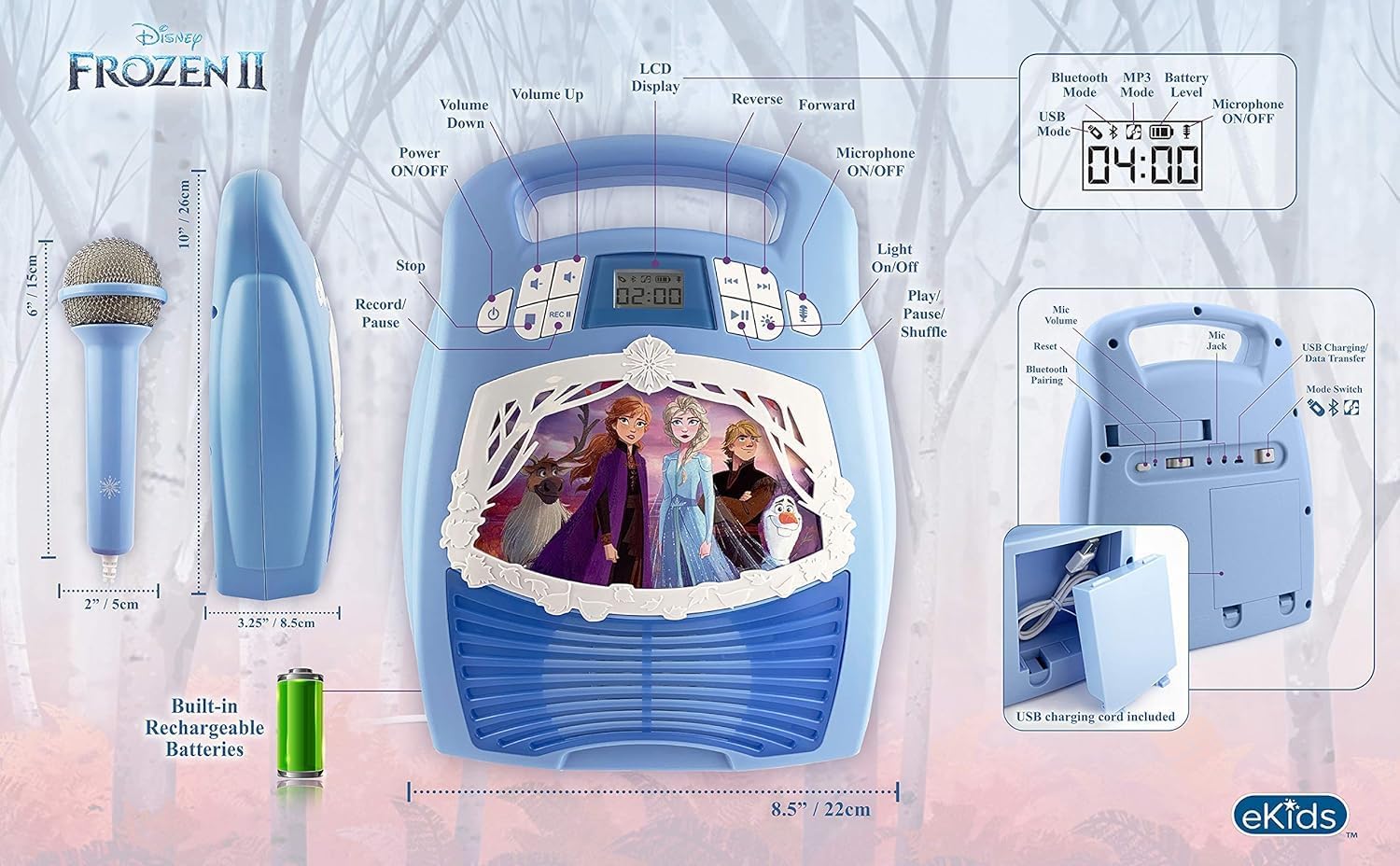
- Muunganisho wa Bluetooth: Connect to any compatible Bluetooth device to stream audio wirelessly.
- Maikrofoni ya Waya: Includes one real working wired microphone for singing along. An additional mic jack is available for a second microphone (sold separately).
- USB Audio Player: Features a USB port to play MP3 files from a USB flash drive (not included).
- Kazi ya Kurekodi: Record performances while singing along to streaming music. Requires a USB flash drive (not included).
- Multi-colored LED Light Show: Integrated light show to enhance the performance experience.
- Kumbukumbu iliyojengwa: Store hours of music directly on the device.
- Betri Inayoweza Kuchajiwa tena: Portable design with a built-in rechargeable battery for on-the-go use.

Kielelezo 1: Zaidiview of the Karaoke Machine's Controls and Features.

Figure 2: Bluetooth Compatibility with various devices.
4. Kuweka
4.1 Kuwezesha Kitengo
The karaoke machine operates on a built-in rechargeable battery. Ensure the unit is fully charged before first use for optimal performance.
- Connect the supplied USB charging cable to the USB charging port on the back of the unit.
- Unganisha ncha nyingine ya kebo ya USB kwenye adapta ya kawaida ya umeme ya USB (haijajumuishwa) au mlango wa USB unaotumia umeme.
- The charging indicator will illuminate. Allow sufficient time for a full charge.
4.2 Kuunganisha Maikrofoni
The wired microphone connects to the microphone jack on the unit.
- Locate the microphone jack on the side or back of the karaoke machine.
- Insert the microphone plug firmly into the jack.

Figure 3: Karaoke Machine with Microphone Connected.
5. Maagizo ya Uendeshaji
5.1 Washa/Zima
Bonyeza na ushikilie Nguvu button located on the control panel to turn the unit on or off.
5.2 Kuoanisha Bluetooth
- Turn on the karaoke machine. The Bluetooth indicator on the display will flash, indicating it is in pairing mode.
- Kwenye kifaa chako kinachotumia Bluetooth (simu mahiri, kompyuta kibao, n.k.), nenda kwenye mipangilio ya Bluetooth na uwashe Bluetooth.
- Select "eKids Frozen 2 Karaoke" (or similar name) from the list of available devices.
- Mara tu kitakapooanishwa, kiashiria cha Bluetooth kitaacha kuwaka na kubaki imara. Sasa unaweza kutiririsha sauti kutoka kwenye kifaa chako.
5.3 Playing Music via USB
- Ingiza kiendeshi cha USB flash kilicho na MP3 files kwenye bandari ya USB kwenye kitengo.
- The unit should automatically switch to USB mode and begin playing music. If not, press the Hali kitufe cha kuchagua modi ya USB.
- Tumia Cheza/Sitisha, Wimbo Unaofuata, na Wimbo Uliopita vifungo vya kudhibiti uchezaji.
5.4 Matumizi ya Maikrofoni
- Ensure the microphone is securely plugged into the mic jack.
- Bonyeza kwa Kipaza sauti IMEZIMWA / IMEZIMWA button to activate the microphone.
- Adjust the microphone volume using the dedicated volume controls if available, or the main volume controls.
5.5 Onyesho la Mwanga
Bonyeza kwa Mwanga WAWASHA/ZIMWA button to activate or deactivate the multi-colored LED light show.
5.6 Recording Performances
To record your singing, a USB flash drive (not included) must be inserted into the USB port.
- Hakikisha kiendeshi cha USB flash kimeingizwa.
- Start playing your desired music (via Bluetooth or USB).
- Bonyeza kwa REC kitufe ili kuanza kurekodi.
- Sing into the microphone.
- Bonyeza kwa REC button again to stop recording. Your performance will be saved to the USB flash drive.
6. Matengenezo
- Safisha kitengo kwa kitambaa laini na kavu. Usitumie visafishaji vya abrasive au vimumunyisho.
- Weka kifaa mbali na jua moja kwa moja, vyanzo vya joto, na unyevu.
- Store the microphone in its designated compartment on the back of the unit when not in use to prevent loss or damage.
Kielelezo cha 4: Nyuma view with microphone storage compartment.
7. Utatuzi wa shida
- Hakuna Nguvu: Ensure the unit is charged. Connect the USB charging cable and allow it to charge.
- Hakuna Sauti: Check the volume levels on both the karaoke machine and your connected Bluetooth device. Ensure the microphone is turned on if using it.
- Bluetooth Haiunganishi: Make sure Bluetooth is enabled on your device and the karaoke machine is in pairing mode. Try restarting both devices. Ensure no other devices are currently connected to the karaoke machine.
- Maikrofoni Haifanyi kazi: Verify the microphone is securely plugged into the correct jack and the microphone ON/OFF button is activated.
- Masuala ya Kurekodi: Ensure a compatible USB flash drive is inserted and has sufficient free space.
8. Vipimo
| Kipengele | Maelezo |
|---|---|
| Vipimo vya Bidhaa | Inchi 8 x 3 x 10 |
| Uzito wa Kipengee | Pauni 2.64 |
| Nambari ya Mfano | FR-553v9M |
| Umri uliopendekezwa | Miezi 3 - 35 |
| Betri | 3 AA batteries required (included) - Note: Product description also mentions built-in rechargeable battery. Please refer to packaging for exact battery type. |
| Kipengele Maalum | Inabebeka, Inaweza Kuchajiwa tena |
| Rangi | Older Version |
| Mtengenezaji | Ubunifu wa KID |
9. Taarifa za Usalama
Please read and follow all safety instructions provided with the product packaging. This product is intended for use by children aged 3 and up, under adult supervision.
10. Udhamini na Msaada
Bidhaa hii inakuja na a Udhamini Mdogo wa Mwaka Mmoja. For warranty claims or technical support, please refer to the contact information provided in your product packaging or visit the eKids official webtovuti.
11. Video ya Bidhaa
Video 1: An official product video from KIDdesigns, Inc. showcasing the eKids Frozen 2 Bluetooth Karaoke Machine with Light Show, highlighting its features and design.


