
1. Utangulizi
This user manual provides detailed instructions for the installation, configuration, and operation of your Jennov 5.0MP PTZ Outdoor WiFi Security Camera. Please read this manual thoroughly before using the product to ensure proper functionality and safety. Keep this manual for future reference.
Vipengele vya Bidhaa Vimekwishaview:
- Azimio la Megapikseli 5.0: Delivers clear and detailed video footage.
- Kuza kwa Macho kwa 5X: Allows for detailed magnification of distant objects without loss of clarity.
- Pan/Tilt/Zoom (PTZ) Functionality: Offers a 355° horizontal rotation and 100° vertical tilt for comprehensive area coverage.
- Sauti ya Njia Mbili: Built-in microphone and speaker enable real-time communication.
- Kuboresha Maono ya Usiku: Equipped with infrared LEDs for clear monitoring up to 65ft in low-light conditions.
- Utambuzi wa Mwendo na Arifa: Configurable motion detection zones and sensitivity with push notifications and email alerts.
- Ukadiriaji wa IP66 Usioathiriwa na Hali ya Hewa: Chuma cha kudumu casing designed to withstand various outdoor weather conditions.
- Kadi ya SD ya GB 64 Imejumuishwa: Provides local storage for continuous 24/7 recording.
- Ufikiaji wa Mbali: Monitor and control the camera from your smartphone, tablet, or PC.
2. Yaliyomo kwenye Kifurushi
Thibitisha kwamba vitu vyote vilivyoorodheshwa hapa chini vipo kwenye kifurushi chako. Ikiwa vitu vyovyote vimepotea au vimeharibika, tafadhali wasiliana na huduma kwa wateja.
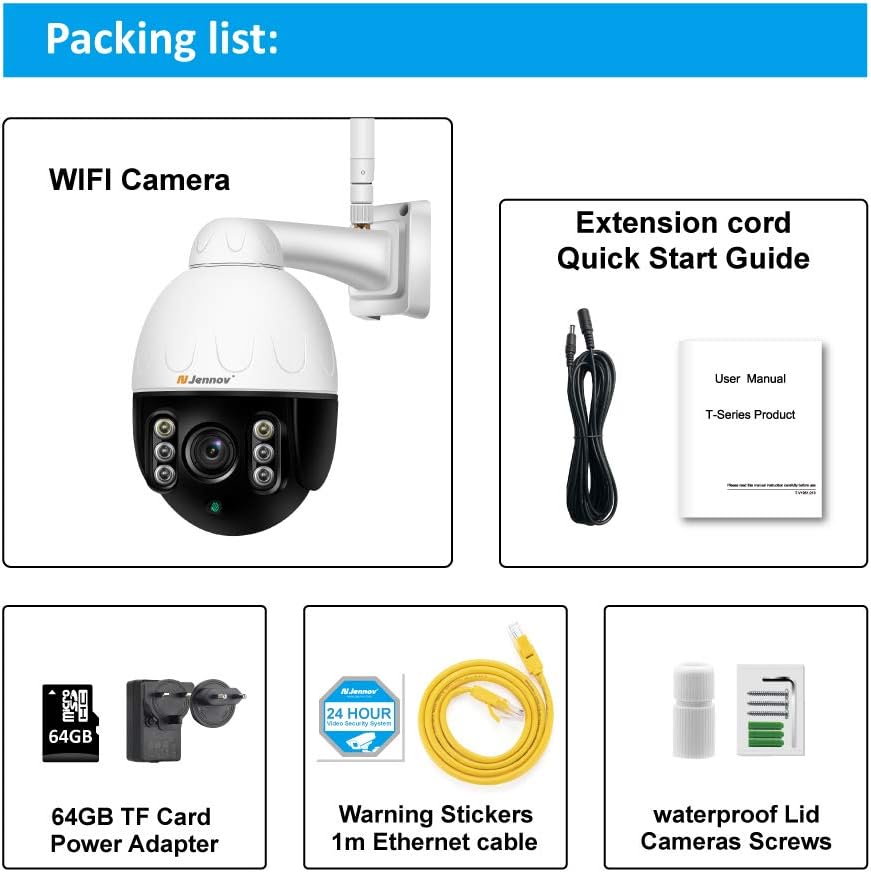
Image: Visual representation of the Jennov PTZ Camera and its included accessories.
- Jennov 5.0MP PTZ WiFi Camera (1 unit)
- 12V1A Power Adapter (1 unit)
- 3.3ft Ethernet Cable (1 unit)
- Skurubu za Kupachika (seti)
- Waterproof Cap for Ethernet connection (1 unit)
- Warning Label (1 unit)
- 64GB Micro SD Card (imesakinishwa awali)
- Mwongozo wa Kuanza Haraka / Mwongozo wa Mtumiaji
3. Maagizo ya Kuweka
3.1 Ufungaji wa Kimwili
- Chagua Mahali: Select a suitable outdoor location for mounting the camera. Ensure it has a clear line of sight to the area you wish to monitor and is within range of your 2.4GHz Wi-Fi network. The camera is designed for wall or ceiling mounting.
- Weka Kamera: Use the provided mounting screws to securely attach the camera bracket to the chosen surface. Ensure the camera is positioned correctly for optimal viewpembe.
- Unganisha Nguvu: Connect the 12V1A power adapter to the camera's power input and plug it into a power outlet.
- Muunganisho wa Ethaneti (Si lazima): For a more stable connection, you can use the provided Ethernet cable to connect the camera directly to your router. Use the waterproof cap to protect the Ethernet port if installed outdoors.
3.2 Usakinishaji wa Programu na Usanidi wa Awali
- Pakua Programu: Tafuta the recommended camera application (e.g., 'HiCam' or similar as per quick start guide) on your smartphone's app store (iOS or Android) and install it.
- Sajili Akaunti: Fungua programu na ufuate maagizo yaliyo kwenye skrini ili kusajili akaunti mpya ya mtumiaji.
- Ongeza Kamera: Power on the camera. In the app, select 'Add Device' or '+' icon. Follow the prompts to connect the camera to your home 2.4GHz Wi-Fi network. Ensure your phone is also connected to the 2.4GHz network during setup.
- Sanidi Mipangilio: Once connected, you can rename the camera, set a password, and adjust initial video settings.
4. Maagizo ya Uendeshaji
4.1 Ishi View na Udhibiti wa PTZ
Access the live video feed through the mobile app or PC client.

Image: A smartphone screen displaying the camera's live feed with pan and tilt controls, indicating 355° horizontal and 100° vertical rotation.
- Pendeza/Tilt: Use the directional controls within the app to rotate the camera horizontally (355°) and vertically (100°) to adjust the viewpembe.
- Kuza kwa Macho: Utilize the zoom controls (often a pinch-to-zoom gesture or dedicated buttons) to activate the 5X optical zoom for closer inspection of details.
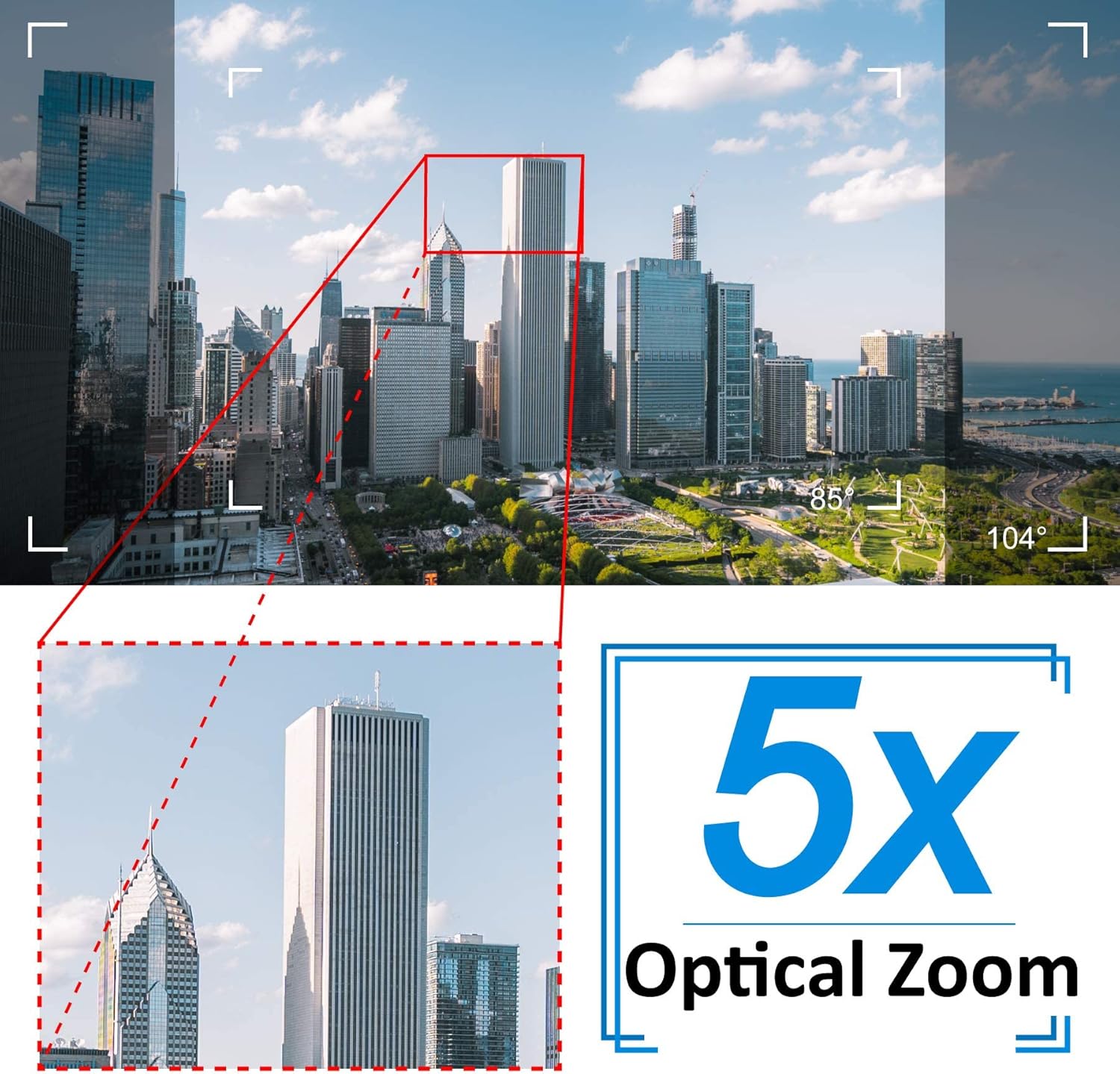
Image: A cityscape view demonstrating the 5X optical zoom feature, highlighting the ability to magnify distant objects clearly.
4.2 Sauti ya Njia Mbili
The camera supports two-way audio communication.

Image: A person interacting with the camera's two-way audio feature via a smartphone, showing speech bubbles for communication.
- Sikiliza: Tap the speaker icon in the app to hear audio from the camera's location.
- Ongea: Press and hold the microphone icon to speak through the camera's speaker. Release to stop speaking.
4.3 Maono ya Usiku
Kamera hubadilika kiotomatiki hadi modi ya maono ya usiku katika hali ya mwanga mdogo.

Image: A comparison showing a daytime view of a house and its clear night vision equivalent captured by the 5MP 1920P camera.
- The integrated IR-Cut filter and infrared LEDs provide clear black-and-white video up to 65ft (20 meters) in complete darkness.
4.4 Utambuzi wa Mwendo na Tahadhari
Configure motion detection settings to receive alerts for suspicious activity.

Image: A visual representation of the camera's human detection, email alert, and app notification features, with highlighted detection zones.
- Set Detection Zone: In the app settings, define specific areas within the camera's view kwa utambuzi wa mwendo.
- Rekebisha Unyeti: Modify the motion detection sensitivity to minimize false alarms.
- Configure Alerts: Enable push notifications to your smartphone and/or email alerts with snapshots when motion is detected.
4.5 Kurekodi na Kuhifadhi
The camera comes with a pre-installed 64GB SD card for local storage.
- Kuendelea Kurekodi: The camera supports 24/7 continuous recording to the SD card.
- Kurekodi Kitanzi: When the SD card is full, new recordings will automatically overwrite the oldest footage.
- Uchezaji: Fikia foo iliyorekodiwatagkupitia kipengele cha uchezaji cha programu.
5. Matengenezo
Matengenezo ya mara kwa mara huhakikisha utendakazi bora na maisha marefu ya kamera yako ya usalama.

Image: The Jennov PTZ camera shown outdoors in various weather conditions (rain, snow, sun, wind), emphasizing its IP66 weatherproof rating.
- Kusafisha: Safisha lenzi ya kamera mara kwa mara kwa laini, damp cloth to remove dust, dirt, or water spots that may affect image quality. Do not use harsh chemicals.
- Angalia Viunganisho: Regularly inspect power and Ethernet cable connections for any signs of wear or damage. Ensure waterproof caps are securely in place.
- Sasisho za Firmware: Check the app regularly for available firmware updates. Keeping the camera's firmware updated can improve performance and security.
- Ulinzi wa Mazingira: While the camera is IP66 weatherproof, extreme conditions (e.g., direct lightning strikes, prolonged submersion) should be avoided.
6. Utatuzi wa shida
Ukikumbana na matatizo na kamera yako, rejelea matatizo na suluhisho zifuatazo za kawaida.
| Tatizo | Sababu inayowezekana | Suluhisho |
|---|---|---|
| Kamera imeshindwa kuunganisha kwenye Wi-Fi. | Incorrect Wi-Fi password; Camera too far from router; Only supports 2.4GHz Wi-Fi. | Verify password. Move camera closer to router. Ensure your router is broadcasting a 2.4GHz network and your phone is connected to it during setup. |
| No image or black screen in live view. | Power issue; Network disconnection; Camera malfunction. | Check power connection. Verify Wi-Fi/Ethernet connection. Restart camera and router. |
| Night vision is unclear. | Dirty lens; Obstruction; Insufficient IR illumination. | Clean the camera lens. Ensure no objects are blocking the IR LEDs. |
| Motion detection alerts are too frequent or not triggered. | Sensitivity too high/low; Detection zone not configured correctly. | Adjust motion detection sensitivity in the app. Redefine the detection zone to focus on critical areas. |
| Sauti ya njia mbili haifanyi kazi. | Microphone/speaker muted; App permissions; Network latency. | Check mute settings in the app. Ensure the app has microphone permissions on your phone. Verify stable network connection. |
7. Vipimo
Detailed technical specifications for the Jennov 5.0MP PTZ Outdoor WiFi Security Camera.
| Kipengele | Vipimo |
|---|---|
| Nambari ya Mfano | JE-P22HT55-5X-FAS-64-UK |
| Utatuzi wa Video Ufanisi | 5 MP (1920p) |
| Kuza macho | 5X (2.7-13.5mm autofocus lens) |
| Pan / Tilt Angle | Mlalo: 355°, Wima: 100° |
| Teknolojia ya Wireless | Wi-Fi (GHz 2.4 pekee) |
| Mbele ya Maono ya Usiku | Up to 65ft (20 meters) with Infrared LED |
| Ukadiriaji wa Kuzuia hali ya hewa | IP66 |
| Hifadhi | 64GB Micro SD Card (imesakinishwa awali) |
| Ugavi wa Nguvu | 12V1A DC (24 Watts) |
| Nyenzo | Chuma Casing |
| Vipimo (L x W x H) | 21.5 x 19.5 x 11.5 cm |
| Uzito | Kilo 1.2 |
| Vifaa Sambamba | Android/iOS Smartphones, Tablets, PCs |
| Aina ya Ufungaji | Mlima wa Ukuta, Mlima wa Dari |
8. Udhamini na Msaada
For warranty information and technical support, please refer to the official Jennov webtembelea tovuti au wasiliana na huduma kwa wateja wao moja kwa moja. Maelezo kuhusu vipindi vya udhamini na njia za usaidizi kwa kawaida hutolewa pamoja na hati zako za ununuzi au kwenye ukurasa wa bidhaa wa mtengenezaji.
Tafadhali hifadhi uthibitisho wako wa ununuzi kwa madai yoyote ya udhamini.


