Bidhaa Imeishaview
The ASRock X570 Steel Legend motherboard is designed to support AMD AM4 Socket Ryzen 2000 and 3000 Series processors. It features a Hyper M.2 socket for next-generation PCIe Gen4 x4 M.2 SSDs, complemented by a full-coverage M.2 heatsink for efficient heat dissipation. This ensures optimal performance for high-speed M.2 SSDs. The motherboard is built with a 10 Power Phase Design and supports DDR4 4666+ (OC) memory, providing a stable and high-performance foundation for your system.

Image: ASRock X570 Steel Legend Motherboard and its retail packaging.
Sifa Muhimu
- Usaidizi wa Kichakataji: Compatible with AMD AM4 Socket Ryzen 2000 and 3000 Series processors.
- Ubunifu wa Nguvu: Features a 10 Power Phase Design for stable power delivery.
- Kumbukumbu: Supports DDR4 memory up to 4666+ (OC) speeds.
- Nafasi za Upanuzi: Includes 2 PCIe 4.0 x16 slots, 3 PCIe 4.0 x1 slots, and 1 M.2 (Key E) slot for Wi-Fi modules.
- Msaada wa GPU nyingi: Supports AMD Quad CrossFireX and CrossFireX technologies.
- Matokeo ya Michoro: Equipped with HDMI and DisplayPort for video output.
- Sauti: Features 7.1 CH HD Audio (Realtek ALC1220 Audio Codec) with Nichicon Audio Caps for high-quality sound.
- Hifadhi: Provides 8 SATA3 ports, 1 Hyper M.2 (PCIe Gen4 x4 & SATA3) slot, and 1 Hyper M.2 (PCIe Gen4 x4) slot.
- Muunganisho wa USB: Offers 2 USB 3.2 Gen2 ports (Rear Type A+C) and 10 USB 3.2 Gen1 ports (4 Front, 6 Rear).
- Mtandao: Integrated Intel Gigabit LAN for reliable network connectivity.
- Mwangaza wa RGB: Supports ASRock Polychrome SYNC for customizable RGB lighting.

Picha: Kina view of the motherboard's power delivery components, M.2 heatsink, and gold-plated contacts in critical slots.
Vipimo
| Kipengele | Maelezo |
|---|---|
| Chapa | ASRock |
| Jina la Mfano | Hadithi ya Chuma ya X570 |
| Soketi ya CPU | Soketi AM4 |
| Wachakataji Sambamba | AMD Ryzen 2000 Series, AMD Ryzen 3000 Series |
| Aina ya Chipset | AMD X570 |
| Teknolojia ya Kumbukumbu ya RAM | DDR4 |
| Kasi ya Kumbukumbu | 2400 MHz (hadi 4666+ MHz OC) |
| Upeo wa RAM | 128GB (4 DIMM slots) |
| Matokeo ya Michoro | HDMI, DisplayPort |
| USB 3.2 Bandari za Gen2 | 2 (Rear Type A+C) |
| USB 3.2 Bandari za Gen1 | 10 (4 Front, 6 Rear) |
| LAN | Intel Gigabit LAN |
| Sauti | 7.1 CH HD Audio (Realtek ALC1220) |
| Vipimo (LxWxH) | Inchi 15.1 x 3.4 x 13.1 |
| Uzito wa Kipengee | Pauni 2.86 |
Picha: Juuview of the motherboard's layout with key components such as the CPU socket, RAM slots, and various expansion slots clearly marked.
Kuweka na Kuweka
Proper installation of your ASRock X570 Steel Legend motherboard is crucial for system stability and performance. Always ensure your system is powered off and unplugged before handling any components. Refer to the detailed diagrams below for component placement.
1. Ufungaji wa CPU
Carefully open the CPU socket lever. Align the triangular marker on your AMD AM4 processor with the corresponding marker on the motherboard's socket. Gently place the CPU into the socket without forcing it, then close the lever to secure it.
2. Ufungaji wa Kumbukumbu (RAM).
Unlock the clips on the DDR4 DIMM slots. Align the notch on your RAM module with the key in the DIMM slot. Press down firmly on both ends of the RAM module until the clips snap into place. For optimal dual-channel performance, consult your motherboard manual for recommended slot configurations.
3. Ufungaji wa M.2 SSD
The motherboard features Hyper M.2 slots. Remove the M.2 heatsink if present. Insert your M.2 SSD into the slot at an angle, then gently push it down and secure it with the provided screw. Reattach the M.2 heatsink for optimal thermal performance.
4. Kuunganisha Pembeni na Nguvu
Connect the 24-pin ATX power connector and the 8-pin CPU power connector from your power supply to the motherboard. Attach your storage devices to the SATA3 ports and connect front panel headers (USB, audio, power buttons, LEDs) according to the motherboard's pin layout.
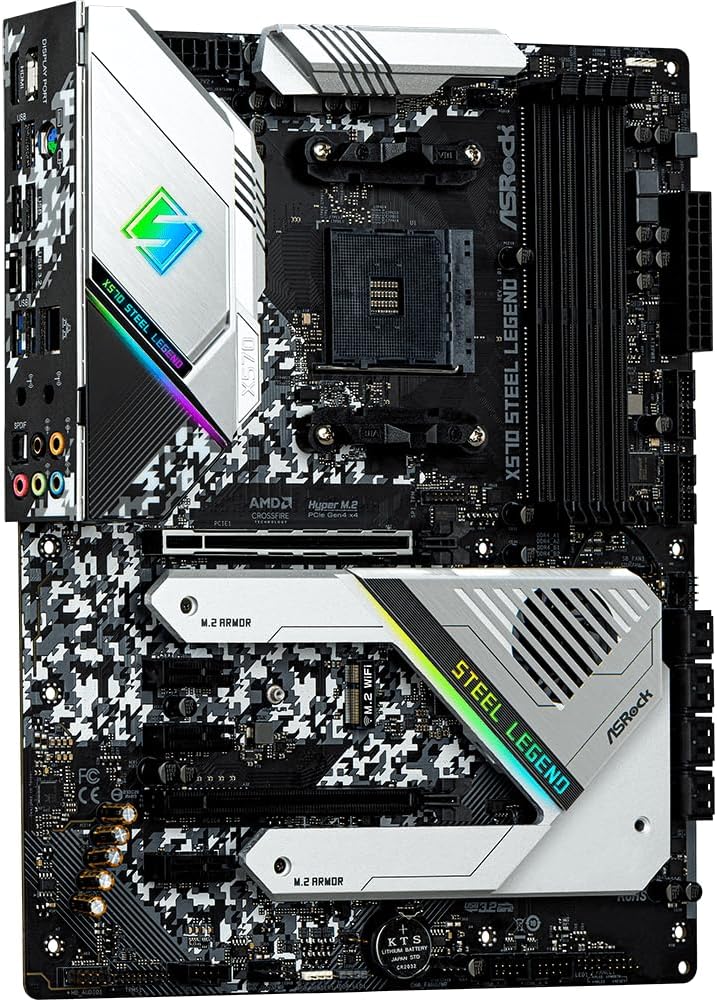
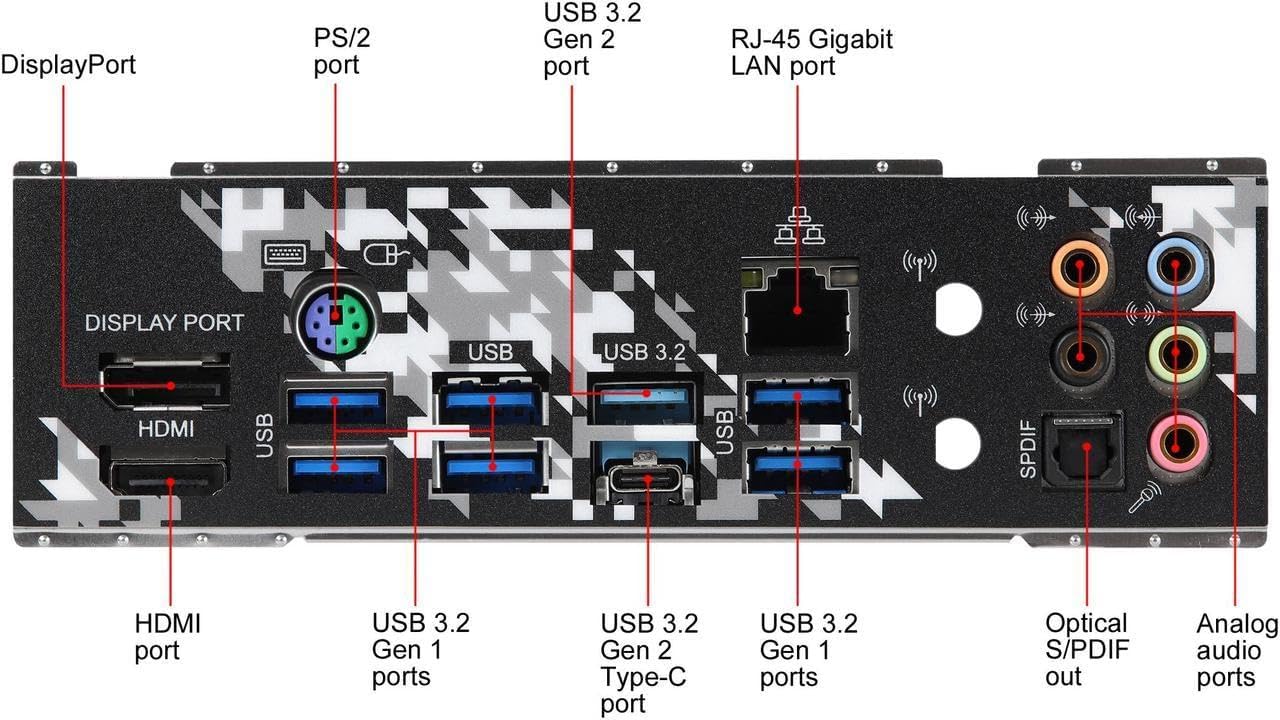
Image: The rear I/O panel, featuring HDMI, DisplayPort, USB 3.2 Gen2 Type-A and Type-C, USB 3.2 Gen1, Intel Gigabit LAN, and 7.1 channel audio jacks.
Miongozo ya Uendeshaji
Once all components are installed and connected, power on your system. The motherboard's UEFI BIOS provides extensive options for system configuration, including memory profiles, fan control, and boot device selection. Utilize the ASRock Polychrome SYNC software to customize the integrated RGB lighting effects.
- Ufikiaji wa BIOS/UEFI: Bonyeza Del or F2 during system startup to enter the UEFI setup utility.
- Ufungaji wa Dereva: Install all necessary drivers from the ASRock support website or the included driver CD for optimal performance and functionality.
- Huduma za Programu: Use ASRock's utility software for system monitoring, fan tuning, and RGB lighting customization.
Matengenezo
Regular maintenance helps prolong the lifespan of your motherboard and ensures consistent performance.
- Uondoaji wa vumbi: Periodically clean dust from the motherboard and components using compressed air. Ensure fans and heatsinks are free from obstructions.
- Sasisho za BIOS: Angalia ASRock website for the latest BIOS updates. Updating the BIOS can improve compatibility, stability, and performance. Follow the instructions carefully to avoid system damage.
- Usimamizi wa Cable: Ensure all cables are neatly routed and secured to promote good airflow within your PC case.
Kutatua matatizo
Ikiwa utapata matatizo na ubao wako wa mama, zingatia hatua zifuatazo za kawaida za utatuzi:
- Hakuna Nguvu / Hakuna Boot:
- Thibitisha nyaya zote za umeme (ATX ya pini 24, CPU ya pini 8) zimeunganishwa kwa usalama.
- Angalia ikiwa usambazaji wa umeme unafanya kazi kwa usahihi.
- Ensure the CPU, RAM, and graphics card are properly seated.
- Masuala ya Kuonyesha:
- Confirm your monitor is connected to the graphics card (if dedicated) or the motherboard's video output (if using an APU).
- Jaribu kebo tofauti ya video au kifuatiliaji.
- Kukosekana kwa Uthabiti wa Mfumo/Kuacha Kufanya Kazi:
- Hakikisha madereva yote yanasasishwa.
- Test RAM modules individually or run a memory diagnostic tool.
- Fuatilia halijoto ya CPU na GPU ili kuzuia joto kupita kiasi.
- Pembeni Haijagunduliwa:
- Jaribu kuunganisha kifaa cha pembeni kwenye lango tofauti la USB.
- Angalia meneja wa kifaa kwa matatizo ya kiendeshi.
For more detailed troubleshooting, refer to the official ASRock support webtovuti au wasiliana na huduma kwa wateja wao.
Udhamini na Msaada
ASRock provides a limited warranty for its motherboards. The specific terms and duration of the warranty may vary by region and retailer. Please retain your proof of purchase for warranty claims.
- Maelezo ya Udhamini: Kwa masharti na masharti ya udhamini wa kina, tafadhali tembelea ASRock rasmi website or consult your product documentation.
- Usaidizi wa Kiufundi: If you require technical assistance, drivers, or BIOS updates, visit the ASRock support page at www.asrock.com/support/.


