Utangulizi
The Naim Mu-so 2nd Generation is a premium wireless speaker system designed for exceptional audio performance and versatile connectivity. This manual provides comprehensive instructions for setting up, operating, and maintaining your Mu-so 2nd Generation speaker to ensure optimal performance and longevity.

The Naim Mu-so 2nd Generation Wireless Speaker features a sleek, brushed aluminum top surface and a fabric grille. The prominent circular control dial on the top provides intuitive access to various functions.
Ni nini kwenye Sanduku
Tafadhali hakikisha vitu vyote vifuatavyo vipo kwenye kifurushi chako:
- Naim Mu-so 2nd Generation Wireless Speaker
- Cable ya Nguvu
- Udhibiti wa Kijijini
- Mwongozo wa Kuanza Haraka

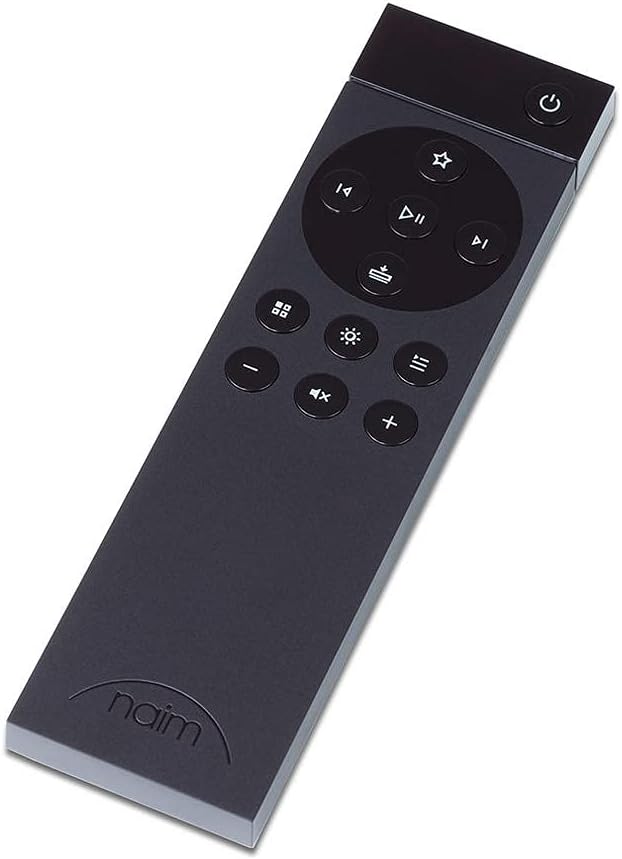
The included remote control provides convenient access to playback, volume, and input selection from a distance.
Sanidi
Uwekaji wa Awali
Place your Naim Mu-so 2nd Generation speaker on a stable, flat surface. For optimal sound dispersion, ensure there is adequate space around the unit. The speaker is designed to be set up in a permanent spot due to its robust construction and weight.
The speaker seamlessly integrates into a modern living room environment, showcasing its elegant design and compact form factor.
Uunganisho wa Nguvu
Connect the supplied power cable to the power input on the rear of the speaker and then to a wall outlet. The unit will power on automatically.
Network Connection (Wi-Fi)
- Download the Naim App from your device's app store (iOS or Android).
- Open the Naim App and follow the on-screen instructions to connect your Mu-so 2nd Generation to your Wi-Fi network.
- Ensure your mobile device is connected to the same Wi-Fi network you intend to use for the speaker.
Viunganisho vya Waya
The Mu-so 2nd Generation offers various wired input options on its rear panel:
- HDMI SANA: For connecting to a television to enhance TV audio.
- Macho: For digital audio sources like CD players or game consoles.
- 3.5mm Analog: For connecting devices with an analog audio output.
- USB 2.0: For playing audio from USB storage devices.

The rear panel of the speaker reveals various connectivity options, including HDMI ARC, optical, and USB ports, designed for easy cable management.
Uendeshaji wa Spika
Touch Control Dial
The illuminated touch control dial on the top of the speaker provides direct control over playback and settings. Rotate the outer ring to adjust volume. Tap the central play/pause button for playback control. Other icons around the ring allow for source selection and preset recall.

Maelezo ya kina view of the illuminated touch control dial, which serves as the primary interface for playback, volume, and preset selection.
Udhibiti wa Kijijini
Use the included remote control for convenient operation from a distance. Buttons are provided for power, volume, track skipping, play/pause, and input selection.
Naim App Control
The Naim App offers comprehensive control over your Mu-so 2nd Generation. You can select audio sources, manage multi-room audio, adjust settings, and access various streaming services like Spotify Connect, TIDAL, and Internet Radio.
Muunganisho wa Waya
- Bluetooth: Pair your Bluetooth-enabled devices for wireless audio streaming.
- Apple AirPlay 2: Stream audio directly from Apple devices and integrate into a multi-room AirPlay 2 system.
- Chromecast iliyojengwa: Cast audio from compatible apps and devices.
- UPnP™: Stream music from network-attached storage (NAS) devices.
- Roon Tayari: Unganisha na mfumo wako wa usimamizi wa muziki wa Roon.
Ubora wa Sauti
The Naim Mu-so 2nd Generation features a Stereo 3-way; DSP-optimised vented box acoustic system, delivering a powerful and refined audio experience. It offers deep, controlled bass and clear, detailed mid and high frequencies. With a total output power of 450 Watts, the speaker is capable of producing extremely loud volumes with minimal distortion.

This image displays the internal speaker drivers of the Naim Mu-so 2nd Generation, including its woofers and tweeters, part of its stereo 3-way acoustic system.
Vipimo
| Kipengele | Maelezo |
|---|---|
| Jina la Mfano | Naim Mu-so 2nd Generation Wireless Speaker |
| Aina ya Spika | Vyumba vingi |
| Vifaa Sambamba | Simu mahiri, Kompyuta Kibao, Kompyuta ya mkononi |
| Aina ya Kidhibiti | App Control, Touchpad |
| Usanidi wa Idhaa ya Sauti inayozunguka | 3.0 |
| Rangi | Nyeusi |
| Uzito wa Kipengee | Kilo 11.2 (pauni 24.6) |
| Haina Maji | UONGO |
| Kiwango cha Juu Zaidi (Bluetooth) | Futi 328 |
| Chanzo cha Nguvu | Umeme wa Cord |
| Kipenyo cha Woofer | Inchi 6 |
| Kipenyo cha Tweeter | Sentimita 2.54 |
| Idadi ya USB 2 Bandari | 1 |
| Vipimo vya Bidhaa | Inchi 10.4 x 24.7 x 4.8 |
| Kiwango cha Juu cha Pato la Spika | 450 Watts |
| Teknolojia ya Uunganisho | Bluetooth, HDMI |
| Njia ya Pato la Sauti | Stereo |
Kutatua matatizo
Masuala ya Muunganisho wa Programu
If you experience difficulty connecting the speaker via the Naim App, try the following steps:
- Ensure your mobile device and the Mu-so 2nd Generation are on the same Wi-Fi network.
- Restart the Naim App.
- Restart the Mu-so 2nd Generation speaker by unplugging it from the power source for 30 seconds and then plugging it back in.
- Check for any available firmware updates for the speaker via the Naim App.
- If issues persist, try resetting the app settings or reinstalling the app.
Hakuna Pato la Sauti
- Verify the volume level on both the speaker and your source device.
- Ensure the correct input source is selected on the speaker (via the app, touch dial, or remote).
- Check all cable connections for wired sources.
- For wireless connections, ensure the device is properly paired and within range.
Sauti Iliyopotoshwa
- Reduce the volume level on both the speaker and the source device.
- Ensure the audio source quality is high.
- Check for any physical obstructions around the speaker.
Matengenezo
To keep your Naim Mu-so 2nd Generation speaker in optimal condition:
- Kusafisha: Use a soft, dry, lint-free cloth to clean the surfaces. Avoid abrasive cleaners or solvents.
- Uingizaji hewa: Ensure the speaker has adequate ventilation and is not placed in an enclosed space that could restrict airflow.
- Mazingira: Avoid exposing the speaker to extreme temperatures, humidity, or direct sunlight. It is not waterproof.
Udhamini na Msaada
The Naim Mu-so 2nd Generation Wireless Speaker comes with a Udhamini mdogo. For detailed information regarding warranty terms, coverage, and how to obtain service, please refer to the warranty card included in your product packaging or visit the official Naim webtovuti.
For further assistance, technical support, or service inquiries, please contact Naim customer support through their official webtovuti au maelezo ya mawasiliano yaliyotolewa katika nyaraka za bidhaa yako.


