Utangulizi
This manual provides comprehensive instructions for the Canyon CNS-SW71BB Smartwatch. Please read this guide thoroughly before using the device to ensure proper operation and to maximize its features. Keep this manual for future reference.
Bidhaa Imeishaview
The Canyon CNS-SW71BB is a versatile smartwatch designed for fitness tracking and daily connectivity. It features a durable metal case, an IP68 waterproof rating, and a comprehensive set of sensors for various activities.
Sifa Muhimu:
- Two interchangeable straps: a metal strap with a magnetic buckle and a TPU strap.
- Durable metal watch case with IP68 waterproof rating for full protection.
- Integrated multi-sport sensors for activity tracking.
- Incoming call notifications.
- Weather display.
- Uwezo wa kuchaji bila waya.
- Bluetooth connectivity for smartphone pairing.
Vipengele:
Kifurushi ni pamoja na:
- Canyon CNS-SW71BB Smartwatch
- Metal strap with magnetic buckle
- Kamba ya TPU
- Wireless charging cable
- Mwongozo wa Mtumiaji

Image: Product packaging for the Canyon CNS-SW71BB Smartwatch, showing the watch face, included straps, and key features listed on the side.
Sanidi
1. Uchaji wa Awali:
Before first use, fully charge the smartwatch. Connect the wireless charging cable to a USB power source and place the smartwatch on the charging pad. The watch display will indicate charging status.
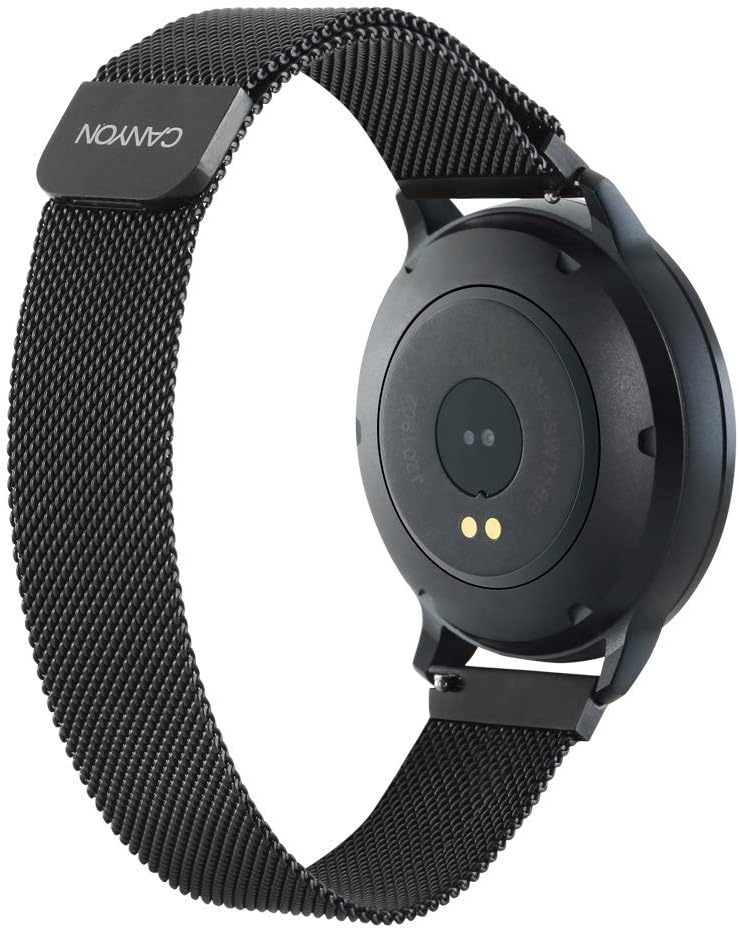
Picha: Nyuma view of the Canyon CNS-SW71BB Smartwatch, highlighting the optical sensors and charging contacts on the back of the watch face.
2. Usakinishaji wa Programu:
Download and install the "Canyon Fit" application on your smartphone. The app is available on both iOS and Android app stores. Tafuta "Canyon Fit" and follow the installation prompts.
3. Kuoanisha Kifaa:
- Hakikisha kuwa Bluetooth imewashwa kwenye simu yako mahiri.
- Open the Canyon Fit application.
- Follow the in-app instructions to search for and connect to your CNS-SW71BB smartwatch.
- Thibitisha ombi la kuoanisha kwenye simu yako mahiri na saa mahiri.
4. Strap Installation:
The smartwatch comes with two interchangeable straps. To change a strap, locate the quick-release pins on the underside of the strap where it connects to the watch case. Slide the pin to detach the strap and attach the desired strap by aligning the pins and releasinWaweke kwenye vifuniko vya saa.

Image: The Canyon CNS-SW71BB Smartwatch fitted with a black and yellow/green TPU strap, demonstrating the interchangeable strap feature.
Maagizo ya Uendeshaji
Once paired, your Canyon CNS-SW71BB smartwatch can track various activities and provide notifications.

Picha: Mbele view of the Canyon CNS-SW71BB Smartwatch display, showing fitness metrics such as steps, distance, calories burned, and heart rate.
Urambazaji Msingi:
The smartwatch typically features a touchscreen display and one or more physical buttons. Swipe across the screen to navigate through different menus and functions. Press the physical button(s) to return to the home screen or access specific features.
Ufuatiliaji wa Siha:
The smartwatch automatically tracks steps, distance, and calories burned. To initiate a specific workout mode (e.g., running, cycling), navigate to the multi-sport section on the watch or through the Canyon Fit app. The watch utilizes its integrated sensors to monitor your activity.
Arifa:
When connected to your smartphone, the smartwatch will display incoming call alerts and notifications from selected applications. Manage notification settings within the Canyon Fit app.
Onyesho la Hali ya Hewa:
Access current weather information directly on your smartwatch. Ensure the watch is connected to your smartphone and the Canyon Fit app has location permissions enabled to receive accurate weather data.
Udhibiti wa Muziki:
Control music playback on your smartphone directly from the smartwatch. This feature allows you to play, pause, skip tracks, and adjust volume without needing to access your phone.
Kamera ya mbali:
Use the smartwatch as a remote shutter button for your smartphone's camera. Activate this feature through the Canyon Fit app and then use the watch to capture photos.
Matengenezo
Kusafisha:
Regularly clean your smartwatch and straps. Wipe the watch face and case with a soft, damp cloth. For the straps, follow the manufacturer's recommendations based on the material (metal or TPU). Avoid using harsh chemicals or abrasive materials.
Upinzani wa Maji:
The Canyon CNS-SW71BB Smartwatch has an IP68 waterproof rating, meaning it is protected against dust ingress and can withstand immersion in water up to 1.5 meters for up to 30 minutes. It is suitable for daily use, including hand washing and light rain. However, it is not recommended for diving, hot showers, or prolonged submersion in hot water, as steam and high temperatures can compromise the seals.
Kutatua matatizo
- Tazama bila kuwasha: Ensure the watch is fully charged. Connect it to the wireless charger and check for charging indicators.
- Haiwezi kuoanishwa na simu mahiri:
- Thibitisha kuwa Bluetooth imewashwa kwenye simu yako mahiri.
- Ensure the Canyon Fit app is installed and running.
- Anzisha tena saa mahiri na simu mahiri.
- Angalia kama saa tayari imeoanishwa na kifaa kingine.
- Data isiyo sahihi ya siha:
- Hakikisha saa imevaliwa vizuri kwenye kifundo cha mkono wako.
- Update the Canyon Fit app to the latest version.
- Rekebisha saa kupitia programu ikiwa chaguo linapatikana.
- Arifa hazionekani:
- Check notification settings in the Canyon Fit app and your smartphone's system settings.
- Hakikisha kuwa saa imeunganishwa kupitia Bluetooth.
Vipimo
| Kipengele | Maelezo |
|---|---|
| Jina la Mfano | CNS-SW71BB |
| Chapa | CANYON |
| Ukubwa wa Kuonyesha | Inchi 1.22 |
| Teknolojia ya Uunganisho | Bluetooth |
| Kiwango cha Mawasiliano isiyo na waya | Bluetooth |
| Vipengele Maalum | Wireless Charging, Multi-sport Sensors, Call Notification, Weather Display |
| Vifaa Sambamba | Simu mahiri |
| Kiwango cha Upinzani wa Maji | IP68 (isiyopitisha maji) |
| Betri | Inaweza kuchajiwa tena (1 zimejumuishwa) |
| Rangi | Nyeusi |
| Umbo | Mzunguko |
| Mtengenezaji | Korongo |
| Masasisho ya Programu Yamehakikishwa Hadi | Habari haipatikani |
| Upatikanaji wa Vipuri | Habari haipatikani |
Udhamini na Msaada
For warranty information and technical support, please refer to the official Canyon website or contact their customer service. Details regarding specific warranty periods and support channels are typically provided with your purchase documentation or on the manufacturer's webtovuti.
Product support and updates may be available through the Canyon Fit application.


