1. Bidhaa Imeishaview
The Dino-Lite USB Digital Microscope AF3113T is a versatile imaging solution designed for detailed inspection and analysis. It offers true optical magnification and high-resolution imaging, making it suitable for various applications across industrial, scientific, medical, educational, and hobbyist needs.
- Ukuzaji: 20x - 50x, 200x True Optical Magnification
- Azimio la Picha: 640 x 480 (MP 0.3)
- Kiwango cha Fremu ya Video: FPS 30
- Muunganisho: USB for easy setup and operation
- Utangamano: Mifumo ya uendeshaji ya Windows na Mac
- Vipengele: MicroTouch for image capture, measurement capabilities, adjustable LED lighting
This microscope provides a balanced field of view for typical inspection and viewing requirements, offering robust tools for capturing, annotating, and analyzing images.

Figure 1: Key features of the Dino-Lite AF3113T, including magnification, USB connectivity, software compatibility, and measurement functions.
2. Kuweka
2.1 Ni nini kwenye Sanduku
- Dino-Lite USB Digital Microscope AF3113T
- Beba Kifuko

Figure 2: The Dino-Lite AF3113T package includes the microscope unit and a protective carry pouch.
2.2 Ufungaji wa Programu
The Dino-Lite AF3113T requires software for full functionality. Install the appropriate software for your operating system:
- Kwa Windows: Install DinoCapture software.
- Kwa Mac: Install DinoXcope software.
These applications provide tools for capturing, annotating, and analyzing images. Refer to the included Quick Start Guide for download links and detailed installation instructions.

Figure 3: The DinoCapture software interface displayed on a laptop, showing a magnified image.
2.3 Connecting the Microscope
Connect the Dino-Lite AF3113T to your computer via the provided USB cable. The microscope is designed for plug-and-play operation once the software is installed.
Kwa imara viewing or precise movement, the microscope can be paired with a compatible stand (sold separately). The microscope can be used handheld or mounted on a stand.

Figure 4: The microscope can be used handheld for flexibility or with a stand for stability and precise positioning.
3. Maagizo ya Uendeshaji
3.1 Kuwasha na Kuzima
The microscope powers on automatically when connected to a powered USB port and the software is launched. To power off, simply disconnect the USB cable or close the software application.
3.2 Kurekebisha Ukuzaji na Umakinifu
The AF3113T features variable magnification from 20x-50x and 200x. To adjust the magnification, rotate the barrel of the microscope. For fine-tuning the focus, use the scroll wheel located on the microscope body.

Figure 5: The magnification dial on the microscope allows for precise adjustment of optical zoom levels.
3.3 Udhibiti wa Taa za LED
The microscope is equipped with 8 white LEDs for illumination. The brightness of these LEDs can be controlled via the software interface (DinoCapture/DinoXcope) to optimize lighting for your subject.
3.4 Image Capture and Measurement
Tumia MicroTouch feature on the microscope to easily capture still images. Simply tap the MicroTouch sensor to take a picture. The included software also provides advanced measurement features, supporting units like inches, millimeters, and micrometers for accurate analysis.
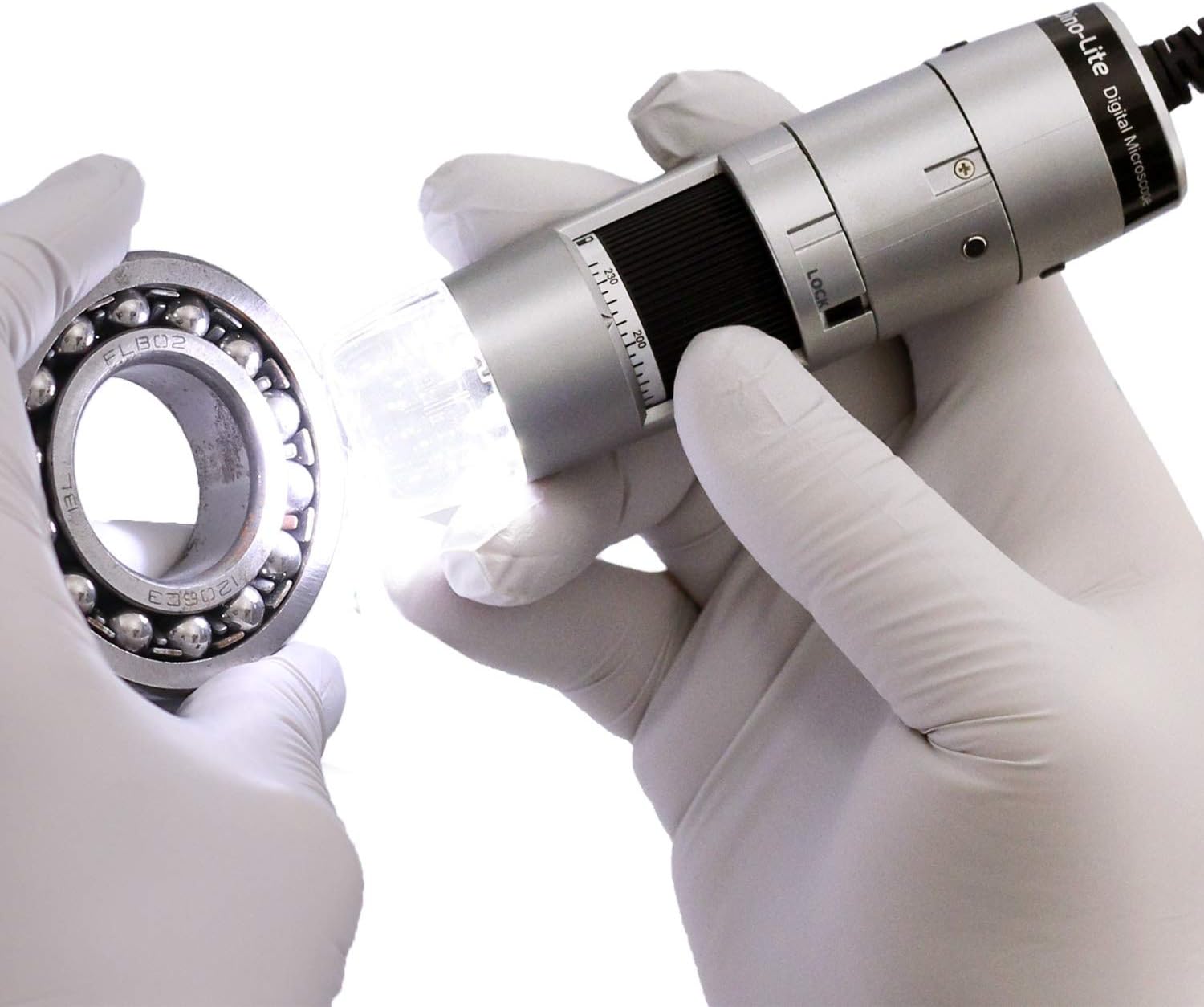
Figure 6: The Dino-Lite microscope in use, demonstrating its ability to inspect small objects with integrated lighting.
4. Matengenezo
- Keep the microscope clean by gently wiping the lens and body with a soft, lint-free cloth.
- Epuka kuhatarisha kifaa kwenye joto kali, unyevunyevu au jua moja kwa moja.
- Store the microscope in its carry pouch when not in use to protect it from dust and damage.
5. Utatuzi wa shida
- Image not appearing: Ensure the USB cable is securely connected to both the microscope and the computer. Verify that the DinoCapture/DinoXcope software is running and the correct device is selected.
- Ubora duni wa picha: Adjust the magnification and focus wheel. Ensure adequate lighting using the built-in LEDs. Clean the lens if necessary.
- Programu isiyotambua kifaa: Reinstall the DinoCapture/DinoXcope software. Check your computer's device manager for proper driver installation. Try a different USB port.
- LEDs not working: Ensure the software is running and check the LED control settings within the application.
6. Vipimo
| Kipengele | Vipimo |
|---|---|
| Vipimo vya Bidhaa | Inchi 1.3 x 1.3 x 4.49 |
| Uzito wa Kipengee | Wakia 10.5 (Kilo 0.3) |
| Nambari ya Mfano wa Kipengee | AF3113T |
| Mtengenezaji | Dino-Lite |
| Aina ya Chanzo cha Mwanga | LED |
| Nyenzo | Plastiki |
| Upeo wa Kukuza | 220 x |
| Voltage | 5 Volts |
| Vifaa Sambamba | Kompyuta Binafsi (Windows, Mac) |
| Maelezo ya Lenzi Lengo | Achromatic |
7. Udhamini na Msaada
For warranty information or technical support, please refer to the documentation included with your product or visit the official Dino-Lite website. You may also contact the manufacturer directly for assistance.


