Utangulizi
Thank you for choosing the Fosmon TSA Accepted 3-Digit Combination Luggage Lock. This manual provides detailed instructions for setting up, operating, and maintaining your lock to ensure secure travel and peace of mind. These locks are designed for durability and ease of use, featuring a zinc alloy body and hardened steel shackle, along with a unique open alert indicator.

Image: Four Fosmon TSA Accepted 3-Digit Combination Luggage Locks.
Vipengele vya Bidhaa
- TSA Accepted Design: Allows TSA agents to inspect luggage without damaging the lock, ensuring your belongings remain secure and the lock is relocked after inspection.
- Open Alert Indicator: A small red indicator pops up if your luggage has been inspected by TSA, providing immediate notification. This indicator automatically resets when the lock is opened with the correct combination.
- Ujenzi wa kudumu: Features a robust zinc alloy body and a hardened steel shackle, designed to withstand the rigors of travel and provide long-lasting security.
- Easy-to-Set 3-Digit Combination: Offers 1,000 possible combinations, which can be easily set and reset without the need for keys. The dials are designed for clear readability.
- Matumizi Mengi: Suitable for securing luggage, travel bags, suitcases, and various lockers such as those found in gyms, schools, and water parks.

Picha: Karibu view of the lock, showing TSA acceptance features.
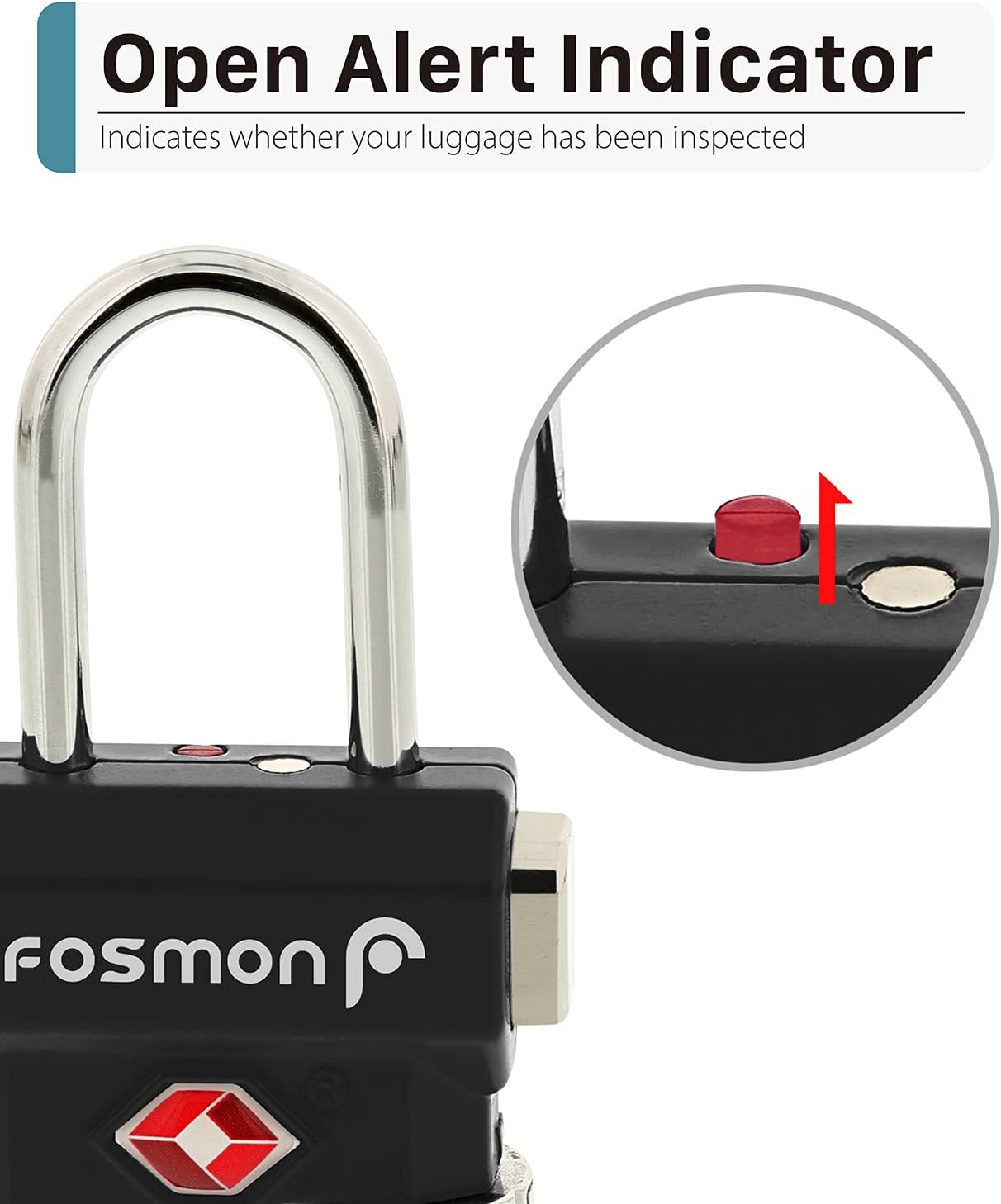
Image: The Open Alert Indicator on the lock.
Bidhaa Imeishaview Video
Video: Muhtasari mfupiview of the Fosmon TSA Accepted Luggage Locks, demonstrating key features and benefits for travelers.
Usanidi: Kuweka Mchanganyiko Wako
The default combination for your Fosmon TSA Accepted Luggage Lock is 0-0-0. Follow these steps to set your personalized 3-digit combination:
- Open the Lock: Ensure the lock is currently set to the default combination (0-0-0) or your previously set combination. Press the release button to open the shackle.
- Locate Reset Button: With the shackle open, hold the lock upside down. You will see a small reset button (often a small circular indentation) next to the TSA keyhole.
- Tumia Hali ya Kuweka Upya: Use a pen or a similar pointed tool to press the reset button in and tilt it rightward until it locks into a groove. The button should remain depressed.
- Weka Mchanganyiko Mpya: While the reset button is engaged, turn the dials to your desired 3-digit combination. Ensure the numbers align precisely with the indicator marks.
- Release Reset Button: Use the same tool to push the reset button leftward, allowing it to return to its default position. This action saves your new combination.
- Test New Combination: Scramble the dials, then enter your new combination and press the release button to confirm the lock opens.
Muhimu: Please write down your new combination and store it in a safe, memorable place. There is no master key for user combinations.

Image: Visual guide for setting a new combination.
Video Guide: How to Set Up Your Lock
Video: A step-by-step video tutorial demonstrating how to set your own 3-digit combination for the Fosmon TSA Accepted Luggage Lock.
Maagizo ya Uendeshaji
Kufunga na Kufungua
- Ili Kufungua: Turn the dials to your correct 3-digit combination. Press the release button on the side of the lock, and the shackle will spring open.
- Kufunga: Close the shackle by pushing it down until it clicks into place. Scramble the dials to a random set of numbers to secure the lock.

Image: Dials and release button for operation.
Using the Open Alert Indicator
The Open Alert Indicator is a small red button located on the top surface of the lock. It serves as a visual cue if your luggage has been opened by TSA for inspection.
- Indicator Up (Red): If the red indicator is visible and raised when you retrieve your luggage, it signifies that TSA personnel have opened your lock for inspection.
- Indicator Down (Hidden): If the indicator is not visible, your luggage has not been opened by TSA, or the indicator has reset. The indicator automatically returns to its hidden position once the lock is opened with your personal combination.

Image: The Open Alert Indicator in action.
Matengenezo
To ensure the longevity and smooth operation of your Fosmon luggage lock, consider the following maintenance tips:
- Kusafisha: Wipe the lock periodically with a soft, dry cloth to remove dust and grime. Avoid using abrasive cleaners or solvents, as these can damage the finish or internal mechanisms.
- Upakaji mafuta: If the dials become stiff over time, a small amount of graphite lubricant (pencil lead dust) can be applied to the moving parts. Avoid oil-based lubricants, which can attract dirt.
- Hifadhi: Store the lock in a dry environment when not in use to prevent moisture buildup and potential corrosion.
Kutatua matatizo
Lock Will Not Open
- Mchanganyiko Usio Sahihi: Double-check that you are entering the correct 3-digit combination. Ensure each number is perfectly aligned with the indicator marks.
- Dials Not Aligned: Sometimes dials can be slightly misaligned. Gently wiggle each dial to ensure it's fully seated in its position for the correct number.
- Reset Button Stuck: If the reset button was not fully released after setting the combination, it might prevent the lock from opening. Try gently pressing and releasing the reset button again.
Open Alert Indicator Not Working
- The indicator only activates when opened by a TSA master key. If the lock was opened by your combination, the indicator will reset to its hidden position.
- Ensure the lock mechanism is not obstructed by debris.
Vipimo
| Chapa | Fosmon |
| Nambari ya Mfano | 51113HOM |
| Aina ya Kufungia | Kufuli la Mchanganyiko la Dijiti 3 |
| Kipengele Maalum | TSA Accepted, Open Alert Indicator, Passcode Unlock |
| Nyenzo | Zinc Alloy Body, Hardened Steel Shackle |
| Vipimo (L x W x H) | Inchi 2.81 x 1.13 x 0.46 |
| Uzito wa Kipengee | Approximately 10.6 ounces (for 4-pack) |
| Matumizi Yanayopendekezwa | Luggage, Travel Bags, Suitcases, Lockers |
Udhamini na Msaada
Fosmon offers a Udhamini Mdogo wa Maisha on this product. For any questions, support, or warranty claims, please contact Fosmon's dedicated USA-based customer service. As a small business, Fosmon is committed to providing excellent customer satisfaction.
For more information, visit the official Fosmon store: Fosmon Store on Amazon


