Utangulizi
This manual provides essential instructions for the safe and efficient use of your Smart Kingfisher Rechargeable Lithium Battery and USB Charger. Please read this manual thoroughly before use and retain it for future reference.
Taarifa za Usalama
- Onyo: Usijaribu kuchaji betri zisizoweza kuchajiwa tena.
- Onyo: Do not charge batteries from other suppliers unless explicitly stated as compatible.
- Weka chaja na betri mbali na maji na unyevu.
- Do not disassemble, crush, or puncture the batteries or charger.
- Epuka kuweka betri kwenye halijoto kali au jua moja kwa moja.
- Tupa betri kwa kuwajibika kulingana na kanuni za eneo lako.
Yaliyomo kwenye Kifurushi
Thibitisha kuwa vipengee vyote vipo kwenye kifurushi chako:
- 2 x 425 Rechargeable Lithium Batteries
- 1 x Dual-Port USB Charger
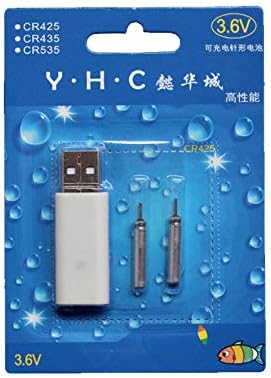
Image: Retail packaging showing the USB charger and two 425 rechargeable batteries.

Image: A pair of Smart Kingfisher 425 rechargeable lithium batteries.
Sanidi
The Smart Kingfisher USB charger is designed for ease of use. No complex setup is required.
- Identify the USB charger and the 425 rechargeable batteries.
- Connect the USB charger to a compatible power source (see "Operating Instructions" for options).

Image: The USB charger unit with its two charging pins visible.
Maagizo ya Uendeshaji
Kuchaji Betri
The charger features two ports, allowing for simultaneous charging of two batteries.
- Insert the 425 rechargeable batteries into the charging ports of the USB charger. Ensure a secure connection.
- Connect the USB charger to a power source. Compatible power sources include:
- USB power adapter (wall charger)
- Benki ya nguvu
- Chaja ya gari
- Laptop or PC USB port
- Observe the LED indicator on the charger:
- A LED ya kijani indicates that the batteries are currently charging.
- A LED nyekundu indicates that the batteries are fully charged.
- Kuchaji huchukua takriban saa 3 kwa chaji kamili.
- Once fully charged, disconnect the charger from the power source and remove the batteries.
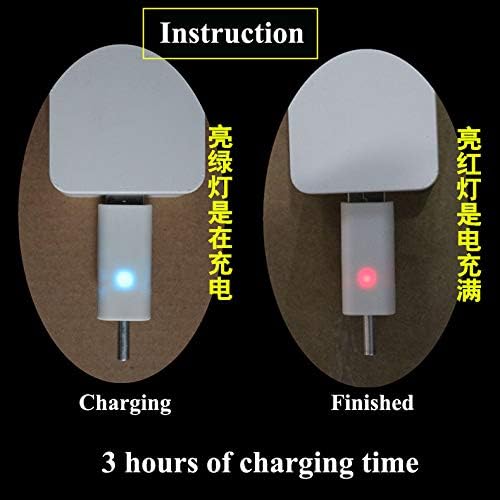
Image: Visual guide for charging status: green light for charging, red light for fully charged. Indicates a 3-hour charging time.

Image: Diagram illustrating multiple methods for charging the device, including car chargers, wall adapters, power banks, and laptops.
Matengenezo
- Clean the charger and batteries with a dry, soft cloth. Do not use liquids or abrasive cleaners.
- Store the batteries and charger in a cool, dry place when not in use.
- Avoid storing fully discharged batteries for extended periods to prolong their lifespan.
Kutatua matatizo
| Tatizo | Sababu inayowezekana | Suluhisho |
|---|---|---|
| Batteries not charging (no LED indication) |
|
|
| Charging takes longer than 3 hours |
|
|
| Red LED does not turn on after extended charging |
|
|
Vipimo
- Nyenzo: Plastiki
- Uzito wa Bidhaa: 20 g (total for charger and batteries)
- Aina ya Betri: 425 Rechargeable Lithium Battery (compatible with CR425, CR435, CR535)
- Aina ya Chaja: Chaja ya USB ya Bandari mbili
- Ingizo: USB (compatible with various USB power sources)
- Kiashiria cha Kuchaji: Green LED (charging), Red LED (fully charged)
- Takriban Muda wa Kuchaji: 3 masaa
Udhamini na Msaada
For warranty information or technical support, please refer to the retailer's return policy or contact the manufacturer directly. Keep your purchase receipt as proof of purchase.
Kwa usaidizi wa ziada, unaweza kutembelea product page on Amazon.com.mx.


