1. Utangulizi
This manual provides essential information for the installation, operation, and maintenance of the Allen-Bradley 1769-OB16 Compact I/O Output Module. It is intended for qualified personnel responsible for the integration and servicing of industrial control systems.
The 1769-OB16 is a 16-point DC output module designed for use with Allen-Bradley CompactLogix and MicroLogix 1500 controllers. It provides reliable digital output control for various industrial applications.
2. Taarifa za Usalama
WARNING: To prevent electric shock or damage to equipment, disconnect power before installing or removing modules.
Observe all local and national electrical codes. Installation and maintenance should only be performed by qualified personnel.
3. Bidhaa Imeishaview
The Allen-Bradley 1769-OB16 is a Compact I/O 16-point DC output module. It features 16 sourcing outputs and is designed for robust industrial environments.

Kielelezo cha 3.1: Mbele view of the 1769-OB16 module, showing the output terminals and status indicators.

Kielelezo cha 3.2: Upande view of the 1769-OB16 module, illustrating its compact design.

Kielelezo cha 3.3: Ndani view of the 1769-OB16 module, showing the circuit board and connectors.

Kielelezo cha 3.4: Chini view of the 1769-OB16 module, highlighting the mounting clips.
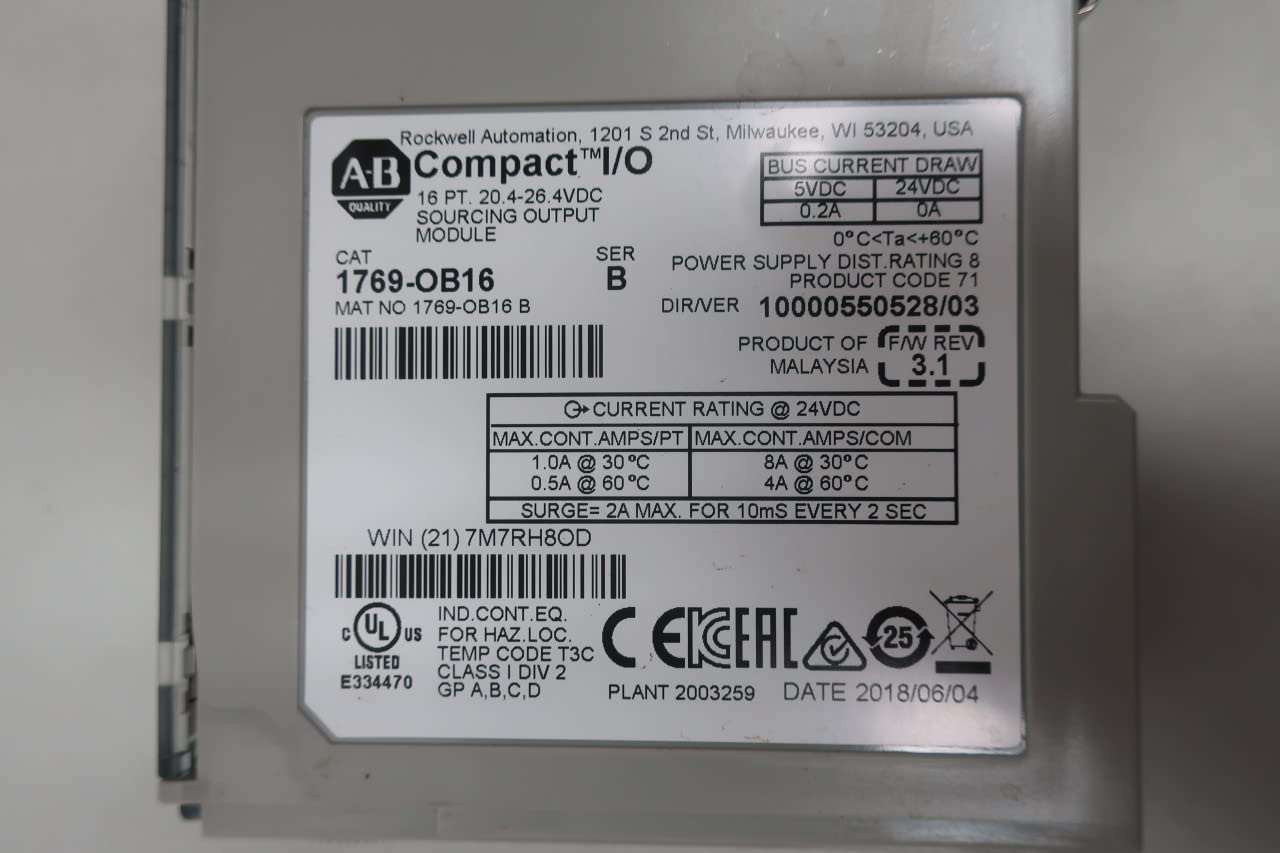
Kielelezo cha 3.5: Product label for the 1769-OB16 module, detailing electrical ratings and certifications. Key information includes: CAT 1769-OB16, SER B, BUS CURRENT DRAW 5VDC 0.2A, 24VDC 0A, MAX CONT AMPS/PT 1.0A @ 30°C, 0.5A @ 60°C, MAX CONT AMPS/COM 8A @ 30°C, 4A @ 60°C, SURGE = 2A MAX. FOR 10ms EVERY 2 SEC. The code 217M7RH8OD is also visible. More information on Rockwell Automation webtovuti.

Kielelezo cha 3.6: Packaging label for the Allen-Bradley 1769-OB16 module, showing part number and barcode. The barcode number is 0893492.
4. Kuweka na Kuweka
4.1 Mounting the Module
- Ensure all power to the CompactLogix or MicroLogix 1500 system is disconnected.
- Align the module with the adjacent module or controller on the DIN rail.
- Slide the module into place until it clicks securely into the bus connector.
- Secure the module to the DIN rail using the integrated locking tabs.
4.2 Wiring the Outputs
The 1769-OB16 module provides 16 sourcing DC outputs. Refer to the terminal block diagram on the module for correct wiring connections.
- Connect the 24V DC source to the appropriate power terminals.
- Connect the load devices to the output terminals (0-15) and the common return.
- Hakikisha miunganisho yote ni salama na imewekewa maboksi ipasavyo.
Kumbuka: For detailed wiring diagrams, consult the CompactLogix or MicroLogix 1500 system user manual.
5. Maagizo ya Uendeshaji
5.1 Kuongeza Nguvu
After installation and wiring are complete, apply power to the CompactLogix or MicroLogix 1500 system. The module's status indicators will illuminate to show operational status.
5.2 Programming Outputs
The 1769-OB16 module outputs are controlled via the programming software (e.g., RSLogix 5000 or RSLogix 500) associated with your controller. Each output point corresponds to a specific address in the controller's I/O map.
- Refer to your controller's programming manual for details on configuring I/O modules.
- Assign output addresses to control specific devices.
- Monitor output status through the programming software or the module's LED indicators.
6. Matengenezo
The 1769-OB16 module is designed for minimal maintenance. Regular inspections are recommended to ensure optimal performance.
6.1 Ukaguzi wa Kawaida
- Visually inspect the module for any signs of damage, discoloration, or loose connections.
- Ensure proper ventilation around the module to prevent overheating.
- Thibitisha kwamba miunganisho yote ya nyaya iko salama.
6.2 Kusafisha
If cleaning is necessary, disconnect power to the module and use a soft, dry, lint-free cloth. Do not use solvents or abrasive cleaners.
7. Utatuzi wa shida
Sehemu hii inatoa hatua za msingi za utatuzi wa matatizo ya kawaida.
| Tatizo | Sababu inayowezekana | Suluhisho |
|---|---|---|
| Moduli haiwashi | No power to the system; incorrect module seating; faulty power supply. | Verify system power; re-seat the module; check power supply. |
| Matokeo hayaamilishwi | Incorrect wiring; faulty load device; programming error; module fault. | Check wiring connections; test load device; verify PLC program logic; check module diagnostics. |
| Module fault indicator active | Internal module error; overcurrent/short circuit on an output. | Consult controller diagnostics for fault codes; inspect output wiring for shorts; replace module if necessary. |
8. Vipimo
| Kigezo | Thamani |
|---|---|
| Nambari ya Mfano | 1769-OB16 |
| Mfululizo | B |
| Aina ya Pato | DC Sourcing |
| Idadi ya Matokeo | 16 |
| Uendeshaji Voltage Mbalimbali | 20.4-26.4VDC |
| Max Continuous Current per Point | 1.0A @ 30°C, 0.5A @ 60°C |
| Max Continuous Current per Common | 8A @ 30°C, 4A @ 60°C |
| Bus Current Draw (5V DC) | 0.2A |
| Bus Current Draw (24V DC) | 0A |
| Vipimo (H x W x D) | Inchi 5.25 x 3.5 x 2.25 (kadirio) |
| Uzito | Pauni 1.5 (takriban) |
| Joto la Uendeshaji | 0°C hadi +60°C |
| Vyeti | CE, EAC, cULus Listed (IND. CONT. EQ. FOR HAZ. LOC. TEMP CODE T3C CLASS I DIV 2 GP A,B,C,D) |
9. Udhamini na Msaada
For warranty information and technical support, please refer to the official Allen-Bradley or Rockwell Automation website, or contact your authorized distributor.
Maelezo ya Mawasiliano ya Rockwell Automation:
- Webtovuti: www.rockwellautomation.com
- Usaidizi: Refer to the "Support" section on their website for regional contact details and knowledge base.
When contacting support, please have your module's model number (1769-OB16) and serial number (if applicable) ready.


