Propel Zipp Nano 2.0 Drone User Manual
Model: Zipp Nano 2.0
Chapa: Propel
1. Utangulizi
This manual provides essential information for the safe and effective operation of your Propel Zipp Nano 2.0 Drone. Please read this manual thoroughly before operating the drone to ensure proper usage and to prevent damage or injury.
The Propel Zipp Nano 2.0 is a high-performance 2.4 GHz indoor/outdoor drone designed for stable flight and exciting aerial maneuvers. It features a built-in 6-axis gyroscopic chip for stability, multiple speed settings, and the ability to perform 360-degree stunt rolls.
2. Tahadhari za Usalama
Always prioritize safety when operating the drone. Failure to follow these guidelines may result in injury or damage to the drone or property.
- Do not operate the drone near people, animals, or obstacles.
- Weka mikono, nywele, na nguo zilizolegea mbali na propela zinazozunguka.
- Ensure the drone is fully charged before each flight.
- Usiruke kwenye upepo mkali au hali mbaya ya hewa.
- Supervise children during operation. This product contains small parts and is not suitable for children under 3 years due to choking hazard.
- Do not attempt to modify or repair the drone yourself. Contact customer support for assistance.

Image: Back of the product packaging, highlighting features and a warning about small parts.
3. Yaliyomo kwenye Kifurushi
Thibitisha kuwa vipengee vyote vipo kwenye kifurushi chako:
- Propel Zipp Nano 2.0 Drone (Red)
- 2.4 GHz Digital Remote Control
- Kebo ya Kuchaji ya USB
- Spare Replacement Parts (Propellers)

Image: The Propel Zipp Nano 2.0 Drone and its remote control visible within the clear retail packaging.
4. Kuweka
4.1 Kuchaji Betri ya Drone
The drone is powered by an internal rechargeable battery. Use the provided USB charging cable to charge the drone.
- Connect the small end of the USB charging cable to the drone's charging port.
- Unganisha ncha kubwa ya kebo ya kuchaji ya USB kwenye chanzo cha umeme cha USB (km, mlango wa USB wa kompyuta, adapta ya ukuta ya USB).
- Taa ya kiashiria cha kuchaji kwenye kebo ya USB itawaka wakati wa kuchaji na kuzima ikiwa imechajiwa kikamilifu.
- Kwa kawaida kuchaji huchukua takriban dakika 30-45. Usichaji kupita kiasi.
4.2 Installing Remote Control Batteries
The remote control requires 2 "AAA" batteries (not included).
- Tafuta sehemu ya betri nyuma ya kidhibiti cha mbali.
- Fungua kifuniko cha sehemu ya betri.
- Insert 2 "AAA" batteries, ensuring correct polarity (+/-).
- Funga kifuniko cha sehemu ya betri kwa usalama.

Image: The remote control for the Propel Zipp Nano 2.0 Drone, showing its various buttons and joysticks.
4.3 Kuoanisha Ndege Isiyo na Rubani na Kidhibiti cha Mbali
Ili kuanzisha uhusiano kati ya drone na udhibiti wa kijijini:
- Weka drone kwenye uso wa gorofa, usawa.
- Turn on the drone by sliding the power switch. The drone's LED lights will flash.
- Washa kidhibiti mbali.
- Sukuma kijiti cha kulia cha kushoto (kasuku) juu kabisa, kisha ukivute chini kabisa.
- The drone's LED lights will turn solid, indicating successful pairing.
5. Kuendesha Ndege isiyo na rubani
5.1 Vidhibiti vya Ndege
Jifahamishe na mpangilio na vitendaji vya udhibiti wa mbali:
- Kijiti cha Kulia cha Kushoto (Kidhibiti/Kipiga Mdundo):
- Push up to increase altitude (throttle).
- Push down to decrease altitude.
- Push left/right to rotate the drone (yaw).
- Kijiti cha Kulia cha Kuchezea (Pitch/Roll):
- Push up/down to move forward/backward (pitch).
- Push left/right to move left/right (roll).
- Kitufe cha Kasi: Cycles through 3 different speed settings (slow, medium, high).
- Stunt Button: Press to initiate 360-degree stunt rolls (see 5.4).
- T-Mode Button: Activates T-Mode for beginner pilots, providing more stable and controlled flight.
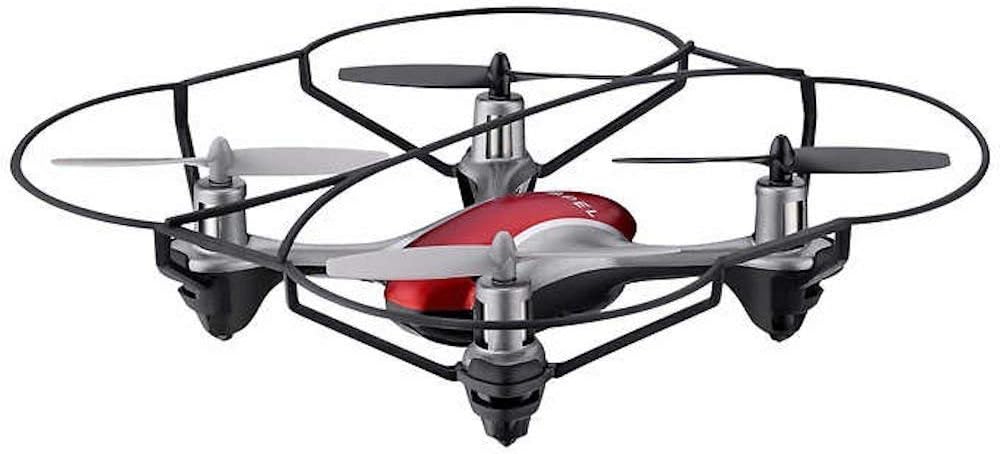
Image: The Propel Zipp Nano 2.0 Drone, showcasinmuundo wake mdogo na walinzi wa propela.
5.2 Kupaa na Kutua
- Kuondoka: After pairing, slowly push the left joystick (throttle) up to lift off.
- Kutua: Slowly pull the left joystick (throttle) down until the drone lands gently.
5.3 Altitude Hold
The Zipp Nano 2.0 features an air pressure sensor that helps lock altitude in mid-air, making it easier to control and hover stably.
5.4 360-Degree Stunt Rolls
To perform a stunt roll:
- Ensure the drone is flying at a sufficient height (at least 6-8 feet).
- Press the dedicated Stunt Button on the remote control.
- Immediately push the right joystick in the desired direction (forward, backward, left, or right) to execute the roll.

Picha: yenye pembe view of the Propel Zipp Nano 2.0 Drone, highlighting its sleek design and protective frame.
6. Matengenezo
- Kusafisha: Use a soft, dry cloth to clean the drone and remote control. Do not use harsh chemicals or water.
- Uingizwaji wa Propela: If propellers become damaged, replace them with the provided spare parts. Carefully remove the damaged propeller and snap the new one into place, ensuring correct orientation.
- Hifadhi: When not in use, store the drone and remote control in a cool, dry place away from direct sunlight.
7. Utatuzi wa shida
| Tatizo | Sababu inayowezekana | Suluhisho |
|---|---|---|
| Drone haijibu kwa udhibiti wa mbali. | Not paired, low drone battery, low remote control batteries. | Re-pair the drone and remote. Charge drone battery. Replace remote control batteries. |
| Ndege zisizo na rubani huruka bila mpangilio au kuelea. | Not calibrated on a level surface, damaged propeller, strong wind. | Ensure drone is placed on a flat surface for pairing. Check for damaged propellers and replace if necessary. Fly in calm conditions. |
| Drone does not lift off. | Low drone battery, propellers not spinning correctly. | Charge drone battery fully. Check for obstructions around propellers. |
8. Vipimo
| Kipengele | Maelezo |
|---|---|
| Chapa | Propel |
| Jina la Mfano | Propel 2.4 ghz (Zipp Nano 2.0) |
| Teknolojia ya Uunganisho | Masafa ya Redio (2.4 GHz) |
| Safu ya Uendeshaji | Hadi futi 200 |
| Gyroscope | Built-in 6-axis gyroscopic chip |
| Mipangilio ya Kasi | 3 (Slow, Medium, High) |
| Vipengele Maalum | 360-degree stunt rolls, Altitude Hold, T-Mode for beginners |
| Aina za Nyenzo | Plastic, Carbon Fibre |
| Vipimo vya Bidhaa | 13.97 x 3.81 x 13.97 cm |
| Uzito wa Kipengee | 453.59 g (1 Pound) |
| Rangi | Nyekundu |
| Kiwango cha Ujuzi | Mwanzilishi |
9. Udhamini na Msaada
Propel offers unlimited replacement parts for one year from the date of purchase. For warranty claims, technical support, or to order replacement parts, please refer to the contact information provided on the product packaging or the official Propel webtovuti.
Weka risiti yako ya ununuzi kama uthibitisho wa ununuzi kwa madhumuni ya udhamini.


