1. Utangulizi
Thank you for choosing the Vento Uragano 54-inch Indoor Chrome Ceiling Fan. This manual provides essential information for the safe installation, operation, and maintenance of your new ceiling fan. Please read all instructions carefully before beginning installation and retain this manual for future reference.
The Vento Uragano is designed for indoor use in bedrooms and living rooms, featuring a chrome finish, five yellow blades, and convenient remote control operation.
2. Taarifa Muhimu za Usalama
ONYO: To reduce the risk of fire, electric shock, or personal injury, always follow these guidelines:
- Turn off power at the circuit breaker or fuse box before installation or servicing.
- Wiring zote lazima ziwe kwa mujibu wa kanuni za umeme za kitaifa na za mitaa. Wasiliana na fundi umeme aliyehitimu ikiwa huna uhakika kuhusu taratibu za kuunganisha waya.
- Ensure the installation site can support the fan's weight (approximately 20-30 lbs).
- Usitumie feni na blade zilizoharibiwa au nyumba.
- Keep hands, clothing, and other objects clear of the fan blades when the fan is operating.
- This fan is for indoor use only. Do not expose to water or excessive humidity.
3. Yaliyomo kwenye Kifurushi
Verify that all components are present and undamaged before proceeding with installation. If any parts are missing or damaged, contact Vento customer support.
- Bunge la Makazi ya Magari
- Mabano ya Kuweka Dari
- Downrod na Dari
- 5 Fan Blades (Yellow)
- Blade Attachment Hardware
- Udhibiti wa Mbali na Wall Mount
- Kitengo cha Mpokeaji
- Pakiti ya vifaa (skrubu, karanga za waya, mashine za kuosha)
- Mwongozo wa Maagizo (hati hii)
4. Kuweka na Kuweka
Kabla ya kuanza: Ensure power is OFF at the circuit breaker. Gather necessary tools: screwdriver, wire strippers, ladder, and electrical tape.
4.1 Kuweka Mabano
Attach the ceiling mounting bracket to the outlet box using the screws provided. Ensure the bracket is securely fastened and can support the fan's weight. The outlet box must be listed for fan support.
4.2 Kuunganisha Feni
- Feed the electrical wires from the motor assembly through the downrod.
- Secure the downrod to the motor housing with the provided pin and clip.
- Inua kwa uangalifu kifaa cha feni na ukitundike kwenye ndoano ya mabano ya kupachika.
4.3 Viunganisho vya Wiring
Connect the fan's wires to the household wiring according to the diagram in your separate wiring guide (if provided) or standard electrical practices. Typically, this involves connecting:
- Green/Bare copper wire (Ground) to household ground wire.
- White wire (Neutral) to household neutral wire.
- Black wire (Live/Hot) to household live wire.
Ensure all connections are secure with wire nuts and electrical tape.
4.4 Kuambatanisha Blades
Attach each of the five yellow fan blades to the blade holders using the screws and washers provided. Then, attach the blade holders to the motor housing. Ensure all screws are tightened securely.
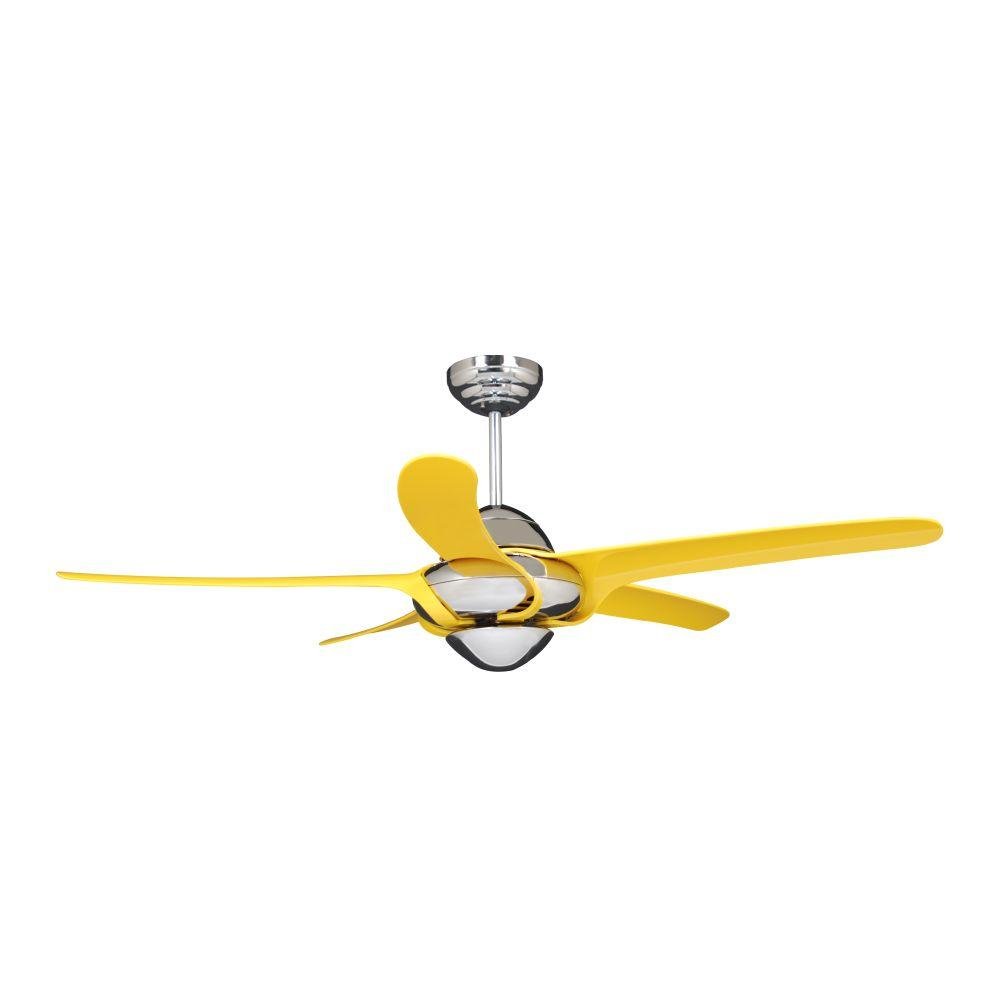
Image 1: The Vento Uragano 54-inch ceiling fan fully assembled, showcasing its chrome motor housing and five yellow blades. This image illustrates the fan's complete appearance after installation.
4.5 Kulinda dari
Slide the canopy up against the ceiling and secure it to the mounting bracket with the provided screws. Ensure no wires are pinched.
5. Maagizo ya Uendeshaji
Your Vento Uragano ceiling fan is operated via the included remote control.
5.1 Kazi za Udhibiti wa Mbali
- Kitufe cha KUWASHA/KUZIMA: Bonyeza ili kuwasha au kuzima feni.
- Vifungo vya Kasi ya Mashabiki (1-3): Select desired fan speed (1=Low, 2=Medium, 3=High).
- Light Button (if applicable): Press to turn the fan light on or off. (Note: This model description does not specify a light kit, refer to your specific model for light functionality).
- Reverse Function Button: Hubadilisha mwelekeo wa mzunguko wa blade kwa majira ya joto (mtiririko wa hewa kwenda chini) au wakati wa msimu wa baridi (mtiririko wa juu wa hewa).
Install 2 AAA batteries (not included) into the remote control, observing polarity.
Operesheni 5.2 za Msimu
- Hali ya Majira ya joto: Mawe huzunguka kinyume cha saa, yakisukuma hewa chini ili kuunda upepo wa kupoeza.
- Hali ya Majira ya baridi: Blades rotate clockwise, drawing air upward to circulate warm air near the ceiling. Use this mode at a low speed.
6. Matengenezo
Regular maintenance ensures optimal performance and extends the life of your Vento Uragano ceiling fan.
- Kusafisha: Vumbia visu vya feni na uwekaji wa injini mara kwa mara kwa laini, damp kitambaa. Usitumie wasafishaji wa abrasive au vimumunyisho, kwani hizi zinaweza kuharibu kumaliza.
- Mizani ya Blade: If the fan wobbles, check that all blade screws are tight. A balancing kit (sold separately) can be used to correct persistent wobbling.
- Ulainishaji wa Magari: Motor shabiki ni lubricated kudumu na hauhitaji mafuta ya ziada.
- Kaza Fasteners: Mara kwa mara angalia skrubu na vifungashio vyote kwenye feni na vifaa vya kupachika ili kuhakikisha viko salama.
Always turn off power to the fan at the circuit breaker before performing any cleaning or maintenance.
7. Utatuzi wa shida
Before attempting any repairs, ensure the power is turned off at the circuit breaker.
| Tatizo | Sababu inayowezekana | Suluhisho |
|---|---|---|
| Shabiki haanzi | Hakuna nguvu kwa shabiki; Uunganisho wa waya huru; Betri ya udhibiti wa mbali imekufa. | Angalia kivunja mzunguko/fyuzi; Hakikisha miunganisho yote ya waya iko salama; Badilisha betri za udhibiti wa mbali. |
| Shabiki anatetemeka kupita kiasi | screws blade huru; blade zisizo na usawa; Mabano yaliyolegea ya kupachika. | Tighten all blade screws; Use a blade balancing kit; Ensure mounting bracket is securely fastened. |
| Operesheni ya kelele | Loose screws; Motor housing rubbing; Fan not level. | Check and tighten all screws; Ensure no parts are touching; Verify fan is level. |
| Udhibiti wa mbali haufanyi kazi | Dead batteries; Incorrect pairing with receiver. | Replace batteries; Refer to remote control pairing instructions (usually involves turning power off/on and pressing a button). |
8. Vipimo
- Mfano: kimbunga
- Chapa: Vento
- Fan Design: Shabiki wa dari
- Ukubwa: inchi 54
- Idadi ya Blade: 5
- Blade Color: Njano
- Maliza Aina: Chrome (motor housing)
- Nyenzo: Chuma
- Matumizi ya Ndani/Nje: Ndani tu
- Aina ya Chumba: Chumbani, chumba cha kulala
- Chanzo cha Nguvu: Umeme wa Cord
- Mbinu ya Kudhibiti: Udhibiti wa Kijijini
- Aina ya Kupachika: Mlima wa dari
9. Udhamini na Msaada
Vento products are manufactured to high-quality standards. For specific warranty details, please refer to the warranty card included with your purchase or visit the official Vento webtovuti. Weka uthibitisho wako wa ununuzi kwa madai ya udhamini.
For technical support, replacement parts, or general inquiries, please contact Vento customer service. Contact information can typically be found on the Vento webtovuti au kwenye ufungaji wa bidhaa.
Msaada mkondoni: www.vento.com/support (Kutampkiungo, badilisha na halisi ikiwa inajulikana)


