1. Utangulizi
This manual provides essential information for the safe and efficient operation of your Neewer NW801H 8-inch TFT-LCD Monitor. Please read this manual thoroughly before using the product and retain it for future reference. The NW801H monitor is designed for versatile applications, including use with DSLRs, PCs, CCTV cameras, DVD players, and car backup camera systems. It features a 4:3 aspect ratio, 1024x768 resolution, and multiple input options.
2. Taarifa za Usalama
- Usiweke skrini kwenye mvua au unyevu ili kuzuia moto au mshtuko wa umeme.
- Usifungue ufuatiliaji casing. Rejelea huduma zote kwa wafanyikazi waliohitimu.
- Tumia tu usambazaji wa umeme uliotolewa.
- Hakikisha uingizaji hewa sahihi ili kuzuia overheating.
- Epuka kuweka kichungi kwenye jua moja kwa moja au karibu na vyanzo vya joto.
- Clean the screen with a soft, dry cloth. Avoid harsh chemicals.
- Weka mbali na watoto.
3. Yaliyomo kwenye Kifurushi
Thibitisha kuwa bidhaa zote zilizoorodheshwa hapa chini zimejumuishwa kwenye kifurushi chako. Ikiwa bidhaa yoyote haipo au kuharibiwa, wasiliana na muuzaji wako.
- 1x Neewer NW801H Monitor
- 1x Power Supply (PSE Listed)
- 1x BNC Cable
- 1x Operation Manual (this document)
- 1x Mount (stand)

Image 3.1: The Neewer NW801H monitor shown with its included accessories: power adapter, BNC cable, and desktop stand.
4. Bidhaa Imeishaview
4.1 Jopo la mbele

Picha 4.1: Mbele view of the Neewer NW801H monitor, displaying the screen and control buttons located below the display.
The front panel features the 8-inch TFT-LCD display and a row of control buttons for navigating the monitor's settings and input selection.
4.2 Paneli ya Nyuma na Miunganisho
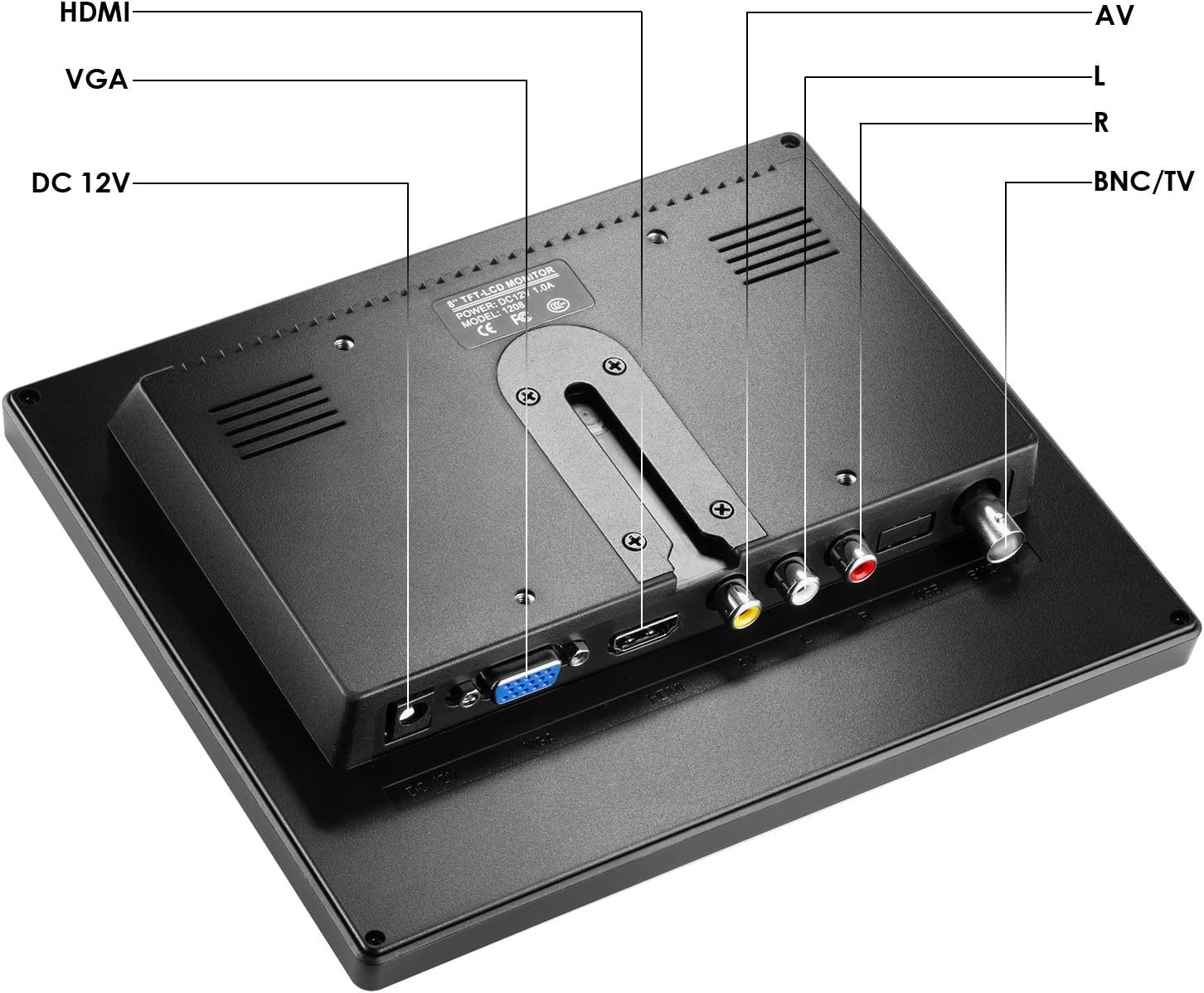
Picha ya 4.2: Nyuma view of the Neewer NW801H monitor, highlighting the various input ports and power connection.
- DC 12V: Power input port for the included 12V power adapter.
- HDMI: High-Definition Multimedia Interface input for digital video and audio signals.
- VGA: Video Graphics Array input for analog video signals.
- AV (L/R): Audio/Video input for composite video and stereo analog audio signals.
- BNC/TV: BNC input for composite video signals, commonly used with CCTV systems.
5. Maagizo ya Kuweka
5.1 Kukusanya Stendi ya Kufuatilia
- Insert the stand's neck into the base.
- Secure the neck to the base using the provided screw and a screwdriver.
- Attach the assembled stand to the back of the monitor by aligning the mounting points and securing it.
- Ensure the monitor is firmly attached to the stand.

Image 5.1: Visual guide demonstrating the four steps to assemble the monitor stand and attach it to the display unit.
Uunganisho wa Nguvu 5.2
Connect the provided 12V power adapter to the "DC 12V" input port on the rear of the monitor. Plug the power adapter into a standard electrical outlet.
5.3 Vifaa vya Kuingiza Data Vinavyounganishwa
The monitor supports multiple input types. Choose the appropriate cable for your device and connect it to the corresponding port on the monitor's rear panel.
- HDMI: For devices like DSLRs, PCs, or DVD players with HDMI output.
- VGA: For PCs or other devices with VGA output.
- YA: For devices with composite video (yellow RCA) and stereo audio (red/white RCA) outputs, such as older DVD players or some cameras.
- BNC: For CCTV cameras or other surveillance equipment with BNC video output.

Image 5.2: Illustrates the monitor's compatibility with various devices including DSLR cameras, DVRs, PCs, CCD cameras, CCTV cameras, and DVD players.
6. Maagizo ya Uendeshaji
6.1 Kuwasha / Kuzima
Press the power button (usually marked with a circle and vertical line symbol) on the front panel to turn the monitor on or off.
6.2 Uteuzi wa Ingizo
Use the "Input" or "Source" button on the front panel to cycle through the available input sources (HDMI, VGA, AV, BNC) until your desired input is displayed.
6.3 Urambazaji wa Menyu
The monitor features an On-Screen Display (OSD) menu for adjusting various settings.
- Press the "Menu" button to open the OSD.
- Use the arrow buttons (often labeled with left/right or up/down arrows) to navigate through menu options.
- Press the "Enter" or "OK" button to select an option or confirm a setting.
- Use the "Exit" or "Menu" button again to close the OSD.
Common Menu Settings:
- Mwangaza/Utofautishaji: Rekebisha viwango vya mwangaza wa onyesho na utofautishaji.
- Mipangilio ya Rangi: Rekebisha halijoto ya rangi, rangi na kueneza.
- Uwiano wa kipengele: Select between 4:3 or other available aspect ratios (if applicable).
- Sauti: Adjust volume for the built-in speaker.
7. Matengenezo
- Kusafisha skrini: Futa skrini kwa upole kwa kitambaa laini kisicho na pamba. Kwa alama za ukaidi, kidogo dampPaka kitambaa maji au suluhisho maalum la kusafisha linalofaa kwa skrini. Usinyunyizie kioevu moja kwa moja kwenye skrini.
- Kusafisha Casing: Tumia kitambaa laini na kikavu kufuta kifaa casing. Epuka visafishaji abrasive au vimumunyisho.
- Hifadhi: Ikiwa haitumiki kwa muda mrefu, hifadhi kifaa cha kuchungulia mahali pakavu na penye baridi, mbali na jua moja kwa moja na halijoto kali.
8. Utatuzi wa shida
| Tatizo | Sababu inayowezekana | Suluhisho |
|---|---|---|
| Hakuna picha kwenye skrini | No power; Incorrect input selected; Loose cable connection. | Check power connection; Select correct input source; Ensure cables are securely connected. |
| Picha imepotoshwa au ina ukungu | Incorrect resolution setting on source device; Cable quality; Monitor settings. | Adjust source device resolution to 1024x768; Try a different cable; Adjust monitor's brightness/contrast/sharpness. |
| Hakuna sauti | Volume too low; Audio cable not connected (for AV/VGA); Source device audio output issue. | Increase monitor volume; Ensure audio cables are connected (if using AV/VGA); Check audio settings on source device. |
| Monitor turns off unexpectedly | Power supply issue; Overheating. | Check power connection and adapter; Ensure adequate ventilation around the monitor. |
9. Vipimo
| Kipengele | Vipimo |
|---|---|
| Paneli ya Kuonyesha | TFT-LCD |
| Ukubwa wa skrini | inchi 8.0 |
| Azimio | 1024x768 |
| Uwiano wa skrini | 4:3 |
| Mwangaza | 300cd/m2 |
| Tofautisha | 500:1 |
| View Pembe | 160 degrees (80/80 degrees) |
| Kiwango cha Kuonyesha upya | 60-75Hz |
| Mwangaza nyuma | LED |
| Ishara Input | HDMI/VGA/AV/BNC |
| Nguvu Voltage | 12V 1A (100V-220V) |
| Joto la Kufanya kazi | -10 ~ 60 ℃ |
| Vipimo vya Bidhaa | Inchi 13 x 10.5 x 2.9 |
| Uzito wa Kipengee | Pauni 1 |
10. Udhamini na Msaada
For warranty information and technical support, please refer to the warranty card included with your product or visit the official Neewer webtovuti. Weka risiti yako ya ununuzi kama uthibitisho wa ununuzi.
Mtengenezaji: Mpya zaidi
Nambari ya Mfano: 10089910


