1. Utangulizi
This manual provides essential instructions for the safe and effective use of your Olympus OM-D E-M1 Mark II Micro Four Thirds System Camera. The E-M1 Mark II is engineered for high performance, featuring a 20.4 Megapixel Live MOS sensor, 5-axis image stabilization, and an advanced autofocus system. Please read this manual thoroughly before using the camera and keep it in a safe place for future reference.
2. Taarifa za Usalama
To prevent injury to yourself or others, or damage to your equipment, observe the following safety precautions:
- Do not disassemble, repair, or modify the camera or lens.
- Keep the camera away from water and moisture. This camera is weather-sealed, but not submersible.
- Avoid exposing the camera to extreme temperatures, direct sunlight for prolonged periods, or high humidity.
- Use only Olympus-approved batteries and chargers.
- Do not look at the sun or bright light sources through the viewfinder or lens, as this can cause permanent vision damage.
- Weka mbali na watoto.
3. Yaliyomo kwenye Kifurushi
Thibitisha kuwa vipengee vyote vipo kwenye kifurushi chako:
- Olympus OM-D E-M1 Mark II Camera Body
- M.Zuiko Digital ED 12-40mm F2.8 PRO Lens
- BLH-1 Li-ion Battery
- BCH-1 Li-ion Battery Charger
- Kebo ya USB
- Cable cha picha ya video
- Kamba ya Mabega
- FL-LM3 Flash
- Instruction Manual (basic guide)
- Kadi ya Udhamini
4. Vipengele vya Kamera
Jizoeshe na sehemu mbalimbali za kamera yako.
4.1 Mbele View with Lens

This image displays the Olympus OM-D E-M1 Mark II camera body with the M.Zuiko 12-40mm PRO lens mounted. Key features visible include the lens barrel, focus ring, zoom ring, and the Olympus branding on the camera body.
4.2 Mbele View (Body Only)
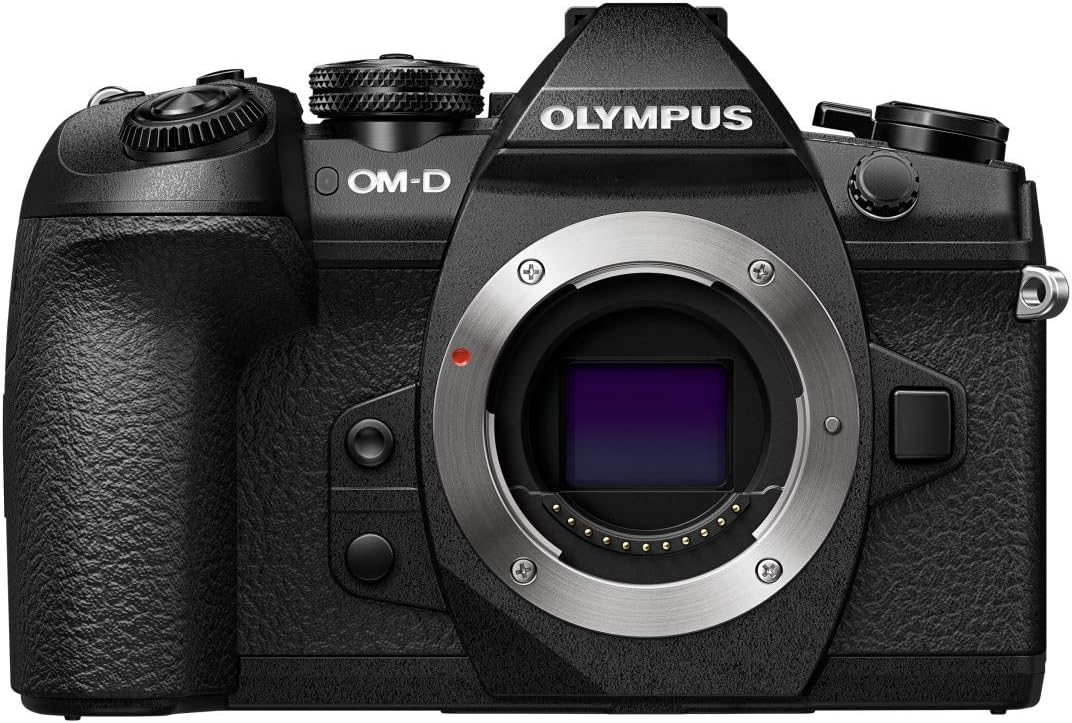
This image shows the front of the Olympus OM-D E-M1 Mark II camera body without a lens attached, revealing the Micro Four Thirds lens mount, the red lens release button, and the textured grip.
4.3 Juu View
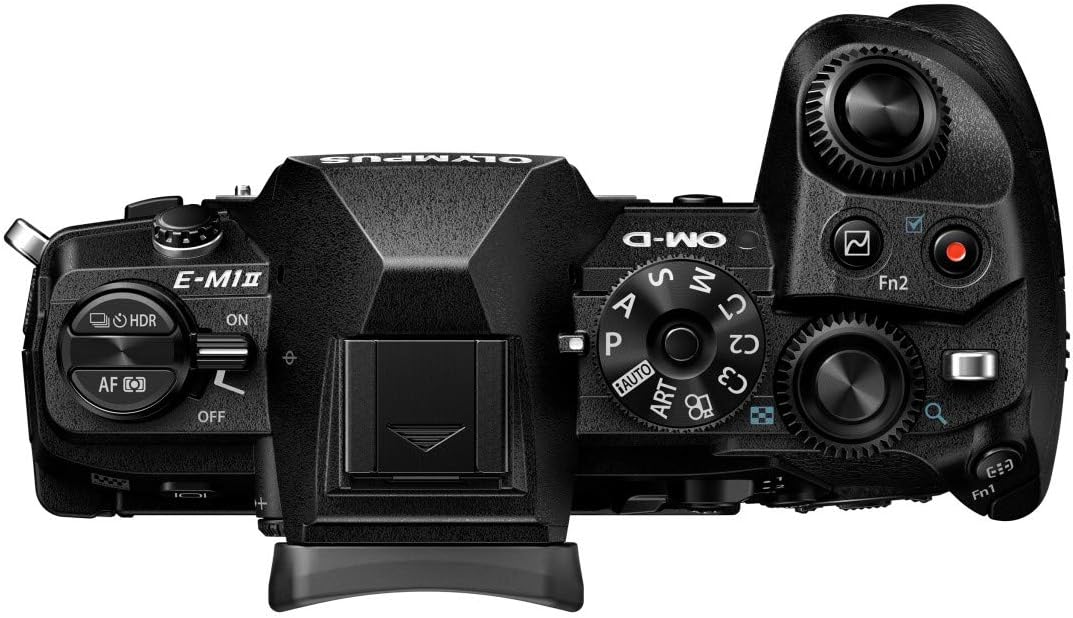
Juu view of the camera highlights the mode dial (P, A, S, M, ART, C1-C4), power switch, shutter button, front and rear control dials, and the hot shoe for external flash.
4.4 Nyuma View

This image presents the rear of the camera with the LCD screen in its closed position. Visible elements include the electronic viewfinder, various function buttons, the directional pad, and the 'OK' button.
4.5 Articulated Screen

The camera's rear view with the LCD screen articulated, demonstrating its flexibility for shooting from various angles. The screen is a 3-inch capacitive touch display.
Upande wa 4.6 View

Upande view of the Olympus OM-D E-M1 Mark II, highlighting the deep ergonomic grip and the covered ports for connectivity (USB, video out).
4.7 Vipimo na Uzito

This diagram illustrates the physical dimensions and weights of the camera body (574g with battery and memory card), the M.Zuiko 12-40mm lens (382g), and an SD card, emphasizing the compact and lightweight design.
5. Kuweka
5.1 Kuchaji Betri
- Insert the BLH-1 Li-ion battery into the BCH-1 Li-ion battery charger.
- Plug the charger into a power outlet. The charging indicator light will illuminate.
- Kuchaji kumekamilika wakati taa ya kiashirio inapozimwa.
5.2 Kuweka Betri na Kadi ya Kumbukumbu
- Fungua kifuniko cha sehemu ya betri/kadi kilicho chini ya kamera.
- Insert the charged BLH-1 battery with the correct orientation until it clicks into place.
- Insert an SDHC or SDXC memory card into one of the two available memory card slots until it clicks. Ensure the card is facing the correct direction.
- Funga kifuniko cha compartment kwa usalama.
5.3 Kuambatanisha Lenzi
- Remove the body cap from the camera and the rear lens cap from the M.Zuiko 12-40mm PRO lens.
- Pangilia alama ya faharasa nyeupe kwenye lenzi na alama nyeupe ya faharasa kwenye mwili wa kamera.
- Weka lenzi kwa kuigeuza kuelekea saa hadi itakapobofya mahali pake.
5.4 Mipangilio ya Awali
Upon first power-on, you will be prompted to set the date, time, and language. Follow the on-screen instructions using the directional pad and 'OK' button.
6. Kuendesha Kamera
6.1 Washa/Zima
Slide the power switch located on the top of the camera to the 'ON' or 'OFF' position.
6.2 Njia za Risasi
Zungusha piga ya modi ili kuchagua modi unayotaka ya upigaji risasi:
- P (Programu Otomatiki): Kamera huweka uwazi na kasi ya kufunga ili kupata mwangaza bora.
- A (Kipaumbele cha Aperture): Unaweka uwazi, kamera inaweka kasi ya kufunga.
- S (Kipaumbele cha Shutter): Unaweka kasi ya shutter, kamera inaweka uwazi.
- M (Mwongozo): Unaweka uwazi na kasi ya kufunga.
- ART (Art Filter): Tumia vichujio mbalimbali vya ubunifu kwenye picha zako.
- C1-C4 (Custom Modes): Save and recall your preferred camera settings.
6.3 Kupiga Picha
- Turn the camera on and select a shooting mode.
- Tengeneza picha yako kwa kutumia elektroniki viewfinder or the LCD monitor.
- Press the shutter button halfway down to activate autofocus and exposure metering.
- Bonyeza kitufe cha shutter kikamilifu ili kunasa picha.
6.4 Mfumo wa Kuzingatia Otomatiki
The OM-D E-M1 Mark II features a high-speed autofocus system with 121 cross-type phase detection AF points. You can select various AF modes and areas through the camera's menu to suit your subject and shooting conditions.
6.5 Uimarishaji wa Picha
The camera incorporates a powerful 5-axis in-body image stabilization system, providing up to 5.5 EV steps of correction. This allows for sharp handheld shots even in low light or with longer shutter speeds.
6.6 Kurekodi Video
The E-M1 Mark II supports 4K (2160p) and Cinema 4K video recording. To start recording, rotate the mode dial to the movie mode or press the dedicated video record button (if assigned).
6.7 Uchezaji
Bonyeza kitufe cha kucheza ili upyaview your captured images and videos. Use the directional pad or control dials to navigate through your media.
6.8 Urambazaji wa Menyu
Press the MENU button to access the camera's settings. Use the directional pad or the touch screen to navigate through menus and adjust parameters. The camera's extensive menu system allows for fine-tuning of various functions.
7. Matengenezo
7.1 Kusafisha Kamera
- Use a blower brush to remove dust from the lens and camera body.
- For stubborn smudges on the lens, use a specialized lens cleaning cloth and solution.
- Wipe the camera body with a soft, dry cloth. Do not use organic solvents.
7.2 Hifadhi
- When not in use for extended periods, remove the battery.
- Hifadhi kamera katika eneo lenye baridi, kavu, na lenye hewa ya kutosha, mbali na jua moja kwa moja na unyevunyevu mwingi.
- Consider using a desiccant to prevent mold growth, especially in humid environments.
8. Utatuzi wa shida
Ukikumbana na matatizo na kamera yako, rejelea matatizo na masuluhisho yafuatayo:
| Tatizo | Sababu inayowezekana | Suluhisho |
|---|---|---|
| Kamera haiwashi. | Betri imeisha au imeingizwa vibaya. | Chaji betri kikamilifu na uhakikishe imeingizwa kwa usahihi. |
| Picha ni ukungu. | Incorrect focus, slow shutter speed, or camera shake. | Check focus mode, increase shutter speed, or utilize the 5-axis image stabilization. |
| Hitilafu ya kadi ya kumbukumbu. | Kadi imejaa, imeharibika au haioani. | Futa isiyo ya lazima files, umbizo la kadi (hii itafuta data yote), au jaribu kadi tofauti inayooana. |
| Flash haina moto. | Flash mode is off, or battery is low. | Check flash settings in the menu; ensure battery is charged. |
For more detailed troubleshooting, refer to the comprehensive digital manual available on the Olympus support webtovuti.
9. Vipimo
Key technical specifications for the Olympus OM-D E-M1 Mark II:
| Kipengele | Maelezo |
|---|---|
| Jina la Mfano | Olympus OM-D E-M1 Mark II |
| Aina ya Sensor | MOS |
| Ufanisi Bado Azimio | 20.4 Mbunge |
| Uimarishaji wa Picha | 5-Axis Electronic |
| Vipandikizi Vinavyolingana | Micro Theluthi nne |
| Pointi za Kuzingatia | 121 (Ugunduzi wa Awamu) |
| Azimio la Video | 2160p (4K) |
| Ukubwa wa skrini | Inchi 3 |
| Aina ya Kuonyesha | Articulating LCD, Capacitive Touch Screen |
| Kumbukumbu Slots Inapatikana | 2 (SDHC, SDXC) |
| Teknolojia ya Uunganisho | USB, Wi-Fi |
| Kichakataji | Olympus TruePic VIII |
| Uzito (Mwili) | 1 Kilogram (approx. 574g with battery/card) |
| Kiwango cha Upinzani wa Maji | Inastahimili Maji (Splashproof) |
10. Udhamini na Msaada
Your Olympus OM-D E-M1 Mark II camera comes with a limited warranty. Please refer to the warranty card included in your package for specific terms and conditions. For technical support, service, or to download the full digital instruction manual, please visit the official Olympus support website or contact your local Olympus service center.
Msaada mkondoni: www.olympus-imaging.com/support/


